
Whimsical MCPサーバー
Whimsicalの公式MCPサーバーがこちらで利用可能になりました
エージェントがWhimsicalダイアグラムを作成できるようにするサードパーティ製のModel Context Protocol (MCP) サーバーです。このサーバーはWhimsicalのAPIと統合し、Mermaidマークアップからダイアグラムを生成します。
デモ
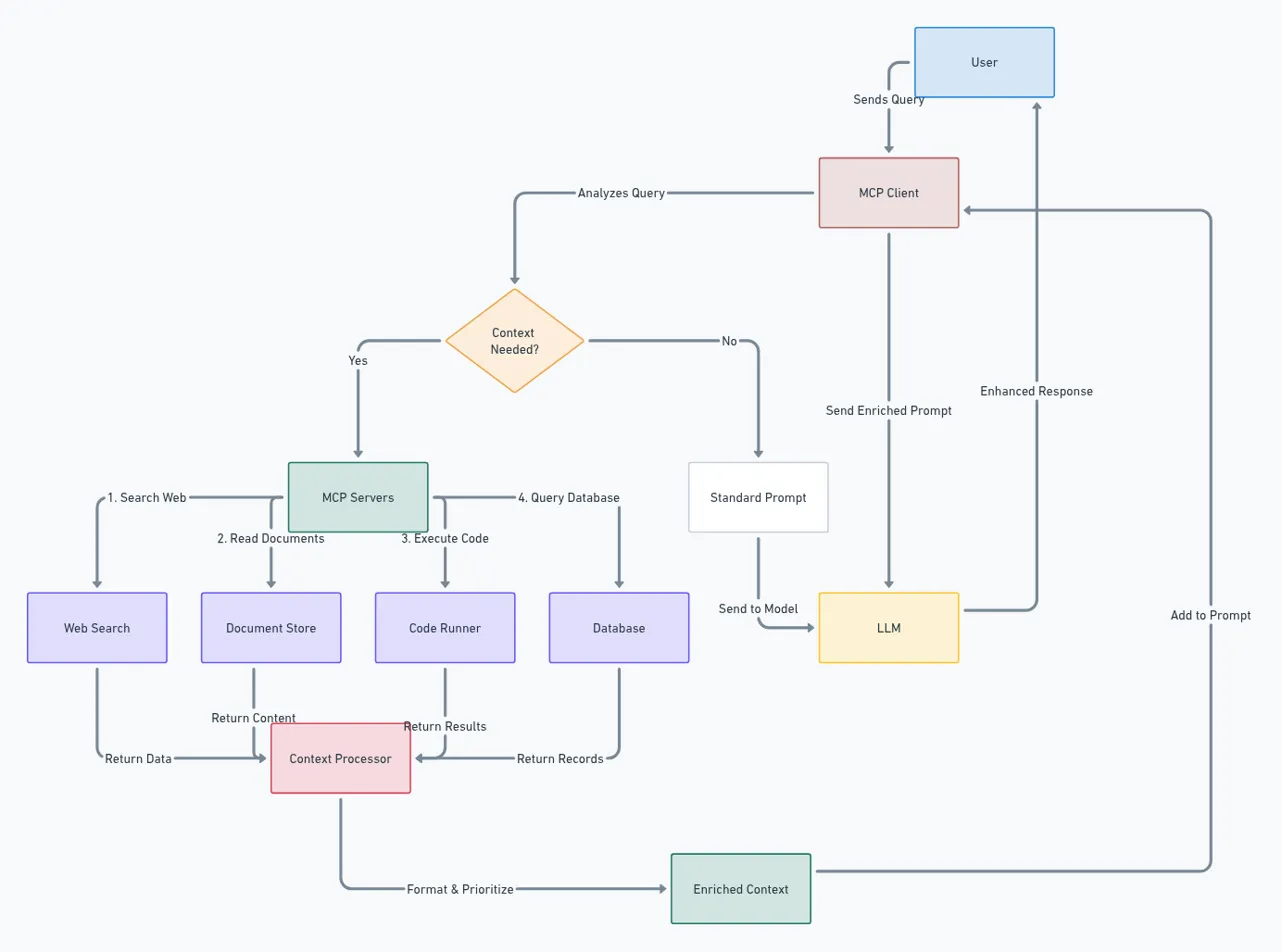
このMCPサーバーとClaudeを使用して作成された複雑なシステムアーキテクチャ図の例です。Model Context Protocol (MCP) アーキテクチャ自体を示しています:
Related MCP server: Draw.io MCP Server
機能
MCPクライアント(Claude、Windsurfなど)が生成したMermaidマークアップを使用してWhimsicalダイアグラムを作成
WhimsicalダイアグラムのURLとbase64エンコードされた画像の両方を返し、クライアントが元のマークアップを反復修正できるようにする
インストール
Smithery経由でのインストール
Smithery経由でClaude Desktop用のWhimsical MCPサーバーを自動的にインストールするには:
npx -y @smithery/cli install BrockReece/whimsical-mcp-server --client claude手動インストール
# Clone the repository
git clone https://github.com/BrockReece/whimsical-mcp-server.git

# Install dependencies
yarn install

# Build the project
yarn build
MCPクライアントとの統合
MCPクライアントの設定を更新し、このリポジトリのdistフォルダを指定してください。 例:
 {
 "mcpServers": {
 "whimsical": {
 "command": "node",
 "args": [
 "/path/to/this/repo/whimsical-mcp-server/dist/index.js"
 ]
 }
 }
 }
ライセンス
このプロジェクトはMITライセンスの下でライセンスされています。
This server cannot be installed
Maintenance
Resources
Unclaimed servers have limited discoverability.
Looking for Admin?
If you are the server author, to access and configure the admin panel.
Latest Blog Posts
MCP directory API
We provide all the information about MCP servers via our MCP API.
curl -X GET 'https://glama.ai/api/mcp/v1/servers/BrockReece/whimsical-mcp-server'
If you have feedback or need assistance with the MCP directory API, please join our Discord server