
Provides a way for users to support the project financially through the Buy Me A Coffee platform.
Allows users to join a Discord server for getting help, sharing feedback, and connecting with other users of the Desktop Commander MCP.
Facilitates project contribution, issue reporting, and discussions through GitHub's platform.
Supports running commands and managing files on Linux systems with specific enhancements for various Linux distributions.
Offers detailed articles exploring how Claude with MCPs is changing developer workflows.
Enables installation and distribution of the Desktop Commander through the npm package registry.
Provides video tutorials and demonstrations showcasing how to set up and use the Desktop Commander effectively.
Click on "Install Server".
Wait a few minutes for the server to deploy. Once ready, it will show a "Started" state.
In the chat, type
@followed by the MCP server name and your instructions, e.g., "@Desktop Commander MCPlist all Python files in my current directory"
That's it! The server will respond to your query, and you can continue using it as needed.
Here is a step-by-step guide with screenshots.
Desktop Commander MCP

👁 npm downloads
👁 Buy Me A Coffee
👁 Discord


Short version. Two key things. Terminal commands and diff based file editing.
Table of Contents
This is server that allows Claude desktop app to execute long-running terminal commands on your computer and manage processes through Model Context Protocol (MCP) + Built on top of MCP Filesystem Server to provide additional search and replace file editing capabilities .
Related MCP server: MCP Tools
Features
Execute terminal commands with output streaming
Command timeout and background execution support
Process management (list and kill processes)
Session management for long-running commands
Full filesystem operations:
Read/write files
Create/list directories
Move files/directories
Search files
Get file metadata
Code editing capabilities:
Surgical text replacements for small changes
Full file rewrites for major changes
Multiple file support
Pattern-based replacements
Installation
First, ensure you've downloaded and installed the Claude Desktop app and you have npm installed.
Option 1: Installing via Smithery
To install Desktop Commander for Claude Desktop automatically via Smithery:
npx -y @smithery/cli install @wonderwhy-er/desktop-commander --client claudeOption 2: Install trough npx
Just run this in terminal
npx @wonderwhy-er/desktop-commander setupRestart Claude if running
Option 3: Add to claude_desktop_config by hand
Add this entry to your claude_desktop_config.json (on Mac, found at ~/Library/Application\ Support/Claude/claude_desktop_config.json):
{
 "mcpServers": {
 "desktop-commander": {
 "command": "npx",
 "args": [
 "-y",
 "@wonderwhy-er/desktop-commander"
 ]
 }
 }
}
Restart Claude if running
Option 4: Checkout locally
Clone and build:
git clone https://github.com/wonderwhy-er/ClaudeComputerCommander.git
cd ClaudeComputerCommander
npm run setup
Restart Claude if running
The setup command will:
Install dependencies
Build the server
Configure Claude's desktop app
Add MCP servers to Claude's config if needed
Usage
The server provides these tool categories:
Terminal Tools
execute_command: Run commands with configurable timeoutread_output: Get output from long-running commandsforce_terminate: Stop running command sessionslist_sessions: View active command sessionslist_processes: View system processeskill_process: Terminate processes by PIDblock_command/unblock_command: Manage command blacklist
Filesystem Tools
read_file/write_file: File operationscreate_directory/list_directory: Directory managementmove_file: Move/rename filessearch_files: Pattern-based file searchget_file_info: File metadata
Edit Tools
edit_block: Apply surgical text replacements (best for changes <20% of file size)write_file: Complete file rewrites (best for large changes >20% or when edit_block fails)
Search/Replace Block Format:
filepath.ext
<<<<<<< SEARCH
existing code to replace
=======
new code to insert
>>>>>>> REPLACE
Example:
src/main.js
<<<<<<< SEARCH
console.log("old message");
=======
console.log("new message");
>>>>>>> REPLACE
Handling Long-Running Commands
For commands that may take a while:
execute_commandreturns after timeout with initial outputCommand continues in background
Use
read_outputwith PID to get new outputUse
force_terminateto stop if needed
Model Context Protocol Integration
This project extends the MCP Filesystem Server to enable:
Local server support in Claude Desktop
Full system command execution
Process management
File operations
Code editing with search/replace blocks
Created as part of exploring Claude MCPs: https://youtube.com/live/TlbjFDbl5Us
Work in Progress and TODOs
The following features are currently being developed or planned:
Better code search (in progress) - Enhanced code exploration with context-aware results
Better configurations (in progress) - Improved settings for allowed paths, commands and shell environment
Windows environment fixes (in progress) - Resolving issues specific to Windows platforms
Linux improvements (in progress) - Enhancing compatibility with various Linux distributions
Support for WSL - Windows Subsystem for Linux integration
Support for SSH - Remote server command execution
Installation troubleshooting guide - Comprehensive help for setup issues
Media
Learn more about this project through these resources:
Article
Claude with MCPs replaced Cursor & Windsurf. How did that happen? - A detailed exploration of how Claude with Model Context Protocol capabilities is changing developer workflows.
Video
Claude Desktop Commander Video Tutorial - Watch how to set up and use the Commander effectively.
Community
Join our Discord server to get help, share feedback, and connect with other users.
Testimonials
👁 It's a life saver! I paid Claude + Cursor currently which I always feel it's kind of duplicated. This solves the problem ultimately. I am so happy. Thanks so much. Plus today Claude has added the web search support. With this MCP + Internet search, it writes the code with the latest updates. It's so good when Cursor doesn't work sometimes or all the fast requests are used.
https://www.youtube.com/watch?v=ly3bed99Dy8&lc=UgyyBt6_ShdDX_rIOad4AaABAg

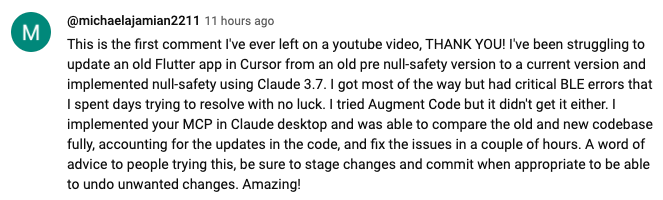
👁 This is the first comment I've ever left on a youtube video, THANK YOU! I've been struggling to update an old Flutter app in Cursor from an old pre null-safety version to a current version and implemented null-safety using Claude 3.7. I got most of the way but had critical BLE errors that I spent days trying to resolve with no luck. I tried Augment Code but it didn't get it either. I implemented your MCP in Claude desktop and was able to compare the old and new codebase fully, accounting for the updates in the code, and fix the issues in a couple of hours. A word of advice to people trying this, be sure to stage changes and commit when appropriate to be able to undo unwanted changes. Amazing!
https://www.youtube.com/watch?v=ly3bed99Dy8&lc=UgztdHvDMqTb9jiqnf54AaABAg
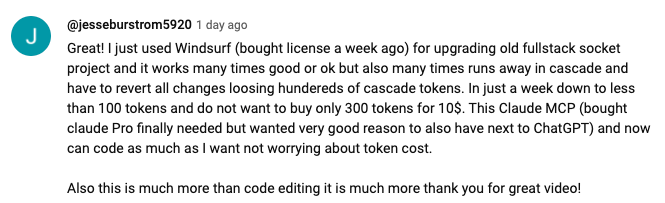
👁 Great! I just used Windsurf, bought license a week ago, for upgrading old fullstack socket project and it works many times good or ok but also many times runs away in cascade and have to revert all changes loosing hundereds of cascade tokens. In just a week down to less than 100 tokens and do not want to buy only 300 tokens for 10$. This Claude MCP ,bought claude Pro finally needed but wanted very good reason to also have next to ChatGPT, and now can code as much as I want not worrying about token cost.
Also this is much more than code editing it is much more thank you for great video!
https://www.youtube.com/watch?v=ly3bed99Dy8&lc=UgyQFTmYLJ4VBwIlmql4AaABAg
👁 it is a great tool, thank you, I like using it, as it gives claude an ability to do surgical edits, making it more like a human developer.
https://www.youtube.com/watch?v=ly3bed99Dy8&lc=Ugy4-exy166_Ma7TH-h4AaABAg

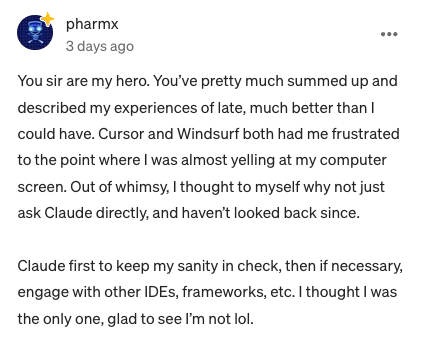
👁 You sir are my hero. You've pretty much summed up and described my experiences of late, much better than I could have. Cursor and Windsurf both had me frustrated to the point where I was almost yelling at my computer screen. Out of whimsy, I thought to myself why not just ask Claude directly, and haven't looked back since.
Claude first to keep my sanity in check, then if necessary, engage with other IDEs, frameworks, etc. I thought I was the only one, glad to see I'm not lol.
33
1
https://medium.com/@pharmx/you-sir-are-my-hero-62cff5836a3e
Contributing
If you find this project useful, please consider giving it a ⭐ star on GitHub! This helps others discover the project and encourages further development.
We welcome contributions from the community! Whether you've found a bug, have a feature request, or want to contribute code, here's how you can help:
Found a bug? Open an issue at github.com/wonderwhy-er/ClaudeComputerCommander/issues
Have a feature idea? Submit a feature request in the issues section
Want to contribute code? Fork the repository, create a branch, and submit a pull request
Questions or discussions? Start a discussion in the GitHub Discussions tab
All contributions, big or small, are greatly appreciated!
If you find this tool valuable for your workflow, please consider supporting the project.
License
MIT

Maintenance
Latest Blog Posts
MCP directory API
We provide all the information about MCP servers via our MCP API.
curl -X GET 'https://glama.ai/api/mcp/v1/servers/MrGNSS/ClaudeDesktopCommander'
If you have feedback or need assistance with the MCP directory API, please join our Discord server