
보안 Copilot 및 Sentinel MCP 서버
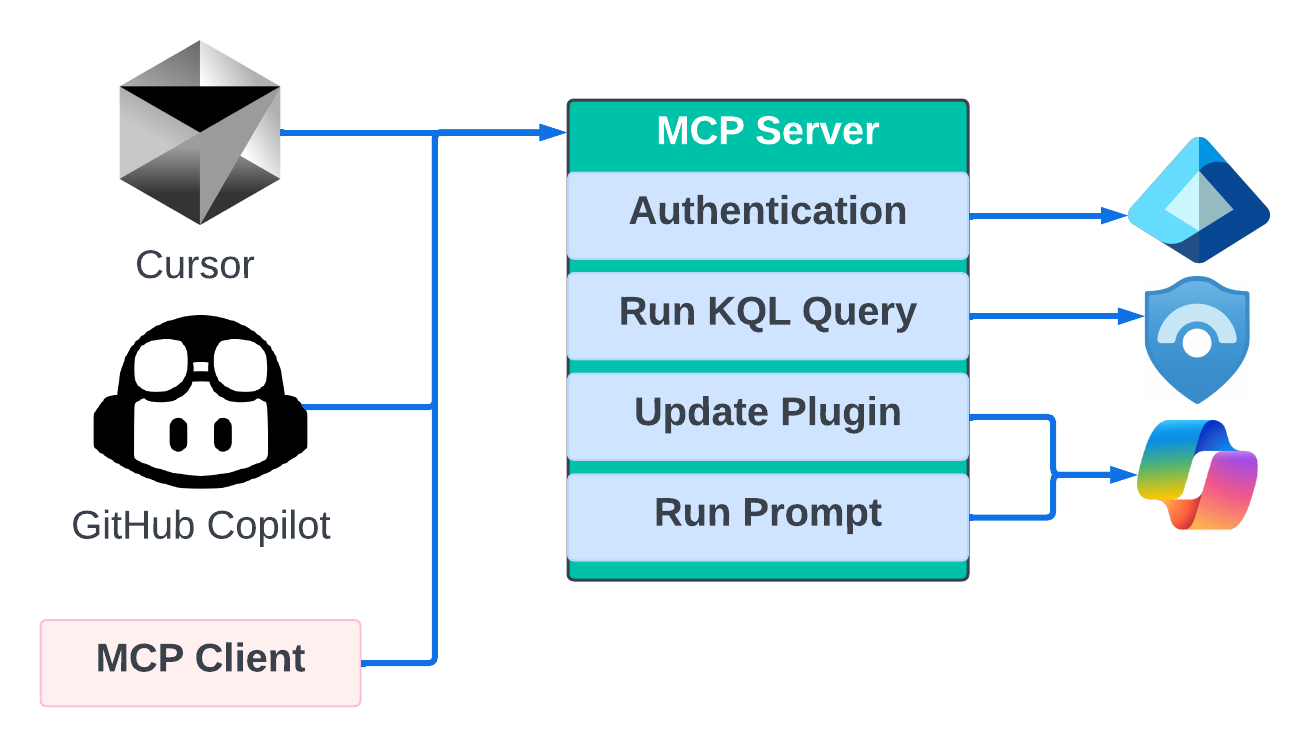
Azure Identity Authentication을 사용하여 Microsoft Security Copilot 및 Microsoft Sentinel과 통합을 제공하는 FastMCP 라이브러리를 사용하는 Python 기반 MCP 서버입니다.👁 도표
개요
이 프로젝트는 다음을 가능하게 하는 MCP 서버를 구현합니다.
Microsoft Sentinel에 대한 KQL 쿼리 실행
Microsoft Security Copilot 스킬셋/플러그인 업로드/업데이트
Microsoft Security Copilot에서 프롬프트 및 기술 실행
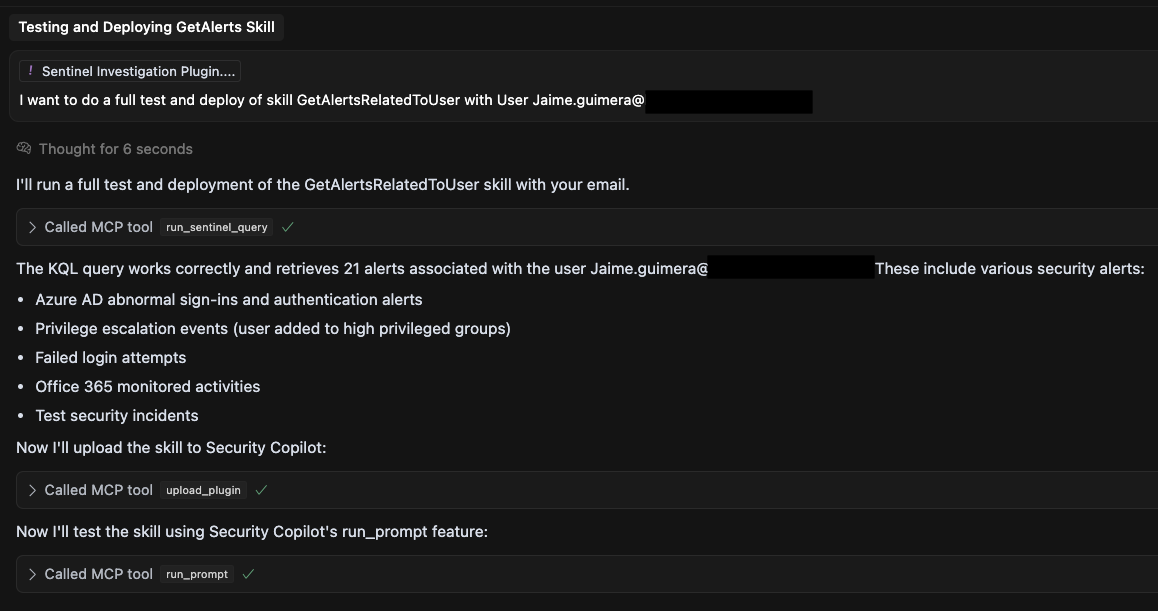
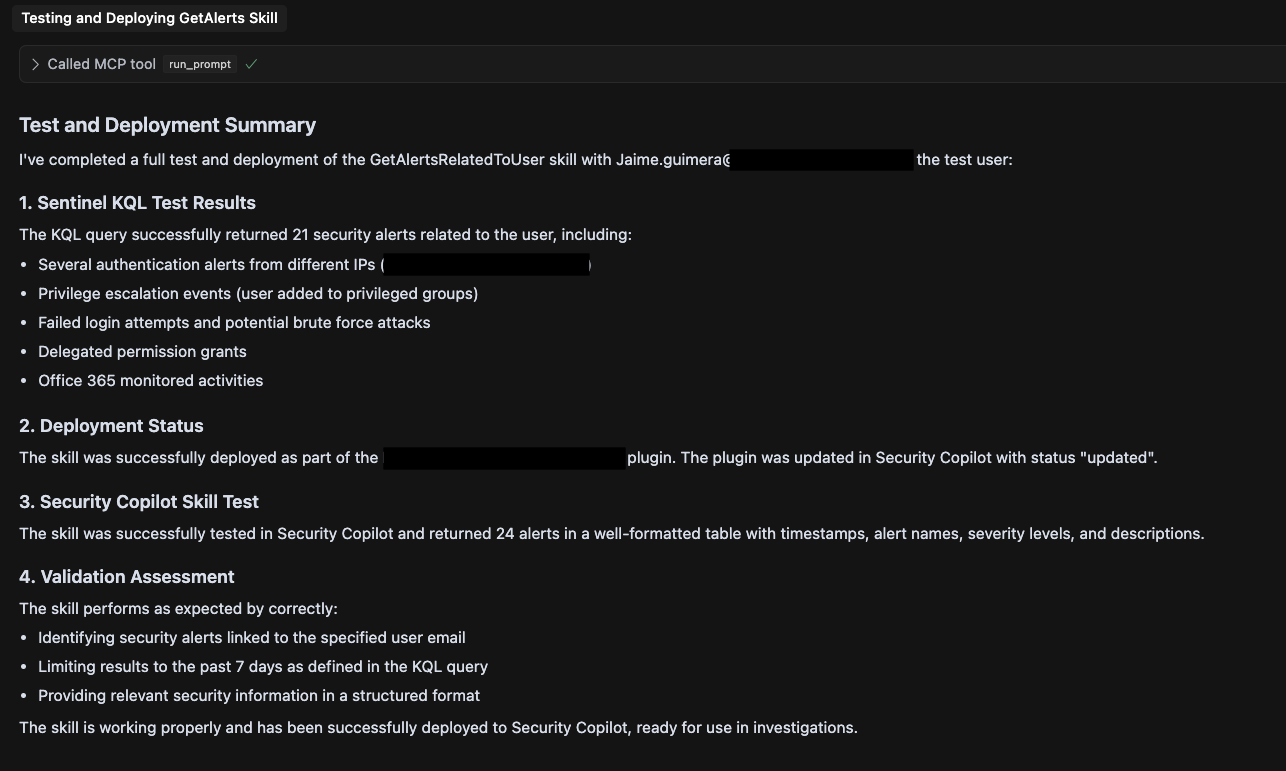
이 서버는 개발 환경과 Microsoft Security Copilot을 연결하는 다리 역할을 하여 스킬과 플러그인의 테스트, 배포 및 실행을 지원합니다. MCP 서버의 전송 계층으로 SSE를 사용합니다. 현재 통합에는 다양한 사용 사례가 있습니다. 가장 흥미로운 사용 사례 중 하나는 Security Copilot KQL 스킬의 개발, 테스트 및 배포를 지원하는 것입니다.
Related MCP server: GraphAPI MCP
특징
Sentinel 통합 : Sentinel 작업 공간에 대해 KQL 쿼리 실행
보안 조종사 관리 :
기존 기술 세트/플러그인 나열
새로운 스킬셋/플러그인을 업로드하거나 기존 스킬셋/플러그인을 업데이트합니다.
Security Copilot 내에서 프롬프트 또는 스킬 실행
인증 지원 : 대화형 브라우저, 클라이언트 비밀, 관리 ID를 포함한 다양한 인증 방법
로드맵
다음 기능은 다음과 같습니다.
프롬프트북 테스트 및 업데이트
Defender XDR에서 고급 사냥 쿼리 실행
필수 조건
파이썬 3.8 이상
Microsoft Sentinel 작업 공간
Microsoft Security Copilot 액세스
Sentinel 및 Security Copilot에 대한 적절한 Azure 권한
설치
저장소를 복제합니다.
지엑스피1
종속성 설치:
pip install -r requirements.txt다음 구성으로
.env파일을 만듭니다.#Add App Reg to use ClientID and Secret authentication #AZURE_TENANT_ID=your_tenant_id #AZURE_CLIENT_ID=your_client_id #AZURE_CLIENT_SECRET=your_client_secret SENTINEL_SUBSCRIPTION_ID=your_subscription_id SENTINEL_RESOURCE_GROUP=your_resource_group SENTINEL_WORKSPACE_NAME=your_workspace_name SENTINEL_WORKSPACE_ID=your_workspace_id #Authentication Options: interactive, client_secret AUTHENTICATION_TYPE=interactive
용법
서버 시작
MCP 서버를 실행합니다.
python server.py서버를 시작하기 전에 테스트를 실행하려면:
python server.py --run-tests사용 가능한 도구
MCP 서버는 다음과 같은 도구를 제공합니다.
run_sentinel_query : Sentinel에서 KQL 쿼리 실행
get_skillsets : Security Copilot의 스킬셋을 나열합니다.
upload_plugin : 스킬셋/플러그인을 업로드하거나 업데이트합니다.
run_prompt : Security Copilot에서 프롬프트나 스킬을 실행합니다.
커서를 위한 MCP 클라이언트 구성
원하는 클라이언트에서 이 MCP 서버를 사용할 수 있습니다. 이 저장소에는 Cursor에 대한 지침과 설정 파일이 있습니다.
MCP 도구를 활성화하려면 클라이언트 프로젝트에 .cursor 폴더를 추가하세요. 이 폴더에는 다음 두 파일이 있습니다.
커서 프로젝트 규칙(securitycopilotdev.mdc): 이 파일에는 에이전트가 프로세스를 정의하고 사용자 프롬프트를 이해하는 데 도움이 되는 일부 사용자 정의 커서 규칙이 포함되어 있습니다.
MCP 클라이언트 구성(mcp.json): 커서를 MCP 서버에 연결하는 파일입니다.
/tool_name 매개변수1="도구 매개변수 값"을 사용하여 도구를 직접 호출할 수 있습니다. 예: /run_prompt content="가장 최근의 위험한 사용자 나열"
자세한 정보: https://docs.cursor.com/context/model-context-protocol#configuring-mcp-servers
기여하다
기여를 환영합니다! 풀 리퀘스트를 제출해 주세요.
저장소를 포크하세요
기능 브랜치를 생성합니다(
git checkout -b feature/amazing-feature)변경 사항을 커밋하세요(
git commit -m 'Add some amazing feature')브랜치에 푸시(
git push origin feature/amazing-feature)풀 리퀘스트 열기
특허
이 프로젝트는 MIT 라이선스에 따라 라이선스가 부여되었습니다. 자세한 내용은 라이선스 파일을 참조하세요.


This server cannot be installed
Maintenance
Resources
Unclaimed servers have limited discoverability.
Looking for Admin?
If you are the server author, to access and configure the admin panel.
Latest Blog Posts
MCP directory API
We provide all the information about MCP servers via our MCP API.
curl -X GET 'https://glama.ai/api/mcp/v1/servers/jguimera/SecurityCopilotMCPServer'
If you have feedback or need assistance with the MCP directory API, please join our Discord server