
mcpサーバー
[!IMPORTANT] AI開発者向けのツールとサービスをより適切に整理するため、プロジェクトをAgenticoに移行しました。新しいパッケージをご利用いただき、 AgenticoのGitHubリポジトリで最新情報をご確認ください。
MCP サーバーは、モデル コンテキスト プロトコル (MCP) を実装して、モデル コンテキスト プロトコルと対話するためのよりシンプルな APIを提供するシンプルなサーバーです。
このサーバーを使用する理由
「 La Rebelion 」では、プロセスとワークフローを簡素化し、開発者エクスペリエンスの向上と効率化を図るためのツールとサービスの開発に取り組んでいます。このサーバーは、これらのツールセットの一部です。
MCPは素晴らしいツールですが、使い始めるには少し戸惑うかもしれません。そこで、モデルコンテキストプロトコル(MCP)を実装したサーバーの作成プロセスを簡素化するファサードを作成しました。パターンはシンプルで、独自のロジックでtoolsを作成し、登録してサーバーを起動するだけです。
Related MCP server: Lodestar MCP Server
新しいサーバーを作成する手順
将来的には、 MCP create serverに似た新しいサーバーを作成するための CLI が提供される予定ですが、現時点では、公式ドキュメントに基づいて以下の手順に従ってサーバーを作成できます。
mkdir -p my-server/src
cd my-server/
yarn init -y
yarn add @modelcontextprotocol/sdk zod zod-to-json-schema
yarn add -D @types/node typescript
# Here lies the magic
yarn add @la-rebelion/mcp-serverpackage.jsonファイルを更新し、 tsconfig.jsonファイルを作成する必要があります。
はじめる
カスタムロジックを使用してツールを実装し、MCPServerに登録します。以下はシンプルなechoツールの例です。
import { Tool, ToolSchema } from "@la-rebelion/mcp-server";

export class EchoTool extends Tool {
 toolSchema: ToolSchema = {
 name: "echo",
 description: "Echoes the input message",
 schema: { // the schema for the parameters needed by the tool
 type: "object",
 properties: {
 message: { type: "string" },
 },
 required: ["message"],
 },
 };

 /**
 * Your logic here, implement the execute method to define the tool behavior
 * @param input The input message - use the schema to define the input type
 * @returns In the example, we are echoing the message
 */
 async execute(input: any): Promise<any> {
 // This is a simple echo tool demo, nothing fancy, just echoing the message
 return Promise.resolve({
 content: [
 {
 type: "text",
 text: `${input.message}`
 }
 ]
 });
 }
}次の内容のindex.tsファイルを作成します。
#!/usr/bin/env node
import { MCPServer } from '@la-rebelion/mcp-server'
import { EchoTool } from "./tools/EchoTool.js";

const myServer = new MCPServer('My MCP Server', '1.0.0');

async function main() {
 // Register tools
 myServer.registerTool("echo", EchoTool);
 await myServer.run();
}

main().catch((error) => {
 console.error("Server error:", error);
 process.exit(1);
});
これで完了です!モデルコンテキストプロトコル(MCP)を実装したシンプルなサーバーを作成しました。Claude Desktopまたは MCP をサポートする他のクライアントでテストしてみてください。
次のコマンドでプロジェクトをビルドします。
yarn buildサーバーを起動することはできますが、まだロジックがないので、次のコマンドでテストできます。
yarn start
# or
node build/index.js
これで完了です。ワークフローとプロセスを簡素化するための独自のツールとサービスの作成を開始してください。
頑張れ、反逆者たち!✊🏻
UML図
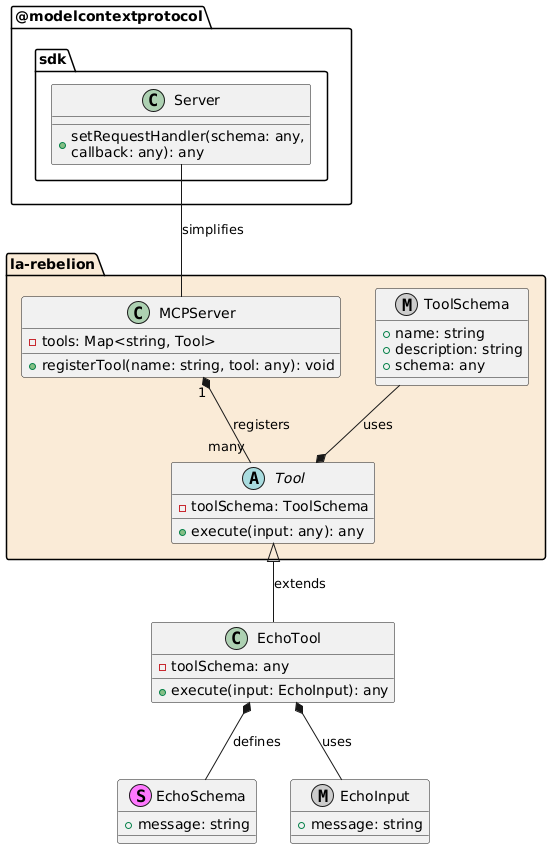
MCPServer : サーバーが使用するツールを登録します。
Tool : すべてのツールの基本クラスで、共通のプロパティとメソッドが含まれています。execute
executeツールが呼び出されたときに呼び出されるメソッドであり、ここでロジックを実装します。EchoTool : Tool クラスを拡張し、独自のスキーマと初期化ロジックを定義する、ツールの特定の実装。
EchoSchema : EchoTool の入力の構造を定義します。
EchoInput : スキーマに基づいた入力の型定義。
このパターンにより、MCPServer クラスと Tool クラスを使用してツールを管理および実装するための柔軟かつ拡張可能な方法が可能になります。
私たちをサポートしてください
これが役に立つと思われる場合は、このリポジトリにスターを付けたり、プロジェクトに貢献したり、スポンサーになったりして、私たちをサポートすることを検討してください。
La Rebelionへの支援方法については、GitHub Sponsors をご覧ください。また、コーヒーを買ったり、 PayPalで支払ったり、 「La Rebelion」グッズを購入したりして支援していただくことも可能です。
ライセンス
このプロジェクトは MIT ライセンスに基づいてライセンスされています - 詳細についてはLICENSEファイルを参照してください。

This server cannot be installed
Maintenance
Resources
Unclaimed servers have limited discoverability.
Looking for Admin?
If you are the server author, to access and configure the admin panel.
Latest Blog Posts
MCP directory API
We provide all the information about MCP servers via our MCP API.
curl -X GET 'https://glama.ai/api/mcp/v1/servers/la-rebelion/mcp-server'
If you have feedback or need assistance with the MCP directory API, please join our Discord server