
🚀 operative.sh web-eval-agent MCP 服务器
让编码代理自行调试,您有更好的事情要做。
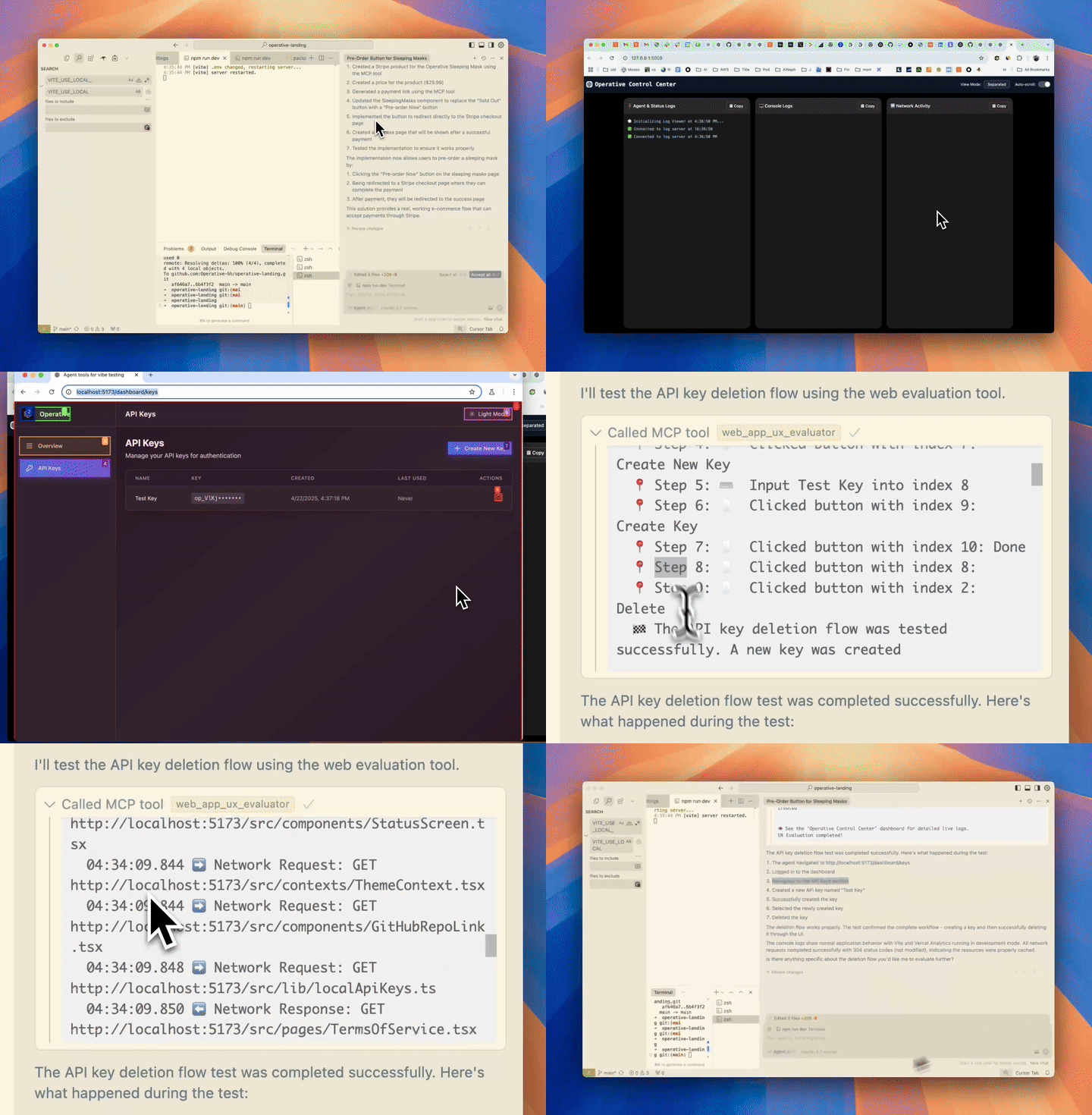
🔥 增强你的调试能力
operative.sh的 MCP 服务器启动一个由浏览器支持的代理,直接在代码编辑器中自主执行和调试 Web 应用程序。
Related MCP server: agnt
⚡ 功能
🌐 使用 BrowserUse浏览你的 Web 应用程序(使用可操作的后端时速度提高 2 倍)
📊捕获网络流量- 请求被智能过滤并返回到上下文窗口
🚨收集控制台错误- 捕获日志和错误
🤖自主调试- Cursor 代理调用 Web QA 代理 mcp 服务器来测试它编写的代码是否按预期端到端工作。
🧰 MCP 工具参考
工具 | 目的 |
| 🤖 自动化 UX 评估器,可驱动浏览器、捕获屏幕截图、控制台和网络日志,并返回丰富的 UX 报告。 |
| 🔒 打开一个交互式(非无头)浏览器,以便您可以登录一次;保存的 cookies/本地存储将被后续的 |
关键论点
web_eval_agenturl(必需) – 正在运行的应用程序的地址 (例如http://localhost:3000)task(必需) ——用自然语言描述要测试的内容(“运行注册流程并记录任何用户体验问题”)headless_browser(可选,默认为false) – 设置为true以隐藏浏览器窗口
setup_browser_stateurl(可选) – 首先打开的页面(方便直接进入登录屏幕)
您可以直接从 IDE 聊天中触发这些工具,例如:
Evaluate my app at http://localhost:3000 – run web_eval_agent with the task "Try the full signup flow and report UX issues".🏁 快速启动(macOS/Linux)
先决条件(通常不需要):
brew:
/bin/bash -c "$(curl -fsSL https://raw.githubusercontent.com/Homebrew/install/HEAD/install.sh)"npm:(
brew install npm)jq:
brew install jq
获取 API 密钥(免费)后运行安装程序
curl -LSf https://operative.sh/install.sh -o install.sh && bash install.sh && rm install.sh访问您最喜欢的 IDE 并重新启动以应用更改
在聊天模式下发送提示来调用网络评估代理工具!例如
Test my app on http://localhost:3000. Use web-eval-agent.🛠️ 手动安装
在 operative.sh 获取您的 API 密钥
curl -LsSf https://astral.sh/uv/install.sh | sh)安装剧作家:
npm install -g chromium playwright && uvx --with playwright playwright install --with-deps使用 API 密钥将以下 JSON 添加到相关代码编辑器
重新启动代码编辑器
🔃 更新
uv cache clean刷新 MCP 服务器
 "web-eval-agent": {
 "command": "uvx",
 "args": [
 "--refresh-package",
 "webEvalAgent",
 "--from",
 "git+https://github.com/Operative-Sh/web-eval-agent.git",
 "webEvalAgent"
 ],
 "env": {
 "OPERATIVE_API_KEY": "<YOUR_KEY>"
 }
 }
Operative Discord 服务器
🛠️ 手动安装(Mac + Cursor/Cline/Windsurf)
在 operative.sh 获取您的 API 密钥
curl -LsSf https://astral.sh/uv/install.sh | sh)安装剧作家:
npm install -g chromium playwright && uvx --with playwright playwright install --with-deps使用 API 密钥将以下 JSON 添加到相关代码编辑器
重新启动代码编辑器
手动安装(Windows + Cursor/Cline/Windsurf)
我们正在改进这一点,如果您有任何问题,请提出问题!
在代码编辑器终端中完成所有这些操作
curl -LSf https://operative.sh/install.sh -o install.sh && bash install.sh && rm install.sh在 operative.sh 获取您的 API 密钥
安装 uv
(curl -LsSf https://astral.sh/uv/install.sh | sh)uvx --from git+https://github.com/Operative-Sh/web-eval-agent.git playwright install重启代码编辑器
🚨 问题
代码编辑器未收到更新,请更新或重新安装最新版本:运行
uv cache clean获取最新版本如有任何问题,请随时在此 repo 或 discord 中打开问题!
5/5 - 未更改的静态应用程序无法进行屏幕录制,已修复!
uv clean+ 重启即可修复
变更日志
4/29 - 代理覆盖更新 - 暂停/播放/停止浏览器中的代理运行
📋 MCP 服务器输出报告示例
📊 Web Evaluation Report for http://localhost:5173 complete!
📝 Task: Test the API-key deletion flow by navigating to the API Keys section, deleting a key, and judging the UX.

🔍 Agent Steps
 📍 1. Navigate → http://localhost:5173
 📍 2. Click "Login" (button index 2)
 📍 3. Click "API Keys" (button index 4)
 📍 4. Click "Create Key" (button index 9)
 📍 5. Type "Test API Key" (input index 2)
 📍 6. Click "Done" (button index 3)
 📍 7. Click "Delete" (button index 10)
 📍 8. Click "Delete" (confirm index 3)
🏁 Flow tested successfully – UX felt smooth and intuitive.

🖥️ Console Logs (10)
 1. [debug] [vite] connecting…
 2. [debug] [vite] connected.
 3. [info] Download the React DevTools …
 …

🌐 Network Requests (10)
 1. GET /src/pages/SleepingMasks.tsx 304
 2. GET /src/pages/MCPRegistryRegistry.tsx 304
 …

⏱️ Chronological Timeline
 01:16:23.293 🖥️ Console [debug] [vite] connecting…
 01:16:23.303 🖥️ Console [debug] [vite] connected.
 01:16:23.312 ➡️ GET /src/pages/SleepingMasks.tsx
 01:16:23.318 ⬅️ 304 /src/pages/SleepingMasks.tsx
 …
 01:17:45.038 🤖 🏁 Flow finished – deletion verified
 01:17:47.038 🤖 📋 Conclusion repeated above
👁️ See the "Operative Control Center" dashboard for live logs.
星史
使用< 3@operative.sh构建

Maintenance
Resources
Unclaimed servers have limited discoverability.
Looking for Admin?
If you are the server author, to access and configure the admin panel.
Appeared in Searches
- Tools for enabling LLMs to interact with web pages and perform end-to-end testing
- IDE extensions and AI coding assistants like GitHub Copilot and ChatGPT
- Browser automation and control for Codex CLI
- MCP servers for curated context in Cursor IDE to plan, debug, and iterate on features
- Web page automation tools for form submission and queries
Latest Blog Posts
MCP directory API
We provide all the information about MCP servers via our MCP API.
curl -X GET 'https://glama.ai/api/mcp/v1/servers/refreshdotdev/web-eval-agent'
If you have feedback or need assistance with the MCP directory API, please join our Discord server