A PowerShell profile is an init script that is executed when the shell starts. PowerShell searches for profile scripts in hard-coded locations. This article explains how to move profile scripts to any directory of your choice.
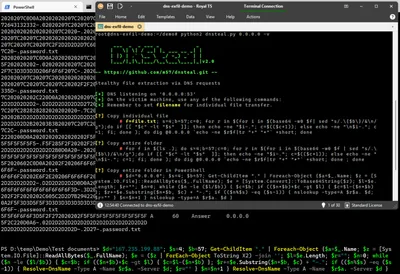
DNS is a protocol that lends itself to abuse because it’s largely unmonitored and unrestricted. This article explains how data exfiltration from a corporate network via DNS works and shows how to set up a working exfiltration demo with DNSteal.
Splunk search results can be exported from the UI as CSV, JSON, and XML, but not as HTML. This article presents a PowerShell script that converts exported search results from JSON into an HTML table for use with documentation, blogs, etc.
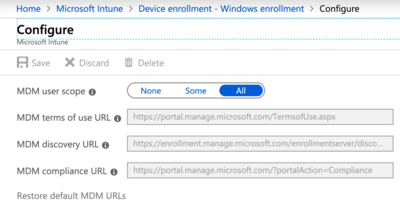
How to centrally manage essential security settings of self-managed devices This is a guest post by Martin Kretzschmar, customer success engineer at vast limits, the uberAgent company.
One thing I especially like about my everyday working life is the flexibility it offers. I appreciate the freedom of choice in terms of location, time and device. We want to avoid getting into micro-management but, being an IT company, we also need to provide the necessary security where needed.
There is more than one way to test the performance of web browsers like Chrome, Firefox, or IE, but regardless of how you do it, you need a consistent workload that makes the browsers comparable. Unless you are testing with synthetic benchmarks (which come with a plethora of problems of their own) you need a way to automate browsers opening tabs and loading URLs. This article presents a simple solution to do just that.
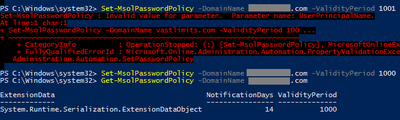
User accounts created in Azure AD are subject to Azure AD’s password policies and restrictions, whose defaults are far from optimal. Unfortunately, the most severe shortcomings cannot currently be changed.
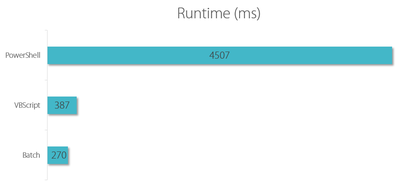
PowerShell is a popular and extremely versatile tool, but is it a good idea to use PowerShell in logon scripts? Let’s try to find out!
Setting the Stage I am going to compare the resource utilization of the following languages frequently used with logon scripts:
As I found out the (excellent) Egnyte Desktop Sync client for Windows ignores directories that have the system attribute set. For some reason some of the directories I wanted to sync did have this attribute set. Getting rid of the system attribute on (many) directories is harder than it seems.
This is a guest post by Bryan Chriscoli, who implemented an innovative alternative to folder redirection with the help of symbolic links, AppSense products and PowerShell scripting. All credit goes to him.
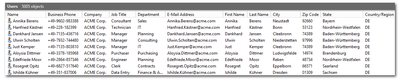
When you need to simulate a real Active Directory with thousands of users you quickly find that creating realistic test accounts is not trivial. Sure enough, you can whip up a quick PowerShell one-liner that creates any number of accounts, but what if you need real first and last names? Real (existing) addresses? Postal codes matching phone area codes? I could go on. The point is that you need two things: input files with names, addresses etc. And script logic that creates user accounts from that data. This blog post provides both.
My recent post about things I dislike about PowerShell provoked some interesting reactions (see the comments). Several readers argued that PowerShell is not supposed to be a full-blown programming language but a kind of super-advanced shell scripting tool.
With all the love PowerShell is getting these days one might think that the golden age of (Windows) scripting has finally begun. Maybe it has. But one man’s nirvana can be another man’s hell.
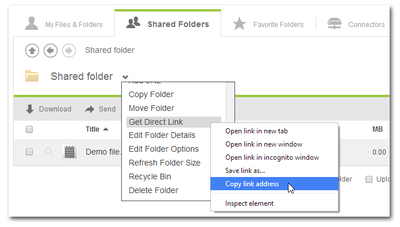
When you have a cloud-based file sharing service it makes a lot of sense to synchronize part or all of the data with your desktop computer. Citrix ShareFile offers the Sync for Windows tool for that purpose. However, once you open its configuration screen you notice that has a severe restriction: it can only synchronize to a single local folder. In many cases it would make much more sense to synchronize different cloud folders to different locations on your hard disk. When I complained to the product manager Peter Schulz about this I learned about a hidden gem: the single folder restriction is only present in the UI; the underlying sync engine is much more flexible. And the best thing is: the sync engine can be configured from PowerShell. Here is how.
When you use XenDesktop the only way it makes sense you may find that Citrix has not really put much effort into making that a smooth experience.
Persistent is a Second-Grade Citizen XenDesktop is really designed to be used with pooled desktops - machines that are reset to a pristine state when the user logs off. Of course, stateless desktops are much better (and, importantly, cheaper) served from XenApp. This has been the topic of many a debate which I will not repeat here. But I will state that if you give a so-called knowledge worker a personal desktop, you better make sure that desktop is persistent.
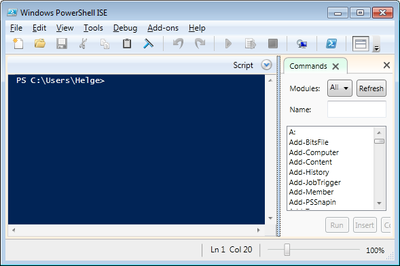
On my quest for a decent PowerShell development tool I first tried out PowerGUI, but was not very happy with it. When the RTM version of PowerShell 3.0 along with a revamped ISE was released a few days ago, I decided to give it a try. Here is what I found.
Windows General Good info for troubleshooting DFS-Namespaces in the MS KB: Storage locations, inconsistencies and how to deal with them.
Complex passwords and security guidelines for end users? No, thank you, says MS researcher. I agree.
There are many ways to determine when Windows was installed. Here are some of them.
Systeminfo The systeminfo tool displays a lot of interesting information about the computer and the operating system, among them the installation date. Here is some sample output: