作者注:详解如何使用 Nano Banana Pro (Gemini 3 Pro Image) 制作建筑正交蓝图,从平面图、立面图到剖面图,快速生成符合 CAD 标准的技术图纸
👁 nano-banana-pro-orthographic-blueprint-tutorial-en 图示
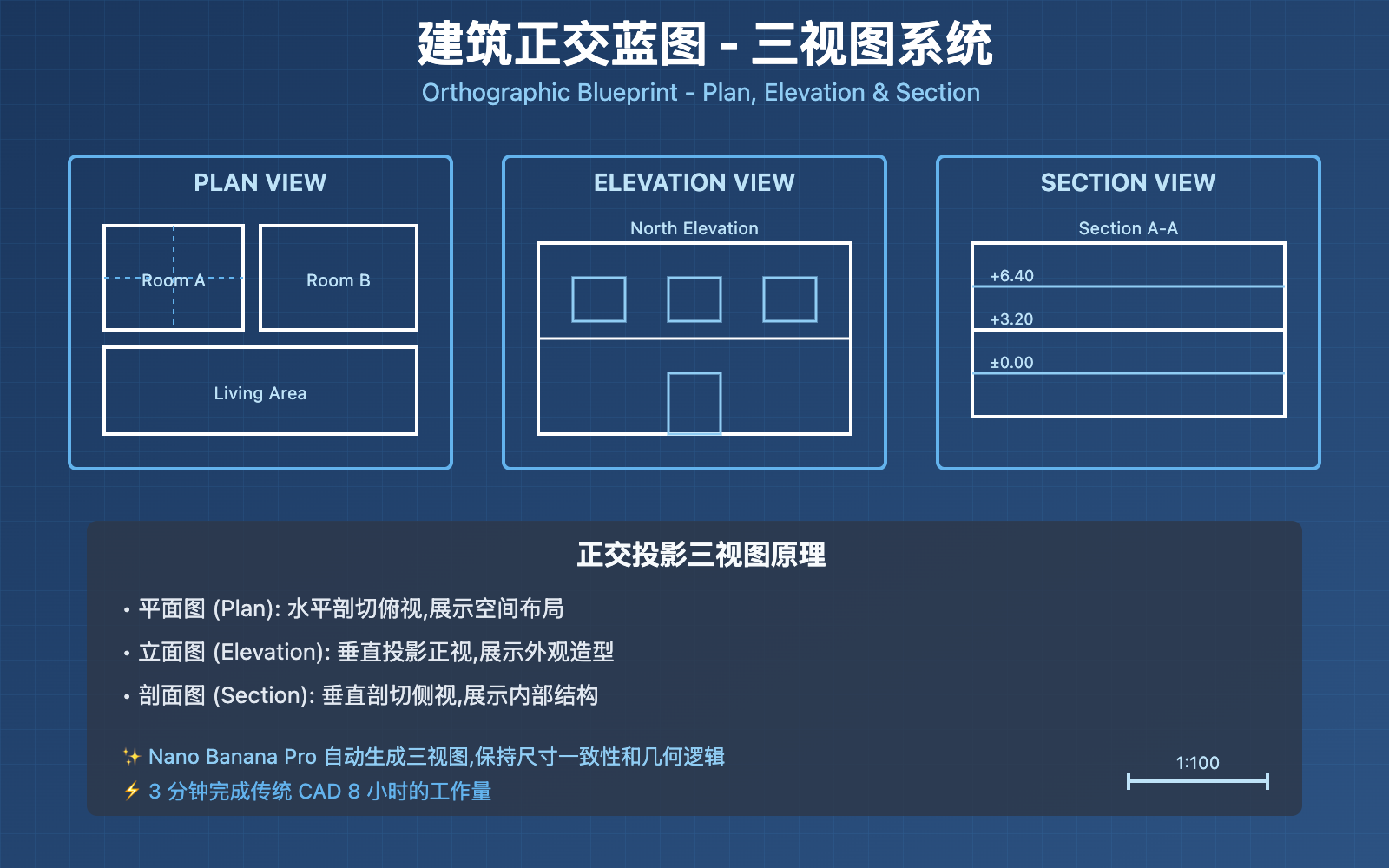
传统建筑蓝图制作需要精通 AutoCAD、Revit 等专业软件,耗时数小时甚至数天。Nano Banana Pro (Gemini 3 Pro Image Preview) 通过强大的视觉推理能力,让你用一句提示词即可生成符合专业标准的正交蓝图,包含平面图 (Plan)、立面图 (Elevation) 和剖面图 (Section)。
核心价值: 读完本文,你将学会使用 Nano Banana Pro 生成建筑正交蓝图,掌握线型控制、标注规范和多视图组合技巧,将概念设计转化为可施工的技术图纸。
Nano Banana Pro 建筑蓝图核心能力
Nano Banana Pro 是 Google DeepMind 基于 Gemini 3 Pro 推出的图像生成模型,在 2025 年底因其卓越的 建筑可视化能力 在建筑界引发病毒式传播。其在技术图纸生成方面的核心能力包括:
| 核心能力 | 技术参数 | 建筑蓝图价值 |
|---|---|---|
| 视觉推理 | 支持 "derendering" 反向工程 | 理解建筑空间逻辑,准确表达结构关系 |
| 精准线型控制 | CAD 级别可变线宽 | 粗线表达剖切元素,细线表达投影元素 |
| 文本渲染 | 技术字体清晰标注 | 尺寸标注、图纸编号、北向指示自动生成 |
| 高分辨率输出 | 原生 2K/4K | 满足打印和施工图纸要求 |
| 多视图生成 | 一次生成平立剖三视图 | 完整表达建筑设计意图 |
什么是建筑正交蓝图 (Orthographic Blueprint)?
建筑正交蓝图是使用 正交投影 (Orthographic Projection) 技术绘制的建筑技术图纸,遵循严格的制图标准。与透视图不同,正交投影保持尺寸比例精确,是建筑施工的法定依据。
三大核心视图:
- 平面图 (Plan View): 从上方俯视建筑水平剖切后的投影,展示房间布局、墙体位置、门窗开口
- 立面图 (Elevation View): 从正前方、侧方等方向观察建筑外观,展示外立面设计、高度关系
- 剖面图 (Section View): 沿垂直面剖切建筑,展示内部空间层高、结构关系、楼板厚度
技术规范:
- 线型标准: 粗线 (0.5-0.7mm) 表示剖切部分,细线 (0.18-0.25mm) 表示投影部分
- 比例尺: 1:50、1:100、1:200 等标准建筑比例
- 标注系统: 尺寸标注、标高标注、材料标注、图纸索引
- 网格系统: 结构轴线编号 (A-Z, 1-99)
Nano Banana Pro Architectural Blueprint Generation Workflow
Step 1: Prepare Reference Images or Concept Descriptions
Nano Banana Pro supports two input methods:
Method 1: Generate Blueprints Based on Reference Images
Upload architectural photos, 3D renderings, or hand-drawn sketches, and AI automatically reverse-engineers them into technical blueprints.
Example Prompt:
Create an orthographic blueprint that describes this building in plan, elevation, and section.

Technical requirements:
- Use strict CAD linework with variable line weights
- Thick lines (0.7mm) for cut elements (walls, ground)
- Thin lines (0.25mm) for projected elements (doors, windows, furniture)
- Include dimensions in meters
- Label "North Elevation" and "Main Entrance"
- Add structural grid lines (A-D, 1-5)
- Use technical architectural font for annotations
- Include scale bar (1:100)

Layout: Grid format with Plan View (top left), Front Elevation (top right), Section A-A (bottom)
Method 2: Generate Blueprints from Pure Text Descriptions
Directly describe architectural design intent in natural language, and AI automatically generates standardized blueprints.
Example Prompt:
Generate an orthographic blueprint for a two-story modern villa.

Building specifications:
- Ground floor: Living room (6m x 8m), Kitchen (4m x 5m), Bathroom (2m x 3m)
- Second floor: Master bedroom (5m x 6m), Two bedrooms (4m x 4m each), Bathroom (2m x 3m)
- Total footprint: 12m x 10m
- Floor height: 3.2m each
- Flat roof with parapet

Blueprint requirements:
- Plan view showing room layout and furniture placement
- North and South elevations showing fenestration
- Section view cutting through main staircase
- Technical line weights and dimension annotations
- Scale 1:100
Key Tips:
- Specify line type requirements: "strict CAD linework" / "variable line weights"
- Designate view types: "plan", "elevation", "section"
- Include dimensional information: room dimensions, floor heights, bay depths
- Annotation requirements: "label", "annotate", "dimension lines"
- Scale: Clearly specify drawing scale (1:50 / 1:100 / 1:200)
👁 nano-banana-pro-orthographic-blueprint-tutorial-en 图示
Step 2: Call API to Generate Blueprints
Here's a Python code example for calling the Nano Banana Pro API to generate architectural blueprints (via APIYi platform):
import openai

client = openai.OpenAI(
 api_key="YOUR_APIYI_KEY",
 base_url="https://vip.apiyi.com/v1"
)

response = client.images.generate(
 model="gemini-3-pro-image-preview",
 prompt="""Create an orthographic blueprint for Neuschwanstein Castle in plan, elevation, and section.

 Use professional CAD linework with variable line weights.
 Include dimension annotations and scale 1:200.""",
 size="2048x2048",
 quality="hd"
)

blueprint_url = response.data[0].url
print(f"Blueprint generated successfully: {blueprint_url}")
Quick Test: Get test credits for Nano Banana Pro through APIYi at apiyi.com. The platform uniformly supports OpenAI SDK calling format. Visit imagen.apiyi.com to experience blueprint generation online without programming.
Step 3: Optimize Line Types and Annotations
Nano Banana Pro supports multi-turn conversational editing for fine-tuning generated blueprints:
Common Optimization Needs:
-
Adjust Line Weights
Make the wall lines thicker (0.9mm) and furniture lines lighter (0.15mm) for better contrast -
Add Dimension Annotations
Add dimension lines showing room sizes in meters. Include overall building dimensions (length x width) -
Supplement Section Annotations
In the section view, add floor height annotations (e.g., "FL +0.00", "FL +3.20", "FL +6.40") Add material hatching for concrete walls and indicate insulation layers -
Optimize Grid System
Add structural grid lines labeled A-D (vertical) and 1-5 (horizontal) Show grid spacing dimensions -
Adjust View Layout
Rearrange the layout: Plan view at top, Front and Rear elevations in middle row, Section A-A at bottom
Align all views to the same baseline for consistency
Professional Tips:
- Use architectural terminology like "hatch", "baseline", "grid spacing" to improve precision
- Specify exact line width values (e.g., 0.7mm, 0.25mm) instead of "thick/thin"
- Reference standard drawing specifications (e.g., GB/T 50104-2010 Architectural Drawing Standards)
Step 4: Export and Post-Processing
Generated blueprints can be directly used for:
- Design Proposals: Concept drawings for client presentations
- Construction Reference: Construction guidance drawings for small projects
- Educational Demonstrations: Case studies in architectural education
Post-Processing Recommendations:
- Import to CAD Software: Open PNG in Adobe Illustrator or Inkscape, convert to vector graphics
- Detailed Adjustments: Supplement precise dimensions and material annotations in AutoCAD
- Print Output: 2K resolution suitable for A3 printing, 4K suitable for A1 large format
Technical Analysis of Nano Banana Pro Blueprint Generation
1. Visual Reasoning
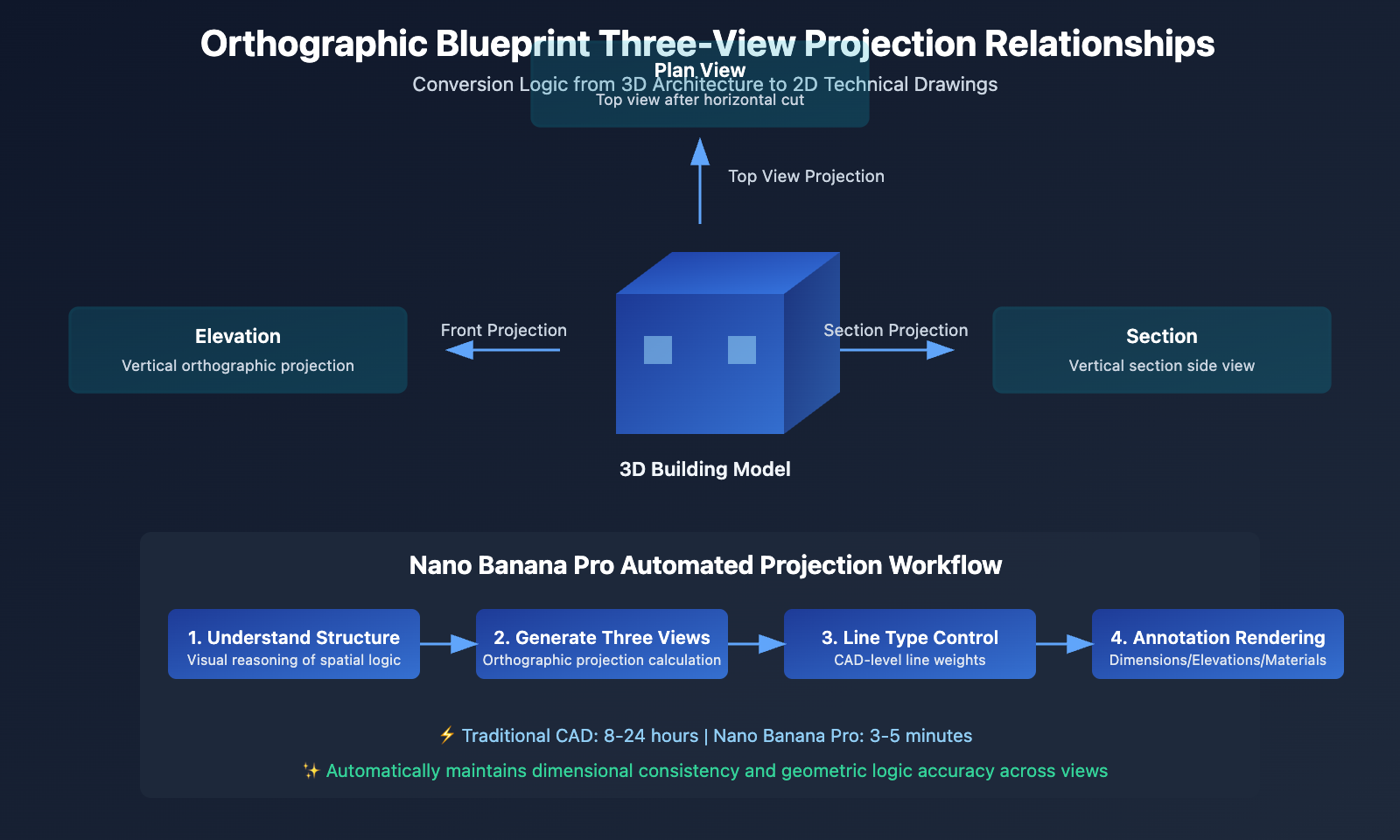
The core advantage of Nano Banana Pro lies in its "derendering" reverse engineering capability, which reverse-engineers structural logic from visual information.
Technical Principles:
- Identifies walls, doors, windows, roofs, and other elements in architectural photographs
- Infers spatial depth and floor height relationships
- Automatically generates geometrically logical floor plans, elevations, and sections
Practical Application:
According to Architizer Journal reports, architect Sarah Chen used Nano Banana Pro to reverse-generate precise blueprints from historical building photographs for technical drawing preparation in restoration projects, reducing traditional surveying time from 2 weeks to 30 minutes.
2. CAD-Level Line Type Control
According to Google AI official documentation, Nano Banana Pro supports professional CAD line type specifications:
| Line Type | Line Weight | Purpose | Example Elements |
|---|---|---|---|
| Thick Continuous Line | 0.7-0.9mm | Cut Sections | Cut walls, floors, roofs |
| Medium Continuous Line | 0.35-0.5mm | Visible Outline | Door/window frames, furniture outlines |
| Thin Continuous Line | 0.18-0.25mm | Projection Lines | Floor materials, furniture details |
| Dashed Line | 0.18mm | Hidden Lines | Upper floor projections, hidden structures |
| Dash-Dot Line | 0.25mm | Axes/Centerlines | Structural grid, symmetry axes |
Prompt Example:
Use professional CAD line weights:
- 0.9mm thick continuous lines for cut walls and structural elements
- 0.35mm medium lines for visible edges and door/window frames
- 0.18mm thin lines for floor patterns and furniture details
- 0.18mm dashed lines for hidden elements (upper floor projection)
- 0.25mm dash-dot lines for structural grid axes
3. Text Annotation System
Nano Banana Pro's text rendering capability is crucial for architectural blueprints:
Supported Annotation Types:
- Dimension Annotations: Room dimensions, wall thickness, door/window openings
- Level Annotations: Floor levels (±0.000, +3.200)
- Material Annotations: Wall materials (240mm brick wall, C30 concrete)
- Drawing Index: Drawing numbers, scale, north indicator
- Room Numbers: Functional zone identification (01 Living Room, 02 Bedroom)
Font Specifications:
- Western Characters: Arial, Helvetica (clean sans-serif)
- Chinese Characters: Heiti, Fangsong (clear and readable)
- Numbers: Monospaced fonts (aligned dimension annotations)
Nano Banana Pro vs Traditional CAD Software Comparison
👁 nano-banana-pro-orthographic-blueprint-tutorial-en 图示
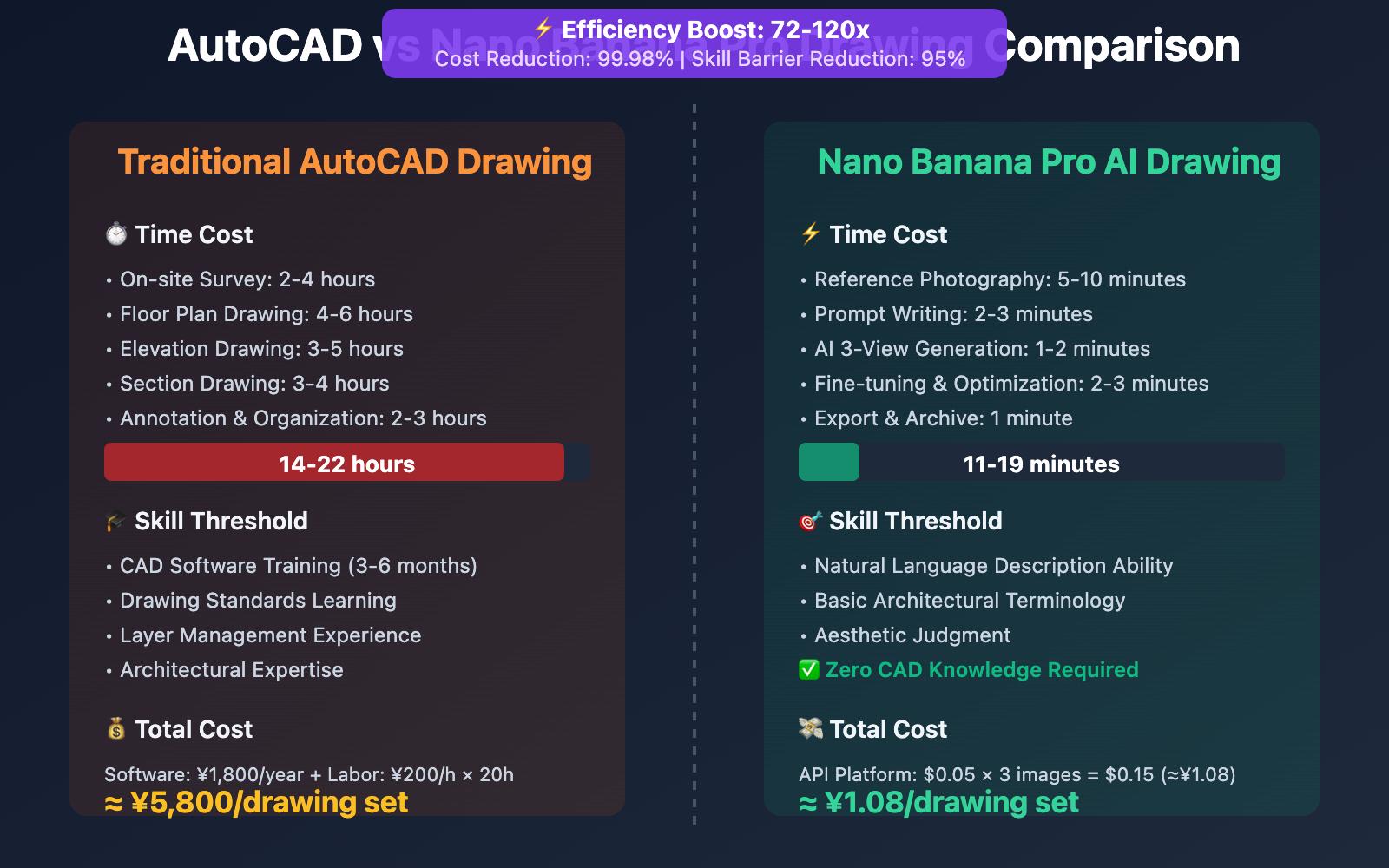
| Comparison Dimension | Traditional AutoCAD Drawing | Nano Banana Pro AI Drawing |
|---|---|---|
| Production Time | 8-24 hours (survey+drawing+annotation) | 3-5 minutes (prompt generation) |
| Technical Threshold | Professional CAD training required (months of learning) | Natural language description sufficient |
| Precision Control | Pixel-level precision (±1mm) | Conceptual-level precision (±5-10%) |
| Modification Cost | Requires redrawing layers | One-sentence local editing |
| Applicable Scenarios | Construction drawings, as-built drawings, legal documents | Conceptual design, proposal presentation, rapid iteration |
| Output Format | DWG/DXF (vector) | PNG/JPG (raster, convertible to vector) |
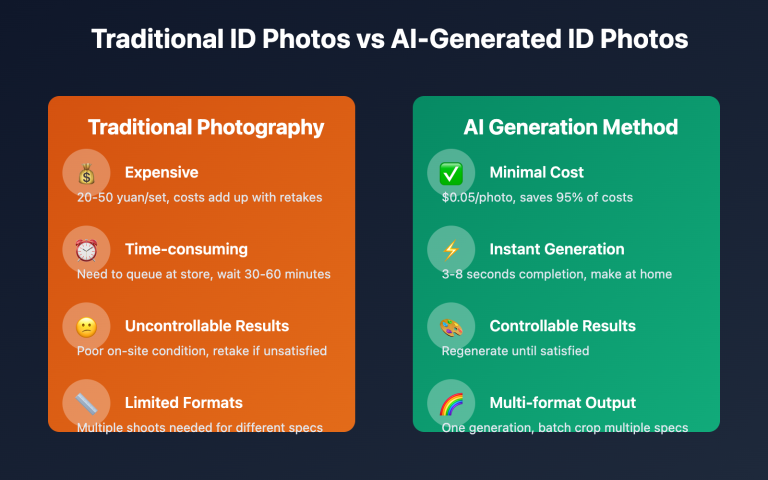
| Cost | AutoCAD subscription ¥1,800/year + labor | API ¥0.05/image |
Conclusion: Nano Banana Pro is suitable for rapid visualization in early design stages, while traditional CAD is appropriate for precision drawing in construction phases. Best practice is combined use: AI-generated drafts → CAD refinement → construction drawing review.
Comparison Notes: The above time data is from ArchiLabs.ai testing reports. Verification can be conducted through the apiyi.com platform at $0.05/image (compared to Google's official 4K pricing of $0.24/image, saving 79%).
Advanced Techniques for Architectural Blueprints with Nano Banana Pro
1. Multi-View Combined Generation
Referring to the iMini AI Tutorial, you can generate a complete drawing set in one go:
prompt = """Generate a complete orthographic blueprint set for a modern art gallery.

Required views:
1. Ground Floor Plan (1:100) - showing exhibition halls, entrance lobby, cafe
2. First Floor Plan (1:100) - showing administrative offices, storage
3. North Elevation (1:100) - main entrance facade
4. South Elevation (1:100) - rear service entrance
5. Section A-A (1:100) - cutting through main exhibition hall showing double-height space
6. Section B-B (1:100) - cutting through staircase

Layout: 2x3 grid with consistent alignment
Technical: CAD line weights, dimension annotations, structural grid (A-F, 1-8)
Style: Professional blueprint on light blue grid paper
"""
Advantage: All views are automatically aligned, ensuring dimensional consistency.
2. Historic Building Surveying
Nano Banana Pro can reverse-engineer historic building photographs into measured drawings:
# Upload historic building photo
with open("historic_building.jpg", "rb") as img:
 response = client.images.generate(
 model="gemini-3-pro-image-preview",
 prompt="""Reverse engineer this historic building into an orthographic blueprint.

 Generate:
 - Measured floor plan with room dimensions
 - Front and side elevations showing architectural details
 - Section view revealing ceiling heights and structural system

 Preserve:
 - Original window proportions and spacing
 - Decorative elements (cornices, pilasters, moldings)
 - Roof pitch and chimney locations

 Technical: 1:50 scale, detailed dimension annotations""",
 image=img
 )
Application Scenarios: Cultural heritage preservation, historic building restoration, retrofitting of old buildings.
3. Parametric Design Iteration
Leverage Nano Banana Pro to rapidly generate multiple design alternatives:
# Batch generate different unit type schemes
for layout in ["1-bedroom", "2-bedroom", "3-bedroom"]:
 prompt = f"""Generate floor plan blueprint for a {layout} apartment unit.

 Specifications:
 - Total area: {"50sqm" if layout == "1-bedroom" else "80sqm" if layout == "2-bedroom" else "120sqm"}
 - Include: Living room, Kitchen, Bathroom(s), Bedroom(s), Balcony
 - Open-plan living/dining area
 - Efficient circulation (minimize corridor space)

 Blueprint requirements:
 - 1:50 scale with dimension annotations
 - Furniture layout showing functional zones
 - Door swing directions and window positions
 - Total area calculation annotation
 """

 response = client.images.generate(
 model="gemini-3-pro-image-preview",
 prompt=prompt
 )

 # Save for scheme comparison
 print(f"{layout} scheme generated")
Efficiency Improvement: Traditional hand-drawing of 3 schemes requires 6-8 hours, AI generation only takes 3 minutes.
Practical Application Scenarios and Case Studies
Scenario 1: Rapid Drawing Production for Architectural Competitions
Requirement: Complete conceptual design and technical drawings within a 48-hour competition deadline
Solution:
- Sketch Phase: Hand-drawn concept sketches (2 hours)
- AI Blueprint Generation: Upload sketches, generate plan, elevations, and sections (10 minutes)
- Design Iteration: Adjust design based on review feedback (5 iterations, 1 hour total)
- Refinement: Import to CAD to supplement detailed annotations (4 hours)
Time Comparison:
- Traditional Process: Sketches 2h + CAD drawing 20h = 22 hours
- AI-Assisted Process: Sketches 2h + AI generation 1h + CAD refinement 4h = 7 hours
- Saves 15 hours (68% efficiency improvement)
Scenario 2: Interior Design Floor Plan Generation
Requirement: Provide client with 3 different style layout schemes
Workflow:
On-site measurement → Input unit parameters → AI generates 3 layouts → Client selection → Design development
Real Case (from Fenestra Blog):
Interior designer Lisa Wang used Nano Banana Pro to generate three floor plan layouts for a 120㎡ residence in modern minimalist, Scandinavian, and industrial styles. The client selected a scheme on the spot, achieving contract signing in just 1 hour from first meeting (traditional process requires 1-2 weeks).
Scenario 3: Architectural Education Case Demonstration
Requirement: Quickly demonstrate orthographic projection principles in architectural education
Teaching Process:
- Display building 3D model or photograph
- Use Nano Banana Pro to generate plan, elevations, and sections in real-time
- Students understand the correspondence between orthographic views and actual buildings
Teaching Advantages:
- Traditional Method: Teacher manual demonstration (30 minutes) + student practice (2 hours)
- AI-Assisted Method: Real-time generation demonstration (5 minutes) + student comprehension of principles (30 minutes)
- Saves 70% teaching time, allowing students to focus on design thinking rather than mechanical drafting
Nano Banana Pro API Pricing and Platform Selection
Official Pricing (Google Vertex AI)
| Resolution | Google Official Price | Access Requirements |
|---|---|---|
| 4K (4096×4096) | $0.24/image | Requires overseas credit card linked to Google Cloud |
| 2K (2048×2048) | $0.134/image | Same as above |
| 1K (1024×1024) | No separate pricing | Same as above |
Enterprise Subscription: Google Cloud enterprise accounts require additional platform management fees (monthly fee $100+)
APIYi Platform Pricing ⭐ Recommended
Basic Pricing
- Unified Price: $0.05/image (Resolution-agnostic, covers 1K/2K/4K)
- Discount Rate:
- vs. Official 4K: Save 79% (approximately 20% of original price)
- vs. Official 2K: Save 63% (approximately 37% of original price)
Special Offers for Architectural Design Teams
Applicable To: Design institutes, architectural firms, and BIM consulting companies with daily consumption > 5,000 images
| Recharge Amount | Bonus Percentage | Actual Credit | Actual Unit Price |
|---|---|---|---|
| $100 | +10% | $110 | $0.045/image |
| $500 | +15% | $575 | $0.043/image |
| $1000+ | +20% (cap) | $1200 | $0.04/image |
Cost Calculation Example:
Assuming a mid-sized design institute generates 5,000 blueprints monthly (including floor plans, elevations, and sections):
| Platform | Unit Price | Monthly Cost | Annual Cost |
|---|---|---|---|
| Google Official (4K) | $0.24 | $1,200 | $14,400 |
| APIYi Basic Price | $0.05 | $250 | $3,000 |
| APIYi Bonus Price (20%) | $0.04 | $200 | $2,400 |
Annual Savings: $12,000 (Save 83%)
Additional Value: Based on an architect's monthly salary of ¥12,000, AI-assisted drafting saves 40 hours of labor per month = ¥6,000 in labor cost savings, ROI of 2400%.
Performance Advantages
- Generation Speed:
- 1K/2K: approximately 30 seconds/image
- 4K: approximately 1 minute/image
- Stability: Based on Google Cloud T3 tier and above enterprise accounts
- Concurrency Control: Unlimited concurrency, supports team collaboration for batch generation
- Daily Capacity: Platform processes 100,000+ images daily on average (January 2026 data)
Payment Methods
- ✅ Alipay / WeChat Pay
- ✅ USDT (convenient for overseas clients, serving European and American architectural firms)
- ✅ Corporate Transfer (supports enterprise procurement invoices)
- ✅ No overseas credit card required
Quick Start
- Developer Documentation: docs.apiyi.com
- Official Website: api.apiyi.com
- Online Testing: imagen.apiyi.com (free trial of Nano Banana Pro blueprint generation)
Frequently Asked Questions
Summary
Core advantages of Nano Banana Pro for architectural orthographic blueprint generation:
- Visual Reasoning: Automatically understands architectural spatial logic, generating multi-view drawings that comply with geometric standards
- CAD-Level Line Types: Automatically differentiates line weights for section cuts vs. projected elements, meeting drafting standards
- Efficient Iteration: Completes plan-elevation-section three-view drawings in 3 minutes vs. traditional 8 hours
- Cost Advantage: Accessible via APIYI platform at only 20% of Google's official pricing
For architects, interior designers, and architecture students, Nano Banana Pro transforms technical drafting from "time-consuming mechanical labor" into a "rapid design tool," enabling designers to invest 80% of their time in creative thinking and only 20% in drawing representation.
Recommended to quickly validate results through APIYI apiyi.com, which provides free trial credits, unified OpenAI SDK calling format, and preferential pricing of $0.05/image covering 1K-4K resolutions. Visit imagen.apiyi.com to experience architectural blueprint generation online.
Author: Technical Team
Technical Exchange: Welcome to share your architectural blueprint works in the comments. For more AI architectural design resources, visit the APIYI apiyi.com technical community
References: