|
VOOZH | about |
|
VOOZH | about |
pdf-document-layout-analysis service by HURIDOCS
10K+
A Docker-powered microservice for intelligent PDF document layout analysis, OCR, and content extraction
👁 Python Version
👁 FastAPI
👁 Docker
👁 GPU Support
Built with ❤️ by HURIDOCS
⭐ Star us on GitHub • 🐳 Pull from Docker Hub • 🤗 View on Hugging Face
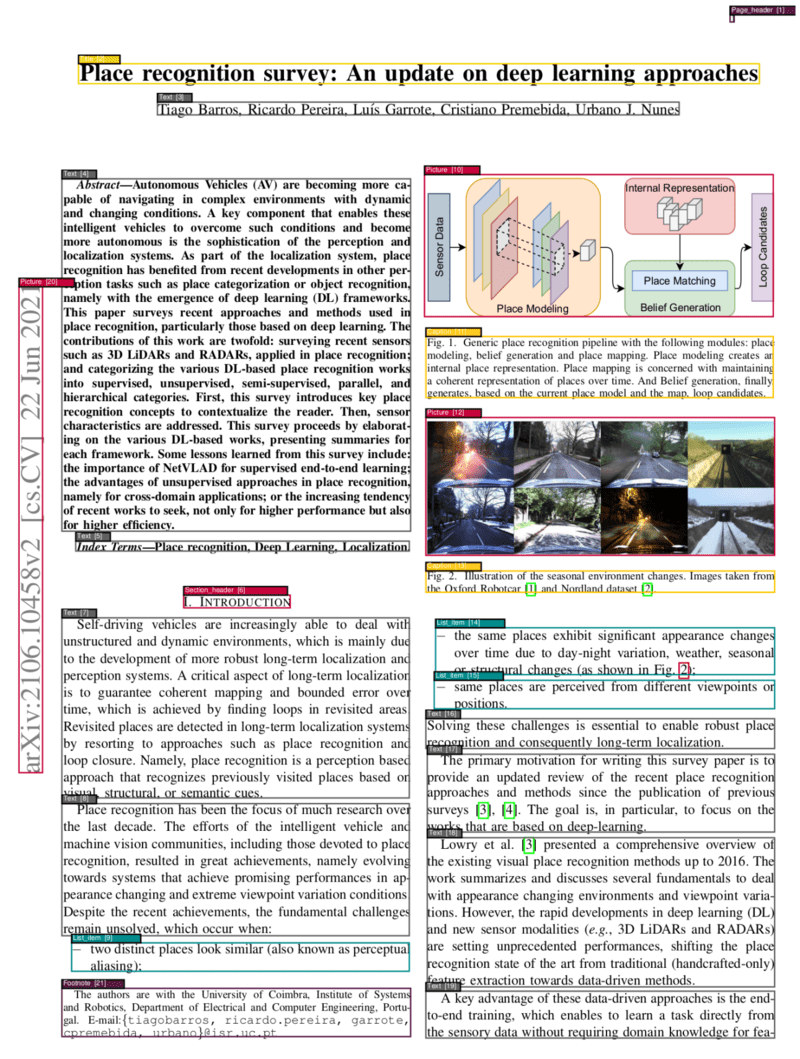
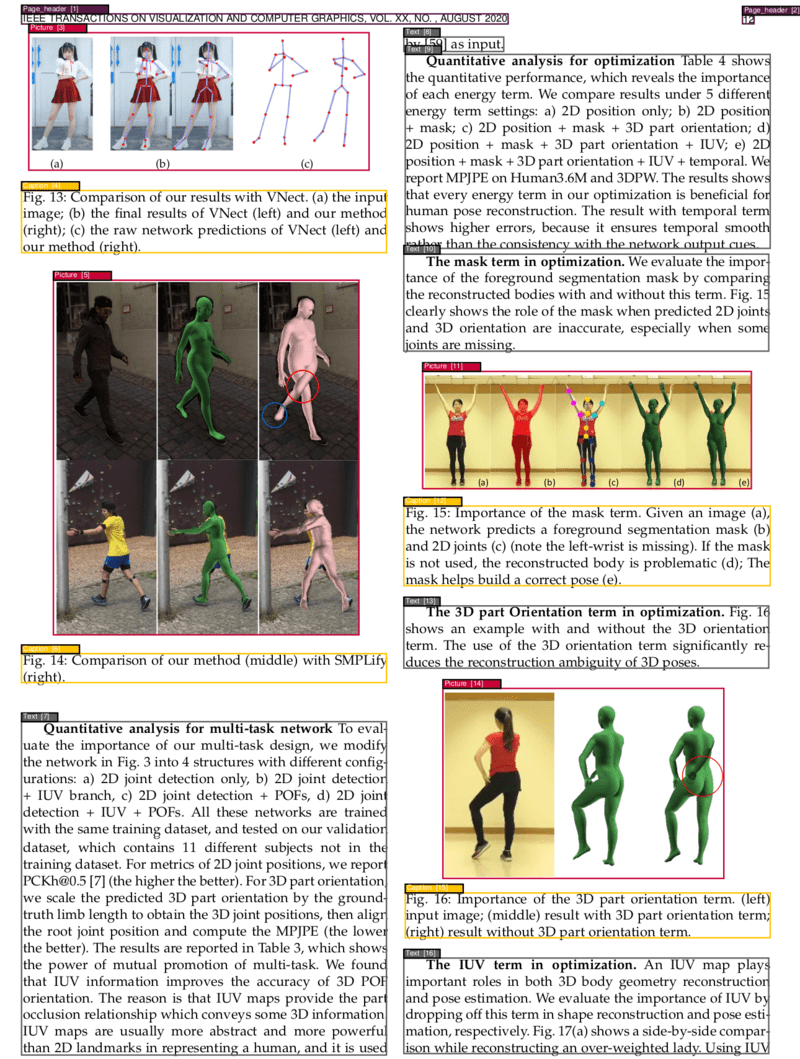
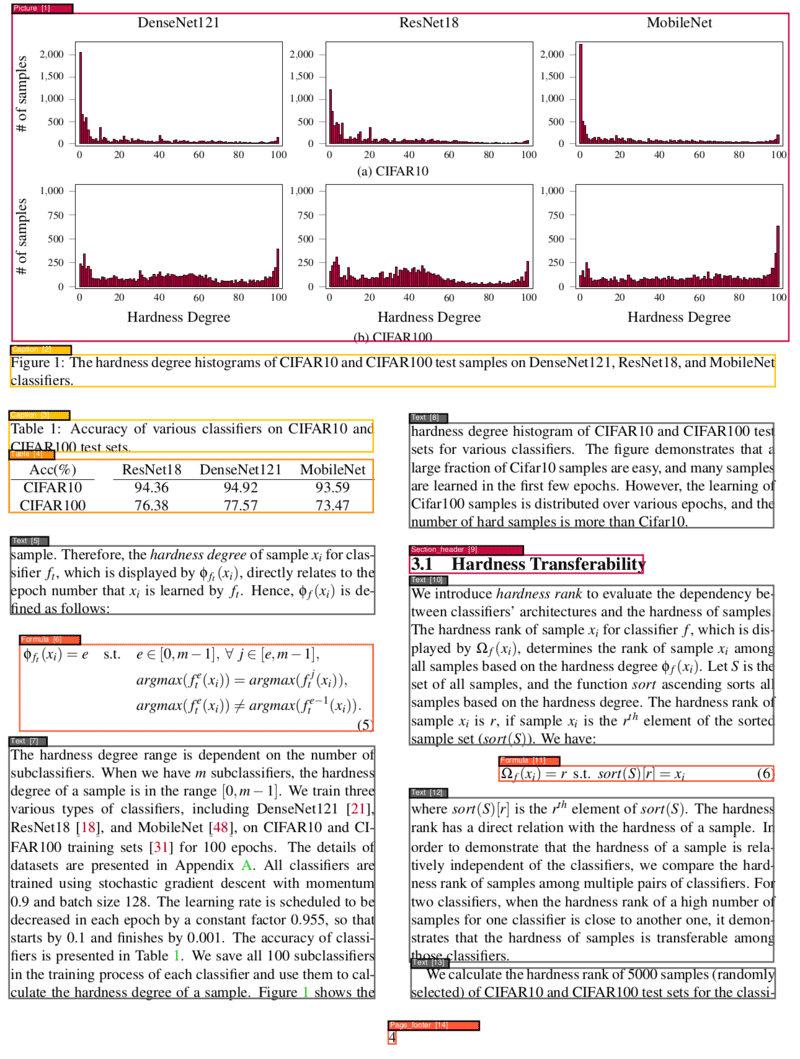
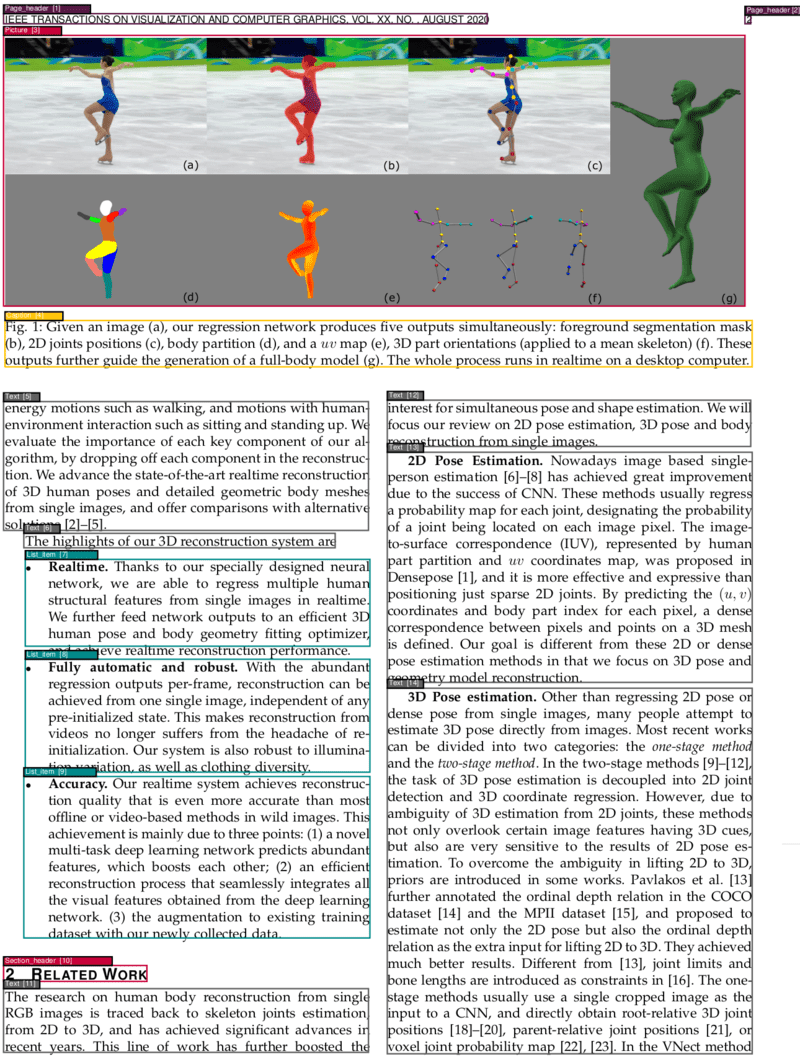
This project provides a powerful and flexible PDF analysis microservice built with Clean Architecture principles. The service enables OCR, segmentation, and classification of different parts of PDF pages, identifying elements such as texts, titles, pictures, tables, formulas, and more. Additionally, it determines the correct reading order of these identified elements and can convert PDFs to various formats including Markdown and HTML.
Run the service:
docker run --rm --name pdf-document-layout-analysis --gpus '"device=0"' -p 5060:5060 --entrypoint ./start.sh huridocs/pdf-document-layout-analysis:v0.0.35
docker run --rm --name pdf-document-layout-analysis -p 5060:5060 --entrypoint ./start.sh huridocs/pdf-document-layout-analysis:v0.0.35
📝 The service also has a user interface and a translation support but you should install it from the source. Check GitHub page for instructions.
Get the segments from a PDF:
curl -X POST -F 'file=@/PATH/TO/PDF/pdf_name.pdf' localhost:5060
To stop the server:
docker stop pdf-document-layout-analysis
💡 Tip: Replace
/path/to/your/document.pdfwith the actual path to your PDF file. The service will return a JSON response with segmented content and metadata.
The service provides a comprehensive RESTful API with the following endpoints:
| Endpoint | Method | Description | Parameters |
|---|---|---|---|
/ | POST | Analyze PDF layout and extract segments | file, fast, ocr_tables |
/save_xml/{filename} | POST | Analyze PDF and save XML output | file, xml_file_name, fast |
/get_xml/{filename} | GET | Retrieve saved XML analysis | xml_file_name |
| Endpoint | Method | Description | Parameters |
|---|---|---|---|
/text | POST | Extract text by content types | file, fast, types |
/toc | POST | Extract table of contents | file, fast |
/toc_legacy_uwazi_compatible | POST | Extract TOC (Uwazi compatible) | file |
| Endpoint | Method | Description | Parameters |
|---|---|---|---|
/markdown | POST | Convert PDF to Markdown (includes segmentation data in zip) | file, fast, extract_toc, dpi, output_file |
/html | POST | Convert PDF to HTML (includes segmentation data in zip) | file, fast, extract_toc, dpi, output_file |
/visualize | POST | Visualize segmentation results on the PDF | file, fast |
| Endpoint | Method | Description | Parameters |
|---|---|---|---|
/ocr | POST | Apply OCR to PDF | file, language |
/info | GET | Get service information | - |
/ | GET | Health check and system info | - |
/error | GET | Test error handling | - |
file: PDF file to process (multipart/form-data)fast: Use LightGBM models instead of VGT (boolean, default: false)ocr_tables: Apply OCR to table regions (boolean, default: false)language: OCR language code (string, default: "en")types: Comma-separated content types to extract (string, default: "all")extract_toc: Include table of contents at the beginning of the output (boolean, default: false)dpi: Image resolution for conversion (integer, default: 120)Standard analysis with VGT model:
curl -X POST \
 -F '[email protected]' \
 http://localhost:5060
Fast analysis with LightGBM models:
curl -X POST \
 -F '[email protected]' \
 -F 'fast=true' \
 http://localhost:5060
Analysis with table OCR:
curl -X POST \
 -F '[email protected]' \
 -F 'ocr_tables=true' \
 http://localhost:5060
Extract all text:
curl -X POST \
 -F '[email protected]' \
 -F 'types=all' \
 http://localhost:5060/text
Extract specific content types:
curl -X POST \
 -F '[email protected]' \
 -F 'types=title,text,table' \
 http://localhost:5060/text
Convert to Markdown:
curl -X POST http://localhost:5060/markdown \
 -F '[email protected]' \
 -F 'extract_toc=true' \
 -F 'output_file=document.md' \
 --output 'document.zip'
Convert to HTML:
curl -X POST http://localhost:5060/html \
 -F '[email protected]' \
 -F 'extract_toc=true' \
 -F 'output_file=document.html' \
 --output 'document.zip'
📋 Segmentation Data: Format conversion endpoints automatically include detailed segmentation data in the zip output. The resulting zip file contains a
{filename}_segmentation.jsonfile with information about each detected document segment including:
- Coordinates:
left,top,width,height- Page information:
page_number,page_width,page_height- Content:
textcontent and segmenttype(e.g., "Title", "Text", "Table", "Picture")
OCR in English:
curl -X POST \
 -F 'file=@scanned_document.pdf' \
 -F 'language=en' \
 http://localhost:5060/ocr \
 --output ocr_processed.pdf
OCR in other languages:
# French
curl -X POST \
 -F 'file=@document_french.pdf' \
 -F 'language=fr' \
 http://localhost:5060/ocr \
 --output ocr_french.pdf

# Spanish
curl -X POST \
 -F 'file=@document_spanish.pdf' \
 -F 'language=es' \
 http://localhost:5060/ocr \
 --output ocr_spanish.pdf
Generate visualization PDF:
curl -X POST \
 -F '[email protected]' \
 http://localhost:5060/visualize \
 --output visualization.pdf
Extract structured TOC:
curl -X POST \
 -F '[email protected]' \
 http://localhost:5060/toc
Analyze and save XML:
curl -X POST \
 -F '[email protected]' \
 http://localhost:5060/save_xml/my_analysis
Retrieve saved XML:
curl http://localhost:5060/get_xml/my_analysis.xml
Get service info and supported languages:
curl http://localhost:5060/info
Health check:
curl http://localhost:5060/
Most endpoints return JSON with segment information:
[
 {
 "left": 72.0,
 "top": 84.0,
 "width": 451.2,
 "height": 23.04,
 "page_number": 1,
 "page_width": 595.32,
 "page_height": 841.92,
 "text": "Document Title",
 "type": "Title"
 },
 {
 "left": 72.0,
 "top": 120.0,
 "width": 451.2,
 "height": 200.0,
 "page_number": 1,
 "page_width": 595.32,
 "page_height": 841.92,
 "text": "This is the main text content...",
 "type": "Text"
 }
]
Caption - Image and table captionsFootnote - Footnote textFormula - Mathematical formulasList item - List items and bullet pointsPage footer - Footer contentPage header - Header contentPicture - Images and figuresSection header - Section headingsTable - Table contentText - Regular text paragraphsTitle - Document and section titlesThis project follows Clean Architecture principles, ensuring separation of concerns, testability, and maintainability. The codebase is organized into distinct layers:
src/
├── domain/ # Enterprise Business Rules
│ ├── PdfImages.py # PDF image handling domain logic
│ ├── PdfSegment.py # PDF segment entity
│ ├── Prediction.py # ML prediction entity
│ └── SegmentBox.py # Core segment box entity
├── use_cases/ # Application Business Rules
│ ├── pdf_analysis/ # PDF analysis use case
│ ├── text_extraction/ # Text extraction use case
│ ├── toc_extraction/ # Table of contents extraction
│ ├── visualization/ # PDF visualization use case
│ ├── ocr/ # OCR processing use case
│ ├── markdown_conversion/ # Markdown conversion use case
│ └── html_conversion/ # HTML conversion use case
├── adapters/ # Interface Adapters
│ ├── infrastructure/ # External service adapters
│ ├── ml/ # Machine learning model adapters
│ ├── storage/ # File storage adapters
│ └── web/ # Web framework adapters
├── ports/ # Interface definitions
│ ├── services/ # Service interfaces
│ └── repositories/ # Repository interfaces
└── drivers/ # Frameworks & Drivers
 └── web/ # FastAPI application setup
🔄 Dependency Inversion: High-level modules don't depend on low-level modules
🧪 Testability: Easy to unit test business logic in isolation
🔧 Maintainability: Changes to external frameworks don't affect business rules
📈 Scalability: Easy to add new features without modifying existing code
The service offers two complementary model approaches, each optimized for different use cases:
Overview: A state-of-the-art visual model developed by Alibaba Research Group that "sees" the entire page layout.
Key Features:
Resource Requirements:
Overview: Lightweight ensemble of two specialized models using XML-based features from Poppler.
Key Features:
Trade-offs:
Both models integrate seamlessly with OCR capabilities:
| Use Case | Recommended Model | Reason |
|---|---|---|
| High accuracy requirements | VGT | Superior visual understanding |
| Batch processing | LightGBM | Faster processing, lower resources |
| GPU available | VGT | Leverages GPU acceleration |
| CPU-only environment | LightGBM | Optimized for CPU processing |
| Real-time applications | LightGBM | Consistent fast response times |
| Research/analysis | VGT | Best accuracy for detailed analysis |
Both model types are trained on the comprehensive DocLayNet dataset, a large-scale document layout analysis dataset containing over 80,000 document pages.
The models can identify and classify 11 distinct content types:
| ID | Category | Description |
|---|---|---|
| 1 | Caption | Image and table captions |
| 2 | Footnote | Footnote references and text |
| 3 | Formula | Mathematical equations and formulas |
| 4 | List item | Bulleted and numbered list items |
| 5 | Page footer | Footer content and page numbers |
| 6 | Page header | Header content and titles |
| 7 | Picture | Images, figures, and graphics |
| 8 | Section header | Section and subsection headings |
| 9 | Table | Tabular data and structures |
| 10 | Text | Regular paragraph text |
| 11 | Title | Document and chapter titles |
For detailed information about the dataset, visit the DocLayNet repository.
VGT model performance on PubLayNet dataset:
| Metric | Overall | Text | Title | List | Table | Figure |
|---|---|---|---|---|---|---|
| F1 Score | 0.962 | 0.950 | 0.939 | 0.968 | 0.981 | 0.971 |
📊 Comparison: View comprehensive model comparisons at Papers With Code
Performance benchmarks on 15-page academic documents:
| Model | Hardware | Speed (sec/page) | Use Case |
|---|---|---|---|
| LightGBM | CPU (i7-8700 3.2GHz) | 0.42 | Fast processing |
| VGT | GPU (GTX 1070) | 1.75 | High accuracy |
| VGT | CPU (i7-8700 3.2GHz) | 13.5 | CPU fallback |
The service uses Tesseract OCR with support for 150+ languages. The Docker image includes only common languages to minimize image size.
docker exec -it --user root pdf-document-layout-analysis /bin/bash
# Install specific language
apt-get update
apt-get install tesseract-ocr-[LANGCODE]
# Korean
apt-get install tesseract-ocr-kor

# German
apt-get install tesseract-ocr-deu

# French
apt-get install tesseract-ocr-fra

# Spanish
apt-get install tesseract-ocr-spa

# Chinese Simplified
apt-get install tesseract-ocr-chi-sim

# Arabic
apt-get install tesseract-ocr-ara

# Japanese
apt-get install tesseract-ocr-jpn
curl http://localhost:5060/info
Find Tesseract language codes in the ISO to Tesseract mapping.
Common language codes:
eng - Englishfra - Frenchdeu - Germanspa - Spanishita - Italianpor - Portugueserus - Russianchi-sim - Chinese Simplifiedchi-tra - Chinese Traditionaljpn - Japanesekor - Koreanara - Arabichin - Hindi# OCR with specific language
curl -X POST \
-F '[email protected]' \
-F 'language=fr' \
http://localhost:5060/ocr \
--output french_ocr.pdf
Explore our ecosystem of PDF processing services built on this foundation:
🔍 Purpose: Intelligent extraction of structured table of contents from PDF documents
Key Features:
📝 Purpose: Advanced text extraction with layout awareness
Key Features:
These services work seamlessly together:
We welcome contributions to improve the PDF Document Layout Analysis service!
Fork the Repository
git clone https://github.com/your-username/pdf-document-layout-analysis.git
Create a Feature Branch
git checkout -b feature/your-feature-name
Set Up Development Environment
make install_venv
make install
Make Your Changes
Run Tests and Quality Checks
make test
make check_format
Submit a Pull Request
This project is licensed under the terms specified in the LICENSE file.
Content type
Image
Digest
sha256:95475823a…
Size
6 GB
Last updated
about 2 months ago
docker pull huridocs/pdf-document-layout-analysis:v0.0.35