





10 items • Updated • 1
Building the Next Generation of Open-Source and Bilingual LLMs
🤗 Hugging Face • 🤖 ModelScope • ✡️ WiseModel
👩🚀 Ask questions or discuss ideas on GitHub
👋 Join us on 👾 Discord or 💬 WeChat
📝 Check out Yi Tech Report
📚 Grow at Yi Learning Hub
What is Yi?
Introduction
🤖 The Yi series models are the next generation of open-source large language models trained from scratch by 01.AI.
🙌 Targeted as a bilingual language model and trained on 3T multilingual corpus, the Yi series models become one of the strongest LLM worldwide, showing promise in language understanding, commonsense reasoning, reading comprehension, and more. For example,
Yi-34B-Chat model landed in second place (following GPT-4 Turbo), outperforming other LLMs (such as GPT-4, Mixtral, Claude) on the AlpacaEval Leaderboard (based on data available up to January 2024).
Yi-34B model ranked first among all existing open-source models (such as Falcon-180B, Llama-70B, Claude) in both English and Chinese on various benchmarks, including Hugging Face Open LLM Leaderboard (pre-trained) and C-Eval (based on data available up to November 2023).
🙏 (Credits to Llama) Thanks to the Transformer and Llama open-source communities, as they reduce the efforts required to build from scratch and enable the utilization of the same tools within the AI ecosystem.
[ Back to top ⬆️ ]
News
[ Back to top ⬆️ ]
Models
Yi models come in multiple sizes and cater to different use cases. You can also fine-tune Yi models to meet your specific requirements.
If you want to deploy Yi models, make sure you meet the software and hardware requirements.
Chat models
| Model | Download |
|---|---|
| Yi-34B-Chat | • 🤗 Hugging Face • 🤖 ModelScope • 🟣 wisemodel |
| Yi-34B-Chat-4bits | • 🤗 Hugging Face • 🤖 ModelScope • 🟣 wisemodel |
| Yi-34B-Chat-8bits | • 🤗 Hugging Face • 🤖 ModelScope • 🟣 wisemodel |
| Yi-6B-Chat | • 🤗 Hugging Face • 🤖 ModelScope • 🟣 wisemodel |
| Yi-6B-Chat-4bits | • 🤗 Hugging Face • 🤖 ModelScope • 🟣 wisemodel |
| Yi-6B-Chat-8bits | • 🤗 Hugging Face • 🤖 ModelScope • 🟣 wisemodel |
- 4-bit series models are quantized by AWQ.
- 8-bit series models are quantized by GPTQ
- All quantized models have a low barrier to use since they can be deployed on consumer-grade GPUs (e.g., 3090, 4090).
Base models
| Model | Download |
|---|---|
| Yi-34B | • 🤗 Hugging Face • 🤖 ModelScope • 🟣 wisemodel |
| Yi-34B-200K | • 🤗 Hugging Face • 🤖 ModelScope • 🟣 wisemodel |
| Yi-9B | • 🤗 Hugging Face • 🤖 ModelScope • 🟣 wisemodel |
| Yi-9B-200K | • 🤗 Hugging Face • 🤖 ModelScope • 🟣 wisemodel |
| Yi-6B | • 🤗 Hugging Face • 🤖 ModelScope • 🟣 wisemodel |
| Yi-6B-200K | • 🤗 Hugging Face • 🤖 ModelScope • 🟣 wisemodel |
- 200k is roughly equivalent to 400,000 Chinese characters.
- If you want to use the previous version of the Yi-34B-200K (released on Nov 5, 2023), run git checkout 069cd341d60f4ce4b07ec394e82b79e94f656cf to download the weight.
Model info
- For chat and base models
| Model | Intro | Default context window | Pretrained tokens | Training Data Date |
|---|---|---|---|---|
| 6B series models | They are suitable for personal and academic use. | 4K | 3T | Up to June 2023 |
| 9B series models | It is the best at coding and math in the Yi series models. | Yi-9B is continuously trained based on Yi-6B, using 0.8T tokens. | ||
| 34B series models | They are suitable for personal, academic, and commercial (particularly for small and medium-sized enterprises) purposes. It's a cost-effective solution that's affordable and equipped with emergent ability. | 3T |
For chat models
[ Back to top ⬆️ ]
How to use Yi?
Quick start
💡 Tip: If you want to get started with the Yi model and explore different methods for inference, check out the Yi Cookbook.
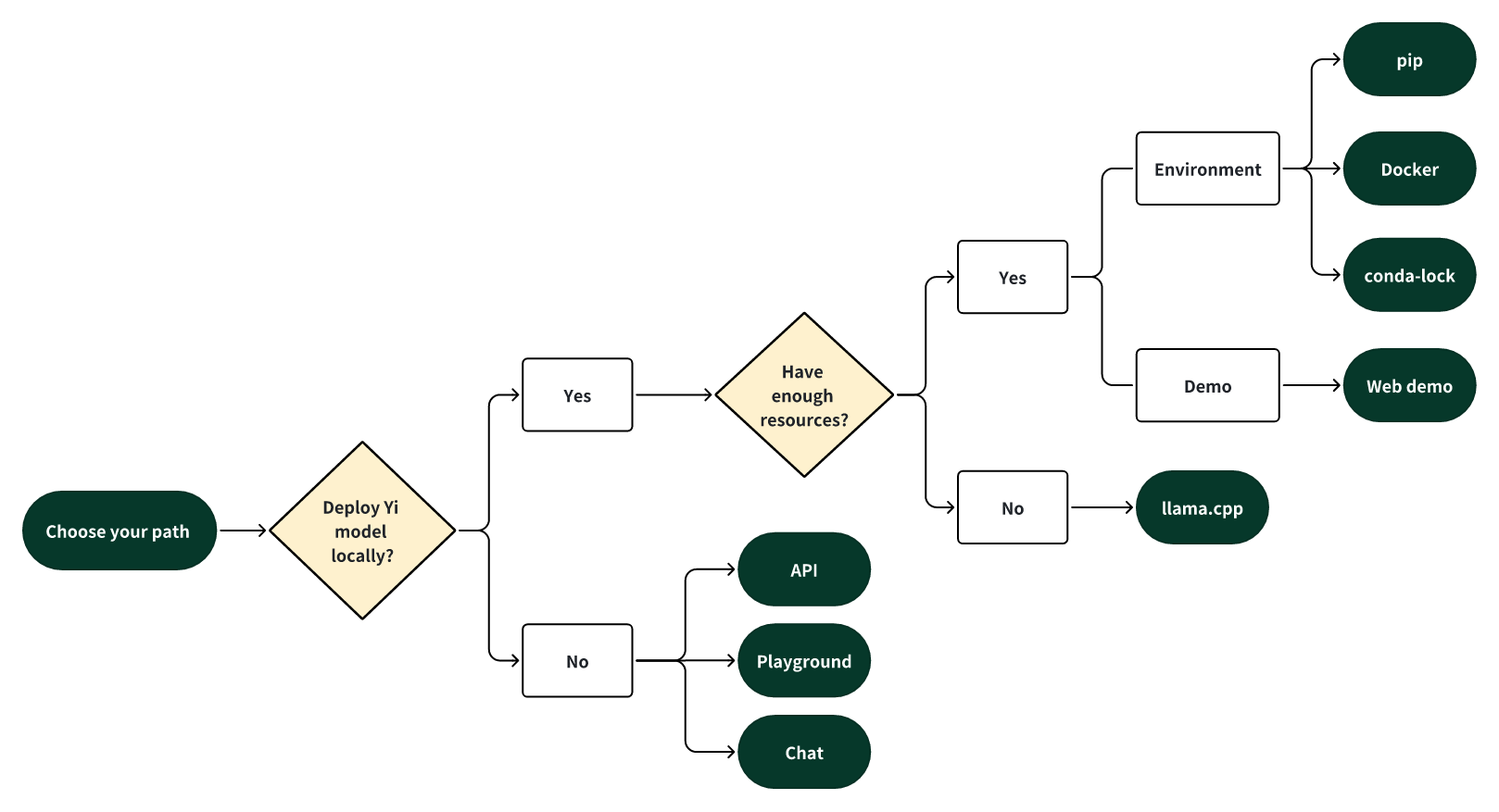
Choose your path
Select one of the following paths to begin your journey with Yi!
👁 Quick start - Choose your path
🎯 Deploy Yi locally
If you prefer to deploy Yi models locally,
🙋♀️ and you have sufficient resources (for example, NVIDIA A800 80GB), you can choose one of the following methods:
🙋♀️ and you have limited resources (for example, a MacBook Pro), you can use llama.cpp.
🎯 Not to deploy Yi locally
If you prefer not to deploy Yi models locally, you can explore Yi's capabilities using any of the following options.
🙋♀️ Run Yi with APIs
If you want to explore more features of Yi, you can adopt one of these methods:
Yi APIs (Yi official)
- Early access has been granted to some applicants. Stay tuned for the next round of access!
Yi APIs (Replicate)
🙋♀️ Run Yi in playground
If you want to chat with Yi with more customizable options (e.g., system prompt, temperature, repetition penalty, etc.), you can try one of the following options:
Yi-34B-Chat-Playground (Yi official)
Yi-34B-Chat-Playground (Replicate)
🙋♀️ Chat with Yi
If you want to chat with Yi, you can use one of these online services, which offer a similar user experience:
Yi-34B-Chat (Yi official on Hugging Face)
- No registration is required.
Yi-34B-Chat (Yi official beta)
[ Back to top ⬆️ ]
Quick start - pip
This tutorial guides you through every step of running Yi-34B-Chat locally on an A800 (80G) and then performing inference.
Step 0: Prerequisites
Make sure Python 3.10 or a later version is installed.
If you want to run other Yi models, see software and hardware requirements.
Step 1: Prepare your environment
To set up the environment and install the required packages, execute the following command.
git clone https://github.com/01-ai/Yi.git
cd yi
pip install -r requirements.txt
Step 2: Download the Yi model
You can download the weights and tokenizer of Yi models from the following sources:
Step 3: Perform inference
You can perform inference with Yi chat or base models as below.
Perform inference with Yi chat model
Create a file named
quick_start.pyand copy the following content to it.from transformers import AutoModelForCausalLM, AutoTokenizer model_path = '<your-model-path>' tokenizer = AutoTokenizer.from_pretrained(model_path, use_fast=False) # Since transformers 4.35.0, the GPT-Q/AWQ model can be loaded using AutoModelForCausalLM. model = AutoModelForCausalLM.from_pretrained( model_path, device_map="auto", torch_dtype='auto' ).eval() # Prompt content: "hi" messages = [ {"role": "user", "content": "hi"} ] input_ids = tokenizer.apply_chat_template(conversation=messages, tokenize=True, add_generation_prompt=True, return_tensors='pt') output_ids = model.generate(input_ids.to('cuda')) response = tokenizer.decode(output_ids[0][input_ids.shape[1]:], skip_special_tokens=True) # Model response: "Hello! How can I assist you today?" print(response)Run
quick_start.py.python quick_start.pyThen you can see an output similar to the one below. 🥳
Hello! How can I assist you today?
Perform inference with Yi base model
Yi-34B
The steps are similar to pip - Perform inference with Yi chat model.
You can use the existing file
text_generation.py.python demo/text_generation.py --model <your-model-path>Then you can see an output similar to the one below. 🥳
Yi-9B
Input
from transformers import AutoModelForCausalLM, AutoTokenizer

MODEL_DIR = "01-ai/Yi-9B"
model = AutoModelForCausalLM.from_pretrained(MODEL_DIR, torch_dtype="auto")
tokenizer = AutoTokenizer.from_pretrained(MODEL_DIR, use_fast=False)

input_text = "# write the quick sort algorithm"
inputs = tokenizer(input_text, return_tensors="pt").to(model.device)
outputs = model.generate(**inputs, max_length=256)
print(tokenizer.decode(outputs[0], skip_special_tokens=True))
Output
# write the quick sort algorithm
def quick_sort(arr):
 if len(arr) <= 1:
 return arr
 pivot = arr[len(arr) // 2]
 left = [x for x in arr if x < pivot]
 middle = [x for x in arr if x == pivot]
 right = [x for x in arr if x > pivot]
 return quick_sort(left) + middle + quick_sort(right)

# test the quick sort algorithm
print(quick_sort([3, 6, 8, 10, 1, 2, 1]))
[ Back to top ⬆️ ]
Quick start - Docker
Quick start - conda-lock
Quick start - llama.cpp
The following tutorial will guide you through every step of running a quantized model (Yi-chat-6B-2bits) locally and then performing inference.
[ Back to top ⬆️ ]
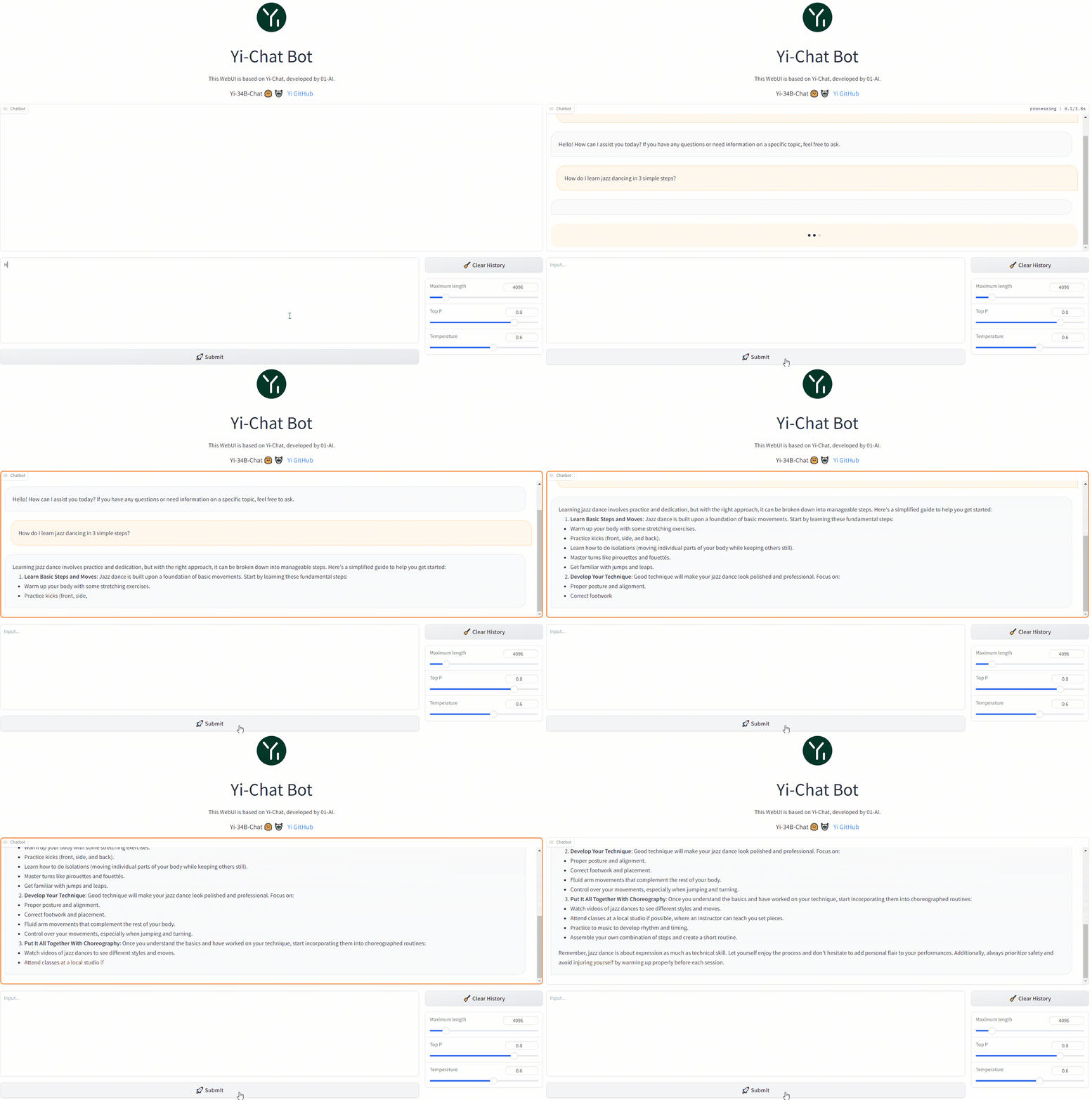
Web demo
You can build a web UI demo for Yi chat models (note that Yi base models are not supported in this senario).
Step 1: Prepare your environment.
Step 2: Download the Yi model.
Step 3. To start a web service locally, run the following command.
python demo/web_demo.py -c <your-model-path>
You can access the web UI by entering the address provided in the console into your browser.
[ Back to top ⬆️ ]
Fine-tuning
bash finetune/scripts/run_sft_Yi_6b.sh
Once finished, you can compare the finetuned model and the base model with the following command:
bash finetune/scripts/run_eval.sh
[ Back to top ⬆️ ]
Quantization
GPT-Q
python quantization/gptq/quant_autogptq.py \
 --model /base_model \
 --output_dir /quantized_model \
 --trust_remote_code
Once finished, you can then evaluate the resulting model as follows:
python quantization/gptq/eval_quantized_model.py \
 --model /quantized_model \
 --trust_remote_code
AWQ
python quantization/awq/quant_autoawq.py \
 --model /base_model \
 --output_dir /quantized_model \
 --trust_remote_code
Once finished, you can then evaluate the resulting model as follows:
python quantization/awq/eval_quantized_model.py \
 --model /quantized_model \
 --trust_remote_code
[ Back to top ⬆️ ]
Deployment
If you want to deploy Yi models, make sure you meet the software and hardware requirements.
Software requirements
Before using Yi quantized models, make sure you've installed the correct software listed below.
| Model | Software |
|---|---|
| Yi 4-bit quantized models | AWQ and CUDA |
| Yi 8-bit quantized models | GPTQ and CUDA |
Hardware requirements
Before deploying Yi in your environment, make sure your hardware meets the following requirements.
Chat models
| Model | Minimum VRAM | Recommended GPU Example |
|---|---|---|
| Yi-6B-Chat | 15 GB | 1 x RTX 3090 (24 GB) 1 x RTX 4090 (24 GB) 1 x A10 (24 GB) 1 x A30 (24 GB) |
| Yi-6B-Chat-4bits | 4 GB | 1 x RTX 3060 (12 GB) 1 x RTX 4060 (8 GB) |
| Yi-6B-Chat-8bits | 8 GB | 1 x RTX 3070 (8 GB) 1 x RTX 4060 (8 GB) |
| Yi-34B-Chat | 72 GB | 4 x RTX 4090 (24 GB) 1 x A800 (80GB) |
| Yi-34B-Chat-4bits | 20 GB | 1 x RTX 3090 (24 GB) 1 x RTX 4090 (24 GB) 1 x A10 (24 GB) 1 x A30 (24 GB) 1 x A100 (40 GB) |
| Yi-34B-Chat-8bits | 38 GB | 2 x RTX 3090 (24 GB) 2 x RTX 4090 (24 GB) 1 x A800 (40 GB) |
Below are detailed minimum VRAM requirements under different batch use cases.
| Model | batch=1 | batch=4 | batch=16 | batch=32 |
|---|---|---|---|---|
| Yi-6B-Chat | 12 GB | 13 GB | 15 GB | 18 GB |
| Yi-6B-Chat-4bits | 4 GB | 5 GB | 7 GB | 10 GB |
| Yi-6B-Chat-8bits | 7 GB | 8 GB | 10 GB | 14 GB |
| Yi-34B-Chat | 65 GB | 68 GB | 76 GB | > 80 GB |
| Yi-34B-Chat-4bits | 19 GB | 20 GB | 30 GB | 40 GB |
| Yi-34B-Chat-8bits | 35 GB | 37 GB | 46 GB | 58 GB |
Base models
| Model | Minimum VRAM | Recommended GPU Example |
|---|---|---|
| Yi-6B | 15 GB | 1 x RTX 3090 (24 GB) 1 x RTX 4090 (24 GB) 1 x A10 (24 GB) 1 x A30 (24 GB) |
| Yi-6B-200K | 50 GB | 1 x A800 (80 GB) |
| Yi-9B | 20 GB | 1 x RTX 4090 (24 GB) |
| Yi-34B | 72 GB | 4 x RTX 4090 (24 GB) 1 x A800 (80 GB) |
| Yi-34B-200K | 200 GB | 4 x A800 (80 GB) |
[ Back to top ⬆️ ]
FAQ
Learning hub
Why Yi?
Ecosystem
Yi has a comprehensive ecosystem, offering a range of tools, services, and models to enrich your experiences and maximize productivity.
Upstream
The Yi series models follow the same model architecture as Llama. By choosing Yi, you can leverage existing tools, libraries, and resources within the Llama ecosystem, eliminating the need to create new tools and enhancing development efficiency.
For example, the Yi series models are saved in the format of the Llama model. You can directly use LlamaForCausalLM and LlamaTokenizer to load the model. For more information, see Use the chat model.
from transformers import AutoModelForCausalLM, AutoTokenizer

tokenizer = AutoTokenizer.from_pretrained("01-ai/Yi-34b", use_fast=False)

model = AutoModelForCausalLM.from_pretrained("01-ai/Yi-34b", device_map="auto")
[ Back to top ⬆️ ]
Downstream
💡 Tip
Feel free to create a PR and share the fantastic work you've built using the Yi series models.
To help others quickly understand your work, it is recommended to use the format of
<model-name>: <model-intro> + <model-highlights>.
Serving
If you want to get up with Yi in a few minutes, you can use the following services built upon Yi.
Yi-34B-Chat: you can chat with Yi using one of the following platforms:
- Yi-34B-Chat | Hugging Face
- Yi-34B-Chat | Yi Platform: Note that currently it's available through a whitelist. Welcome to apply (fill out a form in English or Chinese) and experience it firsthand!
Yi-6B-Chat (Replicate): you can use this model with more options by setting additional parameters and calling APIs.
ScaleLLM: you can use this service to run Yi models locally with added flexibility and customization.
Quantization
If you have limited computational capabilities, you can use Yi's quantized models as follows.
These quantized models have reduced precision but offer increased efficiency, such as faster inference speed and smaller RAM usage.
Fine-tuning
If you're seeking to explore the diverse capabilities within Yi's thriving family, you can delve into Yi's fine-tuned models as below.
TheBloke Models: this site hosts numerous fine-tuned models derived from various LLMs including Yi.
This is not an exhaustive list for Yi, but to name a few sorted on downloads:
SUSTech/SUS-Chat-34B: this model ranked first among all models below 70B and outperformed the twice larger deepseek-llm-67b-chat. You can check the result on the Open LLM Leaderboard.
OrionStarAI/OrionStar-Yi-34B-Chat-Llama: this model excelled beyond other models (such as GPT-4, Qwen-14B-Chat, Baichuan2-13B-Chat) in C-Eval and CMMLU evaluations on the OpenCompass LLM Leaderboard.
NousResearch/Nous-Capybara-34B: this model is trained with 200K context length and 3 epochs on the Capybara dataset.
API
- amazing-openai-api: this tool converts Yi model APIs into the OpenAI API format out of the box.
- LlamaEdge: this tool builds an OpenAI-compatible API server for Yi-34B-Chat using a portable Wasm (WebAssembly) file, powered by Rust.
[ Back to top ⬆️ ]
Tech report
For detailed capabilities of the Yi series model, see Yi: Open Foundation Models by 01.AI.
Citation
@misc{ai2024yi,
 title={Yi: Open Foundation Models by 01.AI},
 author={01. AI and : and Alex Young and Bei Chen and Chao Li and Chengen Huang and Ge Zhang and Guanwei Zhang and Heng Li and Jiangcheng Zhu and Jianqun Chen and Jing Chang and Kaidong Yu and Peng Liu and Qiang Liu and Shawn Yue and Senbin Yang and Shiming Yang and Tao Yu and Wen Xie and Wenhao Huang and Xiaohui Hu and Xiaoyi Ren and Xinyao Niu and Pengcheng Nie and Yuchi Xu and Yudong Liu and Yue Wang and Yuxuan Cai and Zhenyu Gu and Zhiyuan Liu and Zonghong Dai},
 year={2024},
 eprint={2403.04652},
 archivePrefix={arXiv},
 primaryClass={cs.CL}
}
Benchmarks
Chat model performance
Yi-34B-Chat model demonstrates exceptional performance, ranking first among all existing open-source models in the benchmarks including MMLU, CMMLU, BBH, GSM8k, and more.
Base model performance
Yi-34B and Yi-34B-200K
The Yi-34B and Yi-34B-200K models stand out as the top performers among open-source models, especially excelling in MMLU, CMMLU, common-sense reasoning, reading comprehension, and more.
Yi-9B
Yi-9B is almost the best among a range of similar-sized open-source models (including Mistral-7B, SOLAR-10.7B, Gemma-7B, DeepSeek-Coder-7B-Base-v1.5 and more), particularly excelling in code, math, common-sense reasoning, and reading comprehension.
In terms of overall ability (Mean-All), Yi-9B performs the best among similarly sized open-source models, surpassing DeepSeek-Coder, DeepSeek-Math, Mistral-7B, SOLAR-10.7B, and Gemma-7B.
In terms of coding ability (Mean-Code), Yi-9B's performance is second only to DeepSeek-Coder-7B, surpassing Yi-34B, SOLAR-10.7B, Mistral-7B, and Gemma-7B.
In terms of math ability (Mean-Math), Yi-9B's performance is second only to DeepSeek-Math-7B, surpassing SOLAR-10.7B, Mistral-7B, and Gemma-7B.
In terms of common sense and reasoning ability (Mean-Text), Yi-9B's performance is on par with Mistral-7B, SOLAR-10.7B, and Gemma-7B.
[ Back to top ⬆️ ]
Who can use Yi?
Everyone! 🙌 ✅
The code and weights of the Yi series models are distributed under the Apache 2.0 license, which means the Yi series models are free for personal usage, academic purposes, and commercial use.
[ Back to top ⬆️ ]
Misc.
Acknowledgments
A heartfelt thank you to each of you who have made contributions to the Yi community! You have helped Yi not just a project, but a vibrant, growing home for innovation.
[ Back to top ⬆️ ]
Disclaimer
We use data compliance checking algorithms during the training process, to ensure the compliance of the trained model to the best of our ability. Due to complex data and the diversity of language model usage scenarios, we cannot guarantee that the model will generate correct, and reasonable output in all scenarios. Please be aware that there is still a risk of the model producing problematic outputs. We will not be responsible for any risks and issues resulting from misuse, misguidance, illegal usage, and related misinformation, as well as any associated data security concerns.
[ Back to top ⬆️ ]
License
The code and weights of the Yi-1.5 series models are distributed under the Apache 2.0 license.
If you create derivative works based on this model, please include the following attribution in your derivative works:
This work is a derivative of [The Yi Series Model You Base On] by 01.AI, used under the Apache 2.0 License.
[ Back to top ⬆️ ]
- Downloads last month
- 22,424
Safetensors
Model size
34B params
Tensor type
BF16
·