


Looking for Notepad++ in Linux? Unfortunately, Notepad++ is available for the Windows platform only. At work, where I have to use Windows, Notepad++ is my favorite text editor. And at times I miss Notepad++ in Ubuntu.
There is a Wine version of Notepad++ for Linux but using it is not the same as using a native Linux application.
Notepadqq: Notepad++ alternative for Linux
I know there are plenty of text editors that can be used as Notepad++ alternative in Linux such as SciTE . Some are even better even it comes to code handling such as the upcoming Atom editor from Github. But if you get used to of a certain application, you would want the same on all the platforms.
And this is where Notepadqq comes in the picture. It is a look-alike of Notepad++ which has almost the same features. If you are a Notepad++ fan, I would suggest to give Notepadqq a try.
Here is a screenshot from Notepadqq developer:
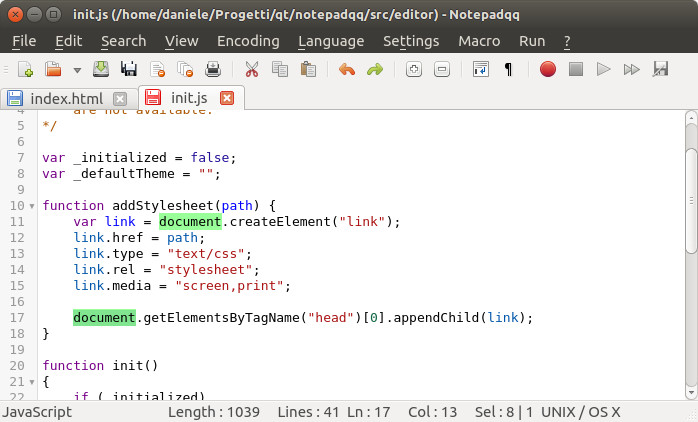
Install Notepadqq in Ubuntu and Linux Mint
For Ubuntu and Ubuntu-based Linux distributions such as Linux Mint, Elementary OS, PinguyOS there is a PPA available from the developers. Open the terminal and use the following commands:
sudo add-apt-repository ppa:notepadqq-team/notepadqq
sudo apt-get update
sudo apt-get install notepadqq
Install Notepadqq in other Linux distributions
Apart from Debian packages, Notepadqq also has packages for Arch Linux. Apart from that, you can get the source code from its Github repository.
Get Notepadqq for other Linux Distributions
Remove Notepadqq installed from PPA
If you did not like Notepadqq, you can uninstall it by using the commands below if you had installed it via PPA:
sudo apt-get remove notepadqq
sudo add-apt-repository --remove ppa:notepadqq-team/notepadqq
Notepad++ is not the only text editor that has been cloned in Linux. We have earlier seen Lime Text editor which is a clone of Sublime Text editor. So as I said before, there is no shortage for good text editors in the Open Source world.
