
Kint - Advanced PHP dumper
What is it?
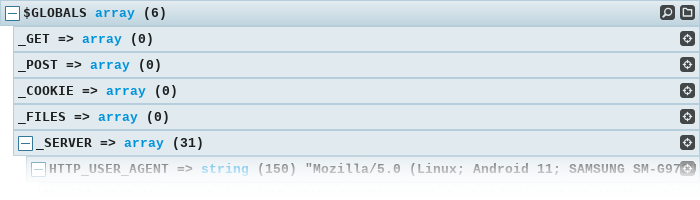
Kint is a dumper in the vein of var_dump, with keyboard controls, search, access path provision, and automatic data parsing.
Install with composer
composer require kint-php/kint
<?php

include 'vendor/autoload.php';

d('Dumped with Kint');
Install a phar file
<?php

// Found in the build folder
include 'kint.phar';

d('Dumped with Kint');
Basic usage
<?php

Kint::dump($GLOBALS, $_SERVER); // Dump any number of variables
d($GLOBALS, $_SERVER); // d() is a shortcut for Kint::dump()

Kint::trace(); // Dump a backtrace

Kint::$enabled_mode = false; // Disable kint
Live demo
You have some data and you need to get more data out of it, but you don’t know how the data is structured until you poke around inside it.
<?php

$time = get_mysterious_value();
$data = get_mysterious_data();
$object = get_mysterious_object();

include 'kint.phar';

d($time, $data, $object);
This output was pre-recorded
- $time integer 1486849709
2017-02-11T21:48:29+00:00
- $data string (740) "eyJjb2xvciI6InJnYmEoMjU1LCAyNTUsIDAsIDAuNSkiLCJkYXRhIjpbeyJ1c2VybmFtZSI6Im1v...
- Base64
- Contents
- base64_decode($data) string (555) "{"color":"rgba(255, 255, 0, 0.5)","data":[{"username":"monkey","created":"20...base64_decode($data)
- Json (2)
- Contents
- color => string (22) "rgba(255, 255, 0, 0.5)"json_decode(base64_decode($data), true)['color']
yellow
#FF0
#FFFF00
#FFFF0080
rgba(255, 255, 0, 0.5)
hsla(60, 100%, 50%, 0.5)
- data => array (6)json_decode(base64_decode($data), true)['data']
- Table (6)
- Contents (6)
username created lastlog 0 monkey 2017-01-25 22:24:08 2017-01-28 14:49:51 1 tiger 2017-01-03 11:40:50 2017-01-09 17:44:48 2 mantis 2017-01-03 12:19:48 2017-01-10 14:46:51 3 snake 2017-01-11 22:15:25 2017-02-06 01:45:46 4 crane 2017-01-09 22:28:34 2017-01-22 00:12:26 5 panda 2017-01-14 13:20:40 2017-01-27 23:14:40 - 0 => array (3)json_decode(base64_decode($data), true)['data'][0]
- username => string (6) "monkey"json_decode(base64_decode($data), true)['data'][0]['username']
- created => string (19) "2017-01-25 22:24:08"json_decode(base64_decode($data), true)['data'][0]['created']
- lastlog => string (19) "2017-01-28 14:49:51"json_decode(base64_decode($data), true)['data'][0]['lastlog']
- username => string (6) "monkey"
- 1 => array (3)json_decode(base64_decode($data), true)['data'][1]
- username => string (5) "tiger"json_decode(base64_decode($data), true)['data'][1]['username']
- created => string (19) "2017-01-03 11:40:50"json_decode(base64_decode($data), true)['data'][1]['created']
- lastlog => string (19) "2017-01-09 17:44:48"json_decode(base64_decode($data), true)['data'][1]['lastlog']
- username => string (5) "tiger"
- 2 => array (3)json_decode(base64_decode($data), true)['data'][2]
- username => string (6) "mantis"json_decode(base64_decode($data), true)['data'][2]['username']
- created => string (19) "2017-01-03 12:19:48"json_decode(base64_decode($data), true)['data'][2]['created']
- lastlog => string (19) "2017-01-10 14:46:51"json_decode(base64_decode($data), true)['data'][2]['lastlog']
- username => string (6) "mantis"
- 3 => array (3)json_decode(base64_decode($data), true)['data'][3]
- username => string (5) "snake"json_decode(base64_decode($data), true)['data'][3]['username']
- created => string (19) "2017-01-11 22:15:25"json_decode(base64_decode($data), true)['data'][3]['created']
- lastlog => string (19) "2017-02-06 01:45:46"json_decode(base64_decode($data), true)['data'][3]['lastlog']
- username => string (5) "snake"
- 4 => array (3)json_decode(base64_decode($data), true)['data'][4]
- username => string (5) "crane"json_decode(base64_decode($data), true)['data'][4]['username']
- created => string (19) "2017-01-09 22:28:34"json_decode(base64_decode($data), true)['data'][4]['created']
- lastlog => string (19) "2017-01-22 00:12:26"json_decode(base64_decode($data), true)['data'][4]['lastlog']
- username => string (5) "crane"
- 5 => array (3)json_decode(base64_decode($data), true)['data'][5]
- username => string (5) "panda"json_decode(base64_decode($data), true)['data'][5]['username']
- created => string (19) "2017-01-14 13:20:40"json_decode(base64_decode($data), true)['data'][5]['created']
- lastlog => string (19) "2017-01-27 23:14:40"json_decode(base64_decode($data), true)['data'][5]['lastlog']
- username => string (5) "panda"
- 0 => array (3)
- color => string (22) "rgba(255, 255, 0, 0.5)"
{"color":"rgba(255, 255, 0, 0.5)","data":[{"username":"monkey","created":"2017-01-25 22:24:08","lastlog":"2017-01-28 14:49:51"},{"username":"tiger","created":"2017-01-03 11:40:50","lastlog":"2017-01-09 17:44:48"},{"username":"mantis","created":"2017-01-03 12:19:48","lastlog":"2017-01-10 14:46:51"},{"username":"snake","created":"2017-01-11 22:15:25","lastlog":"2017-02-06 01:45:46"},{"username":"crane","created":"2017-01-09 22:28:34","lastlog":"2017-01-22 00:12:26"},{"username":"panda","created":"2017-01-14 13:20:40","lastlog":"2017-01-27 23:14:40"}]}
- base64_decode($data) string (555) "{"color":"rgba(255, 255, 0, 0.5)","data":[{"username":"monkey","created":"20...
eyJjb2xvciI6InJnYmEoMjU1LCAyNTUsIDAsIDAuNSkiLCJkYXRhIjpbeyJ1c2VybmFtZSI6Im1vbmtleSIsImNyZWF0ZWQiOiIyMDE3LTAxLTI1IDIyOjI0OjA4IiwibGFzdGxvZyI6IjIwMTctMDEtMjggMTQ6NDk6NTEifSx7InVzZXJuYW1lIjoidGlnZXIiLCJjcmVhdGVkIjoiMjAxNy0wMS0wMyAxMTo0MDo1MCIsImxhc3Rsb2ciOiIyMDE3LTAxLTA5IDE3OjQ0OjQ4In0seyJ1c2VybmFtZSI6Im1hbnRpcyIsImNyZWF0ZWQiOiIyMDE3LTAxLTAzIDEyOjE5OjQ4IiwibGFzdGxvZyI6IjIwMTctMDEtMTAgMTQ6NDY6NTEifSx7InVzZXJuYW1lIjoic25ha2UiLCJjcmVhdGVkIjoiMjAxNy0wMS0xMSAyMjoxNToyNSIsImxhc3Rsb2ciOiIyMDE3LTAyLTA2IDAxOjQ1OjQ2In0seyJ1c2VybmFtZSI6ImNyYW5lIiwiY3JlYXRlZCI6IjIwMTctMDEtMDkgMjI6Mjg6MzQiLCJsYXN0bG9nIjoiMjAxNy0wMS0yMiAwMDoxMjoyNiJ9LHsidXNlcm5hbWUiOiJwYW5kYSIsImNyZWF0ZWQiOiIyMDE3LTAxLTE0IDEzOjIwOjQwIiwibGFzdGxvZyI6IjIwMTctMDEtMjcgMjM6MTQ6NDAifV19
- $object MysteriousObject#2 (2)
- Properties (2)
- Methods (1)
- Static properties (1)
- public definition -> string (143) "<?xml version="1.0"?> <Mystery created="2022-11-10 22:33:28"> <Name>Mysterio...$object->definition
- XML
- Contents
- Mystery SimpleXMLElement (2)simplexml_load_string($object->definition)
- Children (2)
- Attributes (1)
- Name -> SimpleXMLElement (8) "Mysterio"simplexml_load_string($object->definition)->Name
- (string) Name string (8) "Mysterio"(string) simplexml_load_string($object->definition)->Name
- (string) Name string (8) "Mysterio"
- Value -> SimpleXMLElement (6) "Object"simplexml_load_string($object->definition)->Value
- toString
- Attributes (1)
- (string) Value string (6) "Object"(string) simplexml_load_string($object->definition)->Value
- (string) Value string (6) "Object"
- type => string (10) "mysterious"(string) simplexml_load_string($object->definition)->Value['type']
- type => string (10) "mysterious"
- Name -> SimpleXMLElement (8) "Mysterio"
- created => string (19) "2022-11-10 22:33:28"(string) simplexml_load_string($object->definition)['created']
- created => string (19) "2022-11-10 22:33:28"
- Mystery SimpleXMLElement (2)
<?xml version="1.0"?>
<Mystery created="2022-11-10 22:33:28">
 <Name>Mysterio</Name>
 <Value type="mysterious">Object</Value>
</Mystery>
- protected created -> DateTime#5 2022-11-10 22:33:28 +00:00 UTC
- Methods (19)
- Static methods (6)
- Class constants (14)
- public __serialize(): array
- public __unserialize(array $data): void
- public __wakeup()
- public format(string $format)
- public modify(string $modifier)
- public add(DateInterval $interval)
- public sub(DateInterval $interval)
- public getTimezone()
- public getOffset()
- public getMicrosecond(): int
- public setTimestamp(int $timestamp)
- public setMicrosecond(int $microsecond): static
- public getTimestamp()
- public static DateTime::__set_state(array $array)
- public static DateTime::createFromImmutable(DateTimeImmutable $object)
- public static DateTime::createFromInterface(DateTimeInterface $object): DateTime
- public static DateTime::createFromFormat(string $format, string $datetime, ?DateTimeZone $timezone = null)
- public static DateTime::createFromTimestamp(int|float $timestamp)
- public static DateTime::getLastErrors()
- public const DateTimeInterface::ATOM :: string (13) "Y-m-d\TH:i:sP"
- public const DateTimeInterface::COOKIE :: string (16) "l, d-M-Y H:i:s T"
- public const DateTimeInterface::ISO8601 :: string (13) "Y-m-d\TH:i:sO"
- public const DateTimeInterface::ISO8601_EXPANDED :: string (13) "X-m-d\TH:i:sP"
- public const DateTimeInterface::RFC822 :: string (16) "D, d M y H:i:s O"
- public const DateTimeInterface::RFC850 :: string (16) "l, d-M-y H:i:s T"
- public const DateTimeInterface::RFC1036 :: string (16) "D, d M y H:i:s O"
- public const DateTimeInterface::RFC1123 :: string (16) "D, d M Y H:i:s O"
- public const DateTimeInterface::RFC7231 :: string (21) "D, d M Y H:i:s \G\M\T"
- public const DateTimeInterface::RFC2822 :: string (16) "D, d M Y H:i:s O"
- public const DateTimeInterface::RFC3339 :: string (13) "Y-m-d\TH:i:sP"
- public const DateTimeInterface::RFC3339_EXTENDED :: string (15) "Y-m-d\TH:i:s.vP"
- public const DateTimeInterface::RSS :: string (16) "D, d M Y H:i:s O"
- public const DateTimeInterface::W3C :: string (13) "Y-m-d\TH:i:sP"
- public definition -> string (143) "<?xml version="1.0"?> <Mystery created="2022-11-10 22:33:28"> <Name>Mysterio...
- public define(string $definition): void$object->define()
Defined in <ROOT>/demoload.php:58
- public define(string $definition): void
- private static MysteriousObject::$loaded :: boolean true
Let’s take a look at this data with Kint
- Click anywhere on the bar to unfold it
- Double click
+to unfold all children - Press
dto toggle keyboard navigation. - Press
aor the 👁 Image
icon on the right to see the access path to get at a piece of data. - Press
sor the 👁 Image
icon on the right to open a live search. - Press
for the 👁 Image
icon on the right to move the dump to a docked folder. - Change tabs to see different views of data.
-
You can sort tables of data by clicking on the headers.
- Kint automatically detects, unpacks, and parses common formats like XML, base64, and JSON
- Detects common patterns like colors, filenames, tables, and timestamps and displays extra information about them
- Provides the user with the exact piece of code they need to access some information nested deep in the hierarchy


Tips & Tricks
- You can set
Kint::$enabled_mode = false;to turn off output (For example, in production) - You can set nonces for CSP environments:
Kint\Renderer\AbstractRenderer::$js_nonceKint\Renderer\AbstractRenderer::$css_nonce
- There are a couple of real-time modifiers you can use:
+d($var)will disregard depth level limits and output everything
Careful, this can hang your browser on extremely large objects!!d($var)will expand the output automatically~d($var)this call will output in plain text format-d($var)will attempt toob_cleanthe previous output and flush after printing
- Add heavy classes to the blacklist to improve performance:
Kint\Parser\BlacklistPlugin::$shallow_blacklist[] = SomeLargeClass::class; - To change display theme, use
Kint\Renderer\RichRenderer::$theme = 'theme.css';. You can pass the absolute path to a CSS file, or use one of the built in themes:original.css(default)solarized.csssolarized-dark.cssaante-light.cssaante-dark.css
- You can install kint-helpers for more shortcuts and kint-twig for twig integration