|
VOOZH | about |
|
VOOZH | about |
Posted by: Lorraine on: March 5, 2010
Bias is an issue that anyone gathering user data is weary of. Whether its usability testing, face-to-face interviews or online questionnaires, bias can affect the strength and integrity of results in a variety of ways. Question design is one of the most influential factors should therefore be given careful consideration. Leading questions can inadvertently give participants an idea of the desired answer and influence their response. However, sampling bias can also have a significant affect on the research results and is often overlooked by researchers.
I was reading Europeana’s Annual Report this week and noticed that the results from their online visitor survey was on the whole very positive. Reading the survey report in more detail I realised it was possible that sample bias may be affecting the survey results. Data from online visitor surveys are normally gathered using an intercept which invites a visitor to participate in the research when they arrive to the site. Anyone visiting the site is who receives this invite is eligible to participate making them ‘self-selected’. This means that they decide to participate, not the researcher. Their motivation for participating may be related to the topic of the survey or the incentive provided to garner interest. Consequently their participation is unlikely to provide a repserentative sample.
For example, those who participated in Europeana’s survey are more likey to be motivated by their enthusiasm and interest in the website. Certainly those who are apathetic or indifferent to the website are less likely to have participated. This is supported by the proportion of participants who were regular visitors to the site. Only 8.6% of participants were first time visitors and the results from these participants was generally more positive than the participants who had visited the site before. It would be interesting to find out if a larger sample of first time users would alter these results.
So what can researchers do to prevent sample bias in their results? It is very difficult to completely remove sample bias especially in online surveys where the researcher has no control over who participates. Generally speaking visitor surveys will always carry the risk of bias so the aims of the survey should take this into account. Designing a mixture of open and closed questions will provide some insight into the participant’s motivation. Descriptive answers which require more thought are less likely to be fully answered by those motivated by the incentive. It also provides the added benefit of giving users the opportunity to provide their own feedback. It is interesting to note the Europeana did not do this, leading some participants to email their comments to the researchers. Providing an optional section at the end of the survey for final comments could have provided rich feedback not obtained through closed questions. Indeed the comments Europeana received often described situations where users’ had trouble using the site or disliked a particular design feature.
Avoid asking questions which relate to the user’s overall opinion of the system before they have used all the features as it will not provide accurate results. For example, 67% of users stated they had never used the “My Europeana” feature before and were therefore unable to provide feedback on it. Usability testing often provides more insight into these issues by gathering this information retrospectively after asking a user to carry out tasks using the site. If it’s possible to use survey software which can do this then it is recommended because it is more likely to gather meaningful results. It is only after trying to complete a task that a user will be able to accurately describe their experience.
It is worth noting that Europeana have also conducted user testing with eyetracking in addition to focus groups and expert evaluations. The results of these are due to be published soon and I look forward to reading them. It will be interesting to compare the results against our heuristic inspection of Europeana and other DLs.
The second DL to be evaluated is Europeana.
Europeana is a repository which links media from a number of European organisations. You can search for images, video, sound clips and text across museums, galleries, libraries and digital collections. The current version is a prototype which was launched at the end of 2008 and version 1.0 will be available in 2010. It is important to note that Europeana is separate from The Europeana Library.
Although a search form is provided, it is not persistent throughout the entire site. If a user navigates to any of the universal links across the top of the site e.g. communities, time-line etc, then the search form disappears. To find the search form again the user must navigate back to the homepage. Currently the only link to the homepage is within the logo which is not immediately obvious. Consequently this does not meet Heuristic 4 or the ISO heuristic which request systems are consistent and follow platform conventions.
Unlike WDL, Europeana does provide an advanced search. A link to the advanced search form is prominently displayed below the search field. The extra fields in the advanced search are toggled to allow users to expand the search form without having to leave the page. This retains consistency, simplifies the navigation and reduces possible disorientation. Providing an advanced search meets Heuristic 7 which (accelerators for experienced users) and ISO heuristic which promotes dialogue suitable to user’s task and skill level.
As mentioned in the evaluation of WDL, Europeana is also guilty of not providing constructive help to users when no search results are returned which conflicts with Heuristic 9: Help users recognise, diagnose and recover from errors and ISO heuristic: Is the dialogue forgiving?
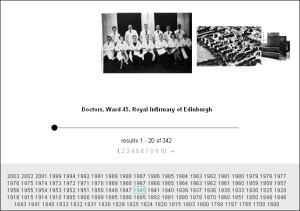
Similarly to WDL, Europeana have introduced a time-line which is currently in beta testing. Europeana present the time-line as a tag cloud of years and the size of font is directly related to the number of items available. When a user selects a year, a carousel of images appears which the user can select or scroll horizontally through. The time-line is not currently the default search method and as a result is not featured on the homepage. However, a carousel of images is presented on the homepage below the search form. The time-line was evaluated to investigate how intuitive the navigation system is to operate and how effective this system is at assisting browsed searching.
Faceted navigation is used to help users frame their choices by allowing them to reduce the number of possible matches to their search. Europeana is one of three DLs evaluated which provided this type of navigation. The faceted navigation was evaluated to understand how useful this system is and identify any potential usability issues such as labelling, disorientation and user control.
Europeana provide a section called ‘My Europeana’ where registered users can save searches, items and add tags to items so that they can be grouped together by keywords. User must first register. Registration is streamlined and only requests the users email address. Often long registration forms requesting unnecessary personal information can be off-putting to users so this form encourages users to join.
However ‘Tagging’ items is a relatively unfamiliar term not used extensively in DLs and as a result it is likely to confuse some users. Additionally, once a user creates and submits their tag, there is no feedback instructing the user on how to find the tag. Although the user is informed that their action has been successful, a link to their tags would help users find them more easily. In this situation the status of the action is provided but its visibility within the site is less straightforward which conflicts with the ISO standard relating to self-descriptiveness.
What are your thoughts? Do you agree or disagree with the findings? All feedback is welcome.