👁 Preview in vscode.dev
A clean Visual Studio Code theme that celebrates the lights of Downtown Tokyo at night.
Note: Many UI elements are intentionally low contrast so as not to distract. I can provide customization settings similar to what is shown further down this page to anyone who needs specific text brightened.
Screenshots
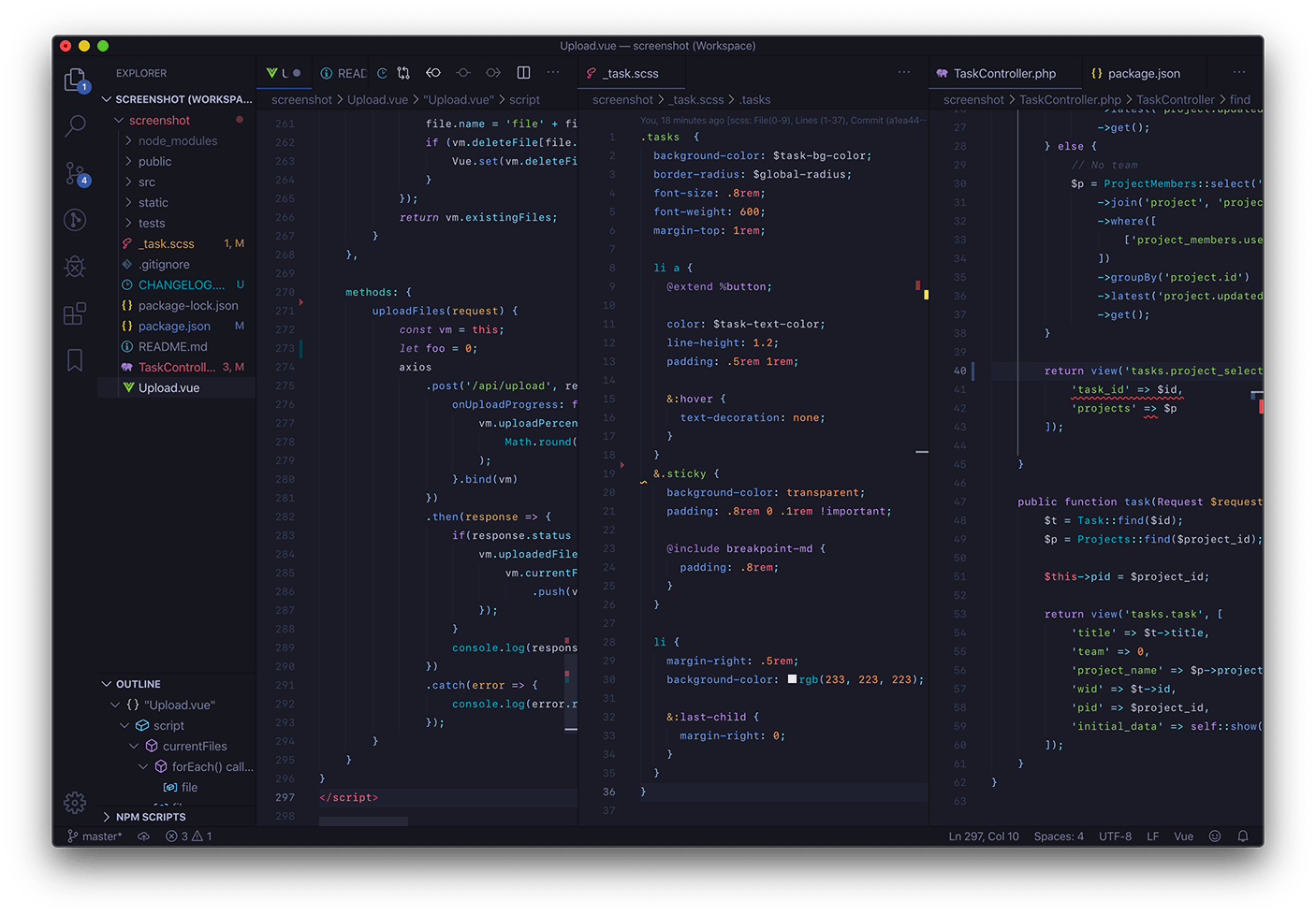
Tokyo Night
👁 Screenshot - Tokyo Night
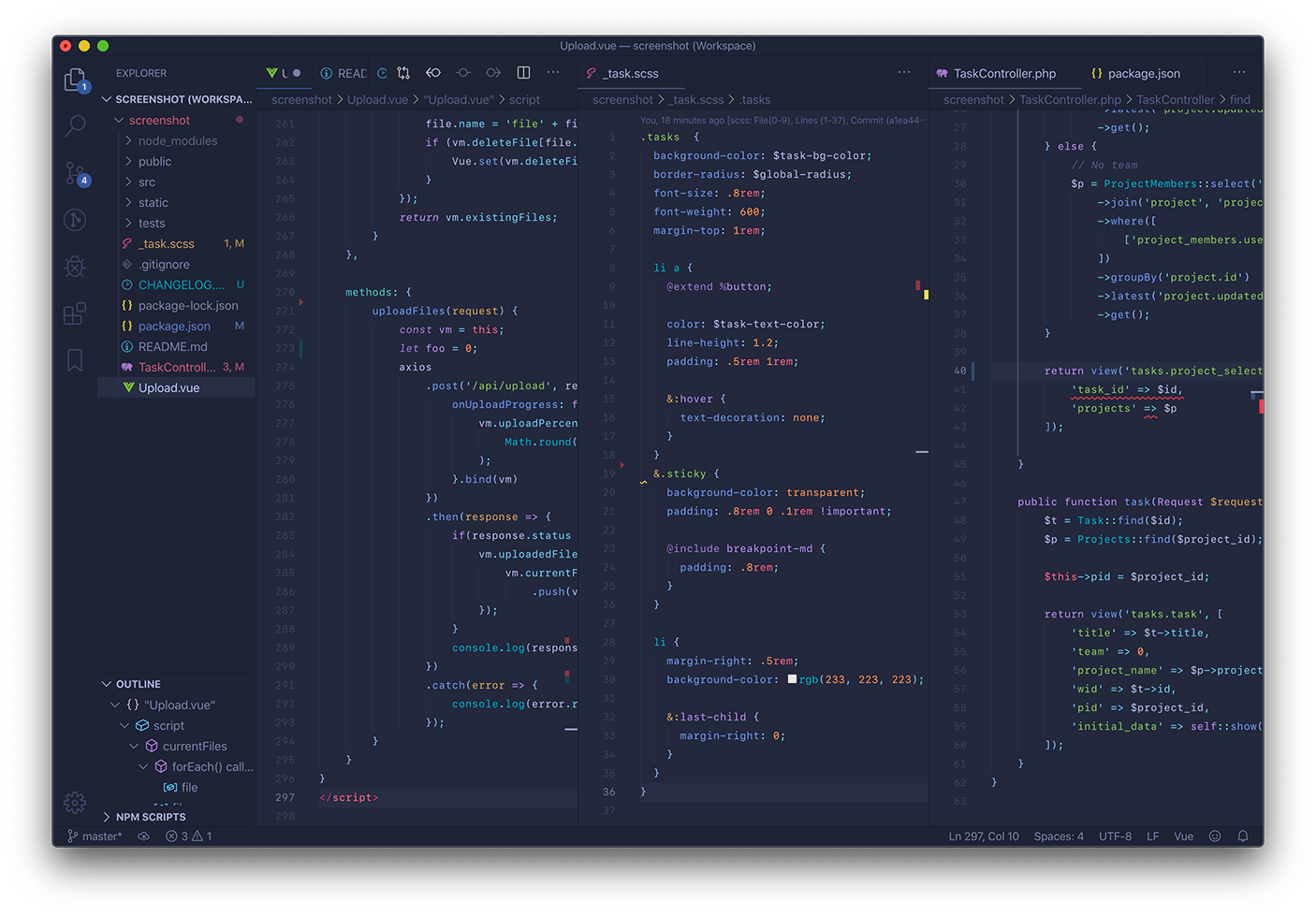
Tokyo Night Storm
👁 Screenshot - Tokyo Night Storm
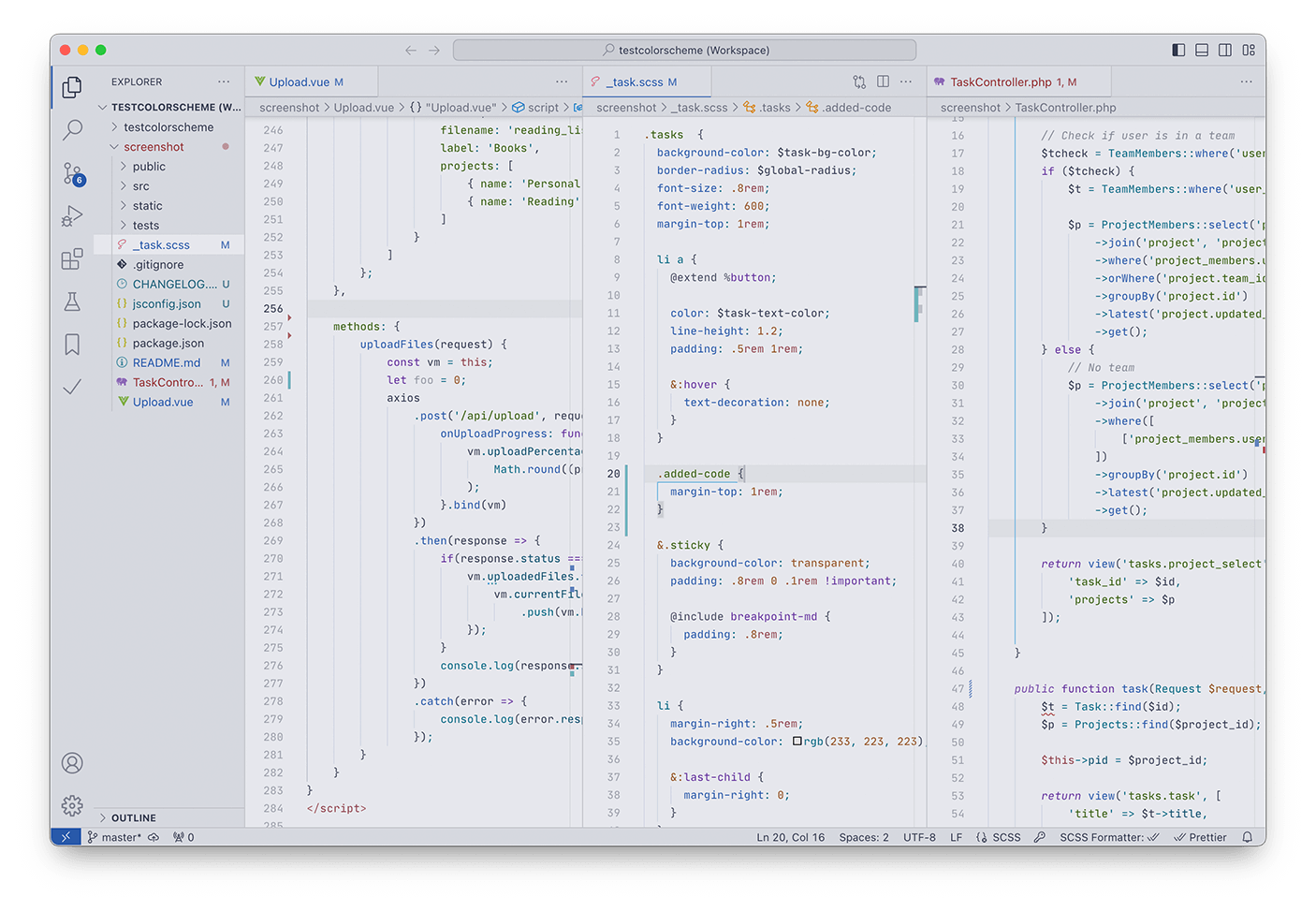
Tokyo Night Light
👁 Screenshot - Tokyo Night Light
Font used in the screenshots is JetBrains Mono.
Disabling Italics
Paste this into your settings.json to disable italics.
"editor.tokenColorCustomizations": {
 "[Tokyo Night]": { // or "[Tokyo Night Storm]"
 "textMateRules": [{
 "scope": [
 "comment",
 "meta.var.expr storage.type",
 "keyword.control.flow",
 "keyword.control.return",
 "meta.directive.vue punctuation.separator.key-value.html",
 "meta.directive.vue entity.other.attribute-name.html",
 "tag.decorator.js entity.name.tag.js",
 "tag.decorator.js punctuation.definition.tag.js",
 "storage.modifier"
 ],
 "settings": {
 "fontStyle": ""
 }
 }]
 }
}
Enabling JSDoc Highlights
Paste this into your settings.json to Enable JSDoc Highlight.
"editor.tokenColorCustomizations": {
 "[Tokyo Night]": { // or "[Tokyo Night Storm]"
 "textMateRules": [
 {
 "scope": [
 "comment keyword.codetag.notation",
 "comment.block.documentation keyword",
 "comment.block.documentation storage.type.class"
 ],
 "settings": {
 "foreground": "#bb9af7"
 }
 },
 {
 "scope": ["comment.block.documentation entity.name.type.instance"],
 "settings": {
 "foreground": "#73daca",
 "fontStyle": "italic"
 }
 },
 {
 "scope": [
 "comment.block.documentation entity.name.type punctuation.definition.bracket"
 ],
 "settings": {
 "foreground": "#bb9af7"
 }
 },
 {
 "scope": ["comment.block.documentation variable"],
 "settings": {
 "foreground": "#e0af68",
 "fontStyle": "italic"
 }
 }
 ]
 }
 }
Customization Settings Examples
Higher Contrast Settings
The below can by no means officially represent high contrast but they may serve as a starting point. This assumes that the darker Tokyo Night version is being used.
"workbench.colorCustomizations": {
 "[Tokyo Night]": {
 "foreground": "#959cbd",
 "panelTitle.activeBorder": "#3d59a1",
 "panelTitle.activeForeground": "#bdc7f0",
 "panelTitle.inactiveForeground": "#959cbd",
 "tab.activeForeground": "#bdc7f0",
 "tab.inactiveForeground": "#959cbd",
 "breadcrumb.foreground": "#959cbd",
 "breadcrumb.focusForeground": "#bdc7f0",
 "breadcrumb.activeSelectionForeground": "#bdc7f0",
 "statusBar.foreground": "#bdc7f0",
 "list.focusForeground": "#bdc7f0",
 "list.hoverForeground": "#bdc7f0",
 "list.activeSelectionForeground": "#bdc7f0",
 "list.inactiveSelectionForeground": "#bdc7f0",
 "list.inactiveSelectionBackground": "#202330",
 "sideBar.foreground": "#959cbd",
 "dropdown.foreground": "#959cbd",
 "menu.foreground":"#bdc7f0",
 "menubar.selectionForeground":"#bdc7f0",
 "input.foreground": "#959cbd",
 "input.placeholderForeground": "#959cbd",
 "activityBar.foreground": "#bdc7f0",
 "activityBar.inactiveForeground": "#787c99",
 "gitDecoration.ignoredResourceForeground": "#696d87",
 },
}
Brightening Codelens text
I prefer my Codelens text fade into the background unless hovered over, but if you'd like a higher contrast, add this to your settings.json:
"workbench.colorCustomizations": {
 "[Tokyo Night]": { // or "[Tokyo Night Storm]"
 "editorCodeLens.foreground": "#7982a9", // Preferred hex color
 }
}
Window Active and Inactive borders (vscode 1.40.0)
macOS dark-mode doesn't play well with these two theme mods so I've chosen to darken them as much as I can to fix the gray border issue on my side. Set them however you like using:
"workbench.colorCustomizations": {
 "[Tokyo Night]": { // or "[Tokyo Night Storm]"
 "window.activeBorder": "#ff0000",
 "window.inactiveBorder":"#0000ff"
 }
}
Color Palette
Tokyo Night and Tokyo Night Storm
| Color |
Use |
👁 #f7768e
#f7768e |
This keyword, HTML elements, Regex group symbol, CSS units, Terminal Red |
👁 #ff9e64
#ff9e64 |
Number and Boolean constants, Language support constants |
👁 #e0af68
#e0af68 |
Function parameters, Regex character sets, Terminal Yellow |
👁 #cfc9c2
#cfc9c2 |
Parameters inside functions (semantic highlighting only) |
👁 #9ece6a
#9ece6a |
Strings, CSS class names |
👁 #73daca
#73daca |
Object literal keys, Markdown links, Terminal Green |
👁 #b4f9f8
#b4f9f8 |
Regex literal strings |
👁 #2ac3de
#2ac3de |
Language support functions, CSS HTML elements |
👁 #7dcfff
#7dcfff |
Object properties, Regex quantifiers and flags, Markdown headings, Terminal Cyan, Markdown code, Import/export keywords |
👁 #7aa2f7
#7aa2f7 |
Function names, CSS property names, Terminal Blue |
👁 #bb9af7
#bb9af7 |
Control Keywords, Storage Types, Regex symbols and operators, HTML Attributes, Terminal Magenta |
👁 #c0caf5
#c0caf5 |
Variables, Class names, Terminal White |
👁 #a9b1d6
#a9b1d6 |
Editor Foreground |
👁 #9aa5ce
#9aa5ce |
Markdown Text, HTML Text |
👁 #565f89
#565f89 |
Comments |
👁 #414868
#414868 |
Terminal Black |
👁 #24283b
#24283b |
Editor Background (Storm) |
👁 #1a1b26
#1a1b26 |
Editor Background (Night) |
Tokyo Night Light
| Color |
Use |
👁 #8c4351
#8c4351 |
This keyword, HTML elements, Regex group symbol, CSS units, Terminal Red |
👁 #965027
#965027 |
Number and Boolean constants, Language support constants |
👁 #8f5e15
#8f5e15 |
Function parameters, Regex character sets, Terminal Yellow |
👁 #634f30
#634f30 |
Parameters inside functions (semantic highlighting only) |
👁 #385f0d
#385f0d |
Strings, CSS class names |
👁 #33635c
#33635c |
Object literal keys, Markdown links, Regex literal strings, Terminal Green |
👁 #006c86
#006c86 |
Language support functions, CSS HTML elements |
👁 #0f4b6e
#0f4b6e |
Object properties, Regex quantifiers and flags, Terminal Cyan, Markdown code, Import/export keywords |
👁 #2959aa
#2959aa |
Function names, CSS property names, Markdown Headings, Terminal Blue |
👁 #5a3e8e
#5a3e8e |
Control Keywords, Storage Types, Regex symbols and operators, HTML Attributes, Terminal Magenta |
👁 #343b58
#343b58 |
Editor Foreground, Variables, Class names, Terminal White |
👁 #40434f
#40434f |
Markdown Text, HTML Text |
👁 #343B58
#343B58 |
Terminal Black |
👁 #6c6e75
#6c6e75 |
Comments |
👁 #e6e7ed
#e6e7ed |
Editor Background |
Other Ports
iTerm
tokyo-night.itermcolors is supplied in this theme's ~/.vscode/extensions folder or via github.
Sublime Text / bat
Tokyo Night is a color scheme option in my Enki Theme.
Xcode
Tokyo Night theme for Xcode mesqueeb/TokyoNightXcodeTheme
Alfred
Install the Tokyo Night Alfred Theme.
DuckDuckGo
DuckduckGo theme preferences
(by Grafikart)
JetBrains IDE
VIM/Neovim
Kitty Terminal
Tokyo Night color scheme for kitty
(by davidmathers)
Alacritty Terminal
Tokyo Night Alacritty Theme, a color scheme for Alacritty Terminal Emulator (by mhyfritz)
Hyper terminal
hyper-tokyo-night, a theme for Hyper (by fitrh)
Windows Terminal
tokyonight-windows-terminal, a theme for Windows Terminal (by g-e-o-m-e-t-r-i-c)
Insomnia
Tokyo Night theme for Insomnia (by pokedotdev)
Visual Studio 2022
tokyo-night-visual-studio-theme for Visual Studio 2022 (by m1chaelbarry)
Firefox
Tokyonight_Vim theme for Firefox, LibreWolf, etc. (by Jared Reardon)
Warp
warp-tokyo-night, a theme for Warp (by bart-krakowski)
KiCad
tokyo-night-kicad-theme, a theme for the KiCad schematic editor (by kevin-nel)
Tilix/Black Box Terminal
tokyo-night-tilix-black-box-theme a theme for tilix colorscheme compatible terminals (by kevin-nel)
gtksourceview (gnome text editor, gedit, builder, etc)
tokyo-night-gtksourceview a theme for gtksourceview applications (by kevin-nel)
gitk
gitk-tokyonight a theme for gitk (by Dominic Walters)
git-gui
git-gui-tokyonight a theme for git-gui (by Dominic Walters)
DevTools
Tokyo Night on DevTools a theme for most browsers' DevTools (by AdelFetner)
Enjoy!
Tokyo Tower icon used in theme icon made by Smashicons from www.flaticon.com. Color palettes in this README use place-hold.it.