

MCP サーバをコンテナ環境で構築して Claude デスクトップで動かす。ローカルファイルへの読み書き編
はじめに
まえおき
この記事は Qiita Advent Calendar 2024 / LLM・LLM活用 Advent Calendar 2024 シリーズ 2 の 6 日目記事です
三行要約
ローカル環境の特定フォルダをコンテナへマウントし、そこをサンドボックスとしてファイルの読み書きをおこなわせるようにする
前回記事で実践した Slack への接続と、今回のファイル読み書きを組み合わせて複数 MCP サーバの協働を見届ける
前提
ひとまず Windows 環境向けに書いているけれど、Mac でも大丈夫でしょう
今回はサンプルコードの Slack 接続を流用します
手順
Docker 環境構築
Rancher Desktop インストールしておけば OK
ディレクトリ用意
ここでは D ドライブに `container` を作成
`container` の中にさらに `mcp-filesystem-server` と `shared` を作成
ファイル用意
.dockerignore
node_modules
dist
.env
*.log
.git
.gitignore
.DS_Store
docker-compose.yml
services:
 filesystem-mcp:
 build: .
 container_name: filesystem-mcp
 volumes:
 # Windows のローカルパスをマウント
 - D:\container\shared:/app/shared
 stdin_open: true # stdinを開いたままにする
 tty: true # 疑似TTYを割り当てる
 networks:
 - mcp-network

networks:
 mcp-network:
 name: filesystem-mcp-network
 driver: bridge
Dockerfile
FROM node:20-slim

WORKDIR /app

# 全てのファイルを一度にコピー
COPY . .

# 依存関係のインストール
RUN npm install

# TypeScriptのビルドとdistディレクトリの作成を確認
RUN npm run build && \
 if [ -d "dist" ]; then \
 chmod +x dist/*.js || true; \
 else \
 echo "Error: dist directory was not created" && exit 1; \
 fi

# 環境変数の設定
ENV NODE_ENV=production

# sharedディレクトリの作成
RUN mkdir -p /app/shared

# コンテナ起動時のコマンド
CMD ["node", "dist/index.js", "/app/shared"]
package.json
GitHub から持ってきたものを一部書き換えているので、以下からコピペしてください
{
 "name": "@modelcontextprotocol/server-slack",
 "version": "0.5.1",
 "description": "MCP server for interacting with Slack",
 "license": "MIT",
 "author": "Anthropic, PBC (https://anthropic.com)",
 "homepage": "https://modelcontextprotocol.io",
 "bugs": "https://github.com/modelcontextprotocol/servers/issues",
 "type": "module",
 "scripts": {
 "build": "tsc && shx chmod +x dist/*.js",
 "prepare": "npm run build",
 "watch": "tsc --watch",
 "start": "node dist/index.js"
 },
 "dependencies": {
 "@modelcontextprotocol/sdk": "0.6.0"
 },
 "devDependencies": {
 "@types/node": "^22.9.3",
 "shx": "^0.3.4",
 "typescript": "^5.6.2"
 }
}
tsconfig.json
がっつり書き換えているので、以下からコピペしてください
{
 "compilerOptions": {
 "target": "ES2020",
 "module": "NodeNext",
 "moduleResolution": "NodeNext",
 "esModuleInterop": true,
 "strict": true,
 "skipLibCheck": true,
 "forceConsistentCasingInFileNames": true,
 "outDir": "./dist",
 "rootDir": "./src",
 "declaration": true,
 "resolveJsonModule": true
 },
 "include": [
 "src/**/*.ts"
 ],
 "exclude": [
 "node_modules",
 "dist"
 ]
}
/src/index.ts
`/src/` を作成してその中に
GitHub からそのまま持ってくる
#!/usr/bin/env node

import { Server } from "@modelcontextprotocol/sdk/server/index.js";
import { StdioServerTransport } from "@modelcontextprotocol/sdk/server/stdio.js";
import {
 CallToolRequestSchema,
 ListToolsRequestSchema,
 ToolSchema,
} from "@modelcontextprotocol/sdk/types.js";
import fs from "fs/promises";
import path from "path";
import os from 'os';
import { z } from "zod";
import { zodToJsonSchema } from "zod-to-json-schema";
import { diffLines, createTwoFilesPatch } from 'diff';

// Command line argument parsing
const args = process.argv.slice(2);
if (args.length === 0) {
 console.error("Usage: mcp-server-filesystem <allowed-directory> [additional-directories...]");
 process.exit(1);
}

// Normalize all paths consistently
function normalizePath(p: string): string {
 return path.normalize(p).toLowerCase();
}

function expandHome(filepath: string): string {
 if (filepath.startsWith('~/') || filepath === '~') {
 return path.join(os.homedir(), filepath.slice(1));
 }
 return filepath;
}

// Store allowed directories in normalized form
const allowedDirectories = args.map(dir =>
 normalizePath(path.resolve(expandHome(dir)))
);

// Validate that all directories exist and are accessible
await Promise.all(args.map(async (dir) => {
 try {
 const stats = await fs.stat(dir);
 if (!stats.isDirectory()) {
 console.error(`Error: ${dir} is not a directory`);
 process.exit(1);
 }
 } catch (error) {
 console.error(`Error accessing directory ${dir}:`, error);
 process.exit(1);
 }
}));

// Security utilities
async function validatePath(requestedPath: string): Promise<string> {
 const expandedPath = expandHome(requestedPath);
 const absolute = path.isAbsolute(expandedPath)
 ? path.resolve(expandedPath)
 : path.resolve(process.cwd(), expandedPath);

 const normalizedRequested = normalizePath(absolute);

 // Check if path is within allowed directories
 const isAllowed = allowedDirectories.some(dir => normalizedRequested.startsWith(dir));
 if (!isAllowed) {
 throw new Error(`Access denied - path outside allowed directories: ${absolute} not in ${allowedDirectories.join(', ')}`);
 }

 // Handle symlinks by checking their real path
 try {
 const realPath = await fs.realpath(absolute);
 const normalizedReal = normalizePath(realPath);
 const isRealPathAllowed = allowedDirectories.some(dir => normalizedReal.startsWith(dir));
 if (!isRealPathAllowed) {
 throw new Error("Access denied - symlink target outside allowed directories");
 }
 return realPath;
 } catch (error) {
 // For new files that don't exist yet, verify parent directory
 const parentDir = path.dirname(absolute);
 try {
 const realParentPath = await fs.realpath(parentDir);
 const normalizedParent = normalizePath(realParentPath);
 const isParentAllowed = allowedDirectories.some(dir => normalizedParent.startsWith(dir));
 if (!isParentAllowed) {
 throw new Error("Access denied - parent directory outside allowed directories");
 }
 return absolute;
 } catch {
 throw new Error(`Parent directory does not exist: ${parentDir}`);
 }
 }
}

// Schema definitions
const ReadFileArgsSchema = z.object({
 path: z.string(),
});

const ReadMultipleFilesArgsSchema = z.object({
 paths: z.array(z.string()),
});

const WriteFileArgsSchema = z.object({
 path: z.string(),
 content: z.string(),
});

const EditOperation = z.object({
 oldText: z.string().describe('Text to search for - must match exactly'),
 newText: z.string().describe('Text to replace with')
});

const EditFileArgsSchema = z.object({
 path: z.string(),
 edits: z.array(EditOperation),
 dryRun: z.boolean().default(false).describe('Preview changes using git-style diff format')
});

const CreateDirectoryArgsSchema = z.object({
 path: z.string(),
});

const ListDirectoryArgsSchema = z.object({
 path: z.string(),
});

const MoveFileArgsSchema = z.object({
 source: z.string(),
 destination: z.string(),
});

const SearchFilesArgsSchema = z.object({
 path: z.string(),
 pattern: z.string(),
});

const GetFileInfoArgsSchema = z.object({
 path: z.string(),
});

const ToolInputSchema = ToolSchema.shape.inputSchema;
type ToolInput = z.infer<typeof ToolInputSchema>;

interface FileInfo {
 size: number;
 created: Date;
 modified: Date;
 accessed: Date;
 isDirectory: boolean;
 isFile: boolean;
 permissions: string;
}

// Server setup
const server = new Server(
 {
 name: "secure-filesystem-server",
 version: "0.2.0",
 },
 {
 capabilities: {
 tools: {},
 },
 },
);

// Tool implementations
async function getFileStats(filePath: string): Promise<FileInfo> {
 const stats = await fs.stat(filePath);
 return {
 size: stats.size,
 created: stats.birthtime,
 modified: stats.mtime,
 accessed: stats.atime,
 isDirectory: stats.isDirectory(),
 isFile: stats.isFile(),
 permissions: stats.mode.toString(8).slice(-3),
 };
}

async function searchFiles(
 rootPath: string,
 pattern: string,
): Promise<string[]> {
 const results: string[] = [];

 async function search(currentPath: string) {
 const entries = await fs.readdir(currentPath, { withFileTypes: true });

 for (const entry of entries) {
 const fullPath = path.join(currentPath, entry.name);

 try {
 // Validate each path before processing
 await validatePath(fullPath);

 if (entry.name.toLowerCase().includes(pattern.toLowerCase())) {
 results.push(fullPath);
 }

 if (entry.isDirectory()) {
 await search(fullPath);
 }
 } catch (error) {
 // Skip invalid paths during search
 continue;
 }
 }
 }

 await search(rootPath);
 return results;
}

// file editing and diffing utilities
function normalizeLineEndings(text: string): string {
 return text.replace(/\r\n/g, '\n');
}

function createUnifiedDiff(originalContent: string, newContent: string, filepath: string = 'file'): string {
 // Ensure consistent line endings for diff
 const normalizedOriginal = normalizeLineEndings(originalContent);
 const normalizedNew = normalizeLineEndings(newContent);

 return createTwoFilesPatch(
 filepath,
 filepath,
 normalizedOriginal,
 normalizedNew,
 'original',
 'modified'
 );
}

async function applyFileEdits(
 filePath: string,
 edits: Array<{oldText: string, newText: string}>,
 dryRun = false
): Promise<string> {
 // Read file content and normalize line endings
 const content = normalizeLineEndings(await fs.readFile(filePath, 'utf-8'));

 // Apply edits sequentially
 let modifiedContent = content;
 for (const edit of edits) {
 const normalizedOld = normalizeLineEndings(edit.oldText);
 const normalizedNew = normalizeLineEndings(edit.newText);

 // If exact match exists, use it
 if (modifiedContent.includes(normalizedOld)) {
 modifiedContent = modifiedContent.replace(normalizedOld, normalizedNew);
 continue;
 }

 // Otherwise, try line-by-line matching with flexibility for whitespace
 const oldLines = normalizedOld.split('\n');
 const contentLines = modifiedContent.split('\n');
 let matchFound = false;

 for (let i = 0; i <= contentLines.length - oldLines.length; i++) {
 const potentialMatch = contentLines.slice(i, i + oldLines.length);

 // Compare lines with normalized whitespace
 const isMatch = oldLines.every((oldLine, j) => {
 const contentLine = potentialMatch[j];
 return oldLine.trim() === contentLine.trim();
 });

 if (isMatch) {
 // Preserve original indentation of first line
 const originalIndent = contentLines[i].match(/^\s*/)?.[0] || '';
 const newLines = normalizedNew.split('\n').map((line, j) => {
 if (j === 0) return originalIndent + line.trimStart();
 // For subsequent lines, try to preserve relative indentation
 const oldIndent = oldLines[j]?.match(/^\s*/)?.[0] || '';
 const newIndent = line.match(/^\s*/)?.[0] || '';
 if (oldIndent && newIndent) {
 const relativeIndent = newIndent.length - oldIndent.length;
 return originalIndent + ' '.repeat(Math.max(0, relativeIndent)) + line.trimStart();
 }
 return line;
 });

 contentLines.splice(i, oldLines.length, ...newLines);
 modifiedContent = contentLines.join('\n');
 matchFound = true;
 break;
 }
 }

 if (!matchFound) {
 throw new Error(`Could not find exact match for edit:\n${edit.oldText}`);
 }
 }

 // Create unified diff
 const diff = createUnifiedDiff(content, modifiedContent, filePath);

 // Format diff with appropriate number of backticks
 let numBackticks = 3;
 while (diff.includes('`'.repeat(numBackticks))) {
 numBackticks++;
 }
 const formattedDiff = `${'`'.repeat(numBackticks)}diff\n${diff}${'`'.repeat(numBackticks)}\n\n`;

 if (!dryRun) {
 await fs.writeFile(filePath, modifiedContent, 'utf-8');
 }

 return formattedDiff;
}

// Tool handlers
server.setRequestHandler(ListToolsRequestSchema, async () => {
 return {
 tools: [
 {
 name: "read_file",
 description:
 "Read the complete contents of a file from the file system. " +
 "Handles various text encodings and provides detailed error messages " +
 "if the file cannot be read. Use this tool when you need to examine " +
 "the contents of a single file. Only works within allowed directories.",
 inputSchema: zodToJsonSchema(ReadFileArgsSchema) as ToolInput,
 },
 {
 name: "read_multiple_files",
 description:
 "Read the contents of multiple files simultaneously. This is more " +
 "efficient than reading files one by one when you need to analyze " +
 "or compare multiple files. Each file's content is returned with its " +
 "path as a reference. Failed reads for individual files won't stop " +
 "the entire operation. Only works within allowed directories.",
 inputSchema: zodToJsonSchema(ReadMultipleFilesArgsSchema) as ToolInput,
 },
 {
 name: "write_file",
 description:
 "Create a new file or completely overwrite an existing file with new content. " +
 "Use with caution as it will overwrite existing files without warning. " +
 "Handles text content with proper encoding. Only works within allowed directories.",
 inputSchema: zodToJsonSchema(WriteFileArgsSchema) as ToolInput,
 },
 {
 name: "edit_file",
 description:
 "Make line-based edits to a text file. Each edit replaces exact line sequences " +
 "with new content. Returns a git-style diff showing the changes made. " +
 "Only works within allowed directories.",
 inputSchema: zodToJsonSchema(EditFileArgsSchema) as ToolInput,
 },
 {
 name: "create_directory",
 description:
 "Create a new directory or ensure a directory exists. Can create multiple " +
 "nested directories in one operation. If the directory already exists, " +
 "this operation will succeed silently. Perfect for setting up directory " +
 "structures for projects or ensuring required paths exist. Only works within allowed directories.",
 inputSchema: zodToJsonSchema(CreateDirectoryArgsSchema) as ToolInput,
 },
 {
 name: "list_directory",
 description:
 "Get a detailed listing of all files and directories in a specified path. " +
 "Results clearly distinguish between files and directories with [FILE] and [DIR] " +
 "prefixes. This tool is essential for understanding directory structure and " +
 "finding specific files within a directory. Only works within allowed directories.",
 inputSchema: zodToJsonSchema(ListDirectoryArgsSchema) as ToolInput,
 },
 {
 name: "move_file",
 description:
 "Move or rename files and directories. Can move files between directories " +
 "and rename them in a single operation. If the destination exists, the " +
 "operation will fail. Works across different directories and can be used " +
 "for simple renaming within the same directory. Both source and destination must be within allowed directories.",
 inputSchema: zodToJsonSchema(MoveFileArgsSchema) as ToolInput,
 },
 {
 name: "search_files",
 description:
 "Recursively search for files and directories matching a pattern. " +
 "Searches through all subdirectories from the starting path. The search " +
 "is case-insensitive and matches partial names. Returns full paths to all " +
 "matching items. Great for finding files when you don't know their exact location. " +
 "Only searches within allowed directories.",
 inputSchema: zodToJsonSchema(SearchFilesArgsSchema) as ToolInput,
 },
 {
 name: "get_file_info",
 description:
 "Retrieve detailed metadata about a file or directory. Returns comprehensive " +
 "information including size, creation time, last modified time, permissions, " +
 "and type. This tool is perfect for understanding file characteristics " +
 "without reading the actual content. Only works within allowed directories.",
 inputSchema: zodToJsonSchema(GetFileInfoArgsSchema) as ToolInput,
 },
 {
 name: "list_allowed_directories",
 description:
 "Returns the list of directories that this server is allowed to access. " +
 "Use this to understand which directories are available before trying to access files.",
 inputSchema: {
 type: "object",
 properties: {},
 required: [],
 },
 },
 ],
 };
});


server.setRequestHandler(CallToolRequestSchema, async (request) => {
 try {
 const { name, arguments: args } = request.params;

 switch (name) {
 case "read_file": {
 const parsed = ReadFileArgsSchema.safeParse(args);
 if (!parsed.success) {
 throw new Error(`Invalid arguments for read_file: ${parsed.error}`);
 }
 const validPath = await validatePath(parsed.data.path);
 const content = await fs.readFile(validPath, "utf-8");
 return {
 content: [{ type: "text", text: content }],
 };
 }

 case "read_multiple_files": {
 const parsed = ReadMultipleFilesArgsSchema.safeParse(args);
 if (!parsed.success) {
 throw new Error(`Invalid arguments for read_multiple_files: ${parsed.error}`);
 }
 const results = await Promise.all(
 parsed.data.paths.map(async (filePath: string) => {
 try {
 const validPath = await validatePath(filePath);
 const content = await fs.readFile(validPath, "utf-8");
 return `${filePath}:\n${content}\n`;
 } catch (error) {
 const errorMessage = error instanceof Error ? error.message : String(error);
 return `${filePath}: Error - ${errorMessage}`;
 }
 }),
 );
 return {
 content: [{ type: "text", text: results.join("\n---\n") }],
 };
 }

 case "write_file": {
 const parsed = WriteFileArgsSchema.safeParse(args);
 if (!parsed.success) {
 throw new Error(`Invalid arguments for write_file: ${parsed.error}`);
 }
 const validPath = await validatePath(parsed.data.path);
 await fs.writeFile(validPath, parsed.data.content, "utf-8");
 return {
 content: [{ type: "text", text: `Successfully wrote to ${parsed.data.path}` }],
 };
 }

 case "edit_file": {
 const parsed = EditFileArgsSchema.safeParse(args);
 if (!parsed.success) {
 throw new Error(`Invalid arguments for edit_file: ${parsed.error}`);
 }
 const validPath = await validatePath(parsed.data.path);
 const result = await applyFileEdits(validPath, parsed.data.edits, parsed.data.dryRun);
 return {
 content: [{ type: "text", text: result }],
 };
 }

 case "create_directory": {
 const parsed = CreateDirectoryArgsSchema.safeParse(args);
 if (!parsed.success) {
 throw new Error(`Invalid arguments for create_directory: ${parsed.error}`);
 }
 const validPath = await validatePath(parsed.data.path);
 await fs.mkdir(validPath, { recursive: true });
 return {
 content: [{ type: "text", text: `Successfully created directory ${parsed.data.path}` }],
 };
 }

 case "list_directory": {
 const parsed = ListDirectoryArgsSchema.safeParse(args);
 if (!parsed.success) {
 throw new Error(`Invalid arguments for list_directory: ${parsed.error}`);
 }
 const validPath = await validatePath(parsed.data.path);
 const entries = await fs.readdir(validPath, { withFileTypes: true });
 const formatted = entries
 .map((entry) => `${entry.isDirectory() ? "[DIR]" : "[FILE]"} ${entry.name}`)
 .join("\n");
 return {
 content: [{ type: "text", text: formatted }],
 };
 }

 case "move_file": {
 const parsed = MoveFileArgsSchema.safeParse(args);
 if (!parsed.success) {
 throw new Error(`Invalid arguments for move_file: ${parsed.error}`);
 }
 const validSourcePath = await validatePath(parsed.data.source);
 const validDestPath = await validatePath(parsed.data.destination);
 await fs.rename(validSourcePath, validDestPath);
 return {
 content: [{ type: "text", text: `Successfully moved ${parsed.data.source} to ${parsed.data.destination}` }],
 };
 }

 case "search_files": {
 const parsed = SearchFilesArgsSchema.safeParse(args);
 if (!parsed.success) {
 throw new Error(`Invalid arguments for search_files: ${parsed.error}`);
 }
 const validPath = await validatePath(parsed.data.path);
 const results = await searchFiles(validPath, parsed.data.pattern);
 return {
 content: [{ type: "text", text: results.length > 0 ? results.join("\n") : "No matches found" }],
 };
 }

 case "get_file_info": {
 const parsed = GetFileInfoArgsSchema.safeParse(args);
 if (!parsed.success) {
 throw new Error(`Invalid arguments for get_file_info: ${parsed.error}`);
 }
 const validPath = await validatePath(parsed.data.path);
 const info = await getFileStats(validPath);
 return {
 content: [{ type: "text", text: Object.entries(info)
 .map(([key, value]) => `${key}: ${value}`)
 .join("\n") }],
 };
 }

 case "list_allowed_directories": {
 return {
 content: [{
 type: "text",
 text: `Allowed directories:\n${allowedDirectories.join('\n')}`
 }],
 };
 }

 default:
 throw new Error(`Unknown tool: ${name}`);
 }
 } catch (error) {
 const errorMessage = error instanceof Error ? error.message : String(error);
 return {
 content: [{ type: "text", text: `Error: ${errorMessage}` }],
 isError: true,
 };
 }
});

// Start server
async function runServer() {
 const transport = new StdioServerTransport();
 await server.connect(transport);
 console.error("Secure MCP Filesystem Server running on stdio");
 console.error("Allowed directories:", allowedDirectories);
}

runServer().catch((error) => {
 console.error("Fatal error running server:", error);
 process.exit(1);
});
ターミナルからコンテナ起動
Windows なら Powershell
上記で作成したディレクトリへ移動してから
docker compose up -dエラーが出なければ OK
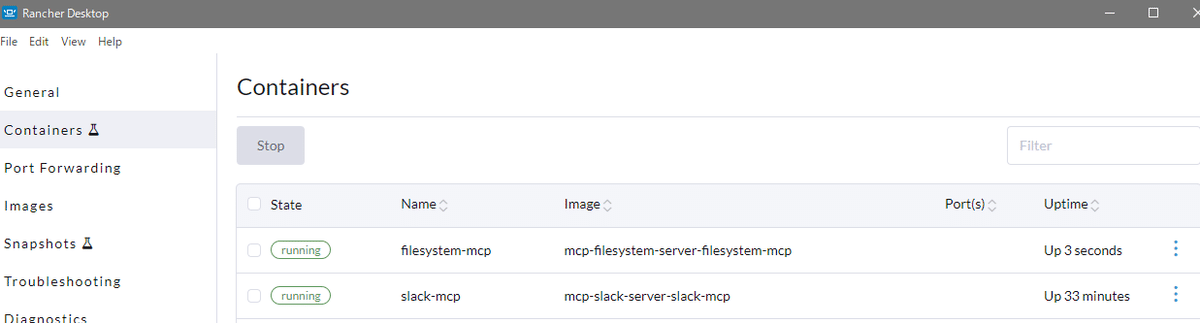
`docker ps` コマンドで動作中のコンテナを確認できるし Rancher Desktop でもコンテナが動作していることが分かる
Claude デスクトップにコンフィグ設定
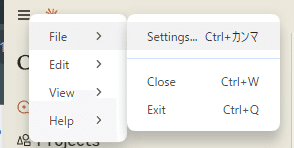
`claude_desktop_config.json` で設定しているので、そこを開くために Settings から移動
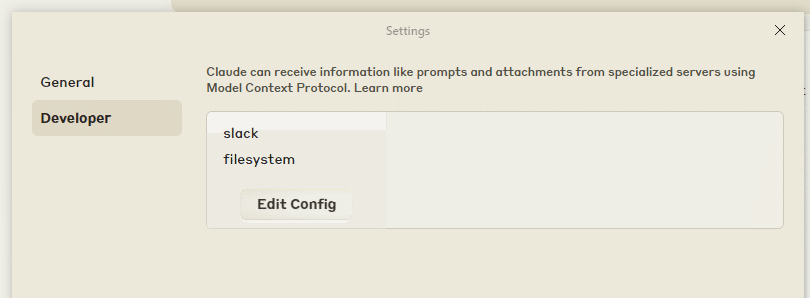
Developer から Edit Config ボタンを押すと `claude_desktop_config.json` がエクスプローラー等で表示されるので、それをエディタで開いて以下のように設定
`-f` オプションで指定している `docker-compose.yml` への path は自身の環境に合わせて書き換えること
前回記事で Slack の設定をおこなっていることが前提になっているので、下に追記されるかたちです
{
 "mcpServers": {
 "slack": {
 "command": "docker",
 "args": [
 "compose",
 "-f",
 "D:\\container\\mcp-slack-server\\docker-compose.yml",
 "exec",
 "-i",
 "--env",
 "SLACK_BOT_TOKEN",
 "--env",
 "SLACK_TEAM_ID",
 "slack-mcp",
 "node",
 "dist/index.js"
 ]
 },
 "filesystem": {
 "command": "docker",
 "args": [
 "compose",
 "-f",
 "D:\\container\\mcp-filesystem-server\\docker-compose.yml",
 "exec",
 "-i",
 "filesystem-mcp",
 "node",
 "dist/index.js",
 "/app/shared"
 ]
 }
 }
}
上記保存したら Claude デスクトップアプリを再起動
単に × などで閉じるだけだと、バックグラウンドで常駐して再起動されないので、ちゃんとプロセスを終了して再起動させること!
再起動後、Settings -> Developer で以下のように slack が表示されていれば OK
Claude Projects 設定
このまま使うのもよろしいですが Claude Projects を使うと、面倒な補足指示を諸々省くことができるようになります
`execute_mcp` という Project を作成
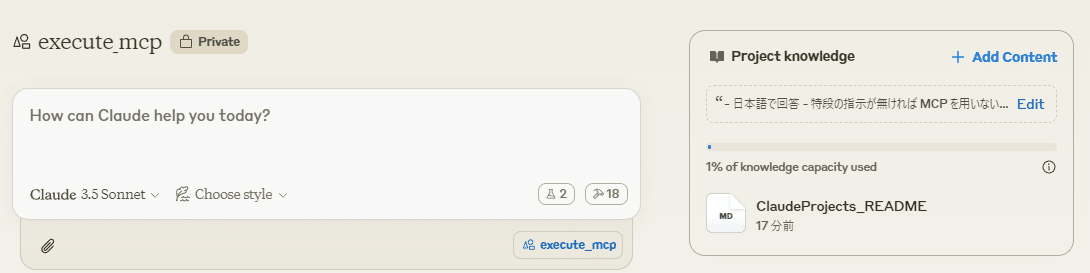
Instructions
- 日本語で回答
- 特段の指示が無ければ MCP を用いないようにすること
- `MCP を用いて` と言われたら、指示に応じてそれぞれの MCP サーバを適切に使い分け出力すること
ナレッジとして `ClaudeProjects_README.md` を作成
以下一例。ご自身の希望の指示を書いてあげてください
# execute_mcp README
## filesystem
### default directory
- /app/shared/
 - 読み込み/書き込み権限を所有している

## slack
### username
- 以下はユーザ id とユーザ名の対照表である。ユーザ id をユーザ名へ置換して出力すること
 - U083FM0MHA5 : Hi_Noguchi
 - U074RTSFTMF : Bot
以下 Claude Projects についての参考記事
動作確認
では動作確認! 正しく実行されたようです
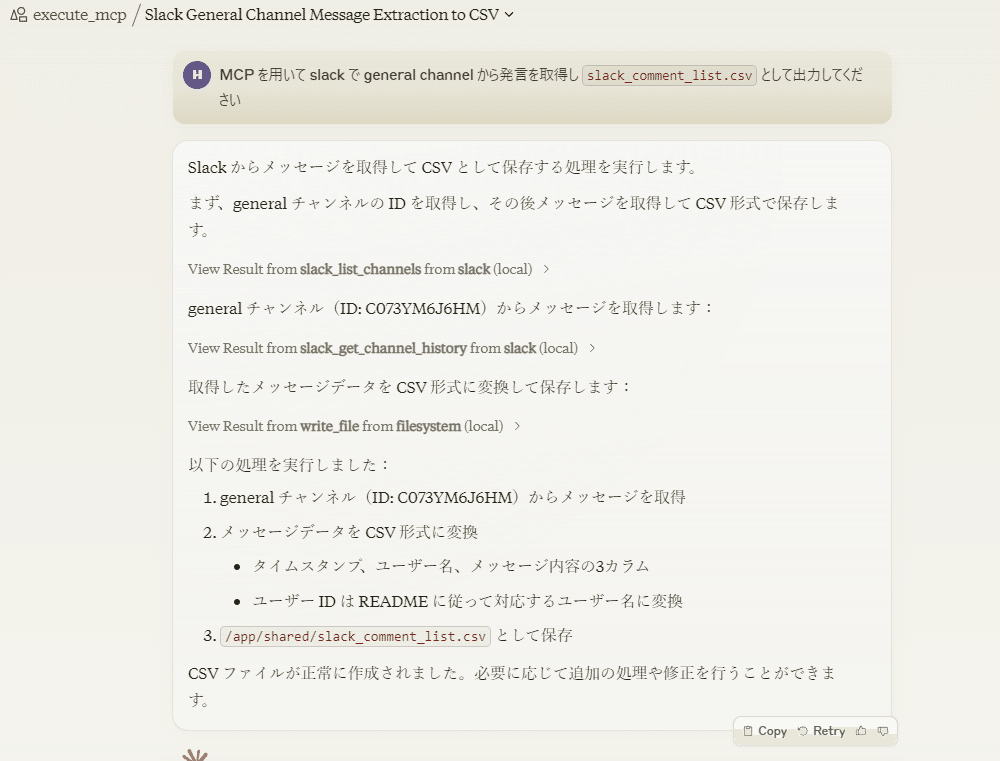
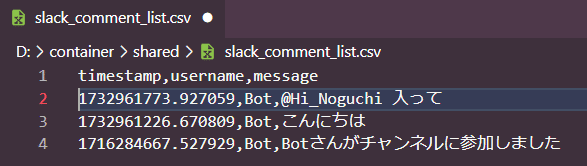
ファイルも作成されていました

Claude Projects でのナレッジを参照してくれているので、記載の指示通りに user id が名前に置き換えられていますね
ちなみに Claude 3.5 Sonnet 限定というわけでなく Claude 3 Haiku でも動きます
おめでとう! さらなる良き MCP サーバ on コンテナ ライフを🎉
おわりに
雑感
前回、以下のように書きましたので、その実践編となりました
ローカル環境内のディレクトリ/ファイルに対して色々させたいのだという場合にはコンテナへマウントすればよいです。むしろその方が閉鎖的にできて安心安全
MCP であっても素の Claude でなくて Projects 使った方がやっぱり強力ですねーということが確認できました
後で追記したりするかもしれない
次回は Supabase か TiDB あたりへの接続をやってみますか
自己紹介
野口 啓之 / Hiroyuki Noguchi
株式会社 きみより 代表
LLM も使いつつ 10 年超の CTO / CIO 経験をもとに DX 推進のための顧問などなどやっております