

MCP サーバをコンテナ環境で構築して Claude デスクトップで動かす。Slack への接続編
はじめに
まえおき
この記事は Qiita Advent Calendar 2024 / LLM・LLM活用 Advent Calendar 2024 シリーズ 2 の 3 日目記事です
三行要約
Anthropic がリリースした MCP サーバはローカル環境へ直接 node.js, python などをインストールして実行環境を構築する必要があったけれど、ローカル環境は汚したくない
ならばコンテナ環境に MCP サーバを構築すればよいではないか
コンテナ環境で MCP サーバを構築して動作確認するところまでできた
おことわり
ちょっと記述が粗い箇所があるかもしれず、不明点ありましたらコメント等でご遠慮なくお尋ねください🙏
前提
ひとまず Windows 環境向けに書いているけれど、Mac でも大丈夫でしょう
今回はサンプルコードの Slack 接続を流用します
ただし Slack 側の bot 作成まわりは解説しません
後で時間ができたら追記するかも
手順
Docker 環境構築
Rancher Desktop インストールしておけば OK
ディレクトリ用意
ここでは D ドライブに `container` を作成
その中にさらに `mcp-slack-server` を作成
ファイル用意
.dockerignore
node_modules
dist
.env
*.log
.git
.gitignore
.DS_Store
.env
自分のものに書き換えて
SLACK_BOT_TOKEN=xoxb-xxxxxxxxxxxxxxxxxxxxxxxxxxxxxxxxxxxxxxxxxxxxx
SLACK_TEAM_ID=T000000000
docker-compose.yml
services:
 slack-mcp:
 build: .
 container_name: slack-mcp
 environment:
 - SLACK_BOT_TOKEN=${SLACK_BOT_TOKEN}
 - SLACK_TEAM_ID=${SLACK_TEAM_ID}
 stdin_open: true # stdinを開いたままにする
 tty: true # 疑似TTYを割り当てる
 networks:
 - mcp-network

networks:
 mcp-network:
 name: slack-mcp-network
 driver: bridge
Dockerfile
FROM node:20-slim

WORKDIR /app

# 必要なファイルを全てコピー
COPY . .

# 依存関係のインストール
RUN npm install

# TypeScriptをビルド
RUN npm run build

# 環境変数の設定
ENV NODE_ENV=production

# コンテナ起動時のコマンド
CMD ["npm", "run", "start"]
package.json
GitHub からそのまま持ってくる
{
 "name": "@modelcontextprotocol/server-slack",
 "version": "0.5.1",
 "description": "MCP server for interacting with Slack",
 "license": "MIT",
 "author": "Anthropic, PBC (https://anthropic.com)",
 "homepage": "https://modelcontextprotocol.io",
 "bugs": "https://github.com/modelcontextprotocol/servers/issues",
 "type": "module",
 "scripts": {
 "build": "tsc && shx chmod +x dist/*.js",
 "prepare": "npm run build",
 "watch": "tsc --watch",
 "start": "node dist/index.js"
 },
 "dependencies": {
 "@modelcontextprotocol/sdk": "0.6.0"
 },
 "devDependencies": {
 "@types/node": "^22.9.3",
 "shx": "^0.3.4",
 "typescript": "^5.6.2"
 }
}
tsconfig.json
GitHub からそのまま持ってくる
{
 "compilerOptions": {
 "target": "es2020",
 "module": "nodenext",
 "moduleResolution": "nodenext",
 "outDir": "./dist",
 "rootDir": "./src",
 "strict": true,
 "esModuleInterop": true,
 "skipLibCheck": true,
 "forceConsistentCasingInFileNames": true
 },
 "include": [
 "src/**/*"
 ],
 "exclude": [
 "node_modules",
 "dist"
 ]
}
/src/index.ts
`/src/` を作成してその中に
GitHub からそのまま持ってくる
#!/usr/bin/env node
import { Server } from "@modelcontextprotocol/sdk/server/index.js";
import { StdioServerTransport } from "@modelcontextprotocol/sdk/server/stdio.js";
import {
 CallToolRequest,
 CallToolRequestSchema,
 ListToolsRequestSchema,
 Tool,
} from "@modelcontextprotocol/sdk/types.js";

// Type definitions for tool arguments
interface ListChannelsArgs {
 limit?: number;
 cursor?: string;
}

interface PostMessageArgs {
 channel_id: string;
 text: string;
}

interface ReplyToThreadArgs {
 channel_id: string;
 thread_ts: string;
 text: string;
}

interface AddReactionArgs {
 channel_id: string;
 timestamp: string;
 reaction: string;
}

interface GetChannelHistoryArgs {
 channel_id: string;
 limit?: number;
}

interface GetThreadRepliesArgs {
 channel_id: string;
 thread_ts: string;
}

interface GetUsersArgs {
 cursor?: string;
 limit?: number;
}

interface GetUserProfileArgs {
 user_id: string;
}

// Tool definitions
const listChannelsTool: Tool = {
 name: "slack_list_channels",
 description: "List public channels in the workspace with pagination",
 inputSchema: {
 type: "object",
 properties: {
 limit: {
 type: "number",
 description:
 "Maximum number of channels to return (default 100, max 200)",
 default: 100,
 },
 cursor: {
 type: "string",
 description: "Pagination cursor for next page of results",
 },
 },
 },
};

const postMessageTool: Tool = {
 name: "slack_post_message",
 description: "Post a new message to a Slack channel",
 inputSchema: {
 type: "object",
 properties: {
 channel_id: {
 type: "string",
 description: "The ID of the channel to post to",
 },
 text: {
 type: "string",
 description: "The message text to post",
 },
 },
 required: ["channel_id", "text"],
 },
};

const replyToThreadTool: Tool = {
 name: "slack_reply_to_thread",
 description: "Reply to a specific message thread in Slack",
 inputSchema: {
 type: "object",
 properties: {
 channel_id: {
 type: "string",
 description: "The ID of the channel containing the thread",
 },
 thread_ts: {
 type: "string",
 description: "The timestamp of the parent message",
 },
 text: {
 type: "string",
 description: "The reply text",
 },
 },
 required: ["channel_id", "thread_ts", "text"],
 },
};

const addReactionTool: Tool = {
 name: "slack_add_reaction",
 description: "Add a reaction emoji to a message",
 inputSchema: {
 type: "object",
 properties: {
 channel_id: {
 type: "string",
 description: "The ID of the channel containing the message",
 },
 timestamp: {
 type: "string",
 description: "The timestamp of the message to react to",
 },
 reaction: {
 type: "string",
 description: "The name of the emoji reaction (without ::)",
 },
 },
 required: ["channel_id", "timestamp", "reaction"],
 },
};

const getChannelHistoryTool: Tool = {
 name: "slack_get_channel_history",
 description: "Get recent messages from a channel",
 inputSchema: {
 type: "object",
 properties: {
 channel_id: {
 type: "string",
 description: "The ID of the channel",
 },
 limit: {
 type: "number",
 description: "Number of messages to retrieve (default 10)",
 default: 10,
 },
 },
 required: ["channel_id"],
 },
};

const getThreadRepliesTool: Tool = {
 name: "slack_get_thread_replies",
 description: "Get all replies in a message thread",
 inputSchema: {
 type: "object",
 properties: {
 channel_id: {
 type: "string",
 description: "The ID of the channel containing the thread",
 },
 thread_ts: {
 type: "string",
 description: "The timestamp of the parent message",
 },
 },
 required: ["channel_id", "thread_ts"],
 },
};

const getUsersTool: Tool = {
 name: "slack_get_users",
 description:
 "Get a list of all users in the workspace with their basic profile information",
 inputSchema: {
 type: "object",
 properties: {
 cursor: {
 type: "string",
 description: "Pagination cursor for next page of results",
 },
 limit: {
 type: "number",
 description: "Maximum number of users to return (default 100, max 200)",
 default: 100,
 },
 },
 },
};

const getUserProfileTool: Tool = {
 name: "slack_get_user_profile",
 description: "Get detailed profile information for a specific user",
 inputSchema: {
 type: "object",
 properties: {
 user_id: {
 type: "string",
 description: "The ID of the user",
 },
 },
 required: ["user_id"],
 },
};

class SlackClient {
 private botHeaders: { Authorization: string; "Content-Type": string };

 constructor(botToken: string) {
 this.botHeaders = {
 Authorization: `Bearer ${botToken}`,
 "Content-Type": "application/json",
 };
 }

 async getChannels(limit: number = 100, cursor?: string): Promise<any> {
 const params = new URLSearchParams({
 types: "public_channel",
 exclude_archived: "true",
 limit: Math.min(limit, 200).toString(),
 team_id: process.env.SLACK_TEAM_ID!,
 });

 if (cursor) {
 params.append("cursor", cursor);
 }

 const response = await fetch(
 `https://slack.com/api/conversations.list?${params}`,
 { headers: this.botHeaders },
 );

 return response.json();
 }

 async postMessage(channel_id: string, text: string): Promise<any> {
 const response = await fetch("https://slack.com/api/chat.postMessage", {
 method: "POST",
 headers: this.botHeaders,
 body: JSON.stringify({
 channel: channel_id,
 text: text,
 }),
 });

 return response.json();
 }

 async postReply(
 channel_id: string,
 thread_ts: string,
 text: string,
 ): Promise<any> {
 const response = await fetch("https://slack.com/api/chat.postMessage", {
 method: "POST",
 headers: this.botHeaders,
 body: JSON.stringify({
 channel: channel_id,
 thread_ts: thread_ts,
 text: text,
 }),
 });

 return response.json();
 }

 async addReaction(
 channel_id: string,
 timestamp: string,
 reaction: string,
 ): Promise<any> {
 const response = await fetch("https://slack.com/api/reactions.add", {
 method: "POST",
 headers: this.botHeaders,
 body: JSON.stringify({
 channel: channel_id,
 timestamp: timestamp,
 name: reaction,
 }),
 });

 return response.json();
 }

 async getChannelHistory(
 channel_id: string,
 limit: number = 10,
 ): Promise<any> {
 const params = new URLSearchParams({
 channel: channel_id,
 limit: limit.toString(),
 });

 const response = await fetch(
 `https://slack.com/api/conversations.history?${params}`,
 { headers: this.botHeaders },
 );

 return response.json();
 }

 async getThreadReplies(channel_id: string, thread_ts: string): Promise<any> {
 const params = new URLSearchParams({
 channel: channel_id,
 ts: thread_ts,
 });

 const response = await fetch(
 `https://slack.com/api/conversations.replies?${params}`,
 { headers: this.botHeaders },
 );

 return response.json();
 }

 async getUsers(limit: number = 100, cursor?: string): Promise<any> {
 const params = new URLSearchParams({
 limit: Math.min(limit, 200).toString(),
 team_id: process.env.SLACK_TEAM_ID!,
 });

 if (cursor) {
 params.append("cursor", cursor);
 }

 const response = await fetch(`https://slack.com/api/users.list?${params}`, {
 headers: this.botHeaders,
 });

 return response.json();
 }

 async getUserProfile(user_id: string): Promise<any> {
 const params = new URLSearchParams({
 user: user_id,
 include_labels: "true",
 });

 const response = await fetch(
 `https://slack.com/api/users.profile.get?${params}`,
 { headers: this.botHeaders },
 );

 return response.json();
 }
}

async function main() {
 const botToken = process.env.SLACK_BOT_TOKEN;
 const teamId = process.env.SLACK_TEAM_ID;

 if (!botToken || !teamId) {
 console.error(
 "Please set SLACK_BOT_TOKEN and SLACK_TEAM_ID environment variables",
 );
 process.exit(1);
 }

 console.error("Starting Slack MCP Server...");
 const server = new Server(
 {
 name: "Slack MCP Server",
 version: "1.0.0",
 },
 {
 capabilities: {
 tools: {},
 },
 },
 );

 const slackClient = new SlackClient(botToken);

 server.setRequestHandler(
 CallToolRequestSchema,
 async (request: CallToolRequest) => {
 console.error("Received CallToolRequest:", request);
 try {
 if (!request.params.arguments) {
 throw new Error("No arguments provided");
 }

 switch (request.params.name) {
 case "slack_list_channels": {
 const args = request.params
 .arguments as unknown as ListChannelsArgs;
 const response = await slackClient.getChannels(
 args.limit,
 args.cursor,
 );
 return {
 content: [{ type: "text", text: JSON.stringify(response) }],
 };
 }

 case "slack_post_message": {
 const args = request.params.arguments as unknown as PostMessageArgs;
 if (!args.channel_id || !args.text) {
 throw new Error(
 "Missing required arguments: channel_id and text",
 );
 }
 const response = await slackClient.postMessage(
 args.channel_id,
 args.text,
 );
 return {
 content: [{ type: "text", text: JSON.stringify(response) }],
 };
 }

 case "slack_reply_to_thread": {
 const args = request.params
 .arguments as unknown as ReplyToThreadArgs;
 if (!args.channel_id || !args.thread_ts || !args.text) {
 throw new Error(
 "Missing required arguments: channel_id, thread_ts, and text",
 );
 }
 const response = await slackClient.postReply(
 args.channel_id,
 args.thread_ts,
 args.text,
 );
 return {
 content: [{ type: "text", text: JSON.stringify(response) }],
 };
 }

 case "slack_add_reaction": {
 const args = request.params.arguments as unknown as AddReactionArgs;
 if (!args.channel_id || !args.timestamp || !args.reaction) {
 throw new Error(
 "Missing required arguments: channel_id, timestamp, and reaction",
 );
 }
 const response = await slackClient.addReaction(
 args.channel_id,
 args.timestamp,
 args.reaction,
 );
 return {
 content: [{ type: "text", text: JSON.stringify(response) }],
 };
 }

 case "slack_get_channel_history": {
 const args = request.params
 .arguments as unknown as GetChannelHistoryArgs;
 if (!args.channel_id) {
 throw new Error("Missing required argument: channel_id");
 }
 const response = await slackClient.getChannelHistory(
 args.channel_id,
 args.limit,
 );
 return {
 content: [{ type: "text", text: JSON.stringify(response) }],
 };
 }

 case "slack_get_thread_replies": {
 const args = request.params
 .arguments as unknown as GetThreadRepliesArgs;
 if (!args.channel_id || !args.thread_ts) {
 throw new Error(
 "Missing required arguments: channel_id and thread_ts",
 );
 }
 const response = await slackClient.getThreadReplies(
 args.channel_id,
 args.thread_ts,
 );
 return {
 content: [{ type: "text", text: JSON.stringify(response) }],
 };
 }

 case "slack_get_users": {
 const args = request.params.arguments as unknown as GetUsersArgs;
 const response = await slackClient.getUsers(
 args.limit,
 args.cursor,
 );
 return {
 content: [{ type: "text", text: JSON.stringify(response) }],
 };
 }

 case "slack_get_user_profile": {
 const args = request.params
 .arguments as unknown as GetUserProfileArgs;
 if (!args.user_id) {
 throw new Error("Missing required argument: user_id");
 }
 const response = await slackClient.getUserProfile(args.user_id);
 return {
 content: [{ type: "text", text: JSON.stringify(response) }],
 };
 }

 default:
 throw new Error(`Unknown tool: ${request.params.name}`);
 }
 } catch (error) {
 console.error("Error executing tool:", error);
 return {
 content: [
 {
 type: "text",
 text: JSON.stringify({
 error: error instanceof Error ? error.message : String(error),
 }),
 },
 ],
 };
 }
 },
 );

 server.setRequestHandler(ListToolsRequestSchema, async () => {
 console.error("Received ListToolsRequest");
 return {
 tools: [
 listChannelsTool,
 postMessageTool,
 replyToThreadTool,
 addReactionTool,
 getChannelHistoryTool,
 getThreadRepliesTool,
 getUsersTool,
 getUserProfileTool,
 ],
 };
 });

 const transport = new StdioServerTransport();
 console.error("Connecting server to transport...");
 await server.connect(transport);

 console.error("Slack MCP Server running on stdio");
}

main().catch((error) => {
 console.error("Fatal error in main():", error);
 process.exit(1);
});
ターミナルからコンテナ起動
Windows なら Powershell
上記で作成したディレクトリへ移動してから
docker compose up -dエラーが出なければ OK
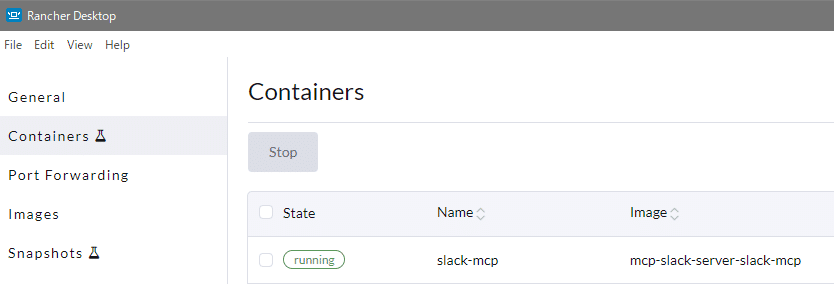
`docker ps` コマンドで動作中のコンテナを確認できるし Rancher Desktop でもコンテナが動作していることが分かる
Claude デスクトップにコンフィグ設定
`claude_desktop_config.json` で設定しているので、そこを開くために Settings から移動
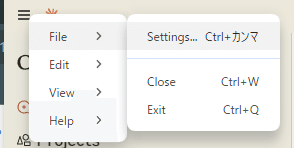
Developer から Edit Config ボタンを押すと `claude_desktop_config.json` がエクスプローラー等で表示されるので、それをエディタで開いて以下のように設定
`-f` オプションで指定している `docker-compose.yml` への path は自身の環境に合わせて書き換えること
{
 "mcpServers": {
 "slack": {
 "command": "docker",
 "args": [
 "compose",
 "-f",
 "D:\\container\\mcp-slack-server\\docker-compose.yml",
 "exec",
 "-i",
 "--env",
 "SLACK_BOT_TOKEN",
 "--env",
 "SLACK_TEAM_ID",
 "slack-mcp",
 "node",
 "dist/index.js"
 ]
 }
 }
}
上記保存したら Claude デスクトップアプリを再起動
単に × などで閉じるだけだと、バックグラウンドで常駐して再起動されないので、ちゃんとプロセスを終了して再起動させること!
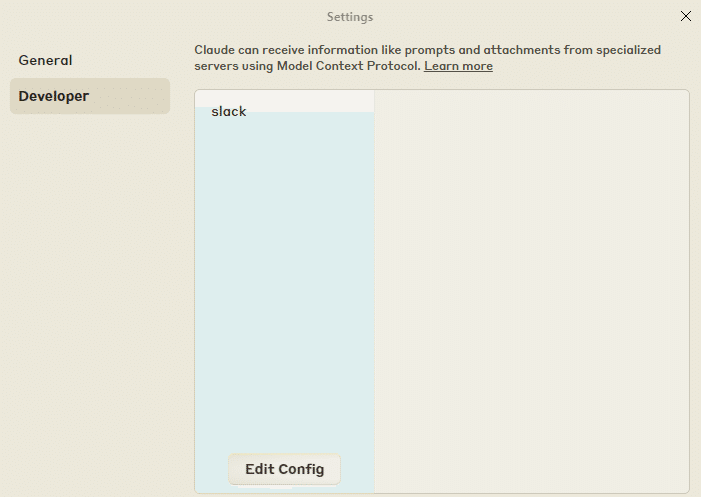
再起動後、Settings -> Developer で以下のように slack が表示されていれば OK
動作確認
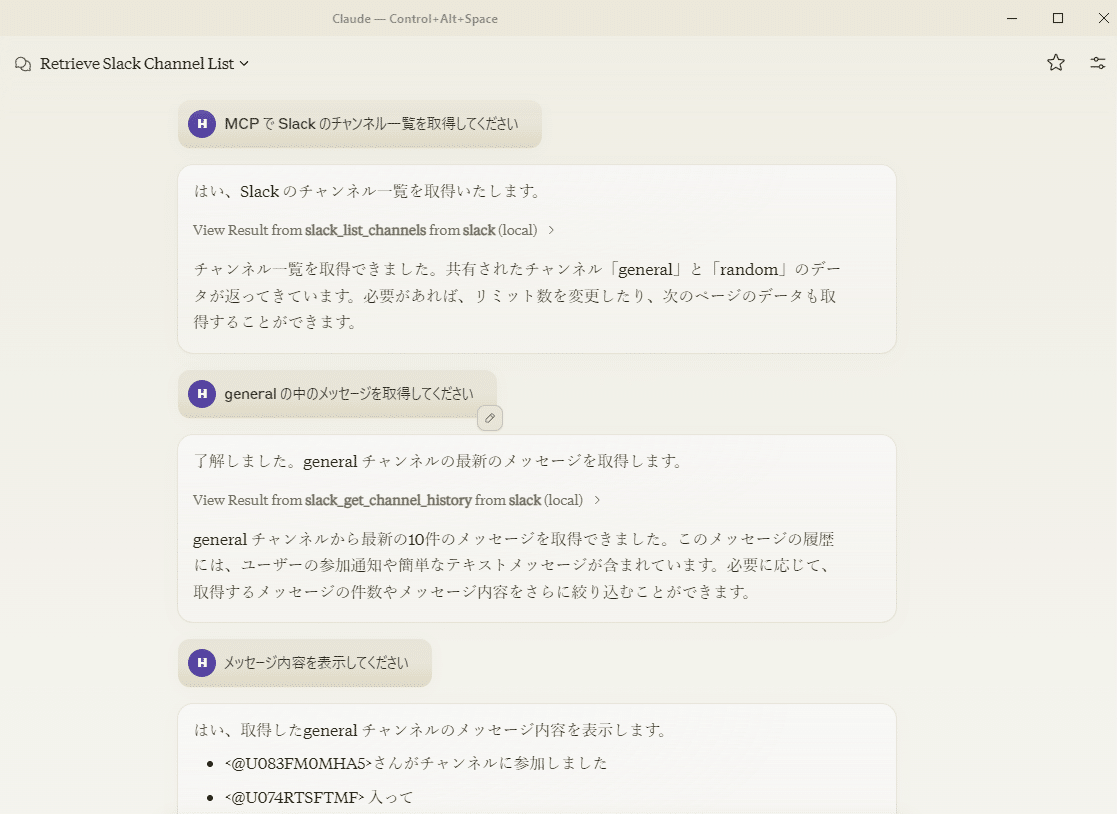
ちなみに Claude 3.5 Sonnet 限定というわけでなく Claude 3 Haiku でも動きます。以下の通り
Claude 3 Haiku はやっぱりちゃんと指示出してあげないと、空気読んで先回りしてタスクこなしてくれない
おめでとう! 良き MCP サーバ on コンテナ ライフを🎉
おわりに
雑感
コンテナ環境で MCP サーバ用意できるってなりゃ、そりゃもう勝ち確じゃないですかこの規格
ローカル環境内のディレクトリ/ファイルに対して色々させたいのだという場合にはコンテナへマウントすればよいです。むしろその方が閉鎖的にできて安心安全
後で追記したりするかもしれない
続き
MCP サーバをコンテナ環境で構築して Claude デスクトップで動かす。ローカルファイルへの読み書き編
今回設定した Slack と協働してローカルファイルへの書き込みを実践しています
自己紹介
野口 啓之 / Hiroyuki Noguchi
株式会社 きみより 代表
LLM も使いつつ 10 年超の CTO / CIO 経験をもとに DX 推進のための顧問などなどやっております