|
VOOZH | about |
|
VOOZH | about |
dotnet add package IronPdf --version 2026.7.2
NuGet\Install-Package IronPdf -Version 2026.7.2
<PackageReference Include="IronPdf" Version="2026.7.2" />
<PackageVersion Include="IronPdf" Version="2026.7.2" />Directory.Packages.props
<PackageReference Include="IronPdf" />Project file
paket add IronPdf --version 2026.7.2
#r "nuget: IronPdf, 2026.7.2"
#:package IronPdf@2026.7.2
#addin nuget:?package=IronPdf&version=2026.7.2Install as a Cake Addin
#tool nuget:?package=IronPdf&version=2026.7.2Install as a Cake Tool
👁 Nuget
👁 Installs
👁 Passed
👁 windows
👁 macOS
👁 linux
👁 docker
👁 aws
👁 microsoftazure
👁 livechat
👁 IronPDF NuGet Trial Banner Image
PM> Install-Package IronPdf
using IronPdf;

// Instantiates Chrome Renderer
var renderer = new ChromePdfRenderer();

// Render Html contents as PDF
var pdf = renderer.RenderHtmlAsPdf("<h1>~Hello World~</h1> Made with IronPDF!");

// Saves the PdfDocument object as a PDF
pdf.SaveAs("html_saved.pdf");
Dive deeper with the documentation and examples:
Tutorials: Step-by-step guides to help you build your first PDF application.
Code Examples: Practical examples of executable code for common tasks.
How-To Guides: Practical, goal-oriented instructions to solve specific problems.
Demo: Interactive demos of IronPDF in action.
API Reference: Detailed technical descriptions of the API and its components.
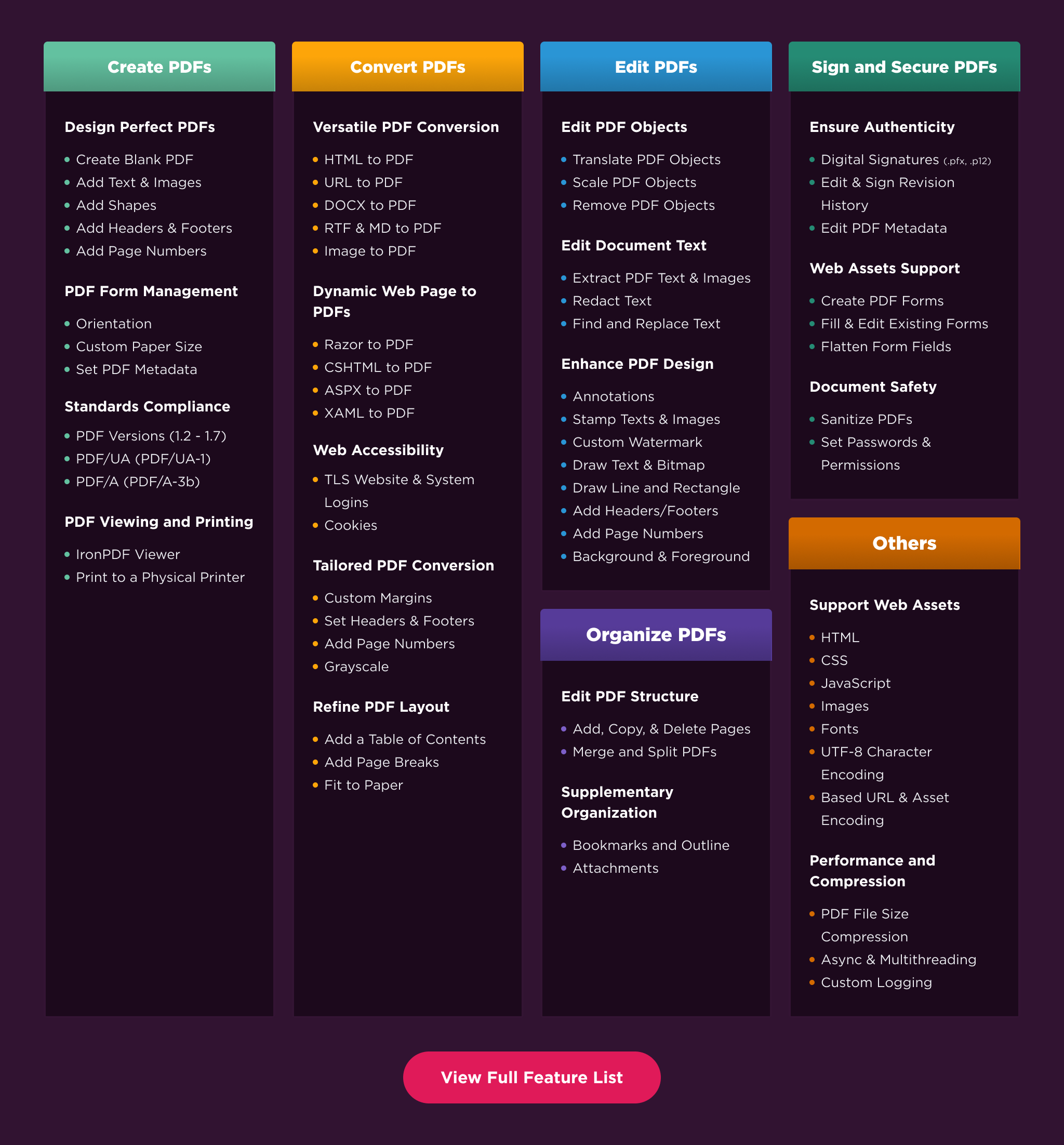
Create PDFs: Create PDFs from scratch in a few lines of code.
Convert PDF: Convert PDFs from HTML, images, docx, and website pages.
Edit PDFs: Modify existing PDF documents. Add text, images, watermarks, and headers/footers.
Organize PDFs: Merge, split, add or remove pages, and manipulate document properties.
Sign & Secure PDFs: Add digital signatures, set passwords, and manage user permissions to protect your documents.
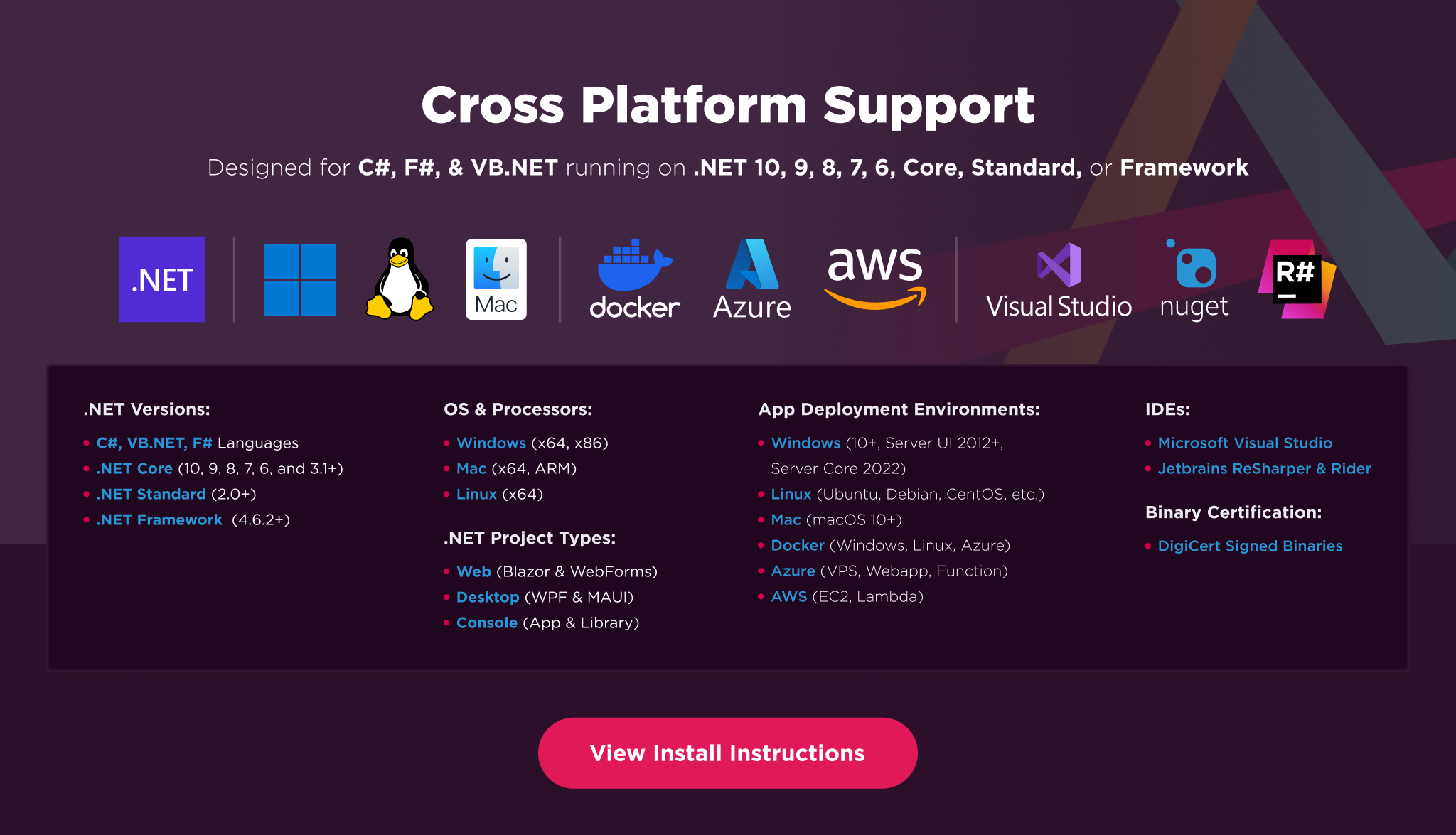
Platforms: .NET 10, .NET 9, .NET 8, .NET 7, .NET 6, .NET 5, Core 2x & 3x, Standard 2
Framework: .NET Framework 4.6.2 (and above)
App Models: Console, Web, and Desktop Apps, MVC, Blazor, MAUI, Razor Pages, Web Forms
Operating Systems: Windows, macOS, Linux (Debian, CentOS, Ubuntu)
IDEs: Microsoft Visual Studio or Jetbrains ReSharper & Rider
👁 IronPDF Cross Platform Compatibility Support Image
IronPDF is a commercially licensed product.
Trial License: Get a free developer key to evaluate the full library with no commitment. For development and testing. Start your trial HERE.
Purchase a License: Unlock the library for use in commercial projects and access technical support. Purchase your license HERE.
Have a question or running into an issue?
Email Support: Reach out to support directly at support@ironsoftware.com.
Live Chat Support: https://ironpdf.com/#helpscout-support
Report a Bug: https://ironsoftware.com/ticket-submission/
Community: https://ironsoftware.com/company/iron-slack-community/
| Product | Versions Compatible and additional computed target framework versions. |
|---|---|
| .NET | net5.0 net5.0 is compatible. net5.0-windows net5.0-windows was computed. net6.0 net6.0 is compatible. net6.0-android net6.0-android was computed. net6.0-ios net6.0-ios was computed. net6.0-maccatalyst net6.0-maccatalyst was computed. net6.0-macos net6.0-macos was computed. net6.0-tvos net6.0-tvos was computed. net6.0-windows net6.0-windows was computed. net7.0 net7.0 was computed. net7.0-android net7.0-android was computed. net7.0-ios net7.0-ios was computed. net7.0-maccatalyst net7.0-maccatalyst was computed. net7.0-macos net7.0-macos was computed. net7.0-tvos net7.0-tvos was computed. net7.0-windows net7.0-windows was computed. net8.0 net8.0 is compatible. net8.0-android net8.0-android was computed. net8.0-browser net8.0-browser was computed. net8.0-ios net8.0-ios was computed. net8.0-maccatalyst net8.0-maccatalyst was computed. net8.0-macos net8.0-macos was computed. net8.0-tvos net8.0-tvos was computed. net8.0-windows net8.0-windows was computed. net9.0 net9.0 was computed. net9.0-android net9.0-android was computed. net9.0-browser net9.0-browser was computed. net9.0-ios net9.0-ios was computed. net9.0-maccatalyst net9.0-maccatalyst was computed. net9.0-macos net9.0-macos was computed. net9.0-tvos net9.0-tvos was computed. net9.0-windows net9.0-windows was computed. net10.0 net10.0 was computed. net10.0-android net10.0-android was computed. net10.0-browser net10.0-browser was computed. net10.0-ios net10.0-ios was computed. net10.0-maccatalyst net10.0-maccatalyst was computed. net10.0-macos net10.0-macos was computed. net10.0-tvos net10.0-tvos was computed. net10.0-windows net10.0-windows was computed. |
| .NET Core | netcoreapp2.0 netcoreapp2.0 is compatible. netcoreapp2.1 netcoreapp2.1 was computed. netcoreapp2.2 netcoreapp2.2 was computed. netcoreapp3.0 netcoreapp3.0 was computed. netcoreapp3.1 netcoreapp3.1 was computed. |
| .NET Standard | netstandard2.0 netstandard2.0 is compatible. netstandard2.1 netstandard2.1 was computed. |
| .NET Framework | net461 net461 was computed. net462 net462 is compatible. net463 net463 was computed. net47 net47 was computed. net471 net471 was computed. net472 net472 was computed. net48 net48 was computed. net481 net481 was computed. |
| MonoAndroid | monoandroid monoandroid was computed. |
| MonoMac | monomac monomac was computed. |
| MonoTouch | monotouch monotouch was computed. |
| Tizen | tizen40 tizen40 was computed. tizen60 tizen60 was computed. |
| Xamarin.iOS | xamarinios xamarinios was computed. |
| Xamarin.Mac | xamarinmac xamarinmac was computed. |
| Xamarin.TVOS | xamarintvos xamarintvos was computed. |
| Xamarin.WatchOS | xamarinwatchos xamarinwatchos was computed. |
Showing the top 5 NuGet packages that depend on IronPdf:
| Package | Downloads |
|---|---|
|
PDF.Core
IronPDF for .Net Core 2.x and 3.x allows developers to create, edit and extract PDF content within .Net Core Applications & Websites. The Iron PDF Core library takes the frustration out of generating PDF documents by not relying on proprietary APIs. "Html-To-Pdf" renders pixel-perfect PDFs from open standard document types: HTML, JS, CSS, JPG, PNG, GIF, and SVG. In short, it uses skills that developers already posses. Key features include: * "Html-To-Pdf" creates PDF files from HTML, CSS, JavaScript, and Images. * "Url-To-Pdf" generates PDFs from existing html pages by simply providing their URL. * "Image-To-PDF" creates PDF documents from image files. * PDF to Image functionality can render PDF documents to image files. * Extract text and images from existing PDFs. * Create, Fill and read data from PDF forms. * Merge, Split and Manipulate PDFs to edit PDF structure and content. * Add Page Numbers, Headers, Footers, Watermarks, Tables, Text and Image Assets. * Edit, Stamp and Watermark PDF files with text, images and HTML * Apply HTML or PDF backgrounds to PDF pages * Sign PDF files with digital certificates IronPDF can be used within ASP.NET projects, MVC, Web Services, Console & Desktop Applications. Requires .Net Core 2.x, 3.x or higher. Supports Windows, Ubuntu, Debian, CentOS, BSD, MacOS and Azure platforms. Licensing & Support available for commercial deployments. For code examples, documentation & more visit http://ironpdf.com For support please email us at developers@ironsoftware.com |
|
|
Jari.FnTrust.Shared
Package Description |
|
|
Co.Backend.Packages.Infrastructure
Package Description |
|
|
BopsGeneralUtilities
All implementations for Bops features |
|
|
Bastion.Recipients.Api
Package Description |
Showing the top 2 popular GitHub repositories that depend on IronPdf:
| Repository | Stars |
|---|---|
|
devmentors/Cine
Modular monolith in .NET Core
|
|
|
marinasundstrom/YourBrand
Prototype enterprise system for e-commerce and consulting services
|
| Version | Downloads | Last Updated |
|---|---|---|
| 2026.7.2 | 1,326 | 6/26/2026 |
| 2026.6.1 | 53,985 | 5/26/2026 |
| 2026.5.2 | 55,752 | 4/29/2026 |
| 2026.4.1 | 95,859 | 3/27/2026 |
| 2026.3.1 | 94,049 | 2/26/2026 |
| 2026.2.1 | 25,875 | 2/17/2026 |
| 2026.1.3 | 27,087 | 2/9/2026 |
| 2025.12.2 | 156,815 | 12/26/2025 |
| 2025.11.12 | 147,119 | 11/10/2025 |
| 2025.10.8 | 180,829 | 10/8/2025 |
| 2025.9.4 | 135,330 | 9/2/2025 |
| 2025.8.8 | 93,536 | 8/13/2025 |
| 2025.7.17 | 63,800 | 7/22/2025 |
| 2025.6.8 | 202,423 | 6/17/2025 |
| 2025.5.6 | 94,061 | 5/13/2025 |
| 2025.4.4 | 163,565 | 4/8/2025 |
| 2025.3.6 | 209,451 | 3/5/2025 |
| 2025.2.8 | 162,901 | 2/3/2025 |
Features
- Added support for extracting and accessing PDF Optional Content Groups (OCG/layers), including layer hierarchy, visibility, and object-level layer metadata
- Added ChromePdfRenderOptions.CssPageRulePolicy and header/footer overlap detection options to improve margin handling and prevent content overlap when rendering or modifying PDFs
Enhancements
- Enhanced PDF scanning reliability by removing shellcode hash-based detection rules that could cause inconsistent false-positive results
- Enhanced render timeout handling by detecting stalled PDF generation operations and returning clearer, more actionable error messages
Bug Fixes
- Fixed engine stability issues that could cause orphaned browser processes, unexpected crashes, and rendering failures under heavy load or constrained CPU environments
- Fixed an issue where PDF redaction could leave partial-character artifacts or remove excess content due to inaccurate text bounding boxes
- Fixed an issue where ImageToPdfConverter.ImageToPdf could generate blank PDFs for image filenames containing both spaces and multiple dots
- Fixed an issue where multi-page TIFF conversion did not preserve per-page orientation and resolution for mixed-orientation PDFs
- Fixed an issue where Cleaner.SanitizeWithSvg could add an extra page and corrupt non-ASCII text in sanitized PDFs
- Fixed an issue where PDF signature timestamps could display an incorrect timezone offset during daylight saving time (DST)
Update
- Updated internal dependencies