|
VOOZH | about |
|
VOOZH | about |
dotnet add package ThisAssembly --version 2.1.2
NuGet\Install-Package ThisAssembly -Version 2.1.2
<PackageReference Include="ThisAssembly" Version="2.1.2">
 <PrivateAssets>all</PrivateAssets>
 <IncludeAssets>runtime; build; native; contentfiles; analyzers</IncludeAssets>
</PackageReference>
<PackageVersion Include="ThisAssembly" Version="2.1.2" />Directory.Packages.props
<PackageReference Include="ThisAssembly"> <PrivateAssets>all</PrivateAssets> <IncludeAssets>runtime; build; native; contentfiles; analyzers</IncludeAssets> </PackageReference>Project file
paket add ThisAssembly --version 2.1.2
#r "nuget: ThisAssembly, 2.1.2"
#:package ThisAssembly@2.1.2
#addin nuget:?package=ThisAssembly&version=2.1.2Install as a Cake Addin
#tool nuget:?package=ThisAssembly&version=2.1.2Install as a Cake Tool
Expose project and assembly level information as constants in the ThisAssembly class using source generators powered by Roslyn.
The main generated entry point type is ThisAssembly in the global namespace (by default),
and is declared as partial so you can extend it too with manually created members.
Use
$(ThisAssemblyNamespace)MSBuild property to set a root namespace forThisAssembly.
Each package in turn extends this partial class to add their own nestes types and members.
The ThisAssembly meta-package includes all the other packages for convenience.
For now, ThisAssembly only generates C# code.
To ensure the long-term sustainability of this project, users of this package who generate revenue must pay an Open Source Maintenance Fee. While the source code is freely available under the terms of the License, this package and other aspects of the project require adherence to the Maintenance Fee.
To pay the Maintenance Fee, become a Sponsor at the proper OSMF tier. A single fee covers all of Devlooped packages.
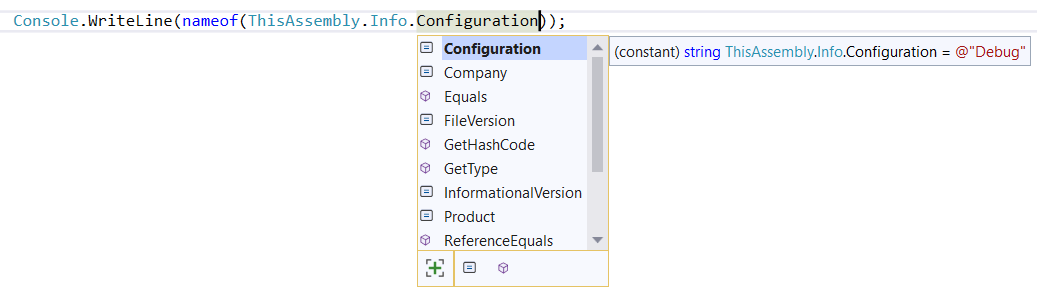
This package generates a static ThisAssembly.Info class with public
constants exposing the following attribute values generated by default for SDK style projects:
AssemblyConfigurationAttribute
AssemblyCompanyAttribute
AssemblyTitleAttribute
AssemblyDescriptionAttribute
AssemblyProductAttribute
AssemblyCopyrightAttribute
AssemblyVersionAttribute
AssemblyInformationalVersionAttribute
AssemblyFileVersionAttribute
If your project includes these attributes by other means, they will still be emitted properly
on the ThisAssembly.Info class.
👁 alternate text is missing from this package README image
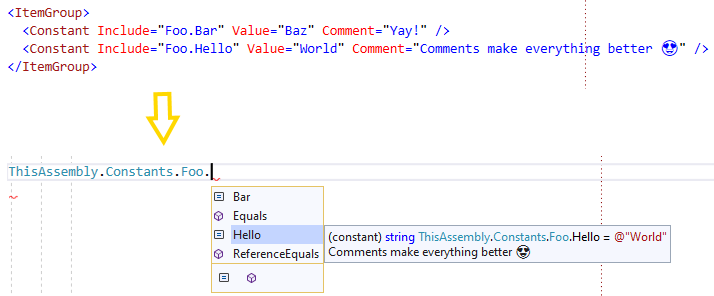
This package generates a static ThisAssembly.Constants class with public
constants for @(Constant) MSBuild items in the project.
 <ItemGroup>
 <Constant Include="Foo.Bar" Value="Baz" Comment="Yay!" />
 <Constant Include="Foo.Hello" Value="World" Comment="Comments make everything better 😍" />
 </ItemGroup>
👁 alternate text is missing from this package README image
These constants can use values from MSBuild properties, making compile-time values configurable via environment variables or command line arguments. For example:
 <PropertyGroup>
 <HttpDefaultTimeoutSeconds>10</HttpDefaultTimeoutSeconds>
 </PropertyGroup>
 <ItemGroup>
 <Constant Include="Http.TimeoutSeconds"
 Value="$(HttpDefaultTimeoutSeconds)"
 Type="int"
 Comment="Default timeout in seconds for HTTP requests" />
 </ItemGroup>
The C# code could consume this constant as follows:
public HttpClient CreateHttpClient(string name, int? timeout = default)
{
 HttpClient client = httpClientFactory.CreateClient(name);
 client.Timeout = TimeSpan.FromSeconds(timeout ?? ThisAssembly.Constants.Http.TimeoutSeconds);
 return client;
}
Note how the constant is typed to int as specified in the Type attribute in MSBuild.
The generated code uses the specified Type as-is, as well as the Value attribute in that
case, so it's up to the user to ensure they match and result in valid C# code. For example,
you can emit a boolean, long, double, etc.. If no type is provided, string is assumed. Values
can also be multi-line and will use C# raw string literals
if supported by the target language version (11+).
In this example, you could trivially change how your product behaves by setting the environment
variable HttpDefaultTimeoutSeconds in CI. This is particularly useful for test projects,
where you can easily change the behavior of the system under test without changing the code.
In addition to arbitrary constants via <Constant ...>, it's quite useful (in particular in test projects)
to generate constants for files in the project, so there's also a shorthand for those:
 <ItemGroup>
 <FileConstant Include="@(Content)" />
 </ItemGroup>
Which results in:
👁 alternate text is missing from this package README image
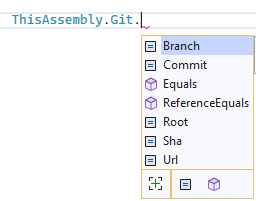
This package generates a static ThisAssembly.Git class with constants
for the following Git properties from the current project:
👁 alternate text is missing from this package README image
This package relies on your project's installed Microsoft.SourceLink.* package reference according to your specific Git-based source control server (such as GitHub, Azure DevOps, BitBucket, etc).
NOTE: from .NET 8 SDK onwards, SourceLink is included by default, so you don't need to add it manually.
The Branch property is populated from environment variables provided
by the currently supported CI systems: GitHub Actions, Azure DevOps,
AppVeyor, TeamCity, Travis CI, Circle CI, GitLab CI, Buddy, and Jenkins.
Whenever the CI system provides a pull request number, the branch name is
pr[NUMBER], such as pr123. This makes it easy to use it as a semver
metadata label.
Note: by default, the values of these constants are populated during "real" builds (that is, not IDE/design-time builds used to populate intellisense). This is to avoid negatively affecting the editor's performance. This means, however, that the properties will seem to always be empty when inspecting them in the IDE (although never at run-time). If you want to force population of these values for design-time builds, set the
EnableSourceControlManagerQueriesproperty totrue. This property is defined and documented by dotnet/sourcelink.
At the MSBuild level, targets can take a dependency on the provided
InitializeGitInformation target, which sets the equivalent properties
named:
The names of these properties were chosen on purpose to match the properties used by nuget pack and nugetizer to populate the relevant package metadata.
So if you have a GitHub repository, installing these three packages will ensure you have the proper metadata out of the box and the simplest packaging experience possible:
<Project Sdk="Microsoft.NET.Sdk">
 <PropertyGroup>
 <TargetFramework>netstandard2.0</TargetFramework>
 </PropertyGroup>

 <ItemGroup>
 <PackageReference Include="Microsoft.SourceLink.GitHub" />
 <PackageReference Include="ThisAssembly.Git" />
 <PackageReference Include="NuGetizer" />
 </ItemGroup>
</Project>
This package provides a static ThisAssembly.Metadata class with public
constants exposing each [System.Reflection.AssemblyMetadata(..)] defined in
the project file as supported by the .NET SDK.
The metadata attribute is declared using MSBuild syntax in the project
(for .NET 5.0+ projects that have built-in support for @(AssemblyMetadata) items):
 <ItemGroup>
 <AssemblyMetadata Include="Foo" Value="Bar" />
 </ItemGroup>
And a corresponding ThisAssembly.Metadata.Foo constant with the value Bar is provided
for this example.
👁 alternate text is missing from this package README image
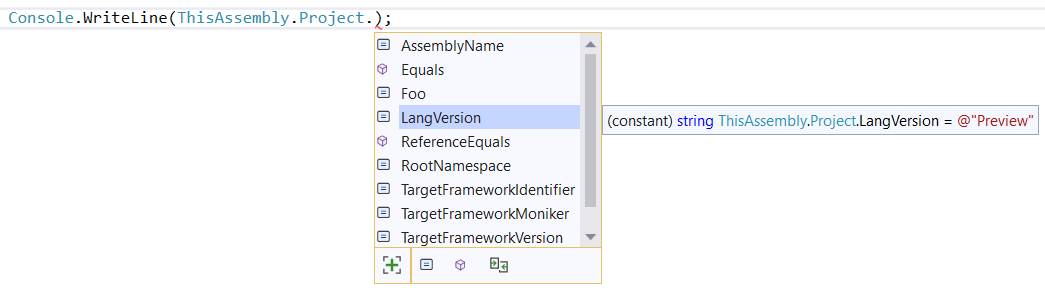
This package generates a static ThisAssembly.Project class with public
constants exposing project properties that have been opted into this mechanism by adding
them as ProjectProperty MSBuild items in the project file, such as:
 <PropertyGroup>

 <Foo>Bar</Foo>
 </PropertyGroup>
 <ItemGroup>

 <ProjectProperty Include="Foo" Comment="This comment replaces the default comment :)" />
 </ItemGroup>
👁 alternate text is missing from this package README image
This package generates a static ThisAssembly.Resources class with public
properties exposing typed APIs to retrieve the contents of embedded resources.
 <ItemGroup>
 <EmbeddedResource Include="Content/Docs/License.md" />
 </ItemGroup>
👁 alternate text is missing from this package README image
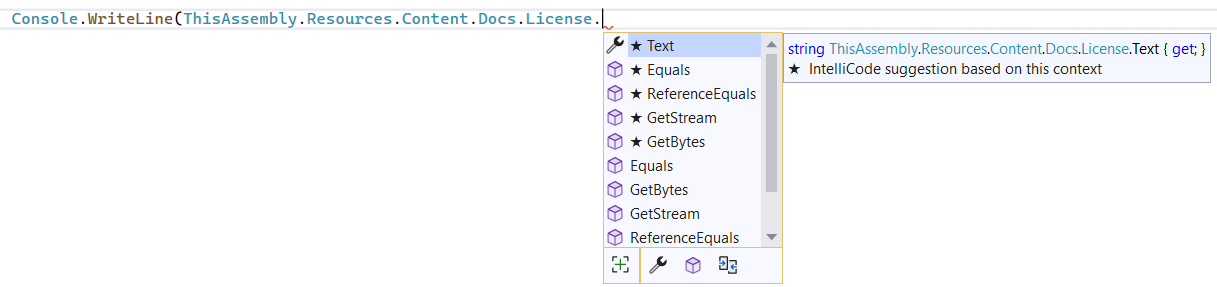
Since markdown files are text files, the API will expose a Text property property
for it that will read its content once and cache it:
👁 alternate text is missing from this package README image
The $(EmbeddedResourceStringExtensions) MSBuild property allows customizing which
file extensions get treated as text files. By default, it's defined as:
 <PropertyGroup>
 <EmbeddedResourceStringExtensions>.txt|.cs|.sql|.json|.md</EmbeddedResourceStringExtensions>
 </PropertyGroup>
You can append additional file extensions to this list, or override it completely. The list must be pipe-separated.
You can always use the provided GetStream and GetBytes for more advanced scenarios (or for
non-text resources).
Optionally, you can specify the Kind metadata for a specific EmbeddedResource you want
treated as a text file:
<ItemGroup>
 <EmbeddedResource Include="query.kql" Kind="Text" />
</ItemGroup>
You can also add a Comment item metadata attribute, which will be used as the <summary> XML
doc for the generated member.
You can also provide additional embedded resources dynamically, by running a target before
PrepareEmbeddedResources:
 <Target Name="AddDynamicResources" BeforeTargets="PrepareEmbeddedResources">
 <ItemGroup>
 <EmbeddedResource Include="Content/Docs/$(Configuration).md" />
 </ItemGroup>
 </Target>
The following MSBuild properties can be used to customize the generated code:
| Property | Description |
|---|---|
| ThisAssemblyNamespace | Sets the namespace of the generated ThisAssembly root class. If not set, it will be in the global namespace. |
| ThisAssemblyVisibility | Sets the visibility modifier of the generated ThisAssembly root class. If not set, it will be internal. |
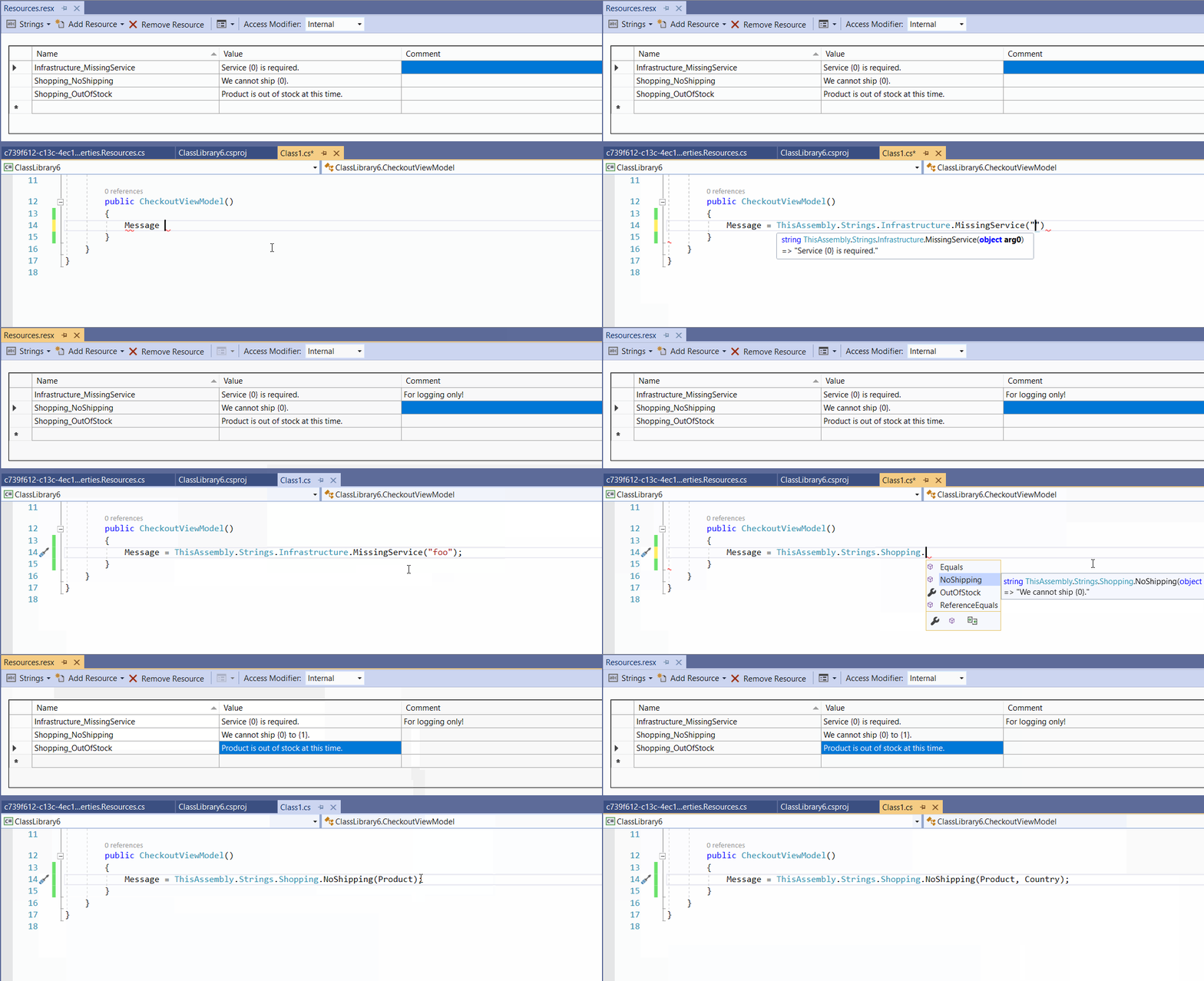
This package generates a static ThisAssembly.Strings class with public
constants exposing string resources in .resx files or methods with the right number of
parameters for strings that use formatting parameters.
👁 alternate text is missing from this package README image
In addition, it groups constants and methods in nested classes according to an optional underscore separator to organize strings. For example, User_InvalidCredentials can be accessed with ThisAssembly.Strings.User.InvalidCredentials if it contains a simple string, or as a method with the right number of parametres if its value has a format string.
Given the following Resx file:
| Name | Value | Comment |
|---|---|---|
| Infrastructure_MissingService | Service {0} is required. | For logging only! |
| Shopping_NoShipping | We cannot ship {0} to {1}. | |
| Shopping_OutOfStock | Product is out of stock at this time. | |
| Shopping_AvailableOn | Product available on {date:yyyy-MM}. |
The following code would be generated:
partial class ThisAssembly
{
 public static partial class Strings
 {
 public static partial class Infrastructure
 {
 /// <summary>
 /// For logging only!
 /// => "Service {0} is required."
 /// </summary>
 public static string MissingService(object arg0)
 => string.Format(CultureInfo.CurrentCulture,
 Strings.GetResourceManager("ThisStore.Properties.Resources").GetString("MissingService"),
 arg0);
 }

 public static partial class Shopping
 {
 /// <summary>
 /// => "We cannot ship {0} to {1}."
 /// </summary>
 public static string NoShipping(object arg0, object arg1)
 => string.Format(CultureInfo.CurrentCulture,
 Strings.GetResourceManager("ThisStore.Properties.Resources").GetString("NoShipping"),
 arg0, arg1);

 /// <summary>
 /// => "Product is out of stock at this time."
 /// </summary>
 public static string OutOfStock
 => Strings.GetResourceManager("ThisStore.Properties.Resources").GetString("OutOfStock");

 /// <summary>
 /// Product available on {date:yyyy-MM}.
 /// </summary>
 public static string AvailableOn(object date)
 => string.Format(CultureInfo.CurrentCulture,
 Strings.GetResourceManager("ThisAssemblyTests.Resources").GetString("WithNamedFormat").Replace("{date:yyyy-MM}", "{0}"),
 ((IFormattable)date).ToString("yyyy-MM", CultureInfo.CurrentCulture));
 }
 }
}
The following MSBuild properties can be used to customize the generated code:
| Property | Description |
|---|---|
| ThisAssemblyNamespace | Sets the namespace of the generated ThisAssembly root class. If not set, it will be in the global namespace. |
| ThisAssemblyVisibility | Sets the visibility modifier of the generated ThisAssembly root class. If not set, it will be internal. |
Set the $(ThisAssemblyNamespace) MSBuild property to set the namespace of the
generated ThisAssembly root class. Otherwise, it will be generated in the global namespace.
The generated root ThisAssembly class is partial and has no visibility modifier by default,
making it internal by default in C#.
You can set the $(ThisAssemblyVisibility) MSBuild property to public to make it public.
This will also change all constants to be static readonly properties instead.
Default:
partial class ThisAssembly
{
 public partial class Constants
 {
 public const string Hello = "World";
 }
}
In this case, the compiler will inline the constants directly into the consuming code at the call site, which is optimal for performance for the common usage of constants.
Public:
public partial class ThisAssembly
{
 public partial class Constants
 {
 public static string Hello => "World";
 }
}
This makes it possible for consuming code to remain unchanged and not require
a recompile when the the values of ThisAssembly are changed in a referenced assembly.
If you want to keep the properties as constants, you can instead extend the generated code by defining another partial that can modify its visibility as needed (or add new members).
// makes the generated class public
public partial ThisAssembly
{
 // Nested classes are always public since the outer class
 // already limits their visibility
 partial class Constants
 {
 // add some custom constants
 public const string MyConstant = "This isn't configurable via MSBuild";

 // generated code will remain as constants
 }
}
👁 Clarius Org
👁 MFB Technologies, Inc.
👁 DRIVE.NET, Inc.
👁 Keith Pickford
👁 Thomas Bolon
👁 Kori Francis
👁 Uno Platform
👁 Reuben Swartz
👁 Jacob Foshee
👁 alternate text is missing from this package README image
👁 Eric Johnson
👁 David JENNI
👁 Jonathan
👁 Charley Wu
👁 Ken Bonny
👁 Simon Cropp
👁 agileworks-eu
👁 Zheyu Shen
👁 Vezel
👁 ChilliCream
👁 4OTC
👁 Vincent Limo
👁 Jordan S. Jones
👁 domischell
👁 Justin Wendlandt
👁 Adrian Alonso
👁 Michael Hagedorn
👁 alternate text is missing from this package README image
👁 torutek
👁 mccaffers
| Product | Versions Compatible and additional computed target framework versions. |
|---|---|
| .NET | net5.0 net5.0 was computed. net5.0-windows net5.0-windows was computed. net6.0 net6.0 was computed. net6.0-android net6.0-android was computed. net6.0-ios net6.0-ios was computed. net6.0-maccatalyst net6.0-maccatalyst was computed. net6.0-macos net6.0-macos was computed. net6.0-tvos net6.0-tvos was computed. net6.0-windows net6.0-windows was computed. net7.0 net7.0 was computed. net7.0-android net7.0-android was computed. net7.0-ios net7.0-ios was computed. net7.0-maccatalyst net7.0-maccatalyst was computed. net7.0-macos net7.0-macos was computed. net7.0-tvos net7.0-tvos was computed. net7.0-windows net7.0-windows was computed. net8.0 net8.0 was computed. net8.0-android net8.0-android was computed. net8.0-browser net8.0-browser was computed. net8.0-ios net8.0-ios was computed. net8.0-maccatalyst net8.0-maccatalyst was computed. net8.0-macos net8.0-macos was computed. net8.0-tvos net8.0-tvos was computed. net8.0-windows net8.0-windows was computed. net9.0 net9.0 was computed. net9.0-android net9.0-android was computed. net9.0-browser net9.0-browser was computed. net9.0-ios net9.0-ios was computed. net9.0-maccatalyst net9.0-maccatalyst was computed. net9.0-macos net9.0-macos was computed. net9.0-tvos net9.0-tvos was computed. net9.0-windows net9.0-windows was computed. net10.0 net10.0 was computed. net10.0-android net10.0-android was computed. net10.0-browser net10.0-browser was computed. net10.0-ios net10.0-ios was computed. net10.0-maccatalyst net10.0-maccatalyst was computed. net10.0-macos net10.0-macos was computed. net10.0-tvos net10.0-tvos was computed. net10.0-windows net10.0-windows was computed. |
| .NET Core | netcoreapp2.0 netcoreapp2.0 was computed. netcoreapp2.1 netcoreapp2.1 was computed. netcoreapp2.2 netcoreapp2.2 was computed. netcoreapp3.0 netcoreapp3.0 was computed. netcoreapp3.1 netcoreapp3.1 was computed. |
| .NET Standard | netstandard2.0 netstandard2.0 is compatible. netstandard2.1 netstandard2.1 was computed. |
| .NET Framework | net461 net461 was computed. net462 net462 was computed. net463 net463 was computed. net47 net47 was computed. net471 net471 was computed. net472 net472 was computed. net48 net48 was computed. net481 net481 was computed. |
| MonoAndroid | monoandroid monoandroid was computed. |
| MonoMac | monomac monomac was computed. |
| MonoTouch | monotouch monotouch was computed. |
| Tizen | tizen40 tizen40 was computed. tizen60 tizen60 was computed. |
| Xamarin.iOS | xamarinios xamarinios was computed. |
| Xamarin.Mac | xamarinmac xamarinmac was computed. |
| Xamarin.TVOS | xamarintvos xamarintvos was computed. |
| Xamarin.WatchOS | xamarinwatchos xamarinwatchos was computed. |
Showing the top 2 NuGet packages that depend on ThisAssembly:
| Package | Downloads |
|---|---|
|
RecordVisitors
This package help you record your visitors |
|
|
Khitiara.Utils
Package Description |
Showing the top 3 popular GitHub repositories that depend on ThisAssembly:
| Repository | Stars |
|---|---|
|
moq/labs
The most popular and friendly mocking framework for .NET
|
|
|
devlooped/avatar
A modern compile-time generated interception/proxy library
|
|
|
devlooped/NuDoq
A standalone API to read .NET XML documentation files and optionally augment it with reflection information.
|
| Version | Downloads | Last Updated |
|---|---|---|
| 2.1.2 | 10,040 | 10/17/2025 |
| 2.0.14 | 17,161 | 4/30/2025 |
| 2.0.13 | 2,186 | 4/24/2025 |
| 2.0.12 | 4,478 | 2/18/2025 |
| 2.0.11 | 2,713 | 2/8/2025 |
| 2.0.10 | 8,011 | 11/26/2024 |
| 2.0.9 | 1,581 | 11/23/2024 |
| 2.0.8 | 2,310 | 11/8/2024 |
| 2.0.7 | 1,375 | 11/8/2024 |
| 2.0.6 | 1,618 | 11/1/2024 |
| 2.0.5 | 1,785 | 10/9/2024 |
| 2.0.4 | 1,349 | 10/8/2024 |
| 2.0.3 | 3,229 | 9/30/2024 |
| 2.0.2 | 1,359 | 9/30/2024 |