

3brs/sylius-payment-fee-plugin
Payment extra fee plugin for Sylius
Maintainers
Package info
github.com/3BRS/sylius-payment-fee-plugin
Type:sylius-plugin
pkg:composer/3brs/sylius-payment-fee-plugin
Requires
- php: ^8.2
- sylius/sylius: ^2.1
Requires (Dev)
- behat/behat: ^v3.24.1
- behat/mink-selenium2-driver: ^v1.7.0
- dbrekelmans/bdi: ^1.4
- dmore/behat-chrome-extension: ^1.4.0
- dmore/chrome-mink-driver: ^2.9.3
- friends-of-behat/mink: ^v1.11.0
- friends-of-behat/mink-browserkit-driver: ^v1.6.2
- friends-of-behat/mink-debug-extension: ^v2.1.0
- friends-of-behat/mink-extension: ^v2.7.5
- friends-of-behat/page-object-extension: ^v0.3.2
- friends-of-behat/suite-settings-extension: ^v1.1.0
- friends-of-behat/symfony-extension: v2.6.0
- friends-of-behat/variadic-extension: ^v1.6.0
- nyholm/psr7: ^1.8
- php-http/message-factory: ^1.1.0
- phpspec/phpspec: ^7.5
- phpstan/phpstan: ^2.1.10
- phpstan/phpstan-doctrine: ^2.0
- phpstan/phpstan-strict-rules: ^2.0.4
- phpstan/phpstan-symfony: ^2.0.3
- phpstan/phpstan-webmozart-assert: ^2.0.0
- phpunit/phpunit: ^11.5 || ^12.0.10
- polishsymfonycommunity/symfony-mocker-container: ^v1.0.8
- rector/rector: ^2.0.10
- sylius-labs/coding-standard: ^v4.4.0
- sylius/sylius-rector: ^v3.0.0
- symfony/browser-kit: ^v6.4|^7.1
- symfony/config: ^v6.4|^7.1
- symfony/debug-bundle: ^v6.4|^7.1
- symfony/dependency-injection: ^v6.4|^7.1
- symfony/doctrine-bridge: ^v6.4|^7.1
- symfony/doctrine-messenger: ^v6.4|^7.1
- symfony/dotenv: ^v6.4|^7.1
- symfony/filesystem: ^v6.4|^7.1
- symfony/flex: ^v2.5.0
- symfony/framework-bundle: ^v6.4|^7.1
- symfony/http-foundation: ^v6.4|^7.1
- symfony/http-kernel: ^v6.4|^7.1
- symfony/intl: ^v6.4|^7.1
- symfony/maker-bundle: ^1.60
- symfony/messenger: ^v6.4|^7.1
- symfony/property-info: ^v6.4|^7.1
- symfony/var-dumper: ^v6.4|^7.1
- symfony/var-exporter: ^v6.4|^7.1
- symfony/web-profiler-bundle: ^v6.4|^7.1
- symplify/easy-coding-standard: ^12.0
Suggests
None
Provides
None
Conflicts
- api-platform/core: <4.2.0
- api-platform/json-schema: <4.2.0
- api-platform/metadata: <4.2.0
- api-platform/symfony: <4.2.0
- babdev/pagerfanta-bundle: <3.6.1
- doctrine/collections: <1.7.0
- doctrine/data-fixtures: <1.5.1
- doctrine/dbal: <2.13.3
- doctrine/doctrine-bundle: <2.8.0
- friendsofsymfony/rest-bundle: <3.1.0
- jms/serializer-bundle: <4.2.0
- knplabs/knp-menu: <3.3.0
- knplabs/knp-menu-bundle: <3.5.0
- lexik/jwt-authentication-bundle: <2.12
- masterminds/html5: <2.7.5
- payum/core: <1.7.3
- polishsymfonycommunity/symfony-mocker-container: <1.0.6
- sylius/resource-bundle: <1.13.0
- sylius/sylius: <2.1.0
- sylius/twig-extra: >=0.9.0 <0.9.1
- sylius/twig-hooks: >=0.9.0 <0.9.1
- symfony/framework-bundle: >=5.4.0 <=5.4.20|>=6.0.0 <=6.0.16|>=6.1.0 <=6.1.8|>=6.2.0 <=6.2.2|6.2.8
- symplify/easy-coding-standard: <10.2.0
- twig/twig: <2.14.7
- webmozart/assert: <1.11.0
- willdurand/negotiation: <3.0
Replaces
None
This package is auto-updated.
Last update: 2026-06-27 11:26:53 UTC
README
Payment Fee Plugin
👁 Image
👁 Image
👁 Image
Features
- Charge extra fee for a payment method
- Typical usage: Cash on Delivery
- Taxes are implemented the same way as taxes for shipping fees
Admin
👁 Admin payment fee configuration

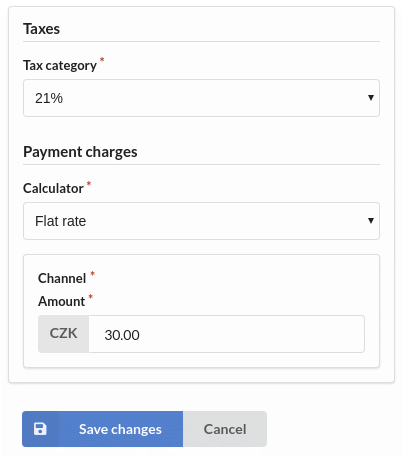
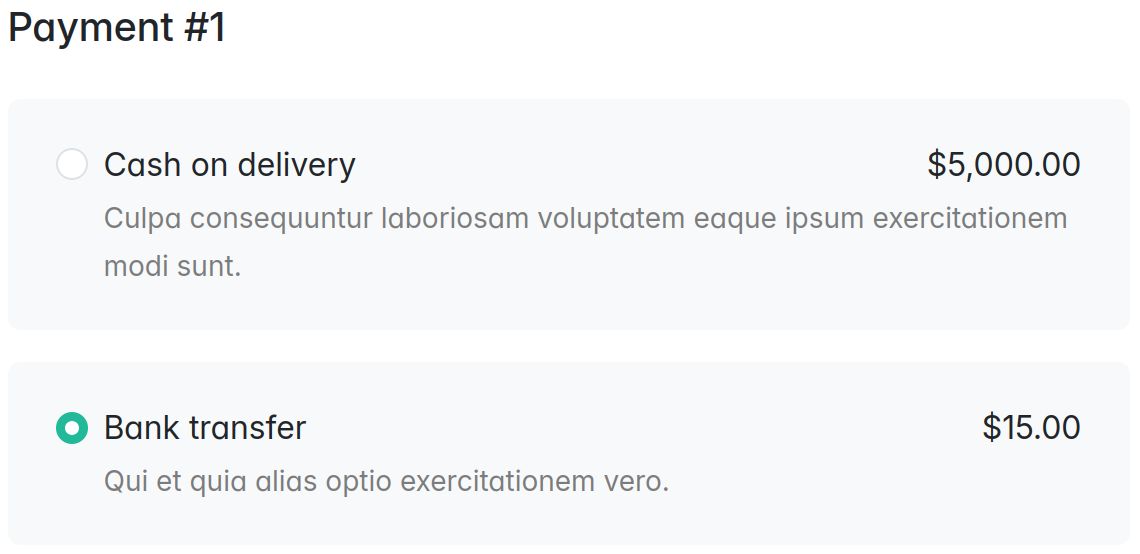
Checkout
👁 Checkout payment fees
👁 Checkout order summary with payment fee


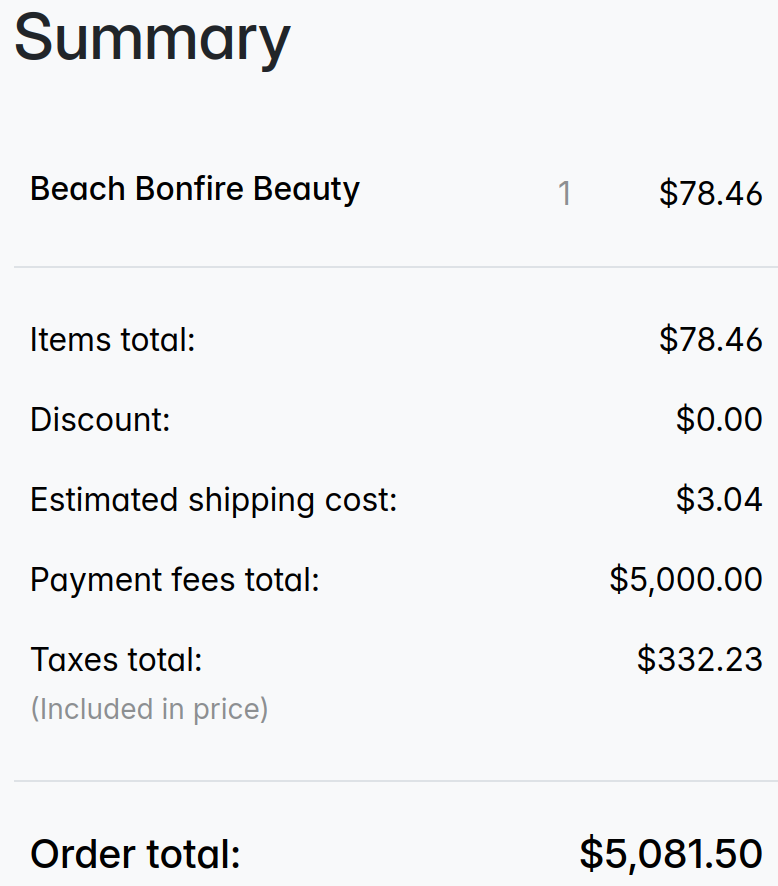
Installation
-
Run
composer require 3brs/sylius-payment-fee-plugin -
Add plugin class to your
config/bundles.phpreturn [ ... ThreeBRS\SyliusPaymentFeePlugin\ThreeBRSSyliusPaymentFeePlugin::class => ['all' => true], ];
-
Add plugin configuration to your
config/packages/_sylius.yamlimports: - { resource: "@ThreeBRSSyliusPaymentFeePlugin/Resources/config/config.yaml" }
-
Your Entity
PaymentMethodhas to implement\ThreeBRS\SyliusPaymentFeePlugin\Model\PaymentMethodWithFeeInterface. You can use TraitThreeBRS\SyliusPaymentFeePlugin\Model\PaymentMethodWithFeeTrait.- see test PaymentMethod for inspiration
For guide how to use your own entity see Sylius docs - Customizing Models
-
JavaScript Integration - Register the Stimulus controller for dynamic calculator configuration forms:
The plugin includes a Stimulus controller (
payment-calculator_controller.js) that handles dynamic prototype forms for payment method calculator configuration. This allows the calculator configuration fields to appear/change dynamically when you select a calculator type in the admin panel.Manual Steps Required:
a. In your application's admin entrypoint file (e.g.,
assets/admin/entrypoint.js):import { startStimulusApp } from '@symfony/stimulus-bridge'; import PaymentCalculatorController from '../../vendor/3brs/sylius-payment-fee-plugin/src/Resources/assets/admin/controllers/payment-calculator_controller'; // Start Stimulus app export const app = startStimulusApp(); // Register the payment calculator controller from the plugin app.register('payment-calculator', PaymentCalculatorController);
b. Rebuild your assets after adding the controller:
yarn install
yarn build
How it works:
- When you select a calculator type (e.g., "Flat rate") in the payment method form, the controller dynamically loads the appropriate configuration fields
- On the edit page, it preserves existing saved values
- On the create page, it initializes empty fields for the selected calculator
- The controller uses Stimulus data attributes:
data-controller="payment-calculator",data-payment-calculator-target="select", anddata-payment-calculator-target="container"
-
Create and run doctrine database migrations:
bin/console doctrine:migrations:diff
bin/console doctrine:migrations:migrate
Development
Usage
- Alter plugin in
/src - See
bin/dir for useful commands
Testing
After your changes you must ensure that the tests are still passing.
composer install
bin/console doctrine:database:create --if-not-exists --env=test
bin/console doctrine:schema:update --complete --force --env=test
yarn --cwd tests/Application install
yarn --cwd tests/Application build

bin/behat
bin/phpstan.sh
bin/ecs.sh
vendor/bin/phpspec run
Opening Sylius with your plugin
-
Install symfony CLI command: https://symfony.com/download
- hint: for Docker (with Ubuntu) use Debian/Ubuntu — APT based
Linux installation steps as
rootuser and withoutsudocommand- you may need to install
curlfirstapt-get update && apt-get install curl --yes
- you may need to install
- hint: for Docker (with Ubuntu) use Debian/Ubuntu — APT based
Linux installation steps as
-
Run app
(cd tests/Application && APP_ENV=test bin/console sylius:fixtures:load)
(cd tests/Application && APP_ENV=test symfony server:start --dir=public --port=8080)
- change
APP_ENVtodevif you need it
License
This library is under the MIT license.