

cebe/yii2-openapi
Generate full REST API application from OpenAPI 3 specification.
Maintainers
Requires
- php: >=7.1.0
- cebe/php-openapi: ^1.5.0
- fakerphp/faker: ^1.9
- insolita/yii2-fractal: ^1.0.0
- laminas/laminas-code: ^3.4
- sam-it/yii2-mariadb: ^2.0
- yiisoft/yii2: ~2.0.15
- yiisoft/yii2-gii: ~2.0.0 | ~2.1.0 | ~2.2.0| ~2.3.0
Requires (Dev)
- cebe/indent: *
- friendsofphp/php-cs-fixer: ~2.16
- phpunit/phpunit: ^6.5|^8.0|^9.0
- yiisoft/yii2-gii: >=2.1.0
Suggests
None
Provides
None
Conflicts
None
Replaces
None
This package is auto-updated.
Last update: 2024-06-04 15:27:13 UTC
README
This repository has been moved to https://github.com/php-openapi/yii2-openapi.
Please use the new packagephp-openapi/yii2-openapiinstead.
REST API application generator for Yii2, openapi 3.0 YAML -> Yii2.
Base on Gii, the Yii Framework Code Generator.
👁 Latest Stable Version
👁 Latest Alpha Version
👁 Total Downloads
👁 License
👁 yii2-openapi


TLDR; what is this?
A code generator for OpenAPI and Yii Framework based PHP API application.
Input: OpenAPI 3.0 YAML or JSON (via cebe/php-openapi)
Output: Yii Framework Application with Controllers, Models, database schema
Features
Currently available features:
- Generate Path mappings, Controllers and Actions for API Endpoints. CRUD Endpoints are ready-to-use, other Endpoints are generated as abstract functions that need to be implemented
- Generate Models and validation based on OpenAPI Schema
- Generate Database Schema from OpenAPI Schema
- Generates Database Migrations for schema changes
- Provide Dummy Data via Faker for development
Requirements
- PHP 7.1 or higher (works fine with PHP 8)
Install
composer require php-openapi/yii2-openapi:^2.0@beta
Usage
You can use this package in your existing application or start a new project using the yii2-app-api application template. For usage of the template, see instructions in the template repo readme.
In your existing Yii application config (works for console as well as web):
<?php
$config = [
 // ... this is your application config ...
];

if (YII_ENV_DEV) {
 // enable Gii module
 $config['bootstrap'][] = 'gii';
 $config['modules']['gii'] = [
 'class' => \yii\gii\Module::class,
 'generators' => [
 // add ApiGenerator to Gii module
 'api' => \cebe\yii2openapi\generator\ApiGenerator::class,

 // --------- OR ---------
 // to disable generation of migrations files or with default config change
 'api' => [
 'class' => \cebe\yii2openapi\generator\ApiGenerator::class,
 'generateMigrations' => false, # this config can also be applied in CLI command
 ],
 ],
 ];
}

return $config;
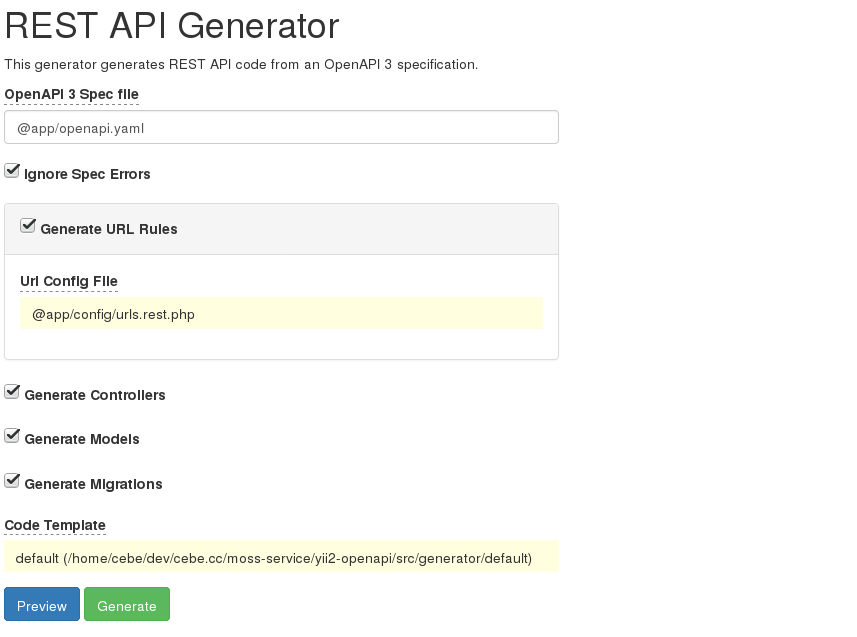
To use the web generator, open index.php?r=gii and select the REST API Generator.
On console you can run the generator with ./yii gii/api --openApiPath=@app/openapi.yaml. Where @app/openapi.yaml should be the absolute path to your OpenAPI spec file. This can be JSON as well as YAML (see also cebe/php-openapi for supported formats).
Run ./yii gii/api --help for all options. Example: Disable generation of migrations files ./yii gii/api --generateMigrations=0
See Petstore example for example OpenAPI spec.
OpenAPI extensions
This library understands the following extensions to the OpenAPI spec:
x-faker
You may specify custom PHP code for generating fake data for a property:
 Post:
 properties:
 id:
 type: integer
 tags:
 type: array
 items:
 type: string
 example: ['one', 'two']
 x-faker: "$faker->randomElements(['one', 'two', 'three', 'four'])"
To avoid generating faker code for particular model attribute, use value false:
 Post:
 properties:
 age:
 type: integer
 x-faker: false
Using in reference with allOf:
 Invoice:
 type: object
 required:
 - id
 properties:
 id:
 type: integer

 Order:
 type: object
 required:
 - id
 properties:
 id:
 type: integer
 invoice:
 allOf:
 - $ref: '#/components/schemas/Invoice'
 - x-faker: false
x-table
Specify the table name for a Schema that defines a model which is stored in the database.
You can generate non-db model based on \yii\base\Model without migrations by setting x-table: false
x-pk
Explicitly specify primary key name for table, if it is different from "id"
 Post:
 x-table: posts
 x-pk: uid
 properties:
 uid:
 type: integer
 title:
 type: string
x-db-type
Explicitly specify the database type for a column. (MUST contain only real DB type! (json, jsonb, uuid, varchar etc.)).
If x-db-type is set to false, property will be processed as virtual;
It will be added in model as public property, but skipped for migrations generation.
Example values of x-db-type are:
false(boolean false)- as string and its value can be like:
- text
- text[]
- INTEGER PRIMARY KEY AUTO_INCREMENT
- decimal(12,4)
- json
- varchar
- VARCHAR
- SMALLINT UNSIGNED ZEROFILL
- MEDIUMINT(10) UNSIGNED ZEROFILL COMMENT "comment" (note the double quotes here)
Such values are not allowed:
int null default null after low_price(null and default will be handled bynullableanddefaultkeys respectively)- MEDIUMINT(10) UNSIGNED ZEROFILL NULL DEFAULT '7' COMMENT 'comment' AFTER
seti, ADD INDEXt(w)
If enum and x-db-type both are provided then for database column schema (migrations), only x-db-type will be considered ignoring enum.
x-indexes
Specify table indexes
 Post:
 x-table: posts
 x-indexes:
 - 'visible,publish_date'
 - 'unique:title' #for unique attributes also unique validation check will be added
 - 'gist:metadata' #for postgres will generate index using GIST index type
 properties:
 id:
 type: integer
 x-db-type: INTEGER PRIMARY KEY AUTO_INCREMENT
 title:
 type: string
 visible:
 type: boolean
 publish_date:
 type: string
 format: date
 metadata:
 type: object
 x-db-type: JSON
 default: '{}'
x-db-default-expression
Ability to provide default value by database expression
created_at:
 readOnly: true
 type: string
 format: datetime
 x-db-type: datetime
 nullable: false
 x-db-default-expression: current_timestamp()
Note: If both default and x-db-default-expression are present then default will be considered.
created_at:
 readOnly: true
 type: string
 format: datetime
 x-db-type: datetime
 nullable: false
 x-db-default-expression: current_timestamp() # this will be ignored
 default: "2011-11-11" # this will be considered
Also see: https://dev.mysql.com/doc/refman/8.0/en/data-type-defaults.html
x-fk-on-delete
Allow to set foreign key constraint in migrations for ON DELETE event of row in database table. Example:
 components:
 schemas:
 User:
 type: object
 description: x on-x (update|delete) foreign key constraint
 properties:
 id:
 type: integer
 name:
 type: string
 Post:
 type: object
 description: x on-x (update|delete) foreign key constraint
 properties:
 id:
 type: integer
 title:
 type: string
 user:
 allOf:
 - $ref: '#/components/schemas/User'
 - x-fk-on-update: CASCADE
 user_2:
 allOf:
 - $ref: '#/components/schemas/User'
 - x-fk-on-update: CASCADE
 - x-fk-on-delete: SET NULL
 user_3:
 allOf:
 - $ref: '#/components/schemas/User'
 - x-fk-on-delete: SET NULL
 user_4:
 $ref: '#/components/schemas/User' # without any constraints
x-fk-on-update
Allow to set foreign key constraint in migrations for ON UPDATE event of row in database table. For example, see above section for x-fk-on-delete.
x-fk-column-name
Provide custom database table column name in case of relationship column. This will not reflect in models relations, faker etc. Example:
 components:
 schemas:
 Webhook:
 type: object
 description: example for x-fk-column-name
 properties:
 id:
 type: integer
 name:
 type: string
 user:
 $ref: '../openapi.yaml#/components/schemas/User' # this will automatically create `user_id` column
 redelivery_of:
 allOf:
 - $ref: '../openapi.yaml#/components/schemas/Delivery'
 # this will automatically create `redelivery_of_id` column, but to avoid that use below extension
 - x-fk-column-name: redelivery_of # this will create `redelivery_of` column instead of `redelivery_of_id`
Many-to-Many relation definition
There are two ways for define many-to-many relations:
Simple many-to-many without junction model
-
property name for many-to-many relation should be equal lower-cased, pluralized related schema name
-
referenced schema should contains mirrored reference to current schema
-
migration for junction table can be generated automatically - table name should be [pluralized, lower-cased schema_name1]2[pluralized, lower-cased schema name2], in alphabetical order; For example, for schemas Post and Tag - table should be posts2tags, for schemas Post and Attachement - table should be attachments2posts
Post:
 properties:
 ...
 tags:
 type: array
 items:
 $ref: '#/components/schemas/Tag'

Tag:
 properties:
 ...
 posts:
 type: array
 items:
 $ref: '#/components/schemas/Post'
Many-to-many with junction model
This way allowed creating multiple many-to-many relations between to models
- define junction schema with all necessary attributes. There are only one important requirement - the junction schema name must be started with prefix 'junction_' (This prefix will be used internally only and will be trimmed before table and model generation)
# Model TeamMembers with table team_members will be generated with columns team_id, user_id and role
junction_TeamMembers:
 team:
 $ref: '#/components/schemas/Team'
 user:
 $ref: '#/components/schemas/User'
 role:
 type: string
- Both many-to-many related schemas must have properties with reference to "junction_*" schema. These properties will be used as relation names
Team:
 properties:
 ...
 team_members:
 type: array
 items:
 $ref: '#/components/schemas/junction_TeamMembers'

User:
 properties:
 ...
 memberships: #You absolutely free with naming for relationship attributes
 type: array
 items:
 $ref: '#/components/schemas/junction_TeamMembers'
- see both examples here tests/specs/many2many.yaml
Handling of NOT NULL constraints
NOT NULL in DB migrations is determined by nullable and required properties of the OpenAPI schema.
e.g. attribute = 'my_property'.
- If you define attribute neither "required" nor via "nullable", then it is by default
NULL:
 ExampleSchema:
 properties:
 my_property:
 type: string
- If you define attribute in "required", then it is
NOT NULL
 ExampleSchema:
 required:
 - my_property
 properties:
 my_property:
 type: string
- If you define attribute via "nullable", then it overrides "required", e.g. allow
NULLin this case:
 ExampleSchema:
 required:
 - my_property
 properties:
 my_property:
 type: string
 nullable: true
- If you define attribute via "nullable", then it overrides "required", e.g.
NOT NULLin this case:
 test_table:
 required:
 properties:
 my_property:
 type: string
 nullable: false
Handling of enum (#enum)
It works on all 3 DB: MySQL, MariaDb and PgSQL.
 test_table:
 properties:
 my_property:
 enum:
 - one
 - two
 - three
Note: Changes in enum values are not very simple. For Mysql and Mariadb, migrations will be generated but in many cases custom modification in it are required. For Pgsql migrations for change in enum values will not be generated. It should be handled manually.
It will be ignored for database column schema (migrations) if x-db-type is provided.
Handling of numeric (#numeric, #MariaDb)
precision-default = 10 scale-default = 2
- You can define attribute like "numeric(precision,scale)":
 test_table:
 properties:
 my_property:
 x-db-type: decimal(12,4)
DB-Result = decimal(12,4)
- You can define attribute like "numeric(precision)" with default scale-default = 2:
 test_table:
 properties:
 my_property:
 x-db-type: decimal(12)
DB-Result = decimal(12,2)
- You can define attribute like "numeric" with precision-default = 10 and scale-default = 2:
 test_table:
 properties:
 my_property:
 x-db-type: decimal
DB-Result = decimal(10,2)
Handling of timestamp database column data type
If field is defined as
created_at:
 type: string
 format: date-time # or datetime
 example: '2020-03-14T21:42:17Z'
 readOnly: true
then database type selected will be timestamp. This is by design. If datetime data type is needed, use x-db-type as
created_at:
 type: string
 format: date-time # or datetime
 example: '2020-03-14T21:42:17Z'
 x-db-type: datetime
 readOnly: true
Assumptions
When generating code from an OpenAPI description there are many possible ways to achive a fitting result. Thus there are some assumptions and limitations that are currently applied to make this work. Here is a (possibly incomplete) list:
- The current implementation works best with OpenAPI description that follows the JSON:API guidelines.
- The request and response format/schema is currently not extracted from OpenAPI schema and may need to be adjusted manually if it does not follow JSON:API
- column/field/property with name
idis considered as Primary Key by this library and it is automatically handled by DB/Yii; so remove it from validationrules()- other fields can currently be used as primary keys using the
x-pkOpenAPI extension (see below) but it may not be work correctly in all cases, please report bugs if you find them.
- other fields can currently be used as primary keys using the
Other things to keep in mind:
Adding columns to existing tables
When adding new fields in the API models, new migrations will be generated to add these fields to the table. For a project that is already in production, it should be considered to adjust the generated migration to add default values for existing data records.
One case where this is important is the addition of a new column with NOT NULL contraint, which does not provide a default value.
Such a migration will fail when the table is not empty:
$this->addColumn('{{%company}}', 'name', $this->string(128)->notNull());
Fails on a PostgreSQL database with
add column name string(128) NOT NULL to table {{%company}} ...Exception: SQLSTATE[23502]: Not null violation: 7 ERROR: column "name" contains null values
The solution would be to create the column, allowing NULL, set the value to a default and add the null constraint later.
$this->addColumn('{{%company}}', 'name', $this->string(128)->null());
$this->update('{{%company}}', ['name' => 'No name']);
$this->alterColumn('{{%company}}', 'name', $this->string(128)->notNull());
Screenshots
Gii Generator Form:

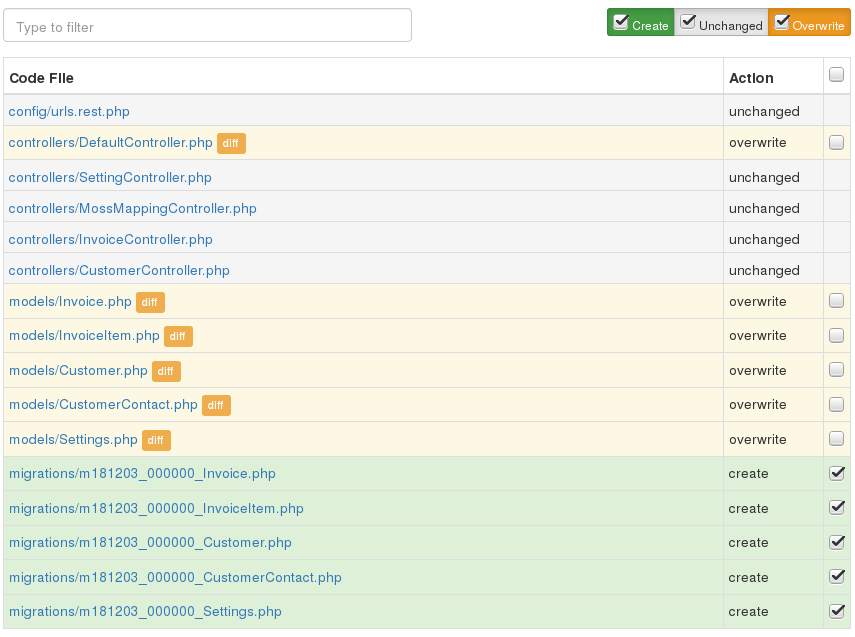
Generated files:

Development
To contribute or play around, steps to set up this project up locally are in CONTRIBUTING.md.
Support
Need help with your API project?
Professional support, consulting as well as software development services are available:
https://www.cebe.cc/en/contact
Development of this library is sponsored by cebe.:cloud: "Your Professional Deployment Platform".