

contributte/apitte-skeleton
🎁 API / REST API / JSON API / PSR-7 / Middlewares project skeleton based on Nette Framework (@nette), Apitte (@apitte), Doctrine (@nettrine) and Contributte (@contributte) libraries by @f3l1x.
Maintainers
Package info
github.com/contributte/apitte-skeleton
Type:project
pkg:composer/contributte/apitte-skeleton
Requires
- php: >=8.4
- contributte/apitte: ^0.14.0
- contributte/bootstrap: ^0.7.0
- contributte/console: ^0.10.1
- contributte/di: ^0.5.6
- contributte/http: ^0.5.0
- contributte/monolog: ^0.6.0
- contributte/neonizer: ^0.7.0
- contributte/security: ^0.5.0
- contributte/tracy: ^0.7.0
- contributte/utils: ^0.7.0
- doctrine/annotations: ^2.0
- nettrine/cache: ^0.5.0
- nettrine/dbal: ^0.10.1
- nettrine/fixtures: ^0.9.0
- nettrine/migrations: ^0.10.0
- nettrine/orm: ^0.10.0
- symfony/cache: ^7.2.3
- symfony/property-info: ^7.2.3
- symfony/serializer: ^7.2.3
- symfony/validator: ^8.0.5
- symfony/var-exporter: ^7.0
Requires (Dev)
- contributte/dev: ^0.6
- contributte/phpstan: ^0.3
- contributte/qa: ^0.4
- contributte/tester: ^0.4
- mockery/mockery: ^1.6.12
- nelmio/alice: ^3.14.0
- phpstan/phpstan-doctrine: ^2.0.0
Suggests
None
Provides
None
Conflicts
None
Replaces
None
This package is auto-updated.
Last update: 2026-06-10 21:54:55 UTC
README
👁 Image
👁 Image
👁 Image
👁 Image
👁 Image
👁 Image
👁 Image
👁 Image
👁 Image
Website 🚀 contributte.org | Contact 👨🏻💻 f3l1x.io | Twitter 🐦 @contributte
Goal
Main goal is to provide best prepared API starter-kit project for Nette-Apitte developers.
Focused on:
- PHP 8.4+
nette/*packages- build PSR-7 API via
contributte/apitte - Doctrine ORM via
nettrine/* - Symfony components via
contributte/* - codestyle checking via CodeSniffer and
contributte/qa - static analysing via phpstan and
contributte/phpstan - unit / integration tests via Nette Tester and
contributte/tester
You can try it out yourself either by running it with docker, or more easily with docker-compose.
Demo
https://examples.contributte.org/apitte-skeleton/
Install with docker
-
At first, use composer to install this project.
composer create-project -s dev contributte/apitte-skeleton
-
After that, you have to setup database.
-
Setup PostgreSQL 10. You can start it manually or use docker image
dockette/postgres:15.docker run -it -p 5432:5432 -e POSTGRES_PASSWORD=contributte -e POSTGRES_USER=contributte dockette/postgres:15
Or use make task,
make docker-postgres. -
Setup MariaDB 10.4. You can start it manually or use docker image
mariadb:10.4.docker run -it -d -p 3306:3306 -e MARIADB_ROOT_PASSWORD=contributte -e MARIADB_PASSWORD=contributte -e MARIADB_USER=contributte -e MARIADB_DATABASE=contributte mariadb:10.4
Or use make task,
make docker-mariadb.
-
-
Custom configuration file is located at
config/local.neon. Edit it if you want.Default configuration should look like this. Pick PostgreSQL or MariaDB.
# Host Config
parameters:

 # Database
 database:

 # Postgres
 driver: pdo_pgsql
 host: database
 dbname: contributte
 user: contributte
 password: contributte
 port: 5432

 # MariaDB
 driver: pdo_mysql
 host: database
 dbname: contributte
 user: contributte
 password: contributte
 port: 3306
-
Ok database is now running and application is configured to connect to it. Let's create initial data.
Run
NETTE_DEBUG=1 bin/console migrations:migrateto create tables. RunNETTE_DEBUG=1 bin/console doctrine:fixtures:load --appendto create first user(s).Or via task
make build. -
Start your devstack or use PHP local development server.
You can start PHP server by running
php -S localhost:8000 -t wwwor use prepared make taskmake dev. -
Open http://localhost and enjoy!
Take a look at:
- [GET] http://localhost:8000/api/public/v1/openapi/meta (Swagger format)
- [GET] http://localhost:8000/api/v1/users
- [GET] http://localhost:8000/api/v1/users?_access_token=admin
- [GET] http://localhost:8000/api/v1/users/1?_access_token=admin
- [GET] http://localhost:8000/api/v1/users/999?_access_token=admin
- [GET] http://localhost:8000/api/v1/users/email?email=admin@admin.cz&_access_token=admin
- [GET] http://localhost:8000/api/v1/static/text
- [POST] http://localhost:8000/api/v1/users/create
Install with docker compose
-
At first, use composer to install this project.
composer create-project -s dev contributte/apitte-skeleton -
Modify
config/local.neonand set host topostgresormariadbDefault configuration should look like this. There is preconfigured database. Pick PostgreSQL or MariaDB.
# Host Config
parameters:

 # Database
 database:

 # Postgres
 driver: pdo_pgsql
 host: database
 dbname: contributte
 user: contributte
 password: contributte
 port: 5432

 # MariaDB
 driver: pdo_mysql
 host: database
 dbname: contributte
 user: contributte
 password: contributte
 port: 3306
-
Run
docker-compose up -
Open http://localhost and enjoy!
Take a look at:
- [GET] http://localhost:8000/api/public/v1/openapi/meta (Swagger format)
- [GET] http://localhost:8000/api/v1/users
- [GET] http://localhost:8000/api/v1/users?_access_token=admin
- [GET] http://localhost:8000/api/v1/users/1?_access_token=admin
- [GET] http://localhost:8000/api/v1/users/999?_access_token=admin
- [GET] http://localhost:8000/api/v1/users/email?email=admin@admin.cz&_access_token=admin
- [POST] http://localhost:8000/api/v1/users/create
- [GET] http://localhost:8000/api/v1/static/text?_access_token=admin
- [GET] http://localhost:8000/api/v1/error/exception?_access_token=admin
(Optional) REST API documentation
Since we have OpenAPI specification available at /api/public/v1/openapi/meta you just need to add UI for it (e.g. to www/doc directory or as a standalone application).
Available options are:
- Swagger UI + themes
- ReDoc
- other
Features
Here is a list of all features you can find in this project.
- PHP 8.4+
- 📦 Packages
- Nette 3+
- Contributte
- 🌳 Structure
appconfig- configuration filesenv- prod/dev/test environmentsapp- application configsext- extensions configslocal.neon- local runtime configlocal.neon.dist- template for local config
domain- business logic and domain specific classesmodel- application backbonemodule- API moduleresources- static content for mails and othersbootstrap.php- Nette entrypoint
bin- console entrypoint (bin/console)db- database filesfixtures- PHP fixturesmigrations- migrations files
docs- documentationvaelog- runtime and error logstmp- temp files and cache
tests- test engine and many casestests/cases/E2E- PhpStorm's requests files (api.http)tests/cases/Integrationtests/cases/Unit
vendor- composer's folderwww- public content
- ❗ Tracy
- Cool error 500 page
Composer packages
Take a detailed look 👀 at each single package.
- contributte/bootstrap
- contributte/di
- contributte/http
- contributte/security
- contributte/utils
- contributte/tracy
- contributte/console
- contributte/neonizer
- contributte/monolog
- contributte/apitte
Doctrine
- contributte/doctrine-orm
- contributte/doctrine-dbal
- contributte/doctrine-migrations
- contributte/doctrine-fixtures
Nette
Symfony
Demo

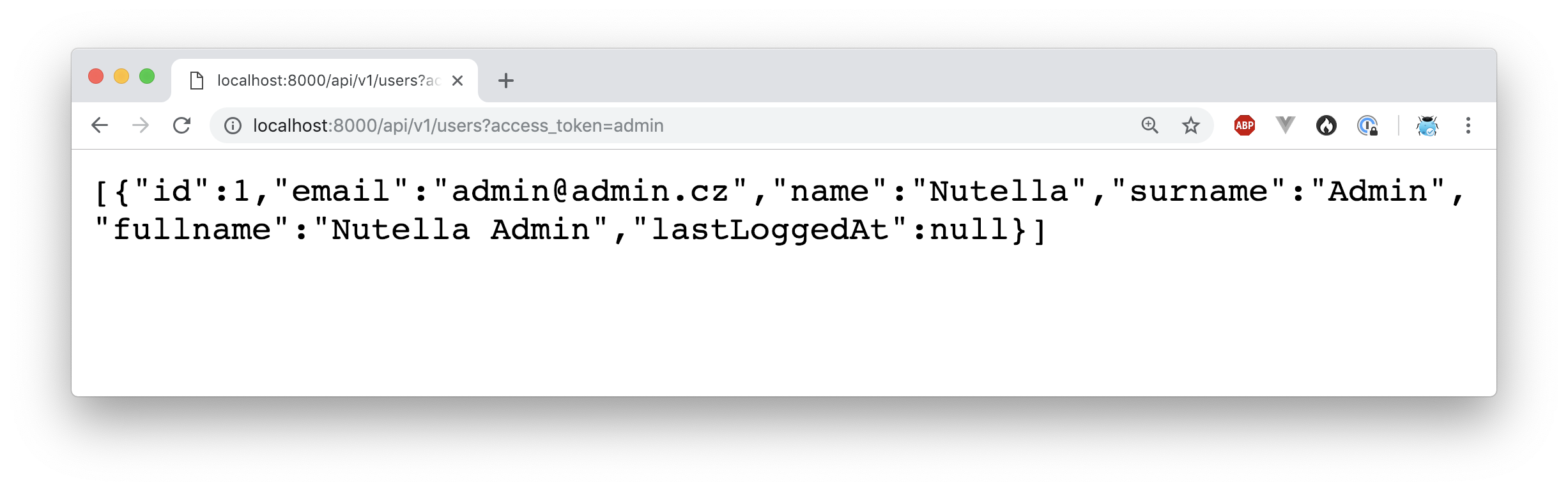

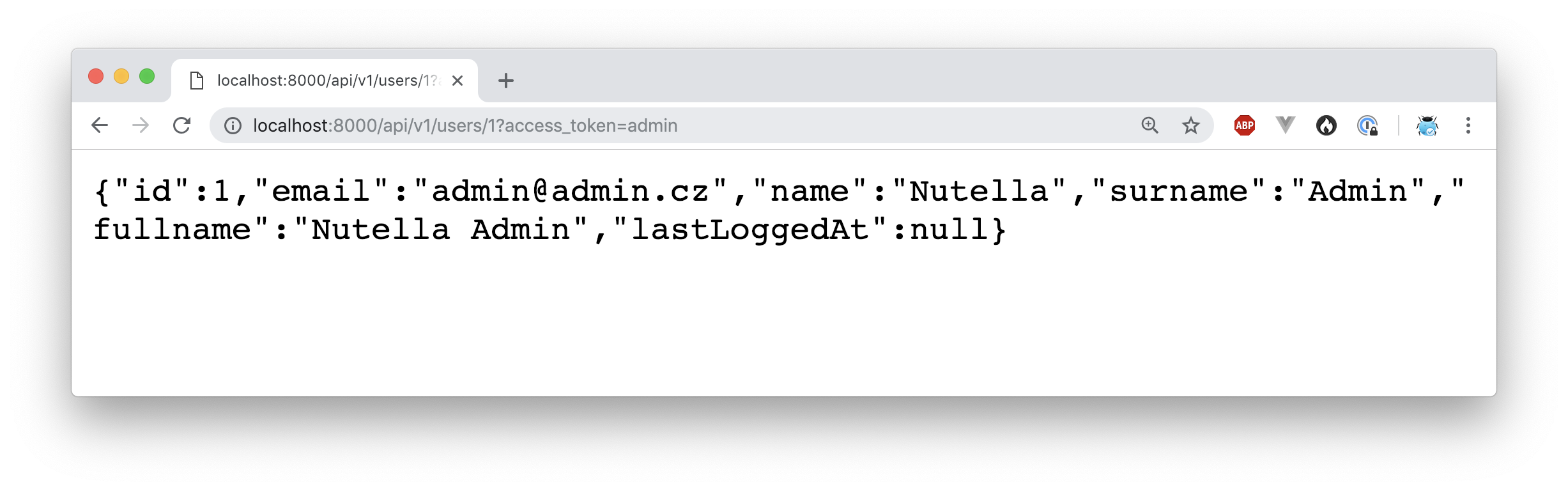

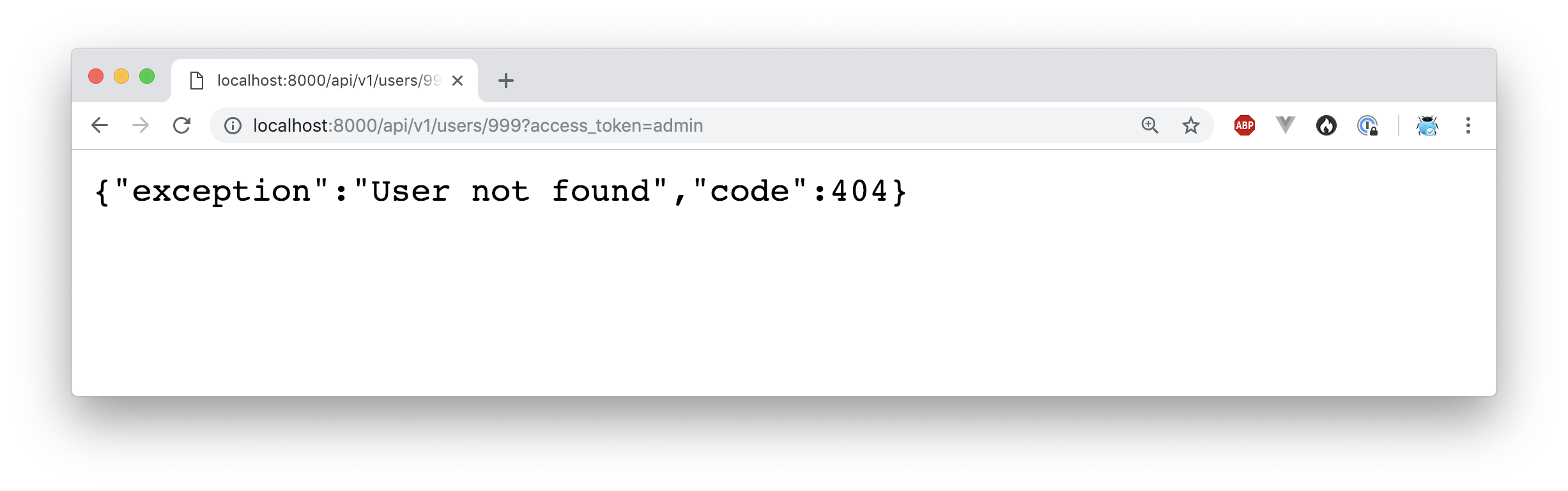
Development
See how to contribute to this package.
This package is currently maintaining by these authors.
👁 ImageConsider to support contributte development team. Also thank you for using this project.