

contributte/doctrine-skeleton
Advanced Nette and Doctrine project skeleton with an expanded set of Nettrine and Contributte integrations. Using Doctrine (@nettrine) and Contributte (@contributte) libraries by @f3l1x.
Maintainers
Package info
github.com/contributte/doctrine-extra-skeleton
Type:project
pkg:composer/contributte/doctrine-skeleton
Requires
- php: >=8.4
- contributte/application: ^0.5.0
- contributte/bootstrap: ^0.6.0
- contributte/cache: ^0.6.0
- contributte/console: ^0.11.0
- contributte/di: ^0.5.0
- contributte/forms: ^0.5.0
- contributte/http: ^0.4.0
- contributte/latte: ^0.6.0
- contributte/mail: ^0.8.0
- contributte/neonizer: ~0.6.0
- contributte/security: ^0.4.0
- contributte/tracy: ^0.6.0
- contributte/translation: ~2.0.0
- contributte/utils: ^0.7.0
- nettrine/dbal: ^0.10.1
- nettrine/extensions-atlantic18: ^0.7.1
- nettrine/fixtures: ^0.9.0
- nettrine/migrations: ^0.10.0
- nettrine/orm: ^0.10.0
- symfony/var-exporter: ^7.0
Requires (Dev)
- contributte/dev: ^0.6
- contributte/phpstan: ^0.1
- contributte/qa: ^0.4
- contributte/tester: ^0.4
- phpstan/phpstan-doctrine: ^1.3.40
Suggests
None
Provides
None
Conflicts
None
Replaces
None
This package is auto-updated.
Last update: 2026-06-27 21:53:12 UTC
README
👁 Image
👁 Image
👁 Image
👁 Image
👁 Image
👁 Image
👁 Image
👁 Image
👁 Image
Website 🚀 contributte.org | Contact 👨🏻💻 f3l1x.io | Twitter 🐦 @contributte
Goal
Main goal is to provide best prepared starter-kit project for Nette developers.
Focused on:
- PHP 8.4+
nette/*packages- Doctrine ORM via
nettrine/* - Symfony components via
contributte/* - codestyle checking via CodeSniffer and
contributte/qa - static analysing via phpstan and
contributte/phpstan - unit / integration tests via Nette Tester and
contributte/tester
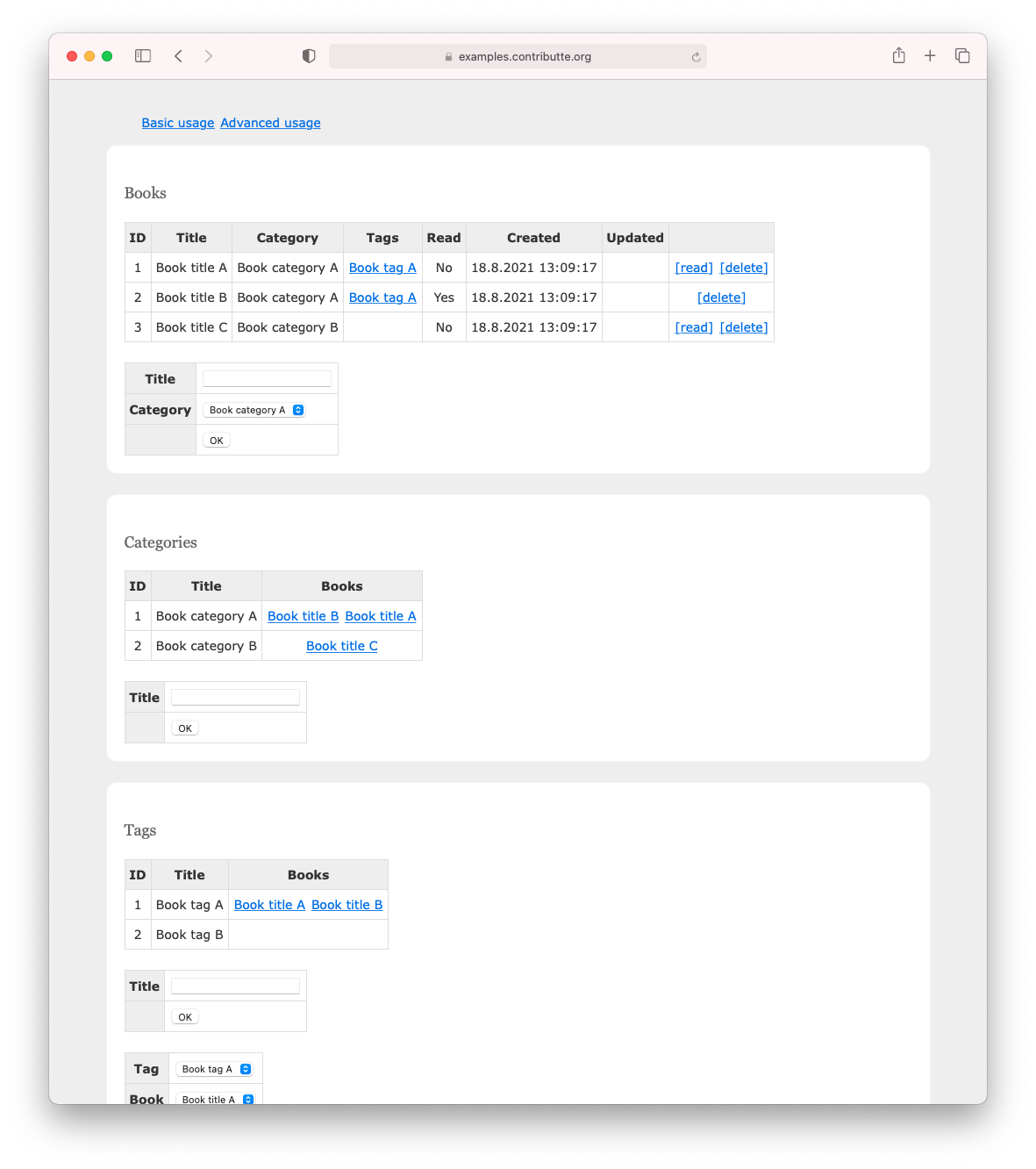
Demo
https://examples.contributte.org/doctrine-skeleton/
Installation
To install latest version of contributte/doctrine-extra-skeleton use Composer.
composer create-project -s dev contributte/doctrine-extra-skeleton acme
Install using docker
-
At first, use composer to install this project.
composer create-project -s dev contributte/doctrine-extra-skeleton -
After that, you have to setup Postgres >= 12 database. You can start it manually or use docker image
dockette/postgres:12.docker run -it -p 5432:5432 -e POSTGRES_PASSWORD=doctrine -e POSTGRES_USER=doctrine dockette/postgres:12Or use make task,
make docker-postgres. -
Custom configuration file is located at
config/local.neon. Edit it if you want.Default configuration should look like:
# Host Config
parameters:
 # Database
 database:
 host: localhost
 dbname: doctrine
 user: doctrine
 password: doctrine
-
Ok database is now running and application is configured to connect to it. Let's create initial data.
Run
NETTE_DEBUG=1 bin/console migrations:migrateto create tables. RunNETTE_DEBUG=1 bin/console doctrine:fixtures:load --appendto create first user(s).Or via task
make build. -
Start your devstack or use PHP local development server.
You can start PHP server by running
php -S localhost:8000 -t wwwor use prepared make taskmake dev. -
Open http://localhost:8000 and enjoy!
Install using docker-compose
-
At first, use composer to install this project.
composer create-project -s dev contributte/webapp-skeleton -
Modify
config/local.neonand set host todatabaseDefault configuration should look like this:
# Host Config
parameters:
 # Database
 database:
 host: database
 dbname: contributte
 user: contributte
 password: contributte
-
Run
docker-compose up -
Open http://localhost and enjoy!
Take a look at:
- http://localhost.
- http://localhost/admin (admin@admin.cz / admin)
Composer packages
Take a detailed look 👀 at each single package.
- contributte/bootstrap
- contributte/application
- contributte/di
- contributte/cache
- contributte/http
- contributte/forms
- contributte/mail
- contributte/security
- contributte/utils
- contributte/latte
- contributte/tracy
- contributte/console
- contributte/translation
- contributte/neonizer
Doctrine
- contributte/doctrine-orm
- contributte/doctrine-dbal
- contributte/doctrine-migrations
- contributte/doctrine-fixtures
- contributte/doctrine-extensions-atlantic18
Dev
Screenshots

Development
See how to contribute to this package.
This package is currently maintaining by these authors.
👁 Image👁 Image
Consider to support contributte development team. Also thank you for using this project.