

guanguans/laravel-code-runner
Run the PHP code in the browser. - 在浏览器中运行 PHP 代码。
Maintainers
Fund package maintenance!

Requires
- php: >=7.4
- ext-json: *
- illuminate/contracts: ^7.0 || ^8.0 || ^9.0 || ^10.0 || ^11.0
- laravel-frontend-presets/tall: ^4.0 || ^5.0 || ^6.0 || ^7.0
- laravel/tinker: ^2.9
- livewire/livewire: ^2.12 || ^3.0
- spatie/laravel-package-tools: ^1.12
Requires (Dev)
- awssat/tailwindo: ^3.0
- brainmaestro/composer-git-hooks: ^2.8
- corveda/php-sandbox: ^3.0
- dms/phpunit-arraysubset-asserts: ^0.5
- ekino/phpstan-banned-code: ^1.0
- ergebnis/composer-normalize: ^2.42
- friendsofphp/php-cs-fixer: ^3.51
- guanguans/ai-commit: dev-main
- guanguans/monorepo-builder-worker: ^1.4
- infection/infection: ^0.26
- innocenzi/laravel-vite: ^0.1
- jetbrains/phpstorm-attributes: ^1.0
- johnkary/phpunit-speedtrap: ^4.0
- mockery/mockery: ^1.6
- nunomaduro/collision: ^5.11 || ^6.0 || ^7.0 || ^8.0
- nunomaduro/larastan: ^1.0 || ^2.0
- nyholm/nsa: ^1.3
- orchestra/testbench: ^6.0 || ^7.0
- pestphp/pest: ^1.23 || ^2.0
- pestphp/pest-plugin-faker: ^1.0 || ^2.0
- pestphp/pest-plugin-laravel: ^1.3
- pestphp/pest-plugin-livewire: ^1.0 || ^2.0
- phpstan/extension-installer: ^1.3
- phpstan/phpstan-deprecation-rules: ^1.1
- phpstan/phpstan-phpunit: ^1.3
- phpstan/phpstan-strict-rules: ^1.5
- psalm/plugin-laravel: ^1.6 || ^2.0
- rector/rector: ^1.0
- roave/security-advisories: dev-latest
- spatie/pest-plugin-snapshots: ^1.1 || ^2.0
- vimeo/psalm: ^4.30 || ^5.0
Suggests
None
Provides
None
Conflicts
None
Replaces
None
MIT 1ac403e46c23212fad8fd5e6fc5b4cf745e91e5a
- guanguans <ityaozm.woop@gmail.com>
phpdebugparserbrowserwebcodedevelopmentrunnerlaravelartisanTinkerphp-parserweb-tinkercode-runner
This package is auto-updated.
Last update: 2026-06-24 14:36:51 UTC
README

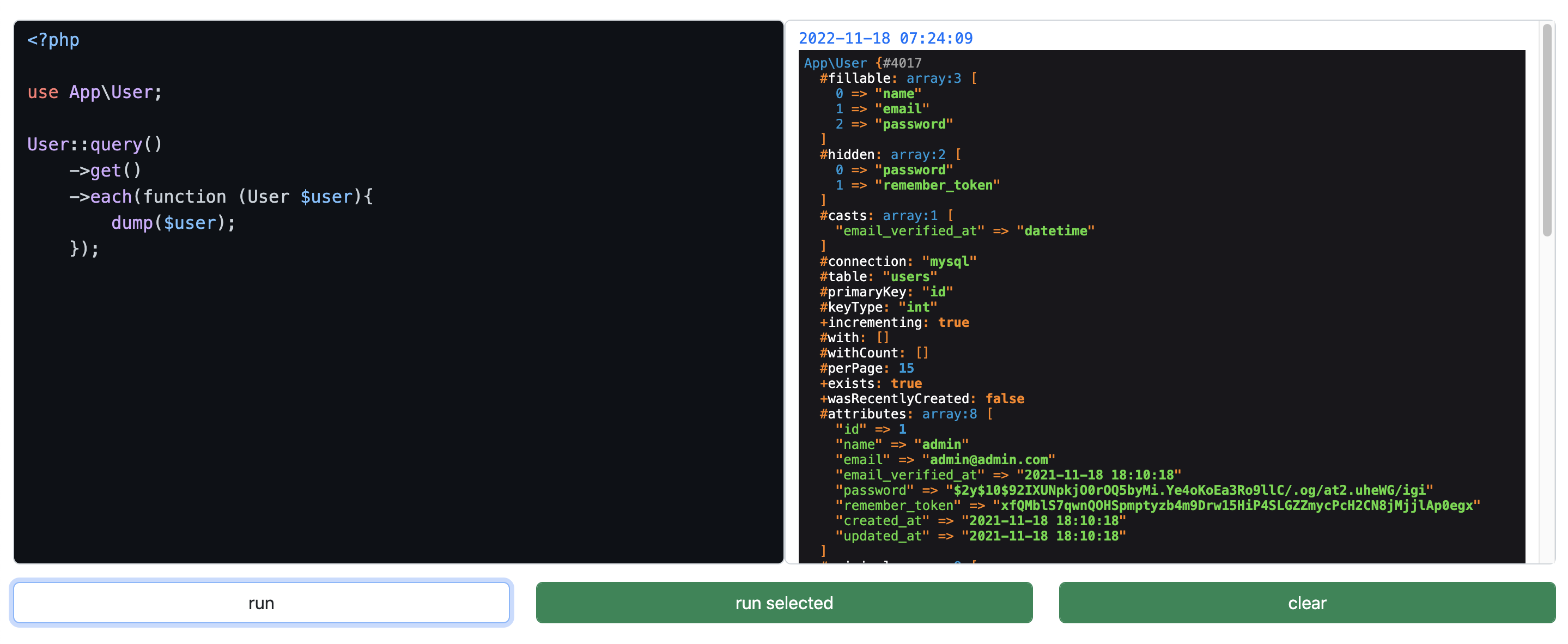
Run the PHP code in the browser. - 在浏览器中运行 PHP 代码。
👁 tests
👁 check & fix styling
👁 codecov
👁 Latest Stable Version
👁 GitHub release (latest by date)
👁 Total Downloads
👁 License


Requirement
- PHP >= 7.4
- Laravel >= 7.0
Installation
You can install the package via composer.
composer require guanguans/laravel-code-runner --prefer-dist -vvv
You must publish the assets from this package by running this command.
php artisan code-runner:install
You can publish the config file of the package(optional).
php artisan vendor:publish --provider="Guanguans\LaravelCodeRunner\CodeRunnerServiceProvider" --tag="code-runner-config"
Usage
By default this package will only run in a local environment.
Visit /code-runner in your app to view page.
Authorization
Should you want to run this in another environment (we do not recommend this), there are two steps you must perform.
-
You must set the
enabledvariable in thecode-runnerconfig file totrue. -
You must register a
view-code-runnerability. A good place to do this is in theAuthServiceProviderthat ships with Laravel.
use Illuminate\Contracts\Auth\Authenticatable;

public function boot()
{
 $this->registerPolicies();

 Gate::define('view-code-runner', function (?Authenticatable $user = null) {
 // Return true if access to web tinker is allowed. Here's an example:
 return $user && in_array($user->email, [
 'admin@example.com',
 ]);
 });
}
Testing
composer test
Changelog
Please see CHANGELOG for more information on what has changed recently.
Contributing
Please see CONTRIBUTING for details.
Security Vulnerabilities
Please review our security policy on how to report security vulnerabilities.
Credits
License
The MIT License (MIT). Please see License File for more information.