

heimrichhannot/contao-multi-column-editor-bundle
This module offers an input type for editing one or more records in frontend and backend.
Maintainers
Package info
github.com/heimrichhannot/contao-multi-column-editor-bundle
Type:contao-bundle
pkg:composer/heimrichhannot/contao-multi-column-editor-bundle
2.21.2
2026-03-23 07:47 UTC
Requires
- php: ^8.1
- contao/core-bundle: ^5.3
- heimrichhannot-contao-components/sortablejs: ^1.8
- heimrichhannot/contao-ajax-bundle: ^1.0
- heimrichhannot/contao-encore-contracts: ^1.0.2
- heimrichhannot/contao-utils-bundle: ^3.0
- psr/log: ^1.0 || ^2.0 || ^3.0
- symfony/deprecation-contracts: ^1.0 || ^2.0 || ^3.0
- symfony/service-contracts: ^1.0 || ^2.0 || ^3.0
Requires (Dev)
None
Suggests
None
Provides
None
Conflicts
None
Replaces
This package is auto-updated.
Last update: 2026-06-23 08:27:50 UTC
README
👁 Image
👁 Image
👁 Image
👁 Image
This module offers an input type for editing one or more records in backend and frontend.

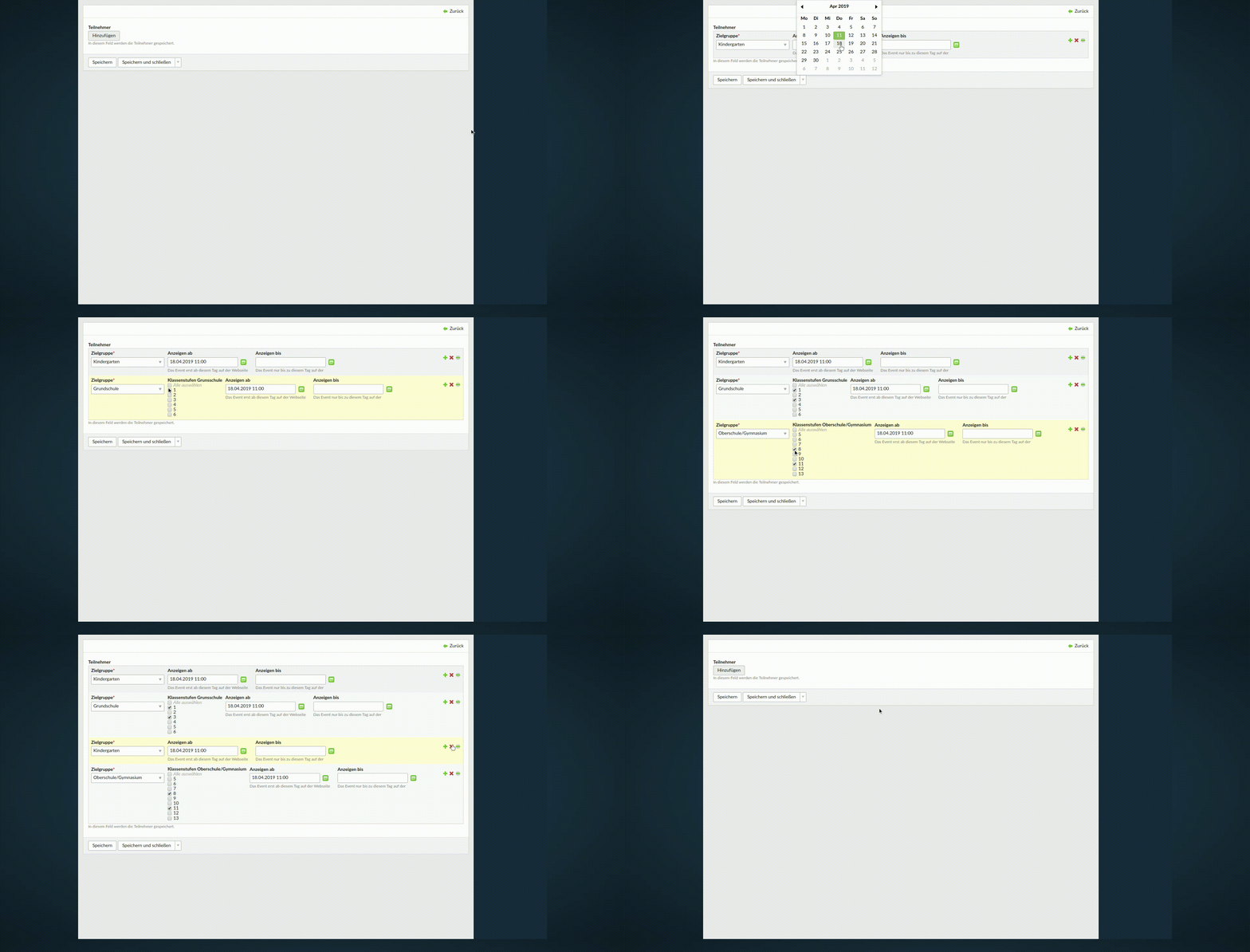
Features
- input type to edit one or multiple records
- support for backend and frontend
- Encore bundle support
Install
Install with composer:
composer require heimrichhannot/contao-multi-column-editor-bundle
Technical instructions
Use the inputType "multiColumnEditor" for your field.
Minimal example:
$GLOBALS['TL_DCA']['tl_my_table']['fields']['mce_field'] = [
 'inputType' => 'multiColumnEditor',
 'eval' => [
 'multiColumnEditor' => [
 'fields' => [
 'field1' => [
 'label' => &$GLOBALS['TL_LANG']['tl_my_table']['field1'],
 'inputType' => 'text',
 'eval' => ['groupStyle' => 'width:150px']
 ],
 'field2' => [
 'label' => &$GLOBALS['TL_LANG']['tl_my_table']['field2'],
 'inputType' => 'select',
 'options' => ['option1', 'option2'],
 'eval' => ['groupStyle' => 'width:150px']
 ],
 ]
 ]
 ],
 'sql' => "blob NULL"
];
All available options
'someField' => [
 'label' => &$GLOBALS['TL_LANG']['tl_my_table']['someField'],
 'inputType' => 'multiColumnEditor',
 'exclude' => true,
 // add 'compact' to tl_class if you want to display a reduced version of MCE
 'tl_class' => 'compact',
 'eval' => [
 'multiColumnEditor' => [
 // set to true if the rows should be sortable (backend only atm)
 'sortable' => true,
 'class' => 'some-class',
 // set to 0 if it should also be possible to have *no* row (default: 1)
 'minRowCount' => 2,
 // set to 0 if an infinite number of rows should be possible (default: 0)
 'maxRowCount' => 5,
 // defaults to false
 'skipCopyValuesOnAdd' => false,
 'editorTemplate' => 'multi_column_editor_backend_default',
 // Optional: add palette and subpalette if you need supalettes support (otherwise all fields will be shows)
 // Legends are supported since verison 2.8
 'palettes' => [
 '__selector__' => ['field1'],
 'default' => 'field1',
 ],
 'subpalettes' => [
 'field1' => 'field2', // key selector
 'field1_10' => 'field3' // key_value selector
 ],
 // place your fields here as you would normally in your DCA
 // (sql is not required)
 'fields' => [

 'field1' => [
 'label' => ['field 1', 'The description of field 1'],
 'inputType' => 'text',
 'eval' => ['groupStyle' => 'width:150px', 'submitOnChange' => true]
 ],
 'field2' => [
 'label' => ['field 2', 'The description of field 2'],
 'inputType' => 'text',
 'eval' => ['groupStyle' => 'width:150px']
 ],
 'field3' => [
 'label' => ['field 3', 'The description of field 3'],
 'inputType' => 'text',
 'eval' => ['groupStyle' => 'width:150px']
 ]
 ]
 ]
 ],
 'sql' => "blob NULL"
],
| Option | Values | Description |
|---|---|---|
| tl_class | compact | Display a reduced version of MCE. |
Add support for special fields (like fileTrees) in Rocksolid Custom Content Elements (RSCE)
Simply add the following to your project's config.php:
$GLOBALS['MULTI_COLUMN_EDITOR']['rsce_fields'] = array_merge(
 is_array($GLOBALS['MULTI_COLUMN_EDITOR']['rsce_fields']) ? $GLOBALS['MULTI_COLUMN_EDITOR']['rsce_fields'] : [], [
 'tl_content' => ['linkImage']
 ]
);
where this would be your RSCE config:
$element = [
 // ...
 'fields' => [
 'links' => [
 'label' => &$GLOBALS['TL_LANG']['tl_content']['links'],
 'inputType' => 'multiColumnEditor',
 'eval' => [
 'tl_class' => 'long clr',
 'multiColumnEditor' => [
 'minRowCount' => 0,
 'fields' => [
 'linkImage' => [
 // ...
 'inputType' => 'fileTree',
 ],
 // ...