

legacy-icons/famfamfam-mini
FamFamFam Mini icon pack, as individual icons or as a CSS spritesheet
Maintainers
Package info
github.com/legacy-icons/famfamfam-mini
Language:CSS
pkg:composer/legacy-icons/famfamfam-mini
Requires
None
Requires (Dev)
None
Suggests
None
Provides
None
Conflicts
None
Replaces
None
README
👁 NPM version
👁 Bower version
👁 Packagist version
👁 Nuget version
👁 Dependency Status
👁 Build Status
About
The Mini icon pack, as available on famfamfam website.
All credits for these icons go to their original author: Mark James (mjames@gmail.com)
The aim of this project is to make this icon pack available through various package managers, such as:
All icons are supplied in GIF format.
CSS spritesheets
You can insert the icons directly into your HTML with a common IMG tag:
<img alt="Refresh" src="dist/gif/action_refresh_blue.gif" width="16" height="16">
In addition to the icons by themselves, this project also ships a CSS spritesheet for the icon-pack. This spritesheet allows to load the entire icon-pack in just 1 image, and thus reduce HTTP calls.
This is what it actually looks:

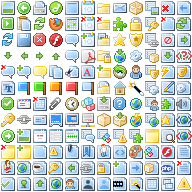
All the positioning of the icons inside this alone image is made through CSS, which allows you to just add block-type tags with the proper class and get the same result:
<div class="famfamfam-mini action_refresh_blue"></div>
Just remember to add the CSS stylesheet to the HEAD of your HTML page!
Install
Get the package with NPM
npm install famfamfam-mini
Get the package with Bower
bower install famfamfam-mini
Get the package with Composer / Packagist
composer require legacy-icons/famfamfam-mini
Get the package with NuGet
Install-Package famfamfam-mini
Build the whole project or your custom project
We use Gulp to build the project, so if you want to re-build or customize this project, you'll need Gulp.
After gulp is installed, and your CLI is pointed to your work directory, first install the dependencies:
with NPM 2.x.x
npm install
with NPM 3.x.x (resolve dependencies for node-spritesheet before this module's ones)
npm install grunt grunt-contrib-coffee grunt-contrib-clean
npm install
then be sure that you have ImageMagick installed for building spritesheet.
then, you can run the gulp build task to build the project:
gulp build
What the build task does?
First, it copies GIF files from the src folder, and pastes them to the dist folder.
Then it creates a spritesheet from the GIF images located in the src folder, and thus creates the sprite folder in dist.
If, for example you just want action_stop and page_right icons in a spritesheet, you just have to fork this project, point your CLI to the working directory,
empty the src directory, except action_stop and page_right icons in GIF format, and then run the gulp build task.
You'll get the proper spritesheet and copies of the icons directly in the dist folder.