

phalcon/incubator-logger
Phalcon Incubator Logger Adapters and Formatters
Requires
- php: >=7.4
- ext-json: *
- ext-phalcon: ^5.0
Requires (Dev)
- aws/aws-sdk-php: ^3.145
- codeception/codeception: ^4.1
- codeception/module-asserts: ^1.0.0
- codeception/module-db: ^1.0
- phalcon/ide-stubs: ^5.0
- phpstan/phpstan: ^1.10
- squizlabs/php_codesniffer: ^3.7.2
- vimeo/psalm: ^5.13
Suggests
- ext-curl: Needed to run in Slack Adapter
- ext-sockets: Needed to run in Udp Logger Adapter
- aws/aws-sdk-php: Needed to run in CloudWatch Logger Adapter
Provides
None
Conflicts
None
Replaces
None
BSD-3-Clause b4d73c031f4d3e01a7f5e127b360e4b115944650
- Phalcon Team <team.woop@phalcon.io>
- Contributors
This package is auto-updated.
Last update: 2026-06-22 22:31:12 UTC
README
👁 Discord
👁 Packagist Version
👁 PHP from Packagist
👁 codecov
👁 Packagist
Extra Adapters for Phalcon Logger component.
Installation
composer require phalcon/incubator-logger
Amazon CloudWatch
Adapter to store logs in AWS CloudWatch:
Note: group name and stream name must be created before call any logs. You can make it inside AWS console.
use Aws\CloudWatchLogs\CloudWatchLogsClient;
use Phalcon\Incubator\Logger\Adapter\CloudWatch;
use Phalcon\Logger\Logger;

$di->set(
 'logger',
 function () {
 $client = new CloudWatchLogsClient([
 'credentials' => [
 'key' => 'AMAZON_CLOUDWATCH_KEY',
 'secret' => 'AMAZON_CLOUDWATCH_SECRET',
 ],
 'region' => 'AMAZON_CLOUDWATCH_REGION',
 'version' => 'latest', // Or any specific
 ]);

 $adapter = new CloudWatch($client, '/group/name', 'stream-name');

 return new Logger('messages', ['main' => $adapter]);
 }
);
Database
Adapter to store logs in a database table:
use Phalcon\Db\Adapter\Pdo\Mysql;
use Phalcon\Incubator\Logger\Adapter\Database as DbLogger;

$di->set(
 'logger',
 function () {
 $connection = new Mysql(
 [
 'host' => 'localhost',
 'username' => 'root',
 'password' => 'secret',
 'dbname' => 'audit',
 ]
 );

 $logsName = 'errors';
 $tableName = 'logs';

 return new DbLogger($connection, $logsName, $tableName);
 }
);
The following table used to store the logs:
CREATE TABLE IF NOT EXISTS `logs` (
 `id` INT(10) unsigned NOT NULL AUTO_INCREMENT,
 `name` VARCHAR(32) DEFAULT NULL,
 `type` INT(3) NOT NULL,
 `content` text,
 `created_at` BIGINT unsigned NOT NULL,
 PRIMARY KEY (`id`)
) ENGINE=InnoDB DEFAULT CHARSET=utf8
UDP logger
Adapter to send messages by UDP protocol to external server
use Phalcon\Incubator\Logger\Adapter\Udp as UdpLogger;

$di->set(
 'logger',
 function () {
 $host = '192.168.1.2';
 $port = 65000;

 return new UdpLogger('errors', $host, $port);
 }
);
Slack logger
Adapter to write messages into a Slack channel

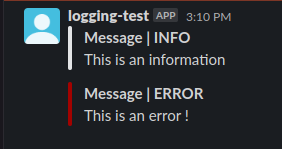
$adapter = new \Phalcon\Incubator\Logger\Adapter\Slack('api-token','channel-name');

$logger = new \Phalcon\Logger\Logger('logger-name', ['main-slack' => $adapter]);
$logger->info('Information message to log in the channel channel-name');
Creating an application in Slack API
Access this page to create an application (after choosing/creating a workspace)
Giving rights to post messages
Go to Features > OAuth & Permissions and in the Scopes section -> Add an oauth scope and select the following rights :
- chat:write
- chat:write.public
Get the token
You can now generate a token for your bot/user in the Install App section which looks something like this :
xoxp-1111111-22222222-33333333-aaaaaaaaaaaaaaaaaaaaaa