

php-opcua/opcua-cli
CLI tool for OPC UA — browse, read, write, watch, discover endpoints, manage certificates, and generate code from NodeSet2.xml
Maintainers
Requires
- php: ^8.2
- php-opcua/opcua-client: ^4.4.0
- php-tui/php-tui: ^0.2.1
Requires (Dev)
- friendsofphp/php-cs-fixer: ^3.0
- pestphp/pest: ^3.0
Suggests
None
Provides
None
Conflicts
None
Replaces
None
README
👁 OPC UA CLI
👁 Tests
👁 Coverage
👁 Latest Version
👁 PHP Version
👁 License
Command-line tool for OPC UA servers. Browse, read, write, watch, interactively explore, discover endpoints, manage certificates, and generate PHP code from NodeSet2.xml -- all from the terminal.
Built on top of php-opcua/opcua-client, the pure PHP OPC UA client.

Installation
Standalone binary (no PHP required)
Pre-built, self-contained executables are published on every tag release. No PHP installation, no composer, no php.ini, no extensions — one file.
# Linux x86_64
curl -LO https://github.com/php-opcua/opcua-cli/releases/latest/download/opcua-cli-linux-x86_64
chmod +x opcua-cli-linux-x86_64
./opcua-cli-linux-x86_64 --version

# Linux aarch64 (ARM: Raspberry Pi, AWS Graviton, industrial edge gateways)
curl -LO https://github.com/php-opcua/opcua-cli/releases/latest/download/opcua-cli-linux-aarch64
chmod +x opcua-cli-linux-aarch64

# macOS arm64 (Apple Silicon — M1/M2/M3/M4)
curl -LO https://github.com/php-opcua/opcua-cli/releases/latest/download/opcua-cli-macos-arm64
chmod +x opcua-cli-macos-arm64
xattr -cr opcua-cli-macos-arm64 # clear Gatekeeper quarantine — see note below

# Windows x86_64 (experimental since v4.3.0 — may be missing from some releases, see note below)
curl.exe -LO https://github.com/php-opcua/opcua-cli/releases/latest/download/opcua-cli-windows-x86_64.exe
opcua-cli-windows-x86_64.exe --version
Each release also ships SHA256SUMS.txt; verify with sha256sum --check SHA256SUMS.txt (Linux/macOS) or Get-FileHash -Algorithm SHA256 (PowerShell).
The binaries bundle PHP 8.4, the statically linked OpenSSL (with full ECC curve support including brainpoolP256r1/P384r1), and the compiled opcua-cli — built via static-php-cli + Box.
macOS note — unsigned binaries. The macOS artefact (v4.3.0 and v4.4.0) is not code-signed or notarized. On first launch Gatekeeper will refuse to run it ("cannot be opened because the developer cannot be verified"). Strip the quarantine flag with
xattr -cr <binary>as shown above, or open the binary once via System Settings → Privacy & Security → Open Anyway. Code-signing + notarization is tracked for v4.4.0.
Intel Mac (
macos-x86_64) not shipped. GitHub retired the freemacos-13runner pool during 2025, so a native Intel build is no longer producible on CI without a paid runner. Intel Mac users should install via Composer (composer global require php-opcua/opcua-cli) or build from source — seedocs/building/static-binary.md. Note that the Apple Silicon binary (macos-arm64) will not run on Intel Macs: Rosetta 2 translates x86_64 → arm64, not the reverse.
Windows note — experimental. The
windows-x86_64.exeleg of the release workflow runs withcontinue-on-error: true, so a release is published even if the Windows build fails. If the.exeis not listed on a given release page, the Windows build did not complete successfully that cycle — usedocs/building/static-binary.mdto produce it locally, or wait for the next release. Windows promotion to first-class support is tracked for v4.4.0.
Need a binary for a platform not in the list above (Alpine/musl, a different PHP or extension set)? See docs/building/static-binary.md — step-by-step instructions for reproducing the build locally.
Via Composer
composer require php-opcua/opcua-cli
The binary is installed at vendor/bin/opcua-cli.
For global installation:
composer global require php-opcua/opcua-cli
Quick Start
# Discover what's available
opcua-cli endpoints opc.tcp://localhost:4840

# Browse the address space
opcua-cli browse opc.tcp://localhost:4840

# Read a value
opcua-cli read opc.tcp://localhost:4840 "i=2259"

# Write a value
opcua-cli write opc.tcp://localhost:4840 "ns=2;i=1001" 42 --type=Int32

# Watch a value in real time
opcua-cli watch opc.tcp://localhost:4840 "ns=2;i=1001"
Commands
browse -- Browse the address space
opcua-cli browse opc.tcp://localhost:4840
opcua-cli browse opc.tcp://localhost:4840 /Objects/MyPLC
opcua-cli browse opc.tcp://localhost:4840 "ns=2;i=1000"
opcua-cli browse opc.tcp://localhost:4840 /Objects --recursive --depth=3
opcua-cli browse opc.tcp://localhost:4840 /Objects --json
├── Server (i=2253) [Object]
├── MyPLC (ns=2;i=1000) [Object]
│ ├── Temperature (ns=2;i=1001) [Variable]
│ └── Pressure (ns=2;i=1002) [Variable]
└── DeviceSet (ns=3;i=5001) [Object]
| Option | Description |
|---|---|
--recursive |
Browse recursively (tree view) |
--depth=N |
Maximum depth for recursive browse (default: 3) |
read -- Read a node value
opcua-cli read opc.tcp://localhost:4840 "i=2259"
opcua-cli read opc.tcp://localhost:4840 "ns=2;i=1001" --attribute=DisplayName
opcua-cli read opc.tcp://localhost:4840 "ns=2;i=1001" --json
NodeId: ns=2;i=1001
Attribute: Value
Value: 23.5
Type: Double
Status: Good (0x00000000)
Source: 2026-03-24T15:30:00+00:00
Server: 2026-03-24T15:30:00+00:00
| Option | Description |
|---|---|
--attribute=NAME |
Attribute to read: Value (default), DisplayName, BrowseName, DataType, NodeClass, Description, AccessLevel, NodeId |
write -- Write a value to a node
opcua-cli write opc.tcp://localhost:4840 "ns=2;i=1001" 42
opcua-cli write opc.tcp://localhost:4840 "ns=2;i=1001" 42 --type=Int32
opcua-cli write opc.tcp://localhost:4840 "ns=2;i=2000" true --type=Boolean
| Option | Description |
|---|---|
--type=TYPE |
Explicit OPC UA type: Boolean, SByte, Byte, Int16, UInt16, Int32, UInt32, Int64, UInt64, Float, Double, String |
endpoints -- Discover server endpoints
opcua-cli endpoints opc.tcp://localhost:4840
Endpoint: opc.tcp://localhost:4840
Security: None (mode: None)
Auth: Anonymous, UserName

Endpoint: opc.tcp://localhost:4840
Security: Basic256Sha256 (mode: SignAndEncrypt)
Auth: Anonymous, UserName, Certificate

Endpoint: opc.tcp://localhost:4840
Security: ECC_nistP256 (mode: SignAndEncrypt)
Auth: Anonymous, UserName
watch -- Watch a value in real time
# Subscription mode (default) -- server pushes changes
opcua-cli watch opc.tcp://localhost:4840 "ns=2;i=1001"

# Polling mode -- read every 250ms
opcua-cli watch opc.tcp://localhost:4840 "ns=2;i=1001" --interval=250
[15:30:00.123] 23.5
[15:30:00.625] 23.6
[15:30:01.127] 23.4
^C
explore -- Interactive TUI browser
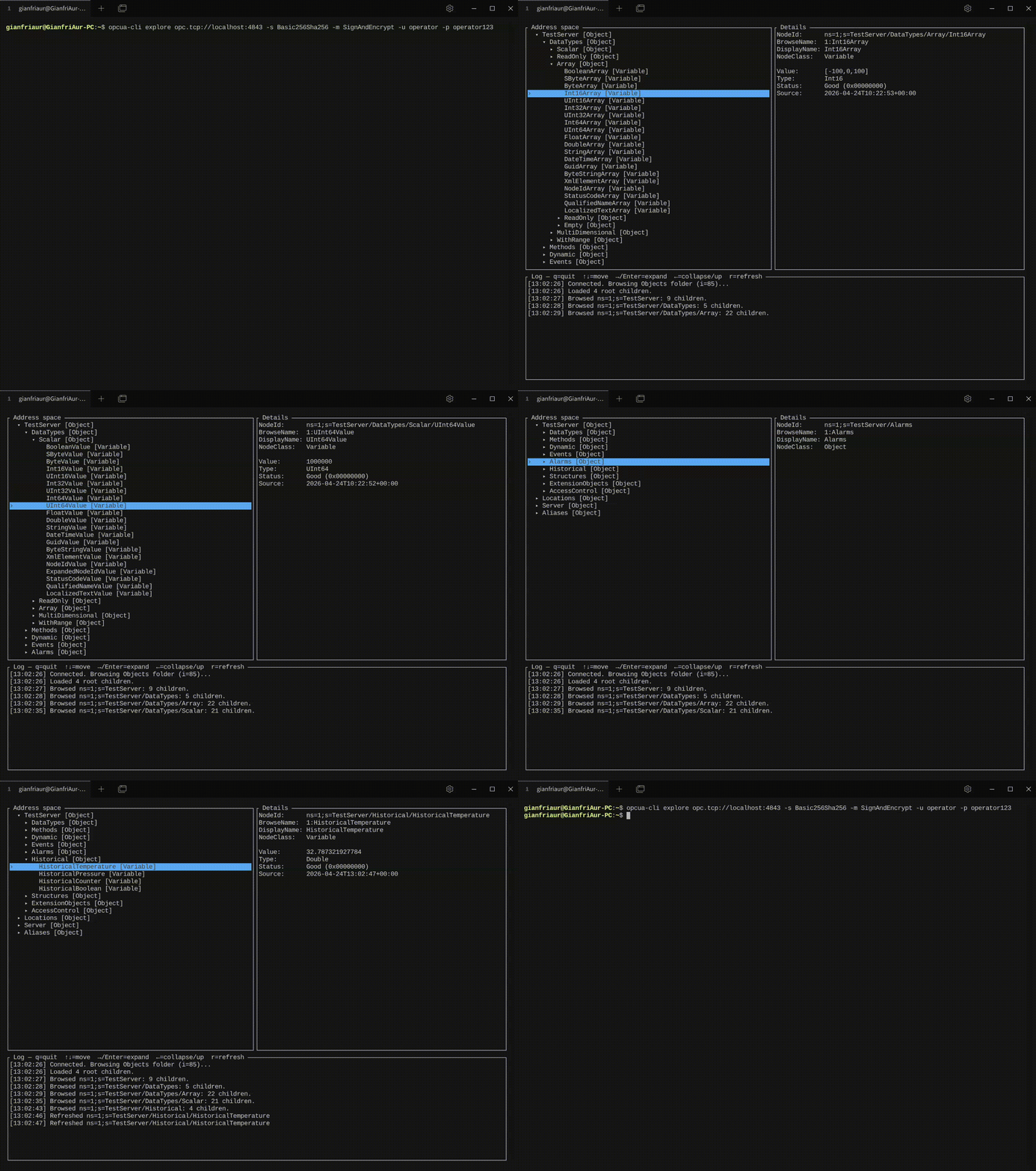
Full-screen terminal UI to walk the address space without typing commands. Tree on the left, details pane on the right (with live Value / Status / Source timestamp for Variables), log pane at the bottom.
opcua-cli explore opc.tcp://localhost:4840
opcua-cli explore opc.tcp://localhost:4840 -u operator -p operator123
| Key | Action |
|---|---|
↑ / ↓ |
Move selection |
→ / Enter |
Expand node (browse children) |
← |
Collapse or jump to parent |
r |
Refresh the Value of the selected Variable |
q / Esc |
Quit |
Platform support. explore currently runs on Linux and macOS. Windows support is coming soon.
Flags. --json and --debug are rejected (they would corrupt the interactive screen). Use --debug-stderr or --debug-file=<path> if you need logs while explore is running.
generate:nodeset -- Generate PHP classes from NodeSet2.xml
opcua-cli generate:nodeset path/to/Opc.Ua.Di.NodeSet2.xml \
 --output=src/Generated/Di/ --namespace=App\\OpcUa\\Di
Generates:
- NodeId constants -- one class with all node IDs as string constants
- PHP enums --
BackedEnumfor each OPC UA enumeration type - DTOs -- readonly classes with typed properties for structured DataTypes
- Codecs --
ExtensionObjectCodecimplementations for binary encoding/decoding - Registrar -- batch-registers all codecs with the client
| Option | Description |
|---|---|
--output=PATH |
Output directory (default: ./generated/) |
--namespace=NS |
PHP namespace (default: Generated\\OpcUa) |
No server connection required -- reads the XML file locally.
dump:nodeset -- Export server address space to NodeSet2.xml
opcua-cli dump:nodeset opc.tcp://192.168.1.100:4840 --output=MyPLC.NodeSet2.xml
opcua-cli dump:nodeset opc.tcp://192.168.1.100:4840 --output=MyPLC.NodeSet2.xml --namespace=2
| Option | Description |
|---|---|
--output=FILE |
Output XML file path (required) |
--namespace=N |
Export only this namespace index (default: all non-zero) |
The exported file can be fed directly to generate:nodeset.
trust -- Trust a server certificate
opcua-cli trust opc.tcp://server:4840 --trust-store=~/.opcua
trust:list -- List trusted certificates
opcua-cli trust:list --trust-store=~/.opcua
trust:remove -- Remove a trusted certificate
opcua-cli trust:remove ab:cd:12:34:... --trust-store=~/.opcua
| Option | Description |
|---|---|
--trust-store=<path> |
Custom trust store path |
--trust-policy=<policy> |
Validation policy (fingerprint, fingerprint+expiry, full) |
--no-trust-policy |
Disable trust validation for this command |
Security Options
All commands support full security configuration — 10 policies (6 RSA + 4 ECC), 3 modes, 3 auth methods:
# Username/password authentication
opcua-cli read opc.tcp://server:4840 "i=2259" -u admin -p secret

# Full security with RSA certificates
opcua-cli read opc.tcp://server:4840 "i=2259" \
 --security-policy=Basic256Sha256 \
 --security-mode=SignAndEncrypt \
 --cert=/path/to/client.pem \
 --key=/path/to/client.key \
 --ca=/path/to/ca.pem \
 -u operator -p secret

# ECC security (auto-generated ECC certificate)
opcua-cli read opc.tcp://server:4840 "i=2259" \
 --security-policy=ECC_nistP256 \
 --security-mode=SignAndEncrypt \
 -u operator -p secret
| Option | Short | Description |
|---|---|---|
--security-policy=<policy> |
-s |
None, Basic128Rsa15, Basic256, Basic256Sha256, Aes128Sha256RsaOaep, Aes256Sha256RsaPss, ECC_nistP256, ECC_nistP384, ECC_brainpoolP256r1, ECC_brainpoolP384r1 |
--security-mode=<mode> |
-m |
None, Sign, SignAndEncrypt |
--cert=<path> |
Client certificate path | |
--key=<path> |
Client private key path | |
--ca=<path> |
CA certificate path | |
--username=<user> |
-u |
Username |
--password=<pass> |
-p |
Password |
--timeout=<seconds> |
-t |
Connection timeout (default: 5) |
ECC disclaimer: ECC security policies (
ECC_nistP256,ECC_nistP384,ECC_brainpoolP256r1,ECC_brainpoolP384r1) are fully implemented and tested against the OPC Foundation's UA-.NETStandard reference stack. However, no commercial OPC UA vendor supports ECC endpoints yet. When using ECC, client certificates are auto-generated if--cert/--keyare omitted, and username/password authentication uses theEccEncryptedSecretprotocol automatically.
Output Options
JSON
Add --json (or -j) to any command for machine-readable output:
opcua-cli browse opc.tcp://localhost:4840 --json | jq '.[].name'
opcua-cli read opc.tcp://localhost:4840 "i=2259" --json | jq '.Value'
Debug Logging
# Log to stdout (incompatible with --json)
opcua-cli read opc.tcp://localhost:4840 "i=2259" --debug

# Log to stderr (compatible with --json)
opcua-cli read opc.tcp://localhost:4840 "i=2259" --debug-stderr --json

# Log to file
opcua-cli read opc.tcp://localhost:4840 "i=2259" --debug-file=/tmp/opcua.log --json
Global Options
| Option | Short | Description |
|---|---|---|
--json |
-j |
Output in JSON format |
--debug |
-d |
Debug logging on stdout |
--debug-stderr |
Debug logging on stderr | |
--debug-file=<path> |
Debug logging to file | |
--help |
-h |
Show help |
--version |
-v |
Show version |
Ecosystem
| Package | Description |
|---|---|
| opcua-client | Pure PHP OPC UA client |
| opcua-cli | CLI tool — browse, read, write, watch, interactively explore, discover endpoints, manage certificates, generate code from NodeSet2.xml (this package) |
| opcua-session-manager | Daemon-based session persistence across PHP requests. Keeps OPC UA connections alive between short-lived PHP processes via a ReactPHP daemon and Unix sockets. Separate package by design — see ROADMAP.md for rationale. |
| opcua-client-nodeset | Pre-generated PHP types from 51 OPC Foundation companion specifications (DI, Robotics, Machinery, MachineTool, ISA-95, CNC, MTConnect, and more). 807 PHP files — NodeId constants, enums, typed DTOs, codecs, registrars with automatic dependency resolution. Just composer require and loadGeneratedTypes(). |
| laravel-opcua | Laravel integration — service provider, facade, config |
| uanetstandard-test-suite | Docker-based OPC UA test servers (UA-.NETStandard) for integration testing |
Testing
Tested against the OPC UA reference implementationThe underlying opcua-client is integration-tested against UA-.NETStandard — the reference implementation maintained by the OPC Foundation, the organization that defines the OPC UA specification. This CLI tool is additionally integration-tested via uanetstandard-test-suite, verifying that every command works correctly against real-world OPC UA servers. Like opcua-client, the CLI unit tests run on Linux, macOS, and Windows across PHP 8.2–8.5 in CI on every push. |
288 tests (258 unit + 30 integration) with 99.9% code coverage. Unit tests run cross-OS (Linux, macOS, Windows) × PHP 8.2–8.5 = 12 combinations; integration tests run on Linux × PHP 8.2–8.5 = 4 combinations against uanetstandard-test-suite — a Docker-based OPC UA environment built on the OPC Foundation's UA-.NETStandard reference implementation.
./vendor/bin/pest # everything
./vendor/bin/pest tests/Unit/ # unit only
./vendor/bin/pest tests/Integration/ --group=integration # integration only
CI runs on PHP 8.2, 8.3, 8.4, and 8.5 via GitHub Actions.
Requirements
- PHP >= 8.2
php-opcua/opcua-client
AI-Ready
This package ships with machine-readable documentation designed for AI coding assistants (Claude, Cursor, Copilot, ChatGPT, and others). Feed these files to your AI so it knows how to use the CLI tool correctly:
| File | Purpose |
|---|---|
llms.txt |
Compact project summary — commands, options, architecture. Optimized for LLM context windows with minimal token usage. |
llms-full.txt |
Comprehensive technical reference — every command, option, class, code generator, output system. For deep dives and complex questions. |
llms-skills.md |
Task-oriented recipes — step-by-step instructions for common tasks (browse, read, write, watch, security, trust, code generation, scripting). Written so an AI can generate correct commands from a user's intent. |
How to use: copy the files you need into your project's AI configuration directory. The files are located in vendor/php-opcua/opcua-cli/ after composer install.
- Claude Code: reference per-session with
--add-file vendor/php-opcua/opcua-cli/llms-skills.md - Cursor: copy into your project's rules directory —
cp vendor/php-opcua/opcua-cli/llms-skills.md .cursor/rules/opcua-cli.md - GitHub Copilot: copy or append the content into your project's
.github/copilot-instructions.mdfile (create the file and directory if they don't exist). Copilot reads this file automatically for project-specific context - Other tools: paste the content into your system prompt, project knowledge base, or context configuration
Versioning
This package follows the same version numbering as php-opcua/opcua-client. Each release of opcua-cli is aligned with the corresponding release of the client library to ensure full compatibility.
License
MIT. See LICENSE.