

rubix/tensor
A library and extension that provides objects for scientific computing in PHP.
Maintainers
Fund package maintenance!
Requires
- php: >=7.4
Requires (Dev)
- friendsofphp/php-cs-fixer: ^3.0
- phalcon/zephir: ^0.17
- phpbench/phpbench: ^1.0
- phpstan/extension-installer: ^1.0
- phpstan/phpstan: ^1.0
- phpstan/phpstan-phpunit: ^1.0
- phpunit/phpunit: ^9.0
Suggests
None
Provides
None
Conflicts
None
Replaces
None
MIT 9f0ee170319280dcf081984adccefa8b0e6f06b8
- Andrew DalPino <support.woop@andrewdalpino.com>
- Contributors
phpmathextensionstatisticsarithmeticvectormatrixcomputingconvolutionsvdlinear algebratensoreigenvalueeigenvectormultithreadedcomputationtrigonometryengineeringdecompositionscientific computingphp extensionsingular value decompositioneigendecompositionmatmulmatrix multiplicationsignal processing1d convolution2d convolutionblasdot productlapackvector normpseudoinverse
README
👁 PHP from Packagist
👁 Latest Stable Version
👁 Code Checks
👁 Extension Build
👁 Downloads from Packagist
👁 GitHub


A library and extension that provides objects for scientific computing in PHP.
Installation
Follow the instructions below to install either Tensor PHP or the Tensor extension.
Tensor PHP
Install Tensor PHP into your project with Composer:
$ composer require rubix/tensor
Tensor Extension
Install the Tensor extension via PECL:
$ pecl install tensor
Compiling on MacOS : To avoid some errors on Mac devices using homebrew, don't forget to add environment variables:
export LDFLAGS="-L$(brew --prefix openblas)/lib -L$(brew --prefix pcre2)/lib -L$(brew --prefix gcc)/lib/gcc/current"
export CPPFLAGS="-I$(brew --prefix openblas)/include -I$(brew --prefix pcre2)/include -I$(brew --prefix gcc)/include"
export PKG_CONFIG_PATH="$(brew --prefix openblas)/lib/pkgconfig:$(brew --prefix pcre2)/lib/pkgconfig:$(brew --prefix gcc)/lib/pkgconfig"
export PATH="$(brew --prefix gcc)/bin:$PATH"
export FC=$(brew --prefix gcc)/bin/gfortran
Note: If both the library and extension are installed, the extension will take precedence.
Requirements
- PHP 8.0 or above
Optional To Compile Extension
- A C compiler such as GCC, Clang, or Visual C++
- A Fortran compiler such as GFortran
- The PHP development package (source code and tooling)
- OpenBLAS development package
- LAPACKE C interface to LAPACK
- re2c 0.13.6 or later
- GNU make 3.81 or later
- autoconf 2.31 or later
- automake 1.14 or later
- Ubuntu build-essentials
Manually Compiling the Extension
Clone the repository locally using Git:
$ git clone https://github.com/RubixML/Tensor
Make sure you have all the necessary build tools installed such as a C compiler and make tools. For example, on an Ubuntu linux system you can enter the following on the command line to install the necessary dependencies.
$ sudo apt-get install make gcc gfortran php-dev libopenblas-dev liblapacke-dev re2c build-essential
Then, change into the ext directory from the project root and run the following commands from the terminal. See this guide for more information on compiling PHP extensions with PHPize.
$ cd ./ext
$ phpize
$ ./configure
$ make
$ sudo make install
Finally, add the following line to your php.ini configuration to install the extension.
extension=tensor.so
To confirm that the extension is loaded in PHP, you can run the following command.
php -m | grep tensor
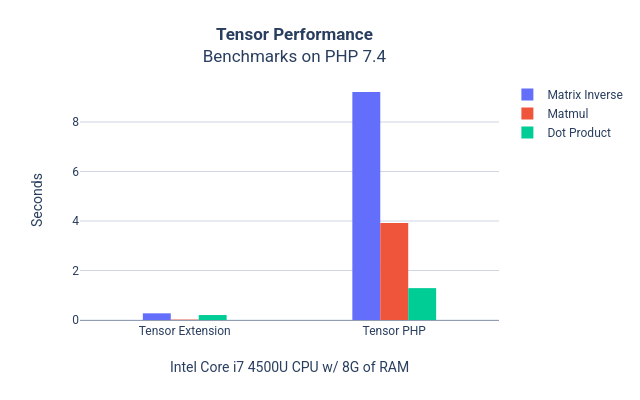
Performance Comparison

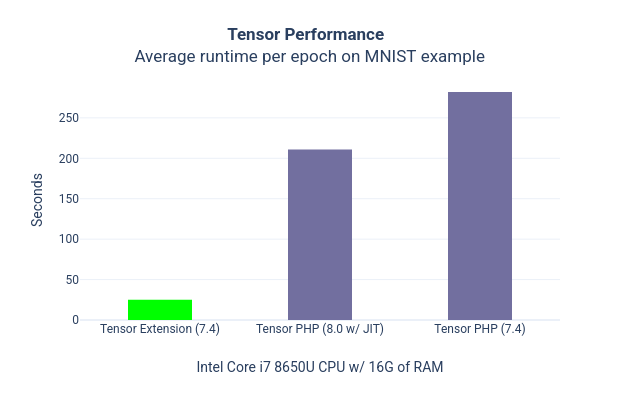
👁 Tensor Performance Benchmarks

Contributing
See CONTRIBUTING.md for guidelines.
License
The code is licensed MIT and the documentation is licensed CC BY-NC 4.0.