

toolkit/pflag
Command line flag parse library of the php
Maintainers
Requires
- php: >8.0.0
- ext-mbstring: *
- toolkit/cli-utils: ~2.0
- toolkit/stdlib: ~2.0
Requires (Dev)
None
Suggests
None
Provides
None
Conflicts
None
Replaces
None
MIT ffbd245d5e4b2e570cd6960de35d3d5add8c2283
- inhere <in.798.woop@qq.com>
README
👁 License
👁 GitHub tag (latest SemVer)
👁 Actions Status
👁 Php Version Support
👁 Latest Stable Version
👁 Coverage Status
👁 zh-CN readme

Generic PHP command line flags parse library
Github: php-toolkit/pflag
Features
- Generic command line options and arguments parser.
- Support set value data type(
int,string,bool,array), will auto format input value. - Support set multi alias names for an option.
- Support set multi short names for an option.
- Support set default value for option/argument.
- Support read flag value from ENV var.
- Support set option/argument is required.
- Support set validator for check input value.
- Support auto render beautiful help message.
Flag Options:
- Options start with
-or--, and the first character must be a letter - Support long option. eg:
--long--long value - Support short option. eg:
-s -a value - Support define array option
- eg:
--tag php --tag gowill gettag: [php, go]
- eg:
Flag Arguments:
- Support binding named arguemnt
- Support define array argument
Quick build command
- Use
Toolkit\PFlag\CliCmdto quickly build a simple command application - Use
Toolkit\PFlag\CliAppto quickly build a command application that supports subcommands
Install
- Require PHP 8.0+
composer
composer require toolkit/pflag
Flags Usage
Flags - is an cli flags(options&argument) parser and manager.
example codes please see example/flags-demo.php
Create Flags
use Toolkit\PFlag\Flags;

require dirname(__DIR__) . '/test/bootstrap.php';

$flags = $_SERVER['argv'];
// NOTICE: must shift first element.
$scriptFile = array_shift($flags);

$fs = Flags::new();
// can with some config
$fs->setScriptFile($scriptFile);
/** @see Flags::$settings */
$fs->setSettings([
 'descNlOnOptLen' => 26
]);

// ...
Define options
Examples for add flag option define:
use Toolkit\PFlag\Flag\Option;
use Toolkit\PFlag\FlagType;
use Toolkit\PFlag\Validator\EnumValidator;

// add options
// - quick add
$fs->addOpt('age', 'a', 'this is a int option', FlagType::INT);

// - use string rule
$fs->addOptByRule('name,n', 'string;this is a string option;true');

// - use array rule
/** @see Flags::DEFINE_ITEM for array rule */
$fs->addOptByRule('name-is-very-lang', [
 'type' => FlagType::STRING,
 'desc' => 'option name is to lang, desc will print on newline',
 'shorts' => ['d','e','f'],
 // TIP: add validator limit input value.
 'validator' => EnumValidator::new(['one', 'two', 'three']),
]);

// -- add multi option at once.
$fs->addOptsByRules([
 'tag,t' => 'strings;array option, allow set multi times',
 'f' => 'bool;this is an bool option',
]);

// - use Option
$opt = Option::new('str1', "this is string option, \ndesc has multi line, \nhaha...");
$opt->setDefault('defVal');
$fs->addOption($opt);
Define Arguments
Examples for add flag argument define:
use Toolkit\PFlag\Flag\Argument;
use Toolkit\PFlag\FlagType;

// add arguments
// - quick add
$fs->addArg('strArg1', 'the is string arg and is required', 'string', true);

// - use string rule
$fs->addArgByRule('intArg2', 'int;this is a int arg and with default value;no;89');

// - use Argument object
$arg = Argument::new('arrArg');
// OR $arg->setType(FlagType::ARRAY);
$arg->setType(FlagType::STRINGS);
$arg->setDesc("this is an array arg,\n allow multi value,\n must define at last");

$fs->addArgument($arg);
Parse Input
use Toolkit\PFlag\Flags;
use Toolkit\PFlag\FlagType;

// ...

if (!$fs->parse($flags)) {
 // on render help
 return;
}

vdump($fs->getOpts(), $fs->getArgs());
Show help
$ php example/flags-demo.php --help
Output:

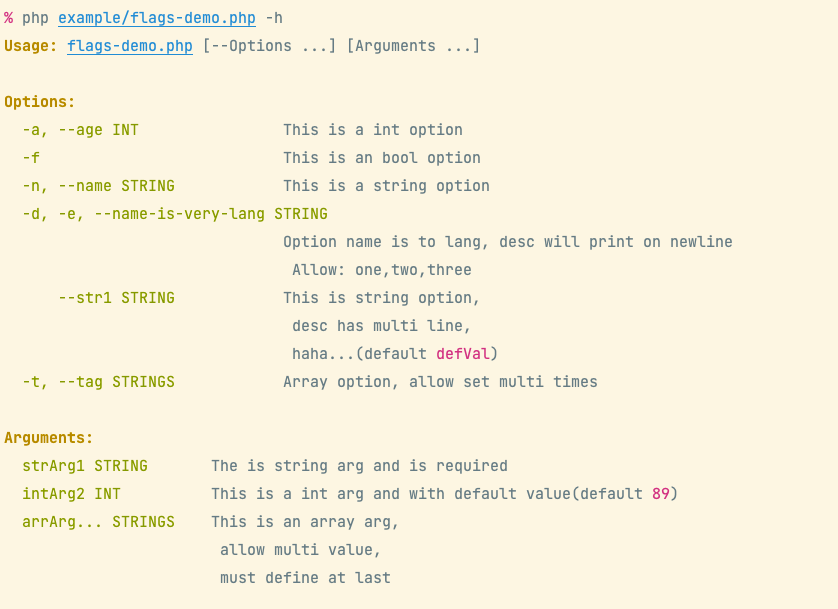
Run demo:
$ php example/flags-demo.php --name inhere --age 99 --tag go -t php -t java -d one -f arg0 80 arr0 arr1
Output:
# options
array(6) {
 ["str1"]=> string(6) "defVal"
 ["name"]=> string(6) "inhere"
 ["age"]=> int(99)
 ["tag"]=> array(3) {
 [0]=> string(2) "go"
 [1]=> string(3) "php"
 [2]=> string(4) "java"
 }
 ["name-is-very-lang"]=> string(3) "one"
 ["f"]=> bool(true)
}

# arguments
array(3) {
 [0]=> string(4) "arg0"
 [1]=> int(80)
 [2]=> array(2) {
 [0]=> string(4) "arr0"
 [1]=> string(4) "arr1"
 }
}
Get Value
Get flag value is very simple, use method getOpt(string $name) getArg($nameOrIndex).
TIP: Will auto format input value by define type.
Options
$force = $fs->getOpt('f'); // bool(true)
$age = $fs->getOpt('age'); // int(99)
$name = $fs->getOpt('name'); // string(inhere)
$tags = $fs->getOpt('tags'); // array{"php", "go", "java"}
Arguments
$arg0 = $fs->getArg(0); // string(arg0)
// get an array arg
$arrArg = $fs->getArg(1); // array{"arr0", "arr1"}
// get value by name
$arrArg = $fs->getArg('arrArg'); // array{"arr0", "arr1"}
Build simple cli app
In the pflag, built in CliApp and CliCmd for quick create and run an simple console application.
Create simple alone command
Build and run a simple command handler. see example file example/clicmd.php
use Toolkit\Cli\Cli;
use Toolkit\PFlag\CliCmd;
use Toolkit\PFlag\FlagsParser;

CliCmd::new()
 ->config(function (CliCmd $cmd) {
 $cmd->name = 'demo';
 $cmd->desc = 'description for demo command';

 // config flags
 $cmd->options = [
 'age, a' => 'int;the option age, is int',
 'name, n' => 'the option name, is string and required;true',
 'tags, t' => 'array;the option tags, is array',
 ];
 // or use property
 // $cmd->arguments = [...];
 })
 ->withArguments([
 'arg1' => 'this is arg1, is string'
 ])
 ->setHandler(function (FlagsParser $fs) {
 Cli::info('options:');
 vdump($fs->getOpts());
 Cli::info('arguments:');
 vdump($fs->getArgs());
 })
 ->run();
Usage:
# show help
php example/clicmd.php -h
# run command
php example/clicmd.php --age 23 --name inhere value1
- Display help:

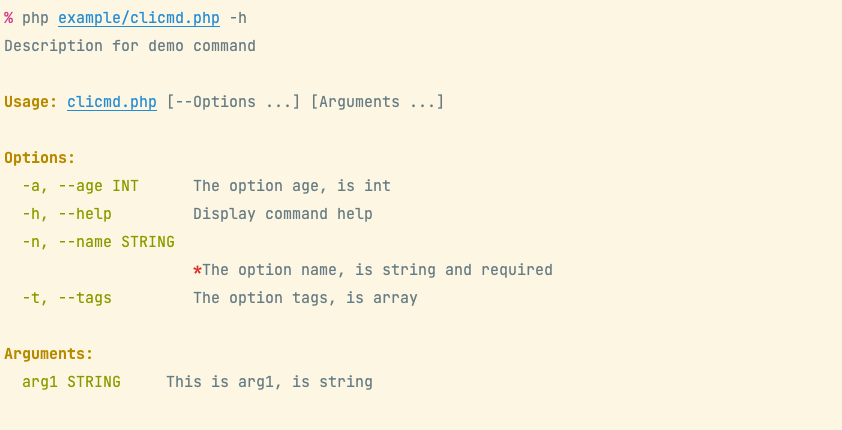
- Run command:

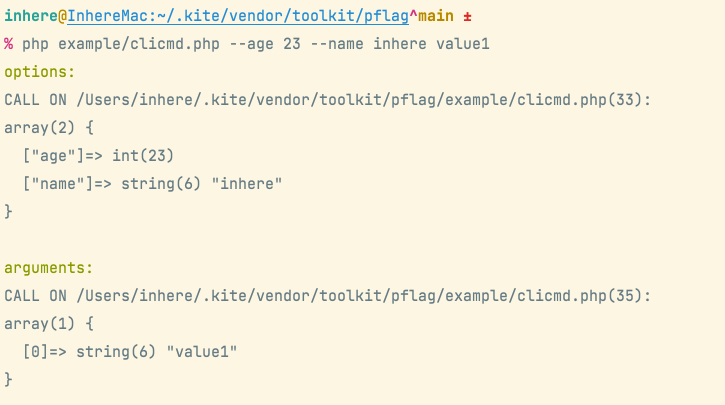
Create an multi commands app
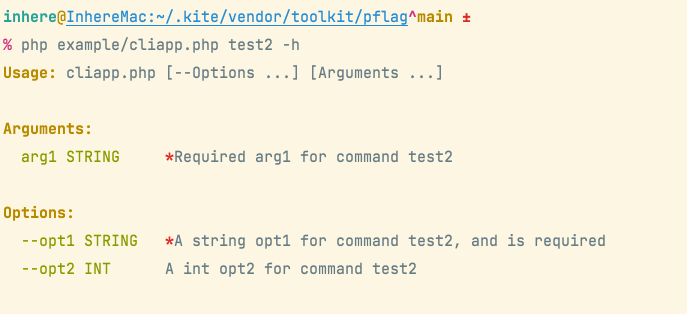
Create an multi commands application, run subcommand. see example file example/cliapp.php
use Toolkit\Cli\Cli;
use Toolkit\PFlag\CliApp;
use Toolkit\PFlag\FlagsParser;
use Toolkit\PFlagTest\Cases\DemoCmdHandler;

$app = new CliApp();

$app->add('test1', fn(FlagsParser $fs) => vdump($fs->getOpts()), [
 'desc' => 'the test 1 command',
 'options' => [
 'opt1' => 'opt1 for command test1',
 'opt2' => 'int;opt2 for command test1',
 ],
]);

$app->add('test2', function (FlagsParser $fs) {
 Cli::info('options:');
 vdump($fs->getOpts());
 Cli::info('arguments:');
 vdump($fs->getArgs());
}, [
 // 'desc' => 'the test2 command',
 'options' => [
 'opt1' => 'a string opt1 for command test2',
 'opt2' => 'int;a int opt2 for command test2',
 ],
 'arguments' => [
 'arg1' => 'required arg1 for command test2;true',
 ]
]);

// fn - required php 7.4+
$app->add('show-err', fn() => throw new RuntimeException('test show exception'));

$app->addHandler(DemoCmdHandler::class);

$app->run();
Usage:
# show help
php example/cliapp.php -h
# run command
php example/cliapp.php test2 --opt1 val1 --opt2 23 value1
- Display commands:

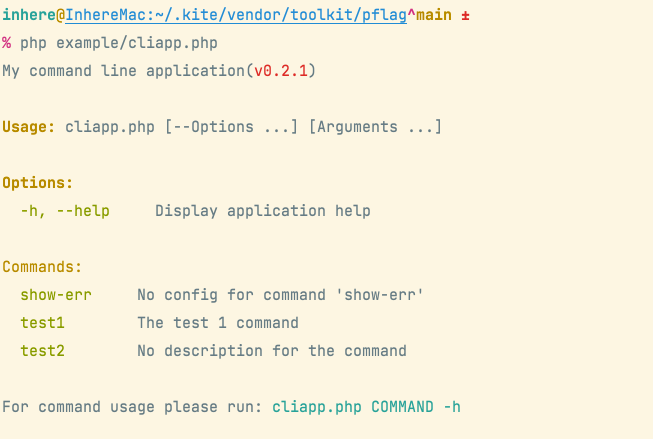
- Command help:

- Run command:

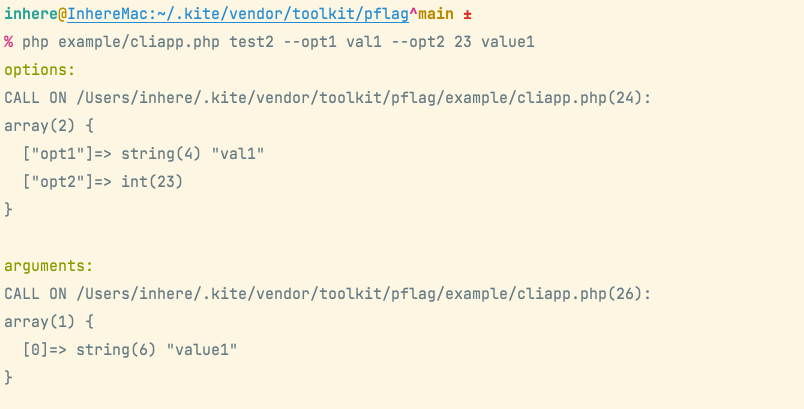
Flag rule
The options/arguments rules. Use rule can quick define an option or argument.
- string value is rule(
type;desc;required;default;shorts). - array is define item
SFlags::DEFINE_ITEM - supported type see
FlagType::*
use Toolkit\PFlag\FlagType;

$rules = [
 // v: only value, as name and use default type FlagType::STRING
 // k-v: key is name, value can be string|array
 'long,s',
 // name => rule
 'long,a,b' => 'int', // long is option name, a and b is shorts.
 'f' => FlagType::BOOL,
 'str1' => ['type' => 'int', 'desc' => 'an string option'],
 'tags' => 'array', // can also: ints, strings
 'name' => 'type;the description message;required;default', // with desc, default, required
]
For options
- option allow set shorts
TIP: name
long,a,b-longis the option name. remaininga,bis short names.
For arguments
- argument no alias/shorts
- array value only allow defined at last
Definition item
The const Flags::DEFINE_ITEM:
public const DEFINE_ITEM = [
 'name' => '',
 'desc' => '',
 'type' => FlagType::STRING,
 'helpType' => '', // use for render help
 // 'index' => 0, // only for argument
 'required' => false,
 'default' => null,
 'shorts' => [], // only for option
 // value validator
 'validator' => null,
 // 'category' => null
];
Custom settings
Settings for parse
 // -------------------- settings for parse option --------------------

 /**
 * Stop parse option on found first argument.
 *
 * - Useful for support multi commands. eg: `top --opt ... sub --opt ...`
 *
 * @var bool
 */
 protected $stopOnFistArg = true;

 /**
 * Skip on found undefined option.
 *
 * - FALSE will throw FlagException error.
 * - TRUE will skip it and collect as raw arg, then continue parse next.
 *
 * @var bool
 */
 protected $skipOnUndefined = false;

 // -------------------- settings for parse argument --------------------

 /**
 * Whether auto bind remaining args after option parsed
 *
 * @var bool
 */
 protected $autoBindArgs = true;

 /**
 * Strict match args number.
 * if exist unbind args, will throw FlagException
 *
 * @var bool
 */
 protected $strictMatchArgs = false;
Setting for render help
support some settings for render help
 // -------------------- settings for built-in render help --------------------

 /**
 * Auto render help on provide '-h', '--help'
 *
 * @var bool
 */
 protected $autoRenderHelp = true;

 /**
 * Show flag data type on render help.
 *
 * if False:
 *
 * -o, --opt Option desc
 *
 * if True:
 *
 * -o, --opt STRING Option desc
 *
 * @var bool
 */
 protected $showTypeOnHelp = true;

 /**
 * Will call it on before print help message
 *
 * @var callable
 */
 private $beforePrintHelp;
- custom help message renderer
$fs->setHelpRenderer(function (\Toolkit\PFlag\FlagsParser $fs) {
 // render help messages
});
Unit tests
phpunit --debug
test with coverage:
phpdbg -dauto_globals_jit=Off -qrr $(which phpunit) --coverage-text
phpdbg -dauto_globals_jit=Off -qrr $(which phpunit) --coverage-clover ./test/clover.info
# use xdebug
phpunit --coverage-clover ./test/clover.info
Project use
Check out these projects, which use https://github.com/php-toolkit/pflag :
- inhere/console Full-featured php command line application library.
- kite Kite is a tool for help development.
- More, please see Packagist