

yamadashy/phpstan-friendly-formatter
Simple error formatter for PHPStan that display code frame
Maintainers
Package info
github.com/yamadashy/phpstan-friendly-formatter
Type:phpstan-extension
pkg:composer/yamadashy/phpstan-friendly-formatter
Requires
- php: ^8.1
- php-parallel-lint/php-console-highlighter: ^0.3 || ^0.4 || ^0.5 || ^1.0
- phpstan/phpstan: ^1.0 || ^2.0
Requires (Dev)
- friendsofphp/php-cs-fixer: ^3.93.0
- phpstan/phpstan-phpunit: ^2.0.12
- phpunit/phpunit: ^10.0 || ^11.0
Suggests
None
Provides
None
Conflicts
None
Replaces
None
MIT cd4882c7293591c13230b5be35e742b33d2ab2ff
- Kazuki Yamada <koukun0120.woop@gmail.com>
This package is auto-updated.
Last update: 2026-06-28 10:22:32 UTC
README
👁 Downloads
👁 Test Status
👁 Latest Version
👁 License
Enhance your PHPStan experience with a formatter that brings your code to life! 🚀
🌟 Features
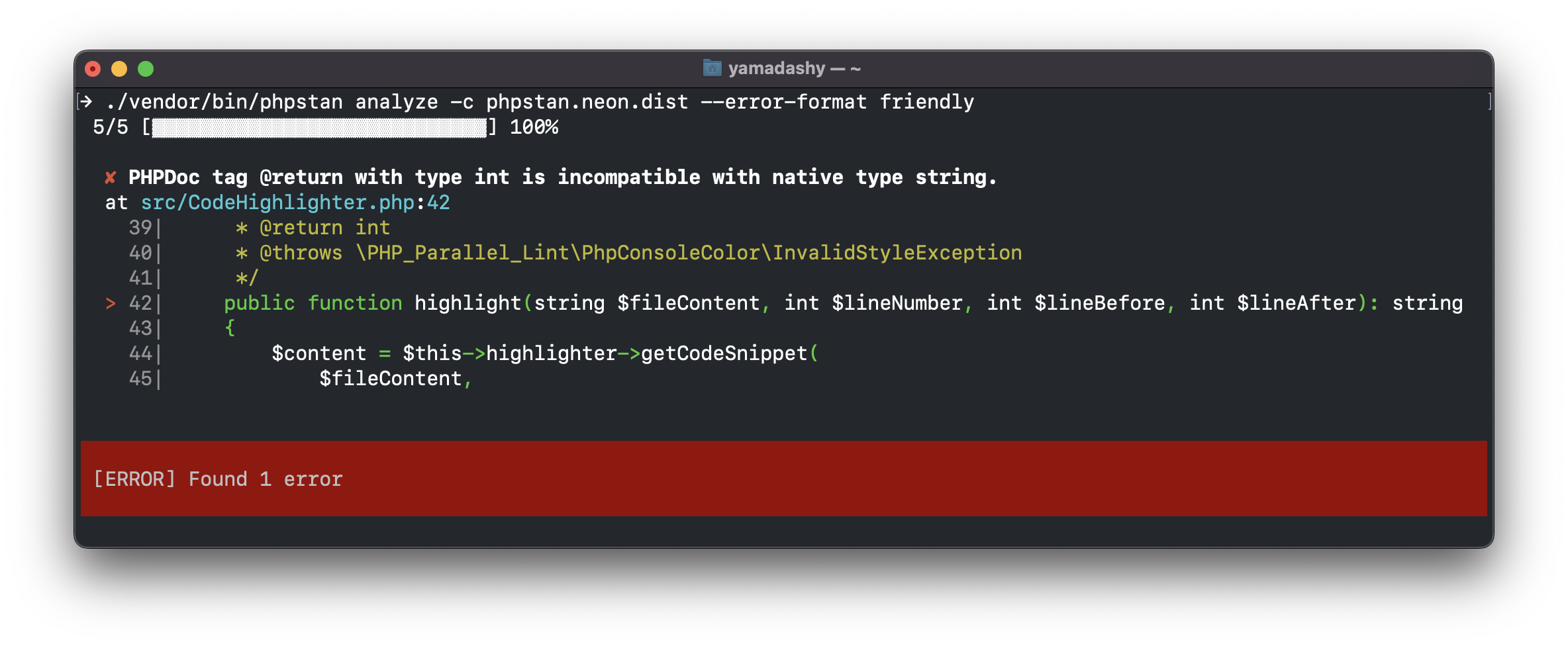
- Display Code Frame: See the problematic code right where the error occurs
- Error Identifier Summary: Get a quick overview of error types and their frequencies
- Beautiful Output: Enjoy a visually appealing and easy-to-read error report
👁 PHPStan Friendly Formatter Example

🎯 Motivation
Ever felt lost in a sea of file paths and line numbers? We've been there! That's why we created this formatter to:
- Instantly pinpoint what's wrong in your code
- Reduce mental overhead when interpreting error messages
- Accelerate your debugging process
🚀 Getting Started
- You may use Composer to install this package as a development dependency.
composer require --dev yamadashy/phpstan-friendly-formatter
- Register error formatter into your
phpstan.neonorphpstan.neon.dist:
includes:
 - ./vendor/yamadashy/phpstan-friendly-formatter/extension.neon
- Finally, set the
errorFormatparameter:
parameters:
 errorFormat: friendly
Optional: Simplify Your Workflow
If you want to make it simpler, setting scripts in composer.json as follows:
{
 "scripts": {
 "analyze": "phpstan analyze --error-format friendly"
 }
}
You can run a short command like this:
composer analyze
⚙️ Configuration Options
You can customize in your phpstan.neon:
parameters:
 friendly:
 lineBefore: 3 # Number of lines to display before error line (default: 2)
 lineAfter: 3 # Number of lines to display after error line (default: 2)
 editorUrl: 'phpstorm://open?file=%%file%%&line=%%line%%' # Editor URL (default: null)
Editor URL Configuration
The editorUrl option allows you to create clickable links in terminal output that open files directly in your editor.
Available placeholders:
%%file%%- Absolute file path%%relFile%%- Relative file path (useful for Docker/container environments)%%line%%- Line number
Editor examples:
parameters:
 friendly:
 # PhpStorm / IntelliJ IDEA
 editorUrl: 'phpstorm://open?file=%%file%%&line=%%line%%'

 # VSCode (with absolute path)
 editorUrl: 'vscode://file/%%file%%:%%line%%'

 # VSCode (with relative path - for Docker environments, requires base path)
 editorUrl: 'vscode://file//your/local/project/path/%%relFile%%:%%line%%'

 # Sublime Text
 editorUrl: 'subl://open?url=file://%%file%%&line=%%line%%'
Note: When running PHPStan in Docker or other virtualized environments, use
%%relFile%%instead of%%file%%to get the relative path. For VSCode, you may need to prepend your local project path since VSCode requires absolute paths.
🖼️ Example
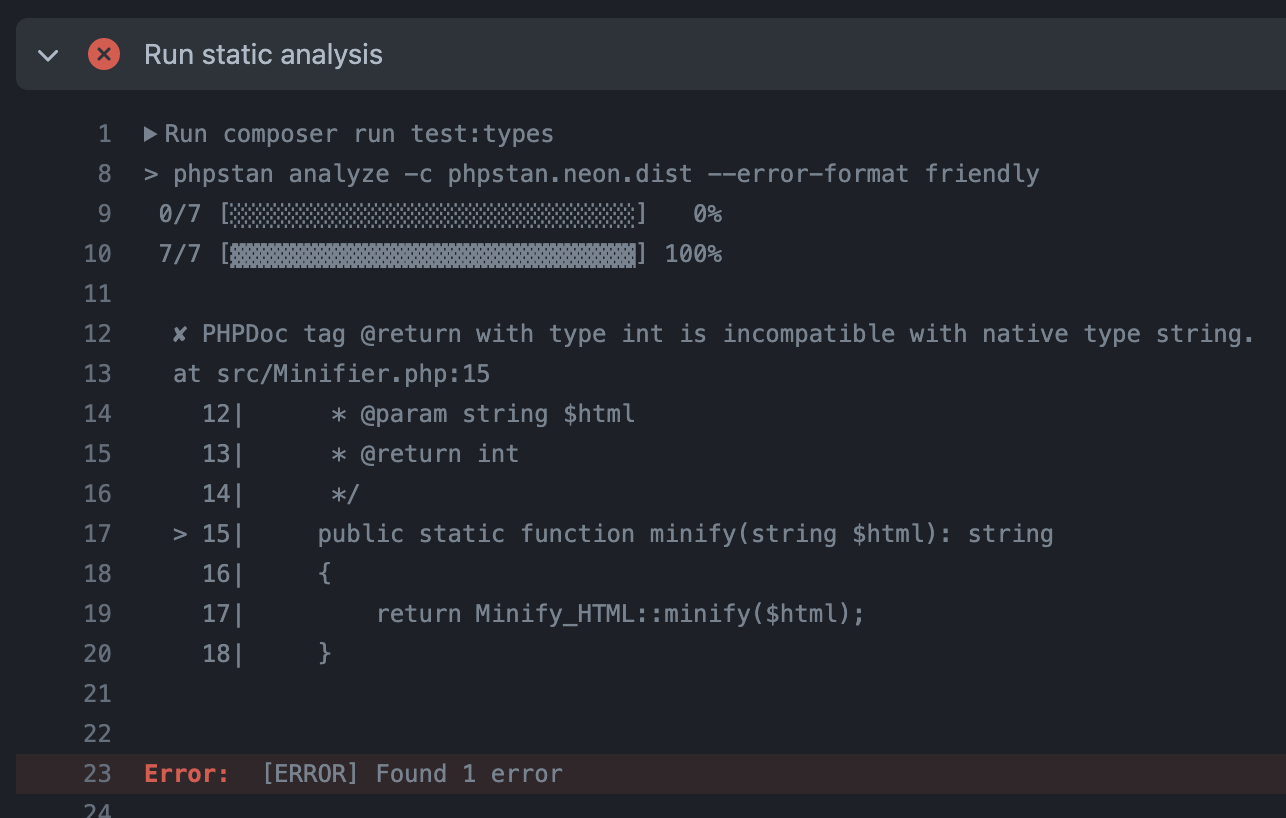
When you actually introduce it in GitHub Actions, it will be displayed as follows.
👁 PHPStan Friendly Formatter output in GitHub Actions
https://github.com/yamadashy/laravel-blade-minify-directive/actions/runs/4714024802/jobs/8360104870

🛠️ Development
composer test # Run tests
composer cs-fix # Fix code style
composer playground # Test formatter output with sample errors
📜 License
Distributed under the MIT license.