yii2assets/yii2-fullscreen-modal
Fullscreen modal
Maintainers
Package info
github.com/Yii2Assets/yii2-fullscreen-modal
Language:CSS
Type:yii2-extension
pkg:composer/yii2assets/yii2-fullscreen-modal
1.0.2
2016-07-20 17:17 UTC
Requires
Requires (Dev)
None
Suggests
None
Provides
None
Conflicts
None
Replaces
None
MIT be3bbecd4547c65a4b9431e0ed667992817bedef
- Sathit Seethaphon <dixonsatit.woop@gmail.com>
This package is not auto-updated.
Last update: 2026-06-17 07:04:33 UTC
README
👁 Latest Stable Version
👁 Total Downloads
👁 Latest Unstable Version
👁 License
👁 composer.lock
Bootstrap fullscreen modal
Installation
The preferred way to install this extension is through composer.
Either run
php composer.phar require --prefer-dist yii2assets/yii2-fullscreen-modal "*"
or add
"yii2assets/yii2-fullscreen-modal": "*"
to the require section of your composer.json file.
Usage
Once the extension is installed, simply use it in your code by :
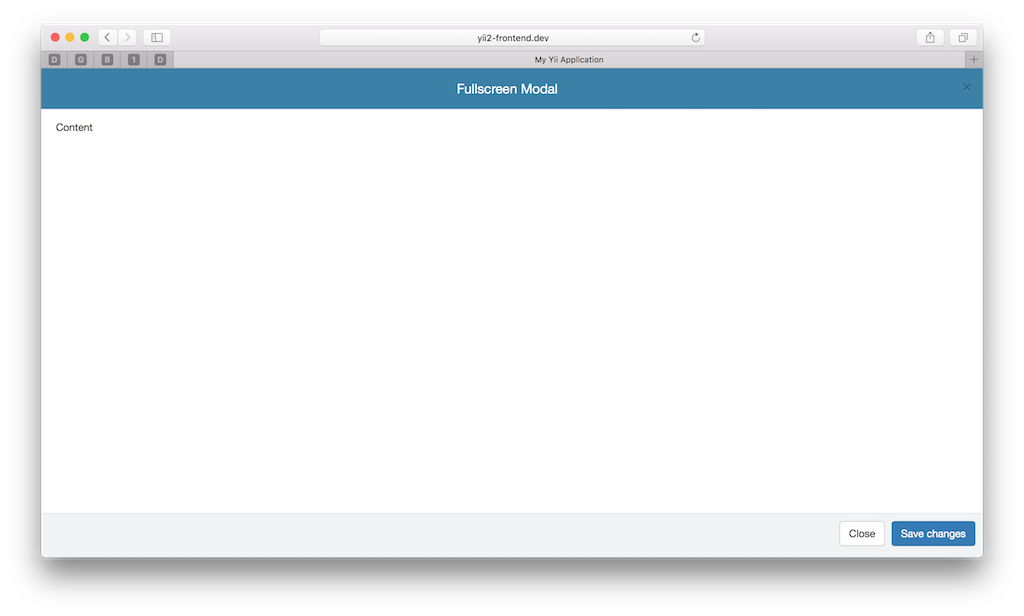
<?php \yii2assets\fullscreenmodal\FullscreenModal::begin([
 'header' => '<h4 class="modal-title text-center">Fullscreen Modal</h4>',
 'footer' => '<button type="button" class="btn btn-default" data-dismiss="modal">Close</button>
 <button type="button" class="btn btn-primary">Save changes</button>',

 'toggleButton' => ['label' => 'Open','class'=>'btn btn-primary'],
]);?>

<p> Content </p>

<?php FullscreenModal::end();?>

Config modal-body no padding
modalbodyPadding => false, //false or set value '10px'
<?php \yii2assets\fullscreenmodal\FullscreenModal::begin([
 'header' => '<h4 class="modal-title text-center">Fullscreen Modal</h4>',
 'footer' => '<button type="button" class="btn btn-default" data-dismiss="modal">Close</button>
 <button type="button" class="btn btn-primary">Save changes</button>',
 'modalbodyPadding'=>false, // <<-----------
 'toggleButton' => ['label' => 'Open','class'=>'btn btn-primary'],
]);?>

<p> Content </p>

<?php FullscreenModal::end();?>