Loading...
Loading...
Loading...
Loading...
Loading...
Loading...
Loading...
Loading...
Loading...
Loading...
Loading...
Loading...
 |
VOOZH | about |
Was this page helpful?
Use the latest Claude Opus (4.7) model for complex tools and ambiguous queries; it handles multiple tools better and seeks clarification when needed.
Use Claude Haiku models for straightforward tools, but note they may infer missing parameters.
If using Claude with tool use and extended thinking, refer to the extended thinking guide for more information.
Client tools (both Anthropic-schema and user-defined) are specified in the tools top-level parameter of the API request. Each tool definition includes:
| Parameter | Description |
|---|---|
name | The name of the tool. Must match the regex ^[a-zA-Z0-9_-]{1,64}$. |
description | A detailed plaintext description of what the tool does, when it should be used, and how it behaves. |
input_schema | A JSON Schema object defining the expected parameters for the tool. |
input_examples | (Optional) An array of example input objects to help Claude understand how to use the tool. See Providing tool use examples. |
For the full set of optional properties available on any tool definition, including cache_control, strict, defer_loading, and allowed_callers, see the Tool reference.
When you call the Claude API with the tools parameter, the API constructs a special system prompt from the tool definitions, tool configuration, and any user-specified system prompt. The constructed prompt is designed to instruct the model to use the specified tool(s) and provide the necessary context for the tool to operate properly:
In this environment you have access to a set of tools you can use to answer the user's question.
{{ FORMATTING INSTRUCTIONS }}
String and scalar parameters should be specified as is, while lists and objects should use JSON format. Note that spaces for string values are not stripped. The output is not expected to be valid XML and is parsed with regular expressions.
Here are the functions available in JSONSchema format:
{{ TOOL DEFINITIONS IN JSON SCHEMA }}
{{ USER SYSTEM PROMPT }}
{{ TOOL CONFIGURATION }}To get the best performance out of Claude when using tools, follow these guidelines:
input_examples for complex tools. Clear descriptions are most important, but for tools with complex inputs, nested objects, or format-sensitive parameters, you can use the input_examples field to provide schema-validated examples. See Providing tool use examples for details.create_pr, , ), group them into a single tool with an parameter. Fewer, more capable tools reduce selection ambiguity and make your tool surface easier for Claude to navigate.The good description clearly explains what the tool does, when to use it, what data it returns, and what the ticker parameter means. The poor description is too brief and leaves Claude with many open questions about the tool's behavior and usage.
For deeper guidance on tool design (consolidation, naming, and response shaping), see Writing tools for agents.
You can provide concrete examples of valid tool inputs to help Claude understand how to use your tools more effectively. This is particularly useful for complex tools with nested objects, optional parameters, or format-sensitive inputs.
Add an optional input_examples field to your tool definition with an array of example input objects. Each example must be valid according to the tool's input_schema:
Examples are included in the prompt alongside your tool schema, showing Claude concrete patterns for well-formed tool calls. This helps Claude understand when to include optional parameters, what formats to use, and how to structure complex inputs.
input_schema. Invalid examples return a 400 errorIn some cases, you may want Claude to use a specific tool to answer the user's question, even if Claude would otherwise answer directly without calling a tool. You can do this by specifying the tool in the tool_choice field like so:
tool_choice = {"type": "tool", "name": "get_weather"}When working with the tool_choice parameter, there are four possible options:
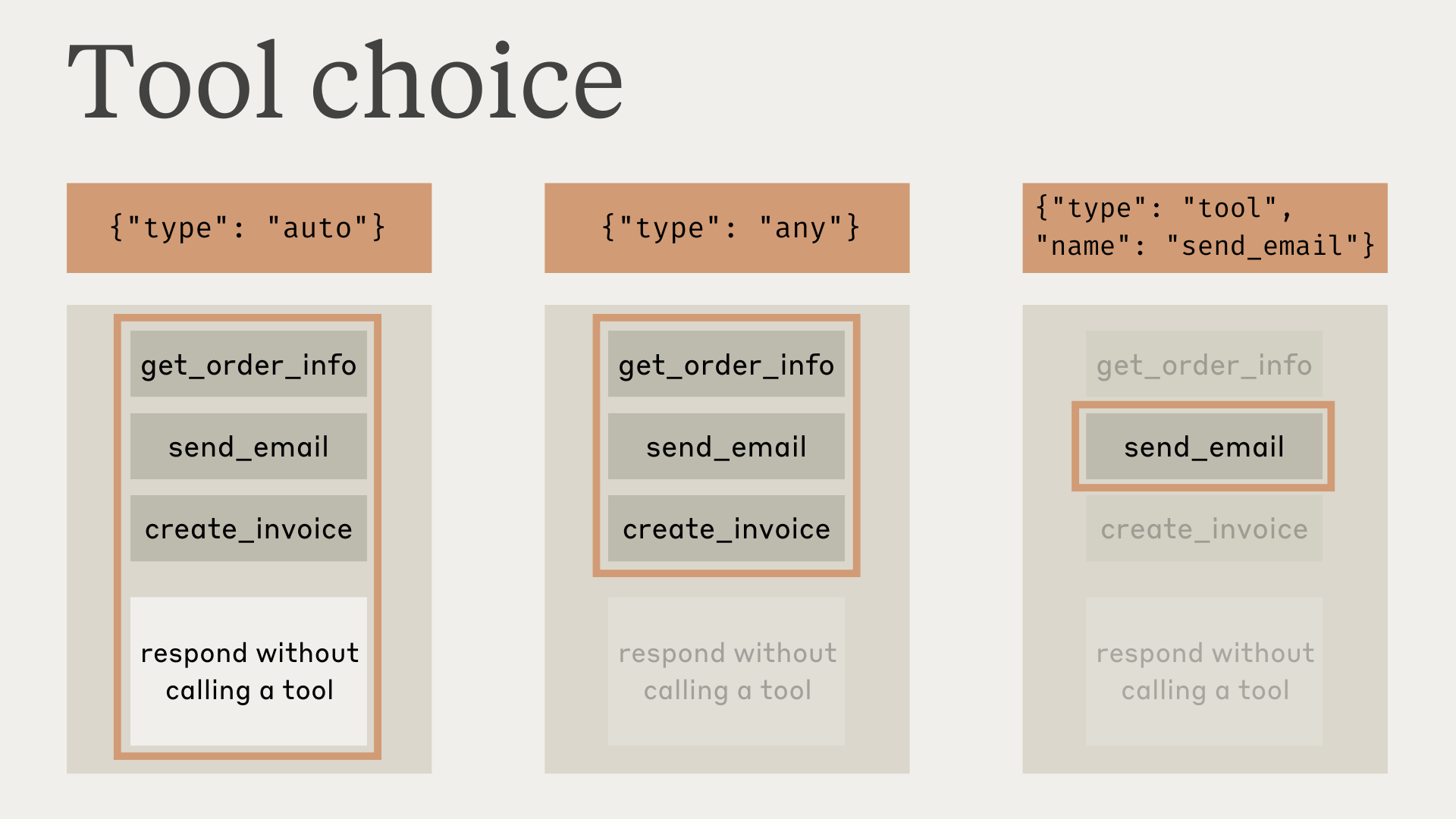
auto allows Claude to decide whether to call any provided tools or not. This is the default value when tools are provided.any tells Claude that it must use one of the provided tools, but doesn't force a particular tool.tool forces Claude to always use a particular tool.none prevents Claude from using any tools. This is the default value when no tools are provided.When using prompt caching, changes to the tool_choice parameter will invalidate cached message blocks. Tool definitions and system prompts remain cached, but message content must be reprocessed.
This diagram illustrates how each option works:
Note that when you have tool_choice as any or tool, the API prefills the assistant message to force a tool to be used. This means that the models will not emit a natural language response or explanation before tool_use content blocks, even if explicitly asked to do so.
When using extended thinking with tool use, tool_choice: {"type": "any"} and tool_choice: {"type": "tool", "name": "..."} are not supported and will result in an error. Only tool_choice: {"type": "auto"} (the default) and tool_choice: {"type": "none"} are compatible with extended thinking.
Claude Mythos Preview does not support forced tool use. Requests with tool_choice: {"type": "any"} or tool_choice: {"type": "tool", "name": "..."} return a 400 error on this model. Use tool_choice: {"type": "auto"} (the default) or tool_choice: {"type": "none"} and rely on prompting to influence tool selection.
Testing has shown that this should not reduce performance. If you would like the model to provide natural language context or explanations while still requesting that the model use a specific tool, you can use {"type": "auto"} for tool_choice (the default) and add explicit instructions in a user message. For example: What's the weather like in London? Use the get_weather tool in your response.
Guaranteed tool calls with strict tools
Combine tool_choice: {"type": "any"} with strict tool use to guarantee both that one of your tools will be called AND that the tool inputs strictly follow your schema. Set strict: true on your tool definitions to enable schema validation.
When using tools, Claude will often comment on what it's doing or respond naturally to the user before invoking tools.
For example, given the prompt "What's the weather like in San Francisco right now, and what time is it there?", Claude might respond with:
{
 "role": "assistant",
 "content": [
 {
 "type": "text",
 "text": "I'll help you check the current weather and time in San Francisco."
 },
 {
 "type": "tool_use",
 "id": "toolu_01A09q90qw90lq917835lq9",
 "name": "get_weather",
 "input": { "location": "San Francisco, CA" }
 }
 ]
}
This natural response style helps users understand what Claude is doing and creates a more conversational interaction. You can guide the style and content of these responses through your system prompts and by providing <examples> in your prompts.
It's important to note that Claude may use various phrasings and approaches when explaining its actions. Your code should treat these responses like any other assistant-generated text, and not rely on specific formatting conventions.
review_prmerge_practiongithub_list_prs, slack_send_message). This makes tool selection unambiguous as your library grows, and is especially important when using tool search.import anthropic
client = anthropic.Anthropic()
response = client.messages.create(
model="claude-opus-4-8",
max_tokens=1024,
tools=[
{
"name": "get_weather",
"description": "Get the current weather in a given location",
"input_schema": {
"type": "object",
"properties": {
"location": {
"type": "string",
"description": "The city and state, e.g. San Francisco, CA",
},
"unit": {
"type": "string",
"enum": ["celsius", "fahrenheit"],
"description": "The unit of temperature",
},
},
"required": ["location"],
},
"input_examples": [
{"location": "San Francisco, CA", "unit": "fahrenheit"},
{"location": "Tokyo, Japan", "unit": "celsius"},
{
"location": "New York, NY" # 'unit' is optional
},
],
}
],
messages=[{"role": "user", "content": "What's the weather like in San Francisco?"}],
)
print(response)