Loading...
Loading...
Loading...
Loading...
Loading...
Loading...
Loading...
Loading...
Loading...
Loading...
Loading...
Loading...
 |
VOOZH | about |
This feature is eligible for Zero Data Retention (ZDR). When your organization has a ZDR arrangement, data sent through this feature is not stored after the API response is returned.
Extended thinking gives Claude enhanced reasoning capabilities for complex tasks, while providing varying levels of transparency into its step-by-step thought process before it delivers its final answer.
On claude-fable-5 and claude-mythos-5, extended thinking is always enabled and cannot be disabled. Manual extended thinking (thinking: {type: "enabled", budget_tokens: N}) is not supported; use adaptive thinking instead. Adaptive thinking is always on, and thinking: {type: "disabled"} returns an error.
For Claude Opus 4.8 and Claude Opus 4.7, set thinking: {type: "adaptive"} to enable adaptive thinking and use the effort parameter to control thinking depth. On both models, manual extended thinking (thinking: {type: "enabled", budget_tokens: N}) is not supported and returns a 400 error. With adaptive thinking, the model decides when and how much to think based on each request, so it triggers thinking only as needed. For Claude Opus 4.6 and Claude Sonnet 4.6, adaptive thinking is also recommended; the manual configuration is still functional on these models but is deprecated and will be removed in a future model release.
Manual extended thinking (thinking: {type: "enabled", budget_tokens: N}) is supported on all current Claude models except Claude Fable 5, Claude Mythos 5, Claude Opus 4.8, and Claude Opus 4.7, where it is not accepted and returns a 400 error. A few models have mode-specific behavior:
Was this page helpful?
claude-fable-5) and Claude Mythos 5 (claude-mythos-5): manual extended thinking is not supported and returns a 400 error. Adaptive thinking is always on; use the effort parameter to control thinking depth.thinking: {type: "adaptive"}) with the effort parameter instead. The model determines whether and how much to use extended thinking based on each request.thinking: {type: "adaptive"}) with the effort parameter instead.thinking: {type: "enabled", budget_tokens: N} is also accepted. thinking: {type: "disabled"} is not supported, and display defaults to "omitted" rather than returning thinking content. Pass display: "summarized" to receive summaries.type: "enabled") is deprecated but still functional.type: "enabled") with interleaved mode is deprecated but still functional.Thinking behavior differs across Claude model versions. See Differences in thinking across model versions for details.
When extended thinking is turned on, Claude creates thinking content blocks where it outputs its internal reasoning. Claude incorporates insights from this reasoning before crafting a final response.
The API response includes thinking content blocks, followed by text content blocks.
Here's an example of the default response format:
{
 "content": [
 {
 "type": "thinking",
 "thinking": "Let me analyze this step by step...",
 "signature": "WaUjzkypQ2mUEVM36O2TxuC06KN8xyfbJwyem2dw3URve/op91XWHOEBLLqIOMfFG/UvLEczmEsUjavL...."
 },
 {
 "type": "text",
 "text": "Based on my analysis..."
 }
 ]
}
For more information about the response format of extended thinking, see the Messages API Reference.
Here is an example of using extended thinking in the Messages API:
client = anthropic.Anthropic()

response = client.messages.create(
 model="claude-sonnet-4-6",
 max_tokens=16000,
 thinking={"type": "enabled", "budget_tokens": 10000},
 messages=[
 {
 "role": "user",
 "content": "Are there an infinite number of prime numbers such that n mod 4 == 3?",
 }
 ],
)

# The response contains summarized thinking blocks and text blocks
for block in response.content:
 if block.type == "thinking":
 print(f"\nThinking summary: {block.thinking}")
 elif block.type == "text":
 print(f"\nResponse: {block.text}")
To turn on extended thinking, add a thinking object, with the type parameter set to enabled and the budget_tokens to a specified token budget for extended thinking. For Claude Opus 4.6 and Claude Sonnet 4.6, use type: "adaptive" instead. See Adaptive thinking for details. While type: "enabled" with budget_tokens is still functional on these models, it is deprecated and will be removed in a future release.
The budget_tokens parameter determines the maximum number of tokens Claude is allowed to use for its internal reasoning process. This limit applies to full thinking tokens, not to the summarized output. Larger budgets can improve response quality by enabling more thorough analysis for complex problems, although Claude may not use the entire budget allocated, especially at ranges above 32k.
budget_tokens is deprecated on Claude Opus 4.6 and Claude Sonnet 4.6 and will be removed in a future model release. Use adaptive thinking with the effort parameter to control thinking depth instead.
Claude Mythos Preview, Claude Opus 4.8, Claude Opus 4.7, and Claude Opus 4.6 support up to 128k output tokens. Claude Sonnet 4.6 and Claude Haiku 4.5 support up to 64k. See the models overview for limits on legacy models. On the Message Batches API, the output-300k-2026-03-24 beta header raises the output limit to 300k for Claude Opus 4.8, Opus 4.7, Opus 4.6, and Sonnet 4.6.
budget_tokens must be set to a value less than max_tokens. However, when using interleaved thinking with tools, you can exceed this limit as the token limit becomes your entire context window. Because budget_tokens must be less than max_tokens, extended thinking cannot be combined with max_tokens: 0 (cache pre-warming).
With extended thinking enabled, the Messages API for Claude 4 models returns a summary of Claude's full thinking process. Summarized thinking provides the full intelligence benefits of extended thinking, while preventing misuse. This is the default behavior on Claude 4 models when the display field on the thinking configuration is unset or set to "summarized". On Claude Fable 5, Claude Mythos 5, Claude Opus 4.8, Claude Opus 4.7, and Claude Mythos Preview, display defaults to "omitted" instead, so you must set display: "summarized" explicitly to receive summarized thinking.
Here are some important considerations for summarized thinking:
In rare cases where you need access to full thinking output for Claude 4 models, contact Anthropic sales.
The display field on the thinking configuration controls how thinking content is returned in API responses. It accepts two values:
"summarized": Thinking blocks contain summarized thinking text. See Summarized thinking for details. This is the default on Claude Opus 4.6, Claude Sonnet 4.6, and earlier Claude 4 models."omitted": Thinking blocks are returned with an empty thinking field. The signature field still carries the encrypted full thinking for multi-turn continuity (see Thinking encryption). This is the default on Claude Fable 5, Claude Mythos 5, Claude Opus 4.8, Claude Opus 4.7, and Claude Mythos Preview.Setting display: "omitted" is useful when your application doesn't surface thinking content to users. The primary benefit is faster time-to-first-text-token when streaming: The server skips streaming thinking tokens entirely and delivers only the signature, so the final text response begins streaming sooner.
Here are some important considerations for omitted thinking:
signature to reconstruct the original thinking for prompt construction (see Preserving thinking blocks). Any text you place in the thinking field of a round-tripped omitted block is ignored.display is invalid with thinking.type: "disabled" (there is nothing to display).thinking.type: "adaptive" and the model skips thinking for a simple request, no thinking block is produced regardless of display.The signature field is identical whether display is "summarized" or "omitted". Switching display values between turns in a conversation is supported.
On Claude Mythos Preview, display defaults to "omitted". The examples in this section pass display explicitly so they apply to all models, but on Mythos Preview you can leave it unset and receive the same behavior. To receive summarized thinking on Mythos Preview, set display: "summarized" explicitly.
Automated pipelines that never surface thinking content to end users can skip the overhead of receiving thinking tokens over the wire. Latency-sensitive applications get the same reasoning quality without waiting for thinking text to stream before the final response begins.
client = anthropic.Anthropic()

response = client.messages.create(
 model="claude-sonnet-4-6",
 max_tokens=16000,
 thinking={
 "type": "enabled",
 "budget_tokens": 10000,
 "display": "omitted",
 },
 messages=[
 {"role": "user", "content": "What is 27 * 453?"},
 ],
)

for block in response.content:
 if block.type == "thinking":
 if block.thinking:
 print(f"Thinking: {block.thinking}")
 else:
 print("Thinking: [omitted]")
 elif block.type == "text":
 print(f"Response: {block.text}")
When display: "omitted" is set, the response contains thinking blocks with an empty thinking field:
{
 "content": [
 {
 "type": "thinking",
 "thinking": "",
 "signature": "EosnCkYICxIMMb3LzNrMu..."
 },
 {
 "type": "text",
 "text": "The answer is 12,231."
 }
 ]
}
When streaming with display: "omitted", no thinking_delta events are emitted; see Streaming thinking below for the event sequence.
You can stream extended thinking responses using server-sent events (SSE).
When streaming is enabled for extended thinking, you receive thinking content via thinking_delta events.
When display: "omitted" is set, no thinking_delta events are emitted. See Controlling thinking display.
For more documentation on streaming via the Messages API, see Streaming Messages.
Here's how to handle streaming with thinking:
client = anthropic.Anthropic()

with client.messages.stream(
 model="claude-sonnet-4-6",
 max_tokens=16000,
 thinking={"type": "enabled", "budget_tokens": 10000},
 messages=[
 {
 "role": "user",
 "content": "What is the greatest common divisor of 1071 and 462?",
 }
 ],
) as stream:
 thinking_started = False
 response_started = False

 for event in stream:
 if event.type == "content_block_start":
 print(f"\nStarting {event.content_block.type} block...")
 # Reset flags for each new block
 thinking_started = False
 response_started = False
 elif event.type == "content_block_delta":
 if event.delta.type == "thinking_delta":
 if not thinking_started:
 print("Thinking: ", end="", flush=True)
 thinking_started = True
 print(event.delta.thinking, end="", flush=True)
 elif event.delta.type == "text_delta":
 if not response_started:
 print("Response: ", end="", flush=True)
 response_started = True
 print(event.delta.text, end="", flush=True)
 elif event.type == "content_block_stop":
 print("\nBlock complete.")
Example streaming output:
event: message_start
data: {"type": "message_start", "message": {"id": "msg_01...", "type": "message", "role": "assistant", "content": [], "model": "claude-sonnet-4-6", "stop_reason": null, "stop_sequence": null}}

event: content_block_start
data: {"type": "content_block_start", "index": 0, "content_block": {"type": "thinking", "thinking": "", "signature": ""}}

event: content_block_delta
data: {"type": "content_block_delta", "index": 0, "delta": {"type": "thinking_delta", "thinking": "I need to find the GCD of 1071 and 462 using the Euclidean algorithm.\n\n1071 = 2 × 462 + 147"}}

event: content_block_delta
data: {"type": "content_block_delta", "index": 0, "delta": {"type": "thinking_delta", "thinking": "\n462 = 3 × 147 + 21\n147 = 7 × 21 + 0\n\nSo GCD(1071, 462) = 21"}}

// Additional thinking deltas...

event: content_block_delta
data: {"type": "content_block_delta", "index": 0, "delta": {"type": "signature_delta", "signature": "EqQBCgIYAhIM1gbcDa9GJwZA2b3hGgxBdjrkzLoky3dl1pkiMOYds..."}}

event: content_block_stop
data: {"type": "content_block_stop", "index": 0}

event: content_block_start
data: {"type": "content_block_start", "index": 1, "content_block": {"type": "text", "text": ""}}

event: content_block_delta
data: {"type": "content_block_delta", "index": 1, "delta": {"type": "text_delta", "text": "The greatest common divisor of 1071 and 462 is **21**."}}

// Additional text deltas...

event: content_block_stop
data: {"type": "content_block_stop", "index": 1}

event: message_delta
data: {"type": "message_delta", "delta": {"stop_reason": "end_turn", "stop_sequence": null}}

event: message_stop
data: {"type": "message_stop"}
When display: "omitted" is set, the thinking block opens, a single signature_delta arrives, and the block closes without any thinking_delta events. Text streaming begins immediately after:
event: content_block_start
data: {"type":"content_block_start","index":0,"content_block":{"type":"thinking","thinking":"","signature":""}}

event: content_block_delta
data: {"type":"content_block_delta","index":0,"delta":{"type":"signature_delta","signature":"EosnCkYICxIMMb3LzNrMu..."}}

event: content_block_stop
data: {"type":"content_block_stop","index":0}

event: content_block_start
data: {"type":"content_block_start","index":1,"content_block":{"type":"text","text":""}}When using streaming with thinking enabled, you might notice that text sometimes arrives in larger chunks alternating with smaller, token-by-token delivery. This is expected behavior, especially for thinking content.
The streaming system needs to process content in batches for optimal performance, which can result in this "chunky" delivery pattern, with possible delays between streaming events.
Extended thinking can be used alongside tool use, allowing Claude to reason through tool selection and results processing.
When using extended thinking with tool use, be aware of the following limitations:
Tool choice limitation: Tool use with thinking only supports tool_choice: {"type": "auto"} (the default) or tool_choice: {"type": "none"}. Using tool_choice: {"type": "any"} or tool_choice: {"type": "tool", "name": "..."} will result in an error because these options force tool use, which is incompatible with extended thinking.
Preserving thinking blocks: During tool use, you must pass thinking blocks back to the API for the last assistant message. Include the complete unmodified block back to the API to maintain reasoning continuity.
You can't toggle thinking in the middle of an assistant turn, including during tool use loops. The entire assistant turn should operate in a single thinking mode:
From the model's perspective, tool use loops are part of the assistant turn. An assistant turn doesn't complete until Claude finishes its full response, which may include multiple tool calls and results.
For example, this sequence is all part of a single assistant turn:
User: "What's the weather in Paris?"
Assistant: [thinking] + [tool_use: get_weather]
User: [tool_result: "20°C, sunny"]
Assistant: [text: "The weather in Paris is 20°C and sunny"]
Even though there are multiple API messages, the tool use loop is conceptually part of one continuous assistant response.
When a mid-turn thinking conflict occurs (such as toggling thinking on or off during a tool use loop), the API automatically disables thinking for that request. To preserve model quality and remain on-distribution, the API may:
This means that attempting to toggle thinking mid-turn won't cause an error, but thinking will be silently disabled for that request. To confirm whether thinking was active, check for the presence of thinking blocks in the response.
Best practice: Plan your thinking strategy at the start of each turn rather than trying to toggle mid-turn.
Example: Toggling thinking after completing a turn
User: "What's the weather?"
Assistant: [tool_use] (thinking disabled)
User: [tool_result]
Assistant: [text: "It's sunny"]
User: "What about tomorrow?"
Assistant: [thinking] + [text: "..."] (thinking enabled - new turn)
By completing the assistant turn before toggling thinking, you ensure that thinking is actually enabled for the new request.
Toggling thinking modes also invalidates prompt caching for message history. For more details, see the Extended thinking with prompt caching section.
During tool use, you must pass thinking blocks back to the API, and you must include the complete unmodified block back to the API. This is critical for maintaining the model's reasoning flow and conversation integrity.
While you can omit thinking blocks from prior assistant role turns, always pass back all thinking blocks to the API for any multi-turn conversation. The API:
Which blocks are kept depends on the model. See Thinking block preservation by model for the per-class defaults. To override the default, use the clear_thinking_20251015 context-editing strategy.
When toggling thinking modes during a conversation, remember that the entire assistant turn (including tool use loops) must operate in a single thinking mode. For more details, see Toggling thinking modes in conversations.
When Claude invokes tools, it is pausing its construction of a response to await external information. When tool results are returned, Claude continues building that existing response. This necessitates preserving thinking blocks during tool use, for a couple of reasons:
Reasoning continuity: The thinking blocks capture Claude's step-by-step reasoning that led to tool requests. When you post tool results, including the original thinking ensures Claude can continue its reasoning from where it left off.
Context maintenance: While tool results appear as user messages in the API structure, they're part of a continuous reasoning flow. Preserving thinking blocks maintains this conceptual flow across multiple API calls. For more information on context management, see the guide on context windows.
Important: When providing thinking blocks, the entire sequence of consecutive thinking blocks must match the outputs generated by the model during the original request; you can't rearrange or modify the sequence of these blocks.
If thinking blocks are modified, the API returns a 400 invalid_request_error whose message contains `thinking` or `redacted_thinking` blocks in the latest assistant message cannot be modified. The most common cause is application code that filters content blocks by type and drops redacted_thinking blocks, or that rebuilds the assistant message instead of echoing it. See Thinking blocks cannot be modified for the full error and fix steps.
Extended thinking with tool use in Claude 4 models supports interleaved thinking, which enables Claude to think between tool calls and make more sophisticated reasoning after receiving tool results.
With interleaved thinking, Claude can:
Model support:
interleaved-thinking-2025-05-14 beta header is deprecated on Opus 4.6 and is safely ignored if included.interleaved-thinking-2025-05-14 beta header with manual extended thinking (thinking: {type: "enabled"}) is still functional but deprecated.interleaved-thinking-2025-05-14 to your API request to enable interleaved thinking.Here are some important considerations for interleaved thinking:
budget_tokens can exceed the max_tokens parameter, as it represents the total budget across all thinking blocks within one assistant turn.interleaved-thinking-2025-05-14 in requests to any model without returning an error. On models that don't support interleaved thinking, the header is ignored. On Claude Opus 4.8, Claude Opus 4.7, and Claude Opus 4.6, it's deprecated and safely ignored. On Claude Mythos Preview, it's not needed and safely ignored.interleaved-thinking-2025-05-14 to any model aside from Claude Opus 4.8, Claude Opus 4.7, Claude Opus 4.6, Claude Sonnet 4.6, Claude Opus 4.5, Claude Opus 4.1 (deprecated), Opus 4 (retired, except on Vertex AI), Sonnet 4.5, or Sonnet 4 (retired, except on Bedrock and Vertex AI), your request will fail.Prompt caching with thinking has several important considerations:
Extended thinking tasks often take longer than 5 minutes to complete. Consider using the 1-hour cache duration to maintain cache hits across longer thinking sessions and multi-step workflows.
Thinking block context removal
Cache invalidation patterns
On earlier Opus/Sonnet models and all Haiku models, thinking blocks are removed for caching and context calculations; on Opus 4.5+ and Sonnet 4.6+, they are kept by default. In either case, they must be preserved when continuing conversations with tool use, especially with interleaved thinking.
When using extended thinking with tool use, thinking blocks exhibit specific caching behavior that affects token counting:
How it works:
Detailed example flow:
Request 1:
User: "What's the weather in Paris?"Response 1:
[thinking_block_1] + [tool_use block 1]Request 2:
User: ["What's the weather in Paris?"],
Assistant: [thinking_block_1] + [tool_use block 1],
User: [tool_result_1, cache=True]
Response 2:
[thinking_block_2] + [text block 2]Request 2 writes a cache of the request content (not the response). The cache includes the original user message, the first thinking block, tool use block, and the tool result.
Request 3:
User: ["What's the weather in Paris?"],
Assistant: [thinking_block_1] + [tool_use block 1],
User: [tool_result_1, cache=True],
Assistant: [thinking_block_2] + [text block 2],
User: [Text response, cache=True]
For Opus 4.5+ and Sonnet 4.6+, all previous thinking blocks are kept by default. For earlier Opus/Sonnet models and all Haiku models, because a non-tool-result user block was included, all previous thinking blocks are ignored and stripped from context. This request will be processed the same as:
User: ["What's the weather in Paris?"],
Assistant: [tool_use block 1],
User: [tool_result_1, cache=True],
Assistant: [text block 2],
User: [Text response, cache=True]
Key points:
cache_control markersmax_tokens (which includes your thinking budget when thinking is enabled) is enforced as a strict limit. On Claude 4.5 models and newer, if input tokens plus max_tokens exceeds the context window size, the API accepts the request. If generation then reaches the context window limit, it stops with stop_reason: "model_context_window_exceeded". On earlier models, the API returns a validation error instead. See Handling stop reasons.
You can read through the guide on context windows for a more thorough deep dive.
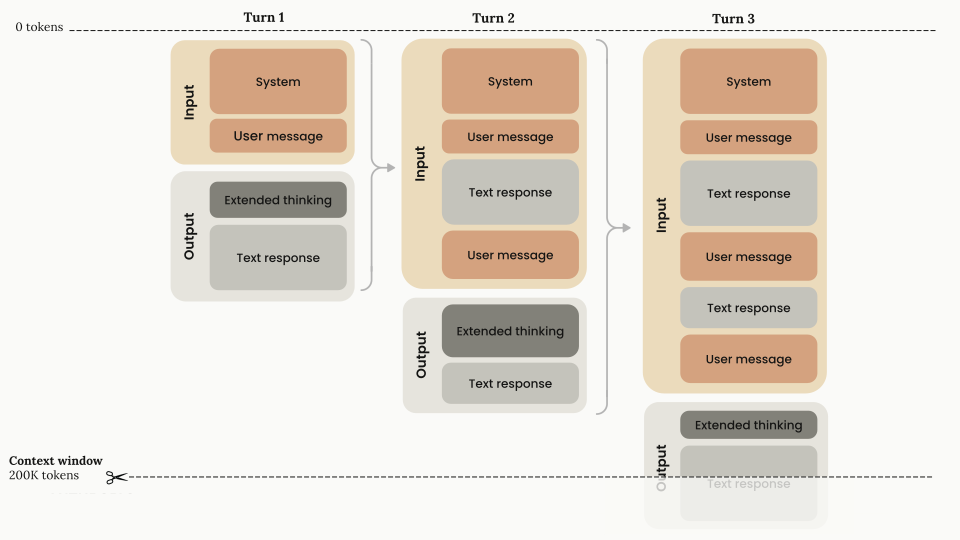
When calculating context window usage with thinking enabled, there are some considerations to be aware of:
max_tokens limit for that turnThe diagram below demonstrates the specialized token management when extended thinking is enabled:
The effective context window is calculated as:
context window =
 (current input tokens - previous thinking tokens) +
 (thinking tokens + encrypted thinking tokens + text output tokens)
Use the token counting API to get accurate token counts for your specific use case, especially when working with multi-turn conversations that include thinking.
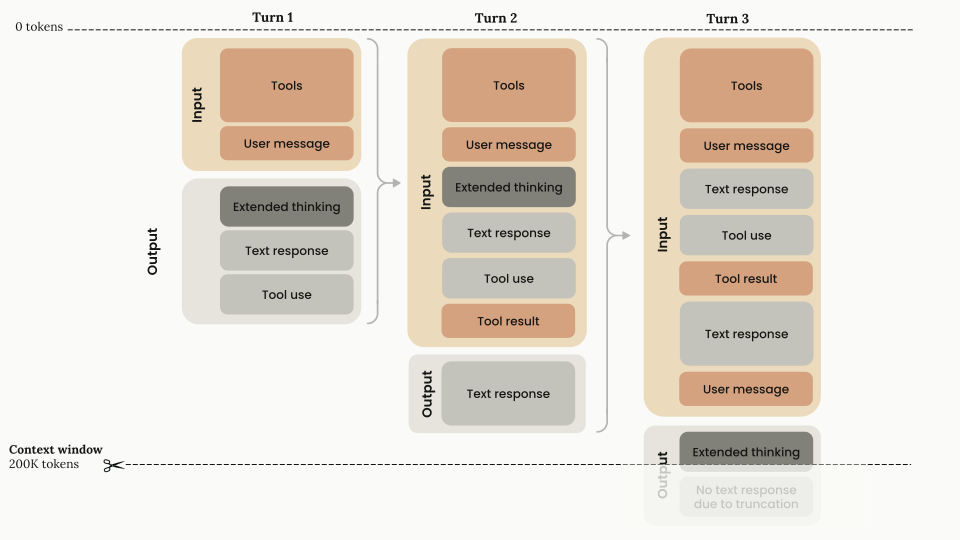
When using extended thinking with tool use, thinking blocks must be explicitly preserved and returned with the tool results.
The effective context window calculation for extended thinking with tool use becomes:
context window =
 (current input tokens + previous thinking tokens + tool use tokens) +
 (thinking tokens + encrypted thinking tokens + text output tokens)
The diagram below illustrates token management for extended thinking with tool use:
Given the context window and max_tokens behavior with extended thinking, you may need to:
max_tokens values as your prompt length changesFull thinking content is encrypted and returned in the signature field. This field is used to verify that thinking blocks were generated by Claude when passed back to the API.
It is only strictly necessary to send back thinking blocks when using tools with extended thinking. Otherwise you can omit thinking blocks from previous turns. If you pass them back, whether the API keeps or strips them depends on the model: Opus 4.5+ and Sonnet 4.6+ keep them in context by default; earlier Opus/Sonnet models and all Haiku models strip them. See context editing to configure this.
If sending back thinking blocks, pass everything back as you received it for consistency and to avoid potential issues.
Here are some important considerations on thinking encryption:
signature_delta inside a content_block_delta event just before the content_block_stop event.signature values are significantly longer in Claude 4 models than in previous models.signature field is an opaque field and should not be interpreted or parsed.signature values are compatible across platforms (Claude APIs, Amazon Bedrock, and Vertex AI). Values generated on one platform will be compatible with another.In addition to regular thinking blocks, the API may return redacted_thinking blocks. A redacted_thinking block contains encrypted thinking content in a data field, with no readable summary:
{
 "type": "redacted_thinking",
 "data": "..."
}
The data field is opaque and encrypted. Like the signature field on regular thinking blocks, you should pass redacted_thinking blocks back to the API unchanged when continuing a multi-turn conversation with tools.
If your code filters content blocks by type (for example, block.type == "thinking") when round-tripping responses with tool use, also include redacted_thinking blocks. Filtering on block.type == "thinking" alone silently drops redacted_thinking blocks and breaks the multi-turn protocol described above.
redacted_thinking blocks are a distinct content block type returned by the API when portions of thinking are safety-redacted. This is separate from the display: "omitted" option, which returns regular thinking blocks with an empty thinking field.
The Messages API handles thinking differently across Claude model versions. The following table gives a condensed comparison:
| Feature | Claude 4 models (pre-Opus 4.5) | Claude Opus 4.5 | Claude Sonnet 4.6 | Claude Opus 4.6 (adaptive thinking) | Claude Opus 4.7 (adaptive thinking) | Claude Opus 4.8 (adaptive thinking) | Claude Mythos Preview (adaptive thinking) |
|---|---|---|---|---|---|---|---|
| Thinking output | Returns summarized thinking | Returns summarized thinking | Returns summarized thinking | Returns summarized thinking | Omitted by default; set display: "summarized" to receive summarized thinking | Omitted by default; set display: "summarized" to receive summarized thinking | Omitted by default; set display: "summarized" to receive summarized thinking. Raw thinking tokens are never returned. |
| Interleaved thinking | Supported with interleaved-thinking-2025-05-14 beta header | Supported with interleaved-thinking-2025-05-14 beta header | Supported with interleaved-thinking-2025-05-14 beta header or automatic with adaptive thinking | Automatic with adaptive thinking (beta header deprecated and safely ignored) | Automatic with adaptive thinking (beta header deprecated and safely ignored) | Automatic with adaptive thinking (beta header deprecated and safely ignored) | Automatic with adaptive thinking (beta header not needed and safely ignored). Inter-tool reasoning moves into thinking blocks on this model. |
| Thinking block preservation | Not preserved across turns | Preserved by default | Preserved by default | Preserved by default | Preserved by default | Preserved by default | Preserved by default. Blocks are stripped when continuing the conversation on a model that does not support the Mythos thinking format. |
Whether thinking blocks from previous assistant turns are preserved in context by default depends on the model class. Opus: Claude Opus 4.5 and later Opus models keep all prior thinking blocks; Claude Opus 4.1 (deprecated) and earlier Opus models keep only the last assistant turn's thinking. Sonnet: Claude Sonnet 4.6 and later Sonnet models keep all; Claude Sonnet 4.5 and earlier Sonnet models keep only the last turn. Haiku: all Haiku models through Claude Haiku 4.5 keep only the last turn. Claude Mythos Preview also keeps all prior thinking blocks.
Benefits of thinking block preservation:
Important considerations:
For earlier models (Claude Sonnet 4.5, Opus 4.1 (deprecated), etc.), thinking blocks from previous turns continue to be removed from context. The existing behavior described in the Extended thinking with prompt caching section applies to those models.
For complete pricing information including base rates, cache writes, cache hits, and output tokens, see the pricing page.
The thinking process incurs charges for:
When extended thinking is enabled, a specialized system prompt is automatically included to support this feature.
When using summarized thinking:
When using display: "omitted":
thinking field is empty)The billed output token count will not match the visible token count in the response. You are billed for the full thinking process, not the thinking content visible in the response.
To see how many billed output tokens were spent on internal reasoning, read usage.output_tokens_details.thinking_tokens in the response. This value reflects the raw reasoning the model generated (not the summarized text returned in the body) and is always less than or equal to output_tokens. Subtract it from output_tokens to approximate the non-reasoning portion of the output.
{
 "usage": {
 "input_tokens": 25,
 "output_tokens": 348,
 "output_tokens_details": {
 "thinking_tokens": 312
 }
 }
}
output_tokens remains the inclusive, authoritative total used for billing. output_tokens_details is a read-only breakdown for observability.
usage.output_tokens_details.thinking_tokens field in the response reports how many of the billed output tokens were internal reasoning. When streaming, this breakdown appears only on the final message_delta event.max_tokens is greater than 21,333 to avoid HTTP timeouts on long-running requests. This is a client-side validation, not an API restriction. If you don't need to process events incrementally, use .stream() with .get_final_message() (Python) or .finalMessage() (TypeScript) to get the complete Message object without handling individual events. See Streaming Messages for details. When streaming, be prepared to handle both thinking and text content blocks as they arrive.display: "omitted" on the thinking configuration to reduce time-to-first-text-token. See Controlling thinking display.temperature or top_k modifications as well as forced tool use.top_p to values between 1 and 0.95.