|
VOOZH | about |
|
VOOZH | about |
Scrutinizer seamlessly integrates into your workflow, and continuously builds and deploys your application.
Scrutinizer offers you the flexibile build configuration that adapts to your project. You could simply allow Scrutinizer to do the customisation suited to your project or you can choose your own custom settings.
For Auto-Setup Nodes, Scrutinizer will infer some commands based on the structure of your project
build:
 nodes:
 myNodeName:
 dependencies:
 before:
 # You can add more commands before the inferred ones
 - git clone https://github.com/some/other-dependency

 override:
 # Or override all dependency commands with your own
 - ./install-deps.sh

 after:
 # Or add more commands after the inferred ones
 # ...

 project_setup:
 # ...

 tests:
 # ...

 cache:
 # You can also add more directories to cache
 directories:
 - a
 - b
For Minimal Nodes, Scrutinizer does not infer any commands.
Scrutinizer only starts the container and injects environment variables and access credentials.
build:
 nodes:
 myNodeName:
 commands:
 - checkout-code ~/build
 - cd ~/build

 # Cache Scope = repository
 # Cache Key = dependencies
 - restore-from-cache repository dependencies
 - ./install-deps
 - store-in-cache repository dependencies vendor/

 - ./run-tests
Scrutinizer allows you to create arbitrary workflows with nodes.
For instance, you can deploy code only when all your tests passed and no failure conditions were raised during the analysis phase.
Or, you could run a heavy compilation task on one node with more CPU resources, cache the result in the execution cache, and then fan-out to multiple nodes for running tests in parallel.
build:
 nodes:
 compile:
 resources:
 cpus: 8
 commands:
 - checkout-code ~/code
 - (cd ~/code && ./compile)
 - store-in-cache execution compile-result ~/code

 tests-1:
 requires:
 - node: compile
 commands:
 - restore-from-cache execution compile-result
 - ./code/tests-1

 tests-2:
 requires:
 - node: compile
 commands:
 - restore-from-cache execution compile-result
 - ./code/tests-2

 deploy:
 requires:
 - node: /tests-\d+/
 - branch: master
 commands:
 - restore-from-cache execution compile-result
 - ./code/deploy
Deployment is just another node in your build that has certain requirements, giving you great flexibility to adapt it to your workflow.
build:
 nodes:
 tests-1:
 # ...
 tests-2:
 # ...
 analysis:
 # ...
 deploy:
 requires:
 - node: tests-1 # tests-1 passed
 - node: tests-2 # tests-2 passed
 - analysis # no failure conditions met
 - branch: master # only for master branch
 commands:
 # Deploy by git push
 - checkout-code ~/code
 - cd ~/code
 - git push some-remote master
 # package code
 - checkout-code ~/code
 - (cd code && restore-from-cache execution assets)
 - tar -czf code.tar.gz code/
 - # move code.tar.gz somewhere
 # or any other command
Scrutinizer allows you to define configuration that should apply to all nodes and can be overwritten for individual nodes as needed.
# Runs ./run-tests.sh for both php5.6 and php7.1
build:
 environment:
 variables:
 FOO: BAR

 tests:
 override:
 - ./run-tests.sh

 nodes:
 php56:
 environment:
 php: 5.6

 php71:
 environment:
 php: 7.1
Scrutinizer can automatically configure a range of services for you. For example, configuring NGINX can involve complicated path configuration and starting of background tasks such as php-fpm. Scrutinizer can take care of this for you.
build:
 environment:
 nginx:
 sites:
 symfony_app:
 host: 'local.dev'
 web_root: 'web/'

 # These are optional and
 # usually do not require changing.
 index: 'index.php index.html'

 # By default Scrutinizer will
 # generate the following location
 # block for the configuration file.
 # But you can simply overwrite
 # it with your own location blocks
 # by adding them under ``locations``

 locations:
 - >
 location ~ [^/]\.php(/|$) {
 try_files $uri $uri/ /index.php /index.html;
 fastcgi_index index.php;
 fastcgi_split_path_info ^(.+?\.php)(/.*)$;
 fastcgi_pass 127.0.0.1:9000;
 include fastcgi_params;
 }
Scrutinizer allows you to directly interact with the cache via regular shell commands.
Since you directly interact via shell commands you can take advantage of powerful UNIX features such as piping data from and to the cache.
build:
 nodes:
 # In this example, we are using a minimal node.
 some-node:
 commands:
 # Store folder vendor/ with key "dependencies".
 # This means all nodes use the same
 # cache for dependencies across all branches.
 - store-in-cache repository "dependencies" vendor/
 - restore-from-cache repository "dependencies"
 - exists-in-cache repository "dependencies"

 # If you would like to use a different
 # cache per branch, you can make the branch
 # name part of the cache key like this.
 - >
 store-in-cache repository
 "dependencies-$SCRUTINIZER_BRANCH" vendor/
 - >
 restore-from-cache repository
 "dependencies-$SCRUTINIZER_BRANCH"
 - >
 exists-in-cache repository
 "dependencies-$SCRUTINIZER_BRANCH"

 # If you further would like to use a
 # different cache per branch and per node, all
 # we need to do is to add the node name to the cache key, too.
 - >
 store-in-cache repository
 "dependencies-$SCRUTINIZER_BRANCH-$SCRUTINIZER_NODE_NAME" vendor/
 - >
 restore-from-cache repository
 "dependencies-$SCRUTINIZER_BRANCH-$SCRUTINIZER_NODE_NAME"
 - >
 exists-in-cache repository
 "dependencies-$SCRUTINIZER_BRANCH-$SCRUTINIZER_NODE_NAME"

 # The storing command is a regular system command, so you can use any environment
 # variables or the output of other commands to make up the cache key. For example,
 # if you wanted to automatically invalidate the cache if a certain file like a lock file
 # changes, this could look like this:
 - >
 store-in-cache repository
 "dependencies-$(sha1sum some.lock | awk '{print $1}')" vendor/
 - >
 restore-from-cache repository
 "dependencies-$(sha1sum some.lock | awk '{print $1}')"
 - >
 exists-in-cache repository
 "dependencies-$(sha1sum some.lock | awk '{print $1}')"
Scrutinizer fully supports Docker including building your own Docker images and Docker layer caching.
build:
 nodes:
 buildImage:
 environment:
 docker:
 # For unrestricted syscalls
 remote_engine: true

 # Push images or pull private images from a registry
 # Simply define logins in the configuration:
 logins:
 # DockerHub
 - { username: "my-user", password: "my-password" }
 - { username: "another-user", password: "some-pass", server: "quay.io" }

 commands:
 - command: >
 restore-from-cache repository layers -
 | docker load
 only_if: exists-in-cache repository layers

 # ... your other commands

 - >
 docker save SOME_LAYER
 | store-in-cache repository layers -
For Auto-Setup Nodes, Scrutinizer will infer some commands based on the structure of your project
build:
 nodes:
 myNodeName:
 dependencies:
 before:
 # You can add more commands before the inferred ones
 - git clone https://github.com/some/other-dependency

 override:
 # Or override all dependency commands with your own
 - ./install-deps.sh

 after:
 # Or add more commands after the inferred ones
 # ...

 project_setup:
 # ...

 tests:
 # ...

 cache:
 # You can also add more directories to cache
 directories:
 - a
 - b
For Minimal Nodes, Scrutinizer does not infer any commands.
Scrutinizer only starts the container and injects environment variables and access credentials.
build:
 nodes:
 myNodeName:
 commands:
 - checkout-code ~/build
 - cd ~/build

 # Cache Scope = repository
 # Cache Key = dependencies
 - restore-from-cache repository dependencies
 - ./install-deps
 - store-in-cache repository dependencies vendor/

 - ./run-tests
Scrutinizer allows you to create arbitrary workflows with nodes.
For instance, you can deploy code only when all your tests passed and no failure conditions were raised during the analysis phase.
Or, you could run a heavy compilation task on one node with more CPU resources, cache the result in the execution cache, and then fan-out to multiple nodes for running tests in parallel.
build:
 nodes:
 compile:
 resources:
 cpus: 8
 commands:
 - checkout-code ~/code
 - (cd ~/code && ./compile)
 - store-in-cache execution compile-result ~/code

 tests-1:
 requires:
 - node: compile
 commands:
 - restore-from-cache execution compile-result
 - ./code/tests-1

 tests-2:
 requires:
 - node: compile
 commands:
 - restore-from-cache execution compile-result
 - ./code/tests-2

 deploy:
 requires:
 - node: /tests-\d+/
 - branch: master
 commands:
 - restore-from-cache execution compile-result
 - ./code/deploy
Deployment is just another node in your build that has certain requirements, giving you great flexibility to adapt it to your workflow.
build:
 nodes:
 tests-1:
 # ...
 tests-2:
 # ...
 analysis:
 # ...
 deploy:
 requires:
 - node: tests-1 # tests-1 passed
 - node: tests-2 # tests-2 passed
 - analysis # no failure conditions met
 - branch: master # only for master branch
 commands:
 # Deploy by git push
 - checkout-code ~/code
 - cd ~/code
 - git push some-remote master
 # package code
 - checkout-code ~/code
 - (cd code && restore-from-cache execution assets)
 - tar -czf code.tar.gz code/
 - # move code.tar.gz somewhere
 # or any other command
Scrutinizer allows you to define configuration that should apply to all nodes and can be overwritten for individual nodes as needed.
# Runs ./run-tests.sh for both php5.6 and php7.1
build:
 environment:
 variables:
 FOO: BAR

 tests:
 override:
 - ./run-tests.sh

 nodes:
 php56:
 environment:
 php: 5.6

 php71:
 environment:
 php: 7.1
Scrutinizer can automatically configure a range of services for you. For example, configuring NGINX can involve complicated path configuration and starting of background tasks such as php-fpm. Scrutinizer can take care of this for you.
build:
 environment:
 nginx:
 sites:
 symfony_app:
 host: 'local.dev'
 web_root: 'web/'

 # These are optional and
 # usually do not require changing.
 index: 'index.php index.html'

 # By default Scrutinizer will
 # generate the following location
 # block for the configuration file.
 # But you can simply overwrite
 # it with your own location blocks
 # by adding them under ``locations``

 locations:
 - >
 location ~ [^/]\.php(/|$) {
 try_files $uri $uri/ /index.php /index.html;
 fastcgi_index index.php;
 fastcgi_split_path_info ^(.+?\.php)(/.*)$;
 fastcgi_pass 127.0.0.1:9000;
 include fastcgi_params;
 }
Scrutinizer allows you to directly interact with the cache via regular shell commands.
Since you directly interact via shell commands you can take advantage of powerful UNIX features such as piping data from and to the cache.
build:
 nodes:
 # In this example, we are using a minimal node.
 some-node:
 commands:
 # Store folder vendor/ with key "dependencies".
 # This means all nodes use the same
 # cache for dependencies across all branches.
 - store-in-cache repository "dependencies" vendor/
 - restore-from-cache repository "dependencies"
 - exists-in-cache repository "dependencies"

 # If you would like to use a different
 # cache per branch, you can make the branch
 # name part of the cache key like this.
 - >
 store-in-cache repository
 "dependencies-$SCRUTINIZER_BRANCH" vendor/
 - >
 restore-from-cache repository
 "dependencies-$SCRUTINIZER_BRANCH"
 - >
 exists-in-cache repository
 "dependencies-$SCRUTINIZER_BRANCH"

 # If you further would like to use a
 # different cache per branch and per node, all
 # we need to do is to add the node name to the cache key, too.
 - >
 store-in-cache repository
 "dependencies-$SCRUTINIZER_BRANCH-$SCRUTINIZER_NODE_NAME" vendor/
 - >
 restore-from-cache repository
 "dependencies-$SCRUTINIZER_BRANCH-$SCRUTINIZER_NODE_NAME"
 - >
 exists-in-cache repository
 "dependencies-$SCRUTINIZER_BRANCH-$SCRUTINIZER_NODE_NAME"

 # The storing command is a regular system command, so you can use any environment
 # variables or the output of other commands to make up the cache key. For example,
 # if you wanted to automatically invalidate the cache if a certain file like a lock file
 # changes, this could look like this:
 - >
 store-in-cache repository
 "dependencies-$(sha1sum some.lock | awk '{print $1}')" vendor/
 - >
 restore-from-cache repository
 "dependencies-$(sha1sum some.lock | awk '{print $1}')"
 - >
 exists-in-cache repository
 "dependencies-$(sha1sum some.lock | awk '{print $1}')"
Scrutinizer fully supports Docker including building your own Docker images and Docker layer caching.
build:
 nodes:
 buildImage:
 environment:
 docker:
 # For unrestricted syscalls
 remote_engine: true

 # Push images or pull private images from a registry
 # Simply define logins in the configuration:
 logins:
 # DockerHub
 - { username: "my-user", password: "my-password" }
 - { username: "another-user", password: "some-pass", server: "quay.io" }

 commands:
 - command: >
 restore-from-cache repository layers -
 | docker load
 only_if: exists-in-cache repository layers

 # ... your other commands

 - >
 docker save SOME_LAYER
 | store-in-cache repository layers -
A build environment that adapts to your project, not the other way around. Whether you use our managed environment or bring your own Docker images, both styles are supported.
Our pre-built environment comes with many languages and services pre-installed. Our config inference automatically starts the necessary services and adds required build commands.
You can also bring your own Docker images for full flexibility and in case you would like to share the same environment between local development and the build environment.
A build service that does not keep you waiting. Be it superior hardware, intelligent caching or adjusting resources to your needs. We got you covered.
Our builds run on high-frequency CPUs with plenty of RAM, SSDs and fast networking. In particular CPU bound tests will run significantly faster than on comparable services.
Our config inference automatically caches dependencies and other directories based on the language and framework.
Allocate more resources where needed. Your build would benefit from multiple CPUs? You can scale them up with a single line change in your configuration.
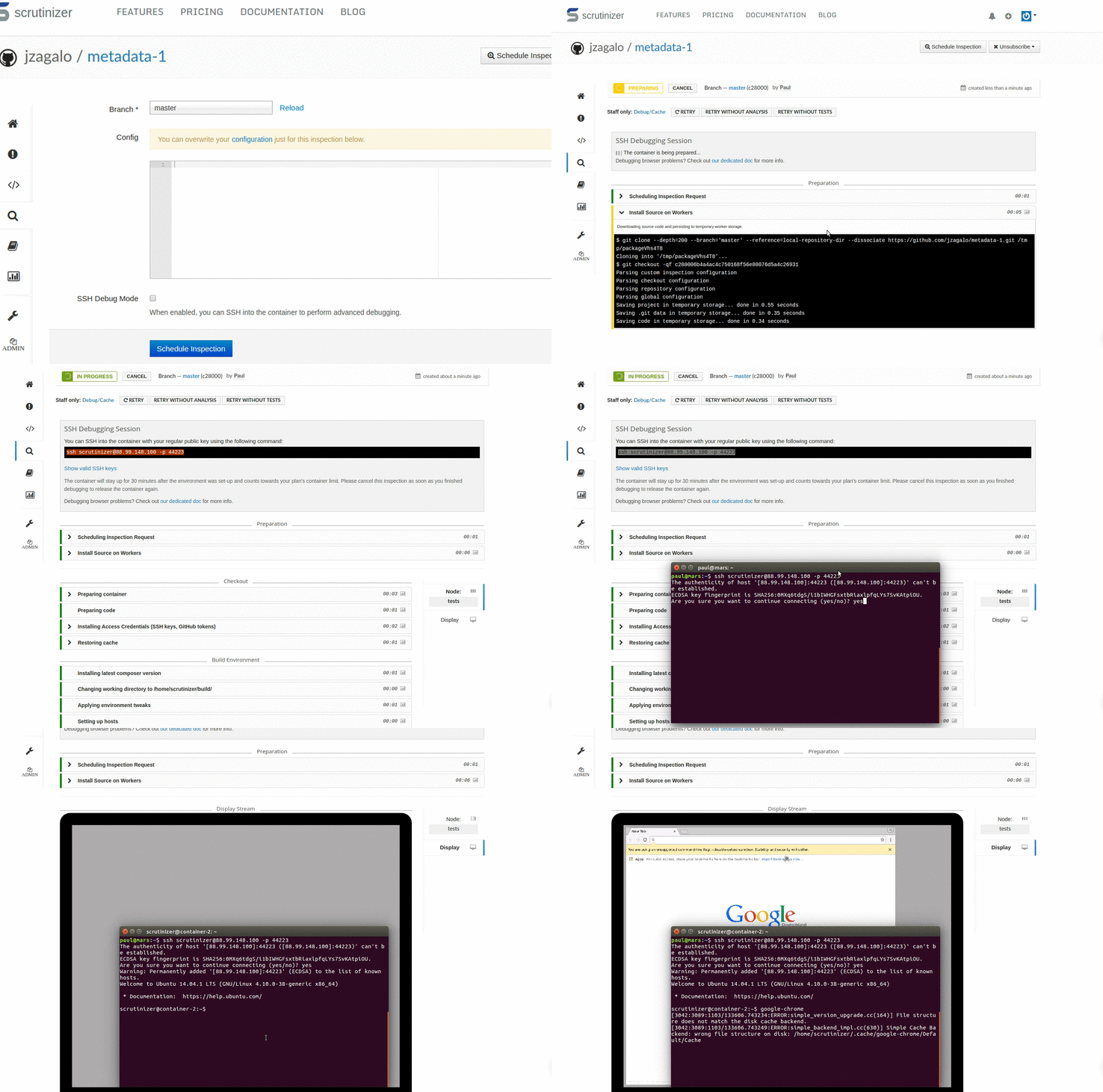
Excellent debugging tools built-in so that you are not lost when a build fails.
Start a SSH debugging session in a couple of seconds, and test out commands directly in the build environment.
Watch the display as you run an SSH debugging session or re-play a recording of your browser-based tests.
Scrutinizer supports all major hosting platforms, many languages, and popular frameworks.