|
VOOZH | about |
|
VOOZH | about |
7th February 2025
I just released llm-smollm2, a new plugin for LLM that bundles a quantized copy of the SmolLM2-135M-Instruct LLM inside of the Python package.
This means you can now pip install a full LLM!
If you’re already using LLM you can install it like this:
llm install llm-smollm2
Then run prompts like this:
llm -m SmolLM2 'Are dogs real?'(New favourite test prompt for tiny models, courtesy of Tim Duffy. Here’s the result).
If you don’t have LLM yet first follow these installation instructions, or brew install llm or pipx install llm or uv tool install llm depending on your preferred way of getting your Python tools.
If you have uv setup you don’t need to install anything at all! The following command will spin up an ephemeral environment, install the necessary packages and start a chat session with the model all in one go:
uvx --with llm-smollm2 llm chat -m SmolLM2
The fact that the model is almost exactly 100MB is no coincidence: that’s the default size limit for a Python package that can be uploaded to the Python Package Index (PyPI).
I asked on Bluesky if anyone had seen a just-about-usable GGUF model that was under 100MB, and Artisan Loaf pointed me to SmolLM2-135M-Instruct.
I ended up using this quantization by QuantFactory just because it was the first sub-100MB model I tried that worked.
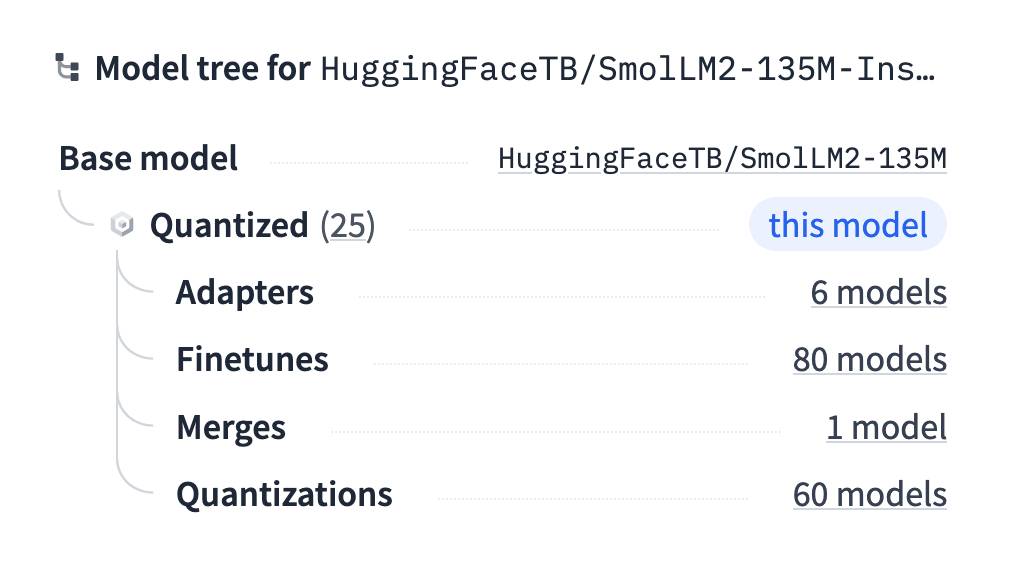
Trick for finding quantized models: Hugging Face has a neat “model tree” feature in the side panel of their model pages, which includes links to relevant quantized models. I find most of my GGUFs using that feature.
I first tried the model out using Python and the llama-cpp-python library like this:
uv run --with llama-cpp-python python
Then:
from llama_cpp import Llama
from pprint import pprint
llm = Llama(model_path="SmolLM2-135M-Instruct.Q4_1.gguf")
output = llm.create_chat_completion(messages=[
 {"role": "user", "content": "Hi"}
])
pprint(output)
This gave me the output I was expecting:
{'choices': [{'finish_reason': 'stop',
 'index': 0,
 'logprobs': None,
 'message': {'content': 'Hello! How can I assist you today?',
 'role': 'assistant'}}],
 'created': 1738903256,
 'id': 'chatcmpl-76ea1733-cc2f-46d4-9939-90efa2a05e7c',
 'model': 'SmolLM2-135M-Instruct.Q4_1.gguf',
 'object': 'chat.completion',
 'usage': {'completion_tokens': 9, 'prompt_tokens': 31, 'total_tokens': 40}}
But it also spammed my terminal with a huge volume of debugging output—which started like this:
llama_model_load_from_file_impl: using device Metal (Apple M2 Max) - 49151 MiB free
llama_model_loader: loaded meta data with 33 key-value pairs and 272 tensors from SmolLM2-135M-Instruct.Q4_1.gguf (version GGUF V3 (latest))
llama_model_loader: Dumping metadata keys/values. Note: KV overrides do not apply in this output.
llama_model_loader: - kv 0: general.architecture str = llama
And then continued for more than 500 lines!
I’ve had this problem with llama-cpp-python and llama.cpp in the past, and was sad to find that the documentation still doesn’t have a great answer for how to avoid this.
So I turned to the just released Gemini 2.0 Pro (Experimental), because I know it’s a strong model with a long input limit.
I ran the entire llama-cpp-python codebase through it like this:
cd /tmp
git clone https://github.com/abetlen/llama-cpp-python
cd llama-cpp-python
files-to-prompt -e py . -c | llm -m gemini-2.0-pro-exp-02-05 \
 'How can I prevent this library from logging any information at all while it is running - no stderr or anything like that'
Here’s the answer I got back. It recommended setting the logger to logging.CRITICAL, passing verbose=False to the constructor and, most importantly, using the following context manager to suppress all output:
from contextlib import contextmanager, redirect_stderr, redirect_stdout

@contextmanager
def suppress_output():
 """
 Suppresses all stdout and stderr output within the context.
 """
 with open(os.devnull, "w") as devnull:
 with redirect_stdout(devnull), redirect_stderr(devnull):
 yield
This worked! It turned out most of the output came from initializing the LLM class, so I wrapped that like so:
with suppress_output():
 model = Llama(model_path=self.model_path, verbose=False)
Proof of concept in hand I set about writing the plugin. I started with my simonw/llm-plugin cookiecutter template:
uvx cookiecutter gh:simonw/llm-plugin
 [1/6] plugin_name (): smollm2
 [2/6] description (): SmolLM2-135M-Instruct.Q4_1 for LLM
 [3/6] hyphenated (smollm2):
 [4/6] underscored (smollm2):
 [5/6] github_username (): simonw
 [6/6] author_name (): Simon Willison
The rest of the plugin was mostly borrowed from my existing llm-gguf plugin, updated based on the latest README for the llama-cpp-python project.
There’s more information on building plugins in the tutorial on writing a plugin.
Once I had that working the last step was to figure out how to package it for PyPI. I’m never quite sure of the best way to bundle a binary file in a Python package, especially one that uses a pyproject.toml file... so I dumped a copy of my existing pyproject.toml file into o3-mini-high and prompted:
Modify this to bundle a SmolLM2-135M-Instruct.Q4_1.gguf file inside the package. I don’t want to use hatch or a manifest or anything, I just want to use setuptools.
Here’s the shared transcript—it gave me exactly what I wanted. I bundled it by adding this to the end of the toml file:
[tool.setuptools.package-data]
llm_smollm2 = ["SmolLM2-135M-Instruct.Q4_1.gguf"]
Then dropping that .gguf file into the llm_smollm2/ directory and putting my plugin code in llm_smollm2/__init__.py.
I tested it locally by running this:
python -m pip install build
python -m build
I fired up a fresh virtual environment and ran pip install ../path/to/llm-smollm2/dist/llm_smollm2-0.1-py3-none-any.whl to confirm that the package worked as expected.
My cookiecutter template comes with a GitHub Actions workflow that publishes the package to PyPI when a new release is created using the GitHub web interface. Here’s the relevant YAML:
 deploy:
 runs-on: ubuntu-latest
 needs: [test]
 environment: release
 permissions:
 id-token: write
 steps:
 - uses: actions/checkout@v4
 - name: Set up Python
 uses: actions/setup-python@v5
 with:
 python-version: "3.13"
 cache: pip
 cache-dependency-path: pyproject.toml
 - name: Install dependencies
 run: |
 pip install setuptools wheel build
 - name: Build
 run: |
 python -m build
 - name: Publish
 uses: pypa/gh-action-pypi-publish@release/v1
This runs after the test job has passed. It uses the pypa/gh-action-pypi-publish Action to publish to PyPI—I wrote more about how that works in this TIL.
This one really isn’t! It’s not really surprising but it turns out 94MB really isn’t enough space for a model that can do anything useful.
It’s super fun to play with, and I continue to maintain that small, weak models are a great way to help build a mental model of how this technology actually works.
That’s not to say SmolLM2 isn’t a fantastic model family. I’m running the smallest, most restricted version here. SmolLM—blazingly fast and remarkably powerful describes the full model family—which comes in 135M, 360M, and 1.7B sizes. The larger versions are a whole lot more capable.
If anyone can figure out something genuinely useful to do with the 94MB version I’d love to hear about it.
This is Using pip to install a Large Language Model that’s under 100MB by Simon Willison, posted on 7th February 2025.
Part of series LLMs on personal devices
Next: URL-addressable Pyodide Python environments
Previous: OpenAI o3-mini, now available in LLM
Sponsor me for $10/month and get a curated email digest of the month's most important LLM developments.
Pay me to send you less!
Sponsor & subscribe![👁 $ uvx --with llm-smollm2 llm chat -m SmolLM2 Chatting with SmolLM2 Type 'exit' or 'quit' to exit Type '!multi' to enter multiple lines, then '!end' to finish > tell me a long story about a dog The story of a dog is a tale of love, loss, and the unspoken rules of the universe. It begins with a small, timid, and timid dog named Max. Max was born into a loving family, but his life was forever changed by a cruel and cruel owner. He was left to fend for himself, and he was left to fend for himself. Max's owner, a kind and gentle soul named Elena, was a cruel and cruel one. She had no patience, no love, and she would do anything to keep Max away from her. Max was left to fend for himself, and he was left to fend for himself. Max's owner, Elena, was determined to make Max happy. She took Max to a beautiful and beautiful place, where Max was allowed to roam freely. Max was allowed to roam freely, and Max was allowed to roam freely. [Then repeats that sentence many times]](https://static.simonwillison.net/static/2025/smol.gif)