|
VOOZH | about |
|
VOOZH | about |
Note: if the app fails to run using snap run invoiceninja it may help to run /snap/invoiceninja/current/bin/invoiceninja instead
Create. Send. Get Paid.
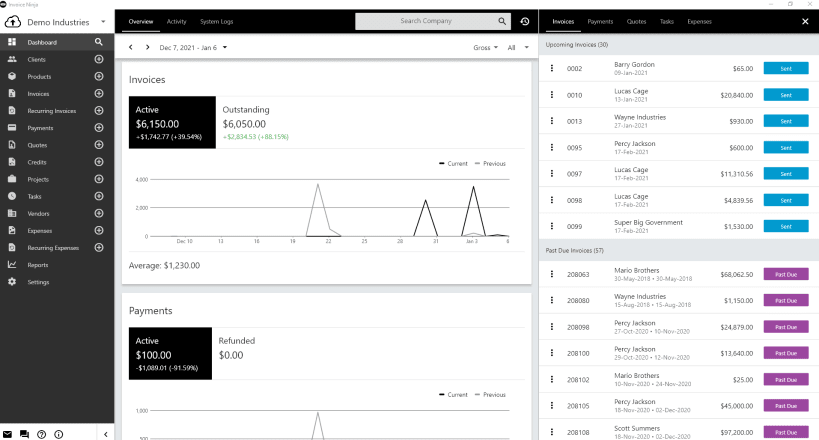
Invoice Ninja is a leading source-code available platform for SMB’s to invoice, accept payments, track expenses & time billable-tasks. Designed for freelancers and small to medium size businesses, Invoice Ninja is a suite of apps to help you get paid.
• Incredibly easy to use
Invoice Ninja was built to serve freelancers and business owners with a complete suite of invoicing & payment tools to advance your business.
• Invoicing & Payments
Every feature is geared towards accurate and secure invoicing and getting you paid. With Invoice Ninja you can send beautiful branded invoices with minimum of effort and maximum professionalism.
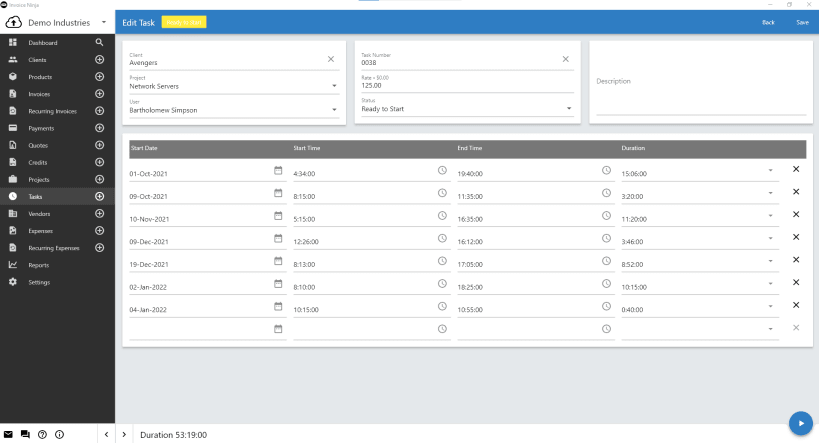
• Time Tracker & Projects
Create projects and individual tasks per project. When done, simply “Send task to invoice” and all details will be sent ready for your clients to pay!
• Track Vendors & Expenses
With Invoice Ninja, all your earnings, expenses, clients and vendors are stored and managed in one system. Categorize your vendors & re-invoice expenses to clients, or simply run expense reports.
All of these features combine to help you receive the money you deserve and reduce the amount of time you spend on repetitive invoicing tasks. Spend less time on paperwork and more time at your craft.
You are about to open
Do you wish to proceed?
Thank you for your report. Information you provided will help us investigate further.
There was an error while sending your report. Please try again later.
Snaps are applications packaged with all their dependencies to run on all popular Linux distributions from a single build. They update automatically and roll back gracefully.
Snaps are discoverable and installable from the Snap Store, an app store with an audience of millions.
Snap can be installed from the command line on openSUSE Leap 15.x and Tumbleweed.
You need first add the snappy repository from the terminal. Choose the appropriate command depending on your installed openSUSE flavor.
Tumbleweed:
sudo zypper addrepo --refresh https://download.opensuse.org/repositories/system:/snappy/openSUSE_Tumbleweed snappy
Leap 15.x:
sudo zypper addrepo --refresh https://download.opensuse.org/repositories/system:/snappy/openSUSE_Leap_15.6 snappy
If needed, Swap out openSUSE_Leap_15. for, openSUSE_Leap_16.0 if you’re using a different version of openSUSE.
With the repository added, import its GPG key:
sudo zypper --gpg-auto-import-keys refresh
Finally, upgrade the package cache to include the new snappy repository:
sudo zypper dup --from snappy
Snap can now be installed with the following:
sudo zypper install snapd
You then need to either reboot, logout/login or source /etc/profile to have /snap/bin added to PATH.
Additionally, enable and start both the snapd and the snapd.apparmor services with the following commands:
sudo systemctl enable --now snapd
sudo systemctl enable --now snapd.apparmor
To install invoiceninja, simply use the following command:
sudo snap install invoiceninjaBrowse and find snaps from the convenience of your desktop using the snap store snap.
Interested to find out more about snaps? Want to publish your own application? Visit snapcraft.io now.