VOOZH about

URL: https://support.mozilla.org/en-US/questions/1069610

⇱ where do i get video plugins | Firefox for Android Support Forum | Mozilla Support


Windows 10 reached EOS (end of support) on October 14, 2025. If you are on Windows 10, see this article.

Search Support

Avoid support scams. We will never ask you to call or text a phone number or share personal information. Please report suspicious activity using the “Report Abuse” option.

Learn More
pete4hand

Getting an error message "plugins needed to play video,"

Getting an error message "plugins needed to play video,"

All Replies (1)

Firefox for Android displays the tap-to-play icon by default for Flash.

  1. Install Adobe Flash player on your Android device by downloading an archived version from Archived Flash Player versions on adobe.com. See Adobe's guide to manually installing Flash for more information.
  2. Tap the grey box with the plugin icon as shown below to play the Flash content.
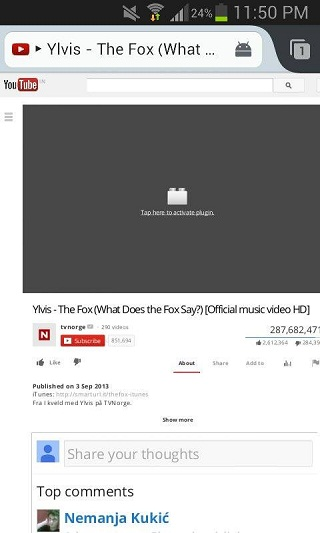
👁 tap_to_play_native1

See also:

Firefox for Android displays the tap-to-play icon by default for Flash. #Install Adobe Flash player on your Android device by downloading an archived version from [http://helpx.adobe.com/flash-player/kb/archived-flash-player-versions.html Archived Flash Player versions] on adobe<!---->.com. See [https://helpx.adobe.com/flash-player/kb/installing-flash-player-android-devices.html Adobe's guide to manually installing Flash] for more information.<!--Replace this link with your language, if available--> #Tap the grey box with the plugin icon as shown below to play the Flash content. [[Image:tap_to_play_native1]] See also: * https://support.mozilla.org/en-US/kb/how-do-i-watch-flash-videos-firefox-android