



This simple tutorial shows how to fix broken pip installer after installing Python 3.12 from Deadsnakes PPA in Ubuntu 22.04 and Ubuntu 20.04.
Due to removal of long deprecated pkgutil.ImpImporter class, pip command may not work for Python 3.12 in your Linux with old setuptools. It either just does not work or outputs following error, when installing anything via pip install:
ERROR: Exception:
Traceback (most recent call last):
 File "/usr/lib/python3/dist-packages/pip/_internal/cli/base_command.py", line 165, in exc_logging_wrapper
 status = run_func(*args)
 ^^^^^^^^^^^^^^^
 File "/usr/lib/python3/dist-packages/pip/_internal/cli/req_command.py", line 205, in wrapper
 return func(self, options, args)
 ^^^^^^^^^^^^^^^^^^^^^^^^^
 File "/usr/lib/python3/dist-packages/pip/_internal/commands/install.py", line 285, in run
 session = self.get_default_session(options)
 ^^^^^^^^^^^^^^^^^^^^^^^^^^^^^^^^^
 File "/usr/lib/python3/dist-packages/pip/_internal/cli/req_command.py", line 75, in get_default_session
 self._session = self.enter_context(self._build_session(options))
 ^^^^^^^^^^^^^^^^^^^^^^^^^^^^
 File "/usr/lib/python3/dist-packages/pip/_internal/cli/req_command.py", line 89, in _build_session
 session = PipSession(
 ^^^^^^^^^^^
 File "/usr/lib/python3/dist-packages/pip/_internal/network/session.py", line 282, in __init__
 self.headers["User-Agent"] = user_agent()
 ^^^^^^^^^^^^
 File "/usr/lib/python3/dist-packages/pip/_internal/network/session.py", line 157, in user_agent
 setuptools_dist = get_default_environment().get_distribution("setuptools")
 ^^^^^^^^^^^^^^^^^^^^^^^^^
 File "/usr/lib/python3/dist-packages/pip/_internal/metadata/__init__.py", line 24, in get_default_environment
 from .pkg_resources import Environment
 File "/usr/lib/python3/dist-packages/pip/_internal/metadata/pkg_resources.py", line 9, in
 from pip._vendor import pkg_resources
 File "/usr/lib/python3/dist-packages/pip/_vendor/pkg_resources/__init__.py", line 2164, in
 register_finder(pkgutil.ImpImporter, find_on_path)
 ^^^^^^^^^^^^^^^^^^^
AttributeError: module 'pkgutil' has no attribute 'ImpImporter'. Did you mean: 'zipimporter'?
To fix the issue, you just have to manually install pip for Python 3.12. And, here’s how to do the job in 2 ways.
Method 1: Install pip via ensurepip
Python has a built-in module ensurepip, to provide support for bootstrapping the pip installer into an existing Python installation.
First, press Ctrl+Alt+T on keyboard to open terminal. When it opens, run command:
python3.12 -m ensurepip --upgrade

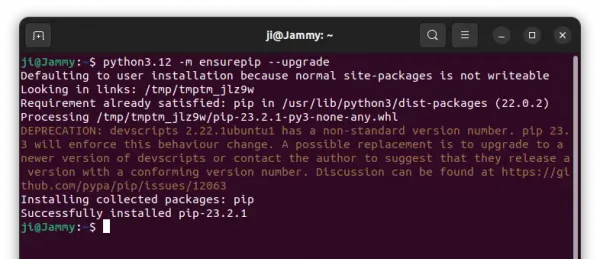
After that, you should be able to use the pip installer for Python 3.12 by either pip3.12 or python3.12 -m pip command.
Method 2: Install pip via get-pip.py
In case the previous method does not work for you, Pypa.io provides a script that can do the same job.
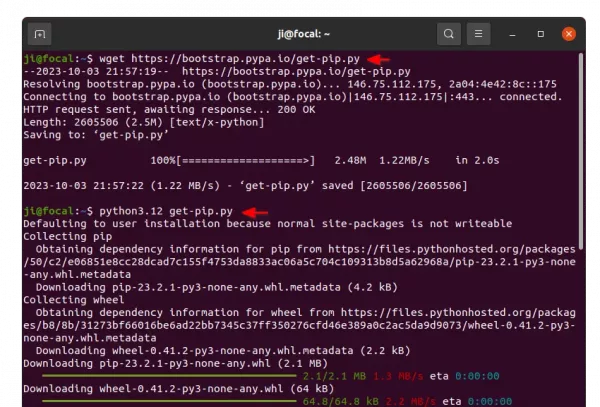
First, open terminal (Ctrl+Alt+T) and run command to download the script via wget command:
wget https://bootstrap.pypa.io/get-pip.py
Then, just run the script to download & install pip:
python3.12 get-pip.py
After installation, you may run python3.12 -m pip command to use the pip installer. To bind it to pip3.12, just run alias pip3.12="python3.12 -m pip".

That’s all. Enjoy!













Leave a Reply Cancel reply