

Description
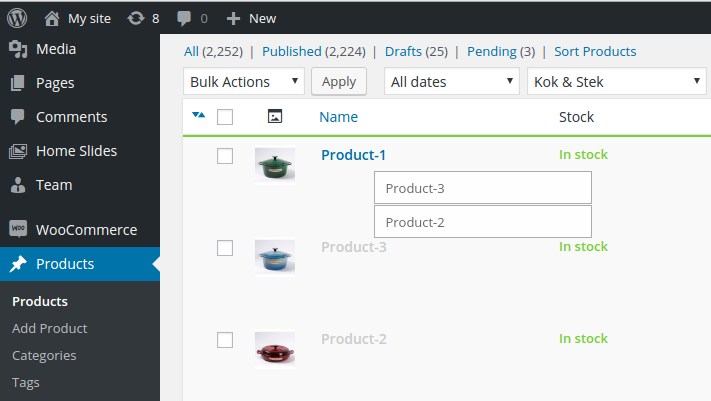
This plugin allows you to arrange any post types and terms with simple drag and drop within the builtin list table on administration screen. Save post order for each term.
Features
- Support for any post types and taxonomies.
- Multiple selection is available.
- Capabilities aware. ‘edit_others_posts’ for post. ‘manage_terms’ for taxonomy.
- No additional column in builtin tables.
- No additional table in database.
- Save post order for each term.
- Woocommerce and Polylang compatibility.
Screenshots



Installation
- Upload ‘anything-order-by-terms’ to the ‘/wp-content/plugins/’ directory
- Activate the plugin through the ‘Plugins’ menu in WordPress
FAQ
-
I don’t want some post types to be sortable.
-
Uncheck the “Order” option in “Show on screen” section on Screen Options tab to disable sorting.
-
I don’t want terms or post to be sortable.
-
Use filter. Place in you theme’s function.php file
add_filter('Anything_Order/do_order/Post', '__return_false');oradd_filter('Anything_Order/do_order/Taxonomy', '__return_false');. -
Why is the post order wrong when using the `get_posts` function?
-
As you can see from source code function
get_postsdefault setsuppress_filtersparam to WP_Query args. Therefore, filters specified by plugins don’t work. So if you need menu order or order within term add'suppress_filters' => falseto your args. -
How do I reset the order?
-
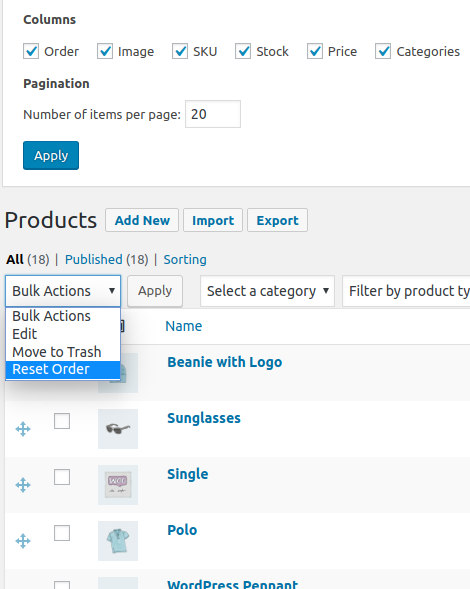
Select the “Reset Order” option in bulk actions select and click “Apply”.
-
How do I select multiple items?
-
Ctrl(or Command on OS X)+Click toggle selection state of current item. Shift+Click select items between first selected item on the list and current item.
Reviews
Contributors & Developers
“Anything Order by Terms” is open source software. The following people have contributed to this plugin.
Contributors“Anything Order by Terms” has been translated into 1 locale. Thank you to the translators for their contributions.
Translate “Anything Order by Terms” into your language.
Interested in development?
Browse the code, check out the SVN repository, or subscribe to the development log by RSS.
Changelog
1.4.0 – 2022-07-08
- Fixed – WordPress 6.0 compatibility.
1.3.10 – 2022-07-06
- Fixed bug with “Woocommerce + Polylang + WP All Import” package.
1.3.9 – 2022-04-22
- Fixed – WordPress 5.7 compatibility.
1.3.8 – 2021-11-11
- Fixed – Conflict with Wicked Folders plugin.
1.3.7 – 2020-11-04
- Changed – WordPress 5.6 and Woocommerce 4.9 compatibility.
1.3.6 – 2020-11-04
- Fixed – Wrong detect current term if Polylang is activated.
1.3.5 – 2020-07-21
- Changed – WordPress 5.4.2 and Woocommerce 4.3.0 compatibility.
Meta
- Version 2.0.1
- Last updated 1 week ago
- Active installations 1,000+
- WordPress version 5.0 or higher
- Tested up to 7.0
- PHP version 5.6 or higher
- Languages
- Tags
- Advanced View