

Description
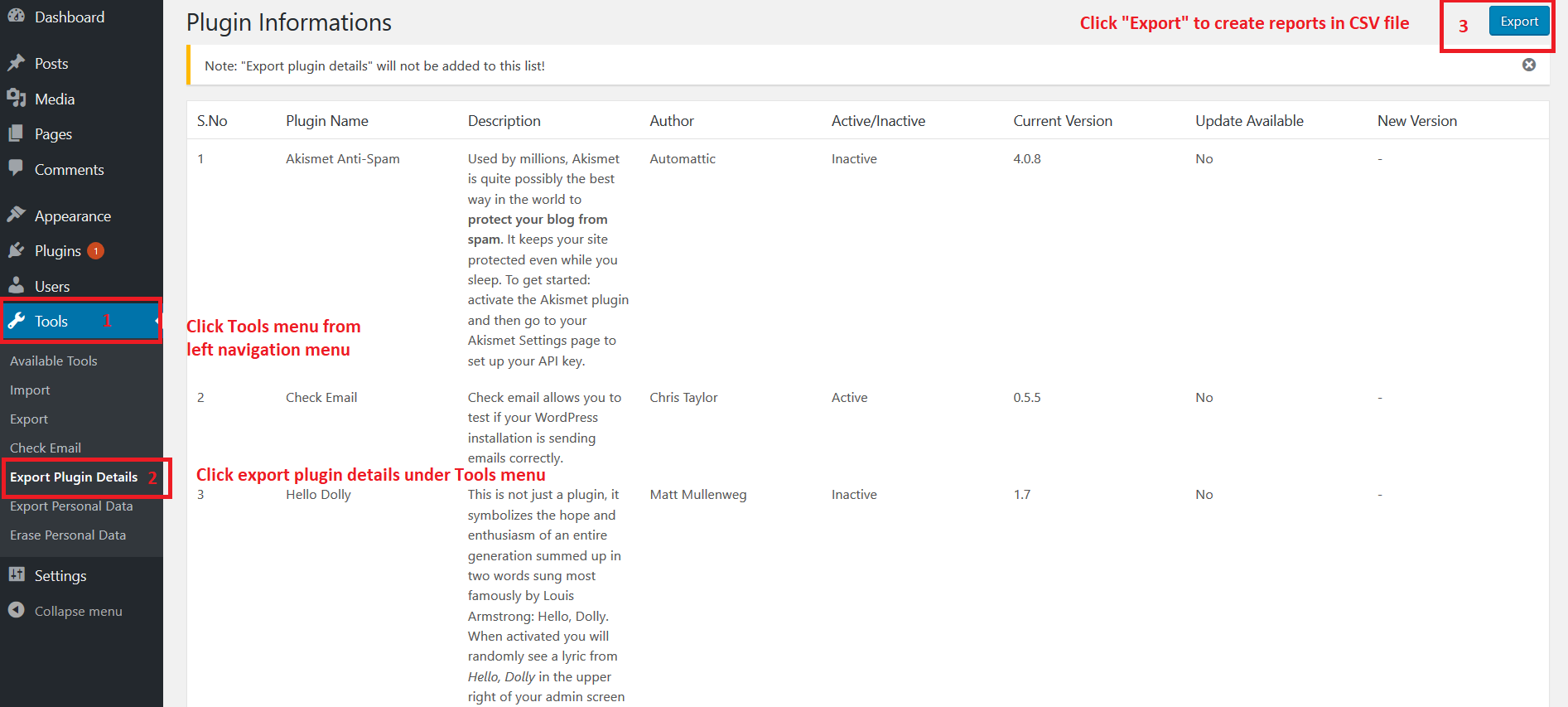
This plugin allows you to export your installed plugin list in CSV format. CSV file having the following fields
- Plugin Name
- Description
- Author
- Active/Inactive
- Current Version
- Update Available(Yes/No)
- New Version
Kindly let us know your feedback or comments to add more features in this plugin.
Screenshots


Installation
- Log in to your WordPress admin panel and go to Plugins -> Add New
- Type Export Plugin Details in the search box and click on search button.
- Find Export Plugin Details plugin.
- Then click on Install Now after that activate the plugin.
Reviews
I use this all the time when I need to review all the plugins or document what is on the site. Works like a charm. Thanks for the plugin.
excellent simple plugin.
I usually do not write reviews for plugins, but I have tried this plugin for several years and I find it very helpful.
I hope we can bring more attention to it from the WP community.
I tend to have to write plugin audits for clients and they can be really time consuming to do by hand. This plugin saves me so much time. I only wish I had found this plugin sooner.
Huge thank you to you for this plugin Boopathi Rajan!
Nice work on this plugin.
Excellent… awesome… incredible… plugin
Thank you very much for creating this unique and free plugin! It’s so perfect as is. 2 suggestions if you decide to extend its abilities:Version of Wordpress and a similar list of themes could be included.
Contributors & Developers
“Export Plugin Details” is open source software. The following people have contributed to this plugin.
ContributorsTranslate “Export Plugin Details” into your language.
Interested in development?
Browse the code, check out the SVN repository, or subscribe to the development log by RSS.
Meta
- Version 1.1.7
- Last updated 2 years ago
- Active installations 2,000+
- WordPress version 4.3 or higher
- Tested up to 6.6.5
- PHP version 5.2.4 or higher
- Tags
- Advanced View
Ratings
4.9 out of 5 stars.