

Description
Managing a WooCommerce store means constantly moving data — products from suppliers, orders from other platforms, customer databases, coupon campaigns. Doing it manually is slow, error-prone, and simply does not scale. The Import WooCommerce Suite solves this by giving you a reliable, flexible bulk import tool for every major WooCommerce data type.
Import products, orders, coupons, customers, and reviews from CSV, XML, or Excel files in just a few steps. The add-on handles product images (including gallery images and external URLs), product variations in a single CSV file, SEO data, EAN/GTIN fields, multilingual products, and a wide range of third-party plugin fields — all with an intuitive drag-and-drop interface and real-time import logs.
This add-on is part of the WP Ultimate CSV Importer ecosystem. Install the free WP Ultimate CSV Importer & Exporter plugin first to use this add-on. If you also need to export WooCommerce products, orders, customers, or other data, install the WP Ultimate Exporter add-on.
Key Features
WooCommerce Product Import
- Import all WooCommerce product types: simple, grouped, variable, and external/affiliate
- Import product variations from a single CSV file
- Import product images, gallery images, and featured images
- Import images from external URLs or Dropbox links
- Import inline images within product descriptions using shortcodes
- Import product categories, tags, and custom taxonomies
- Import product SEO data (compatible with All-in-One SEO)
- Import EAN/GTIN fields
- Import multilingual products (compatible with Polylang for WooCommerce)
- Import product reviews and ratings
- Auto-map CSV headers to WooCommerce fields
WooCommerce Order Import
- Bulk import WooCommerce orders from CSV or XML files
- Import order details including personalized product fields from PPOM (Personalized Product Option Manager)
- Import order fields from Extra Product Options for WooCommerce
- Import YITH WooCommerce Order and Shipment Tracking fields
WooCommerce Coupon Import
- Bulk import coupons to streamline marketing campaigns
- Import all coupon types and discount rules
WooCommerce Customer Import
- Import your entire customer database with billing and shipping addresses
- Import customer meta fields
Import Configuration & Reliability
- Drag-and-drop file upload interface
- Real-time import log (web and admin view)
- Duplicate detection based on content and post title
- Configurable server request settings for large imports
- Comprehensive import log manager: download summary logs, media logs, and failed media logs as CSV
- Compatible with most WordPress themes and plugins
Supported Third-Party Plugins
- Product Bundles
- Product Add-ons for WooCommerce
- Chained Products
- Product Retailers
- Returns and Warranty Requests
- WooCommerce Pre-Orders
- Extra Product Options for WooCommerce
- PPOM (Personalized Product Option Manager)
- All-in-One SEO
- Polylang for WooCommerce
- YITH WooCommerce Order & Shipment Tracking
The WP Ultimate CSV Importer Ecosystem
This add-on works as part of a complete data management suite for WordPress and WooCommerce:
- WP Ultimate CSV Importer & Exporter (Free, required) — The core plugin for importing posts, pages, custom post types, and more from CSV, XML, and Excel files.
- Import WooCommerce Suite (This plugin) — Extends the core plugin to support all WooCommerce data types: products, orders, coupons, customers, and reviews.
- Import Users Add-on — Import WordPress users and user meta from CSV files.
- WP Ultimate Exporter — Export WooCommerce products, orders, customers, and other WordPress data to CSV or XML files.
Install just what your workflow needs, or use all four together for a complete import/export solution.
Use Cases
- Migrate from another platform — Moving from Shopify, Magento, or BigCommerce? Import your entire product catalog, customer database, and order history into WooCommerce.
- Sync a supplier catalog — Receive a product feed CSV from your supplier and bulk import products with prices, stock levels, and images in minutes.
- Bulk update product data — Update prices, stock, descriptions, or SEO fields across hundreds or thousands of products by re-importing a CSV.
- Migrate from another WooCommerce store — Transfer products, orders, coupons, and customers between WooCommerce installations cleanly.
- Import from a marketplace — Bring product listings from Amazon, eBay, or other marketplaces into your WooCommerce store.
- Launch a coupon campaign — Bulk import hundreds of unique coupon codes for a promotion or affiliate campaign.
- Restore order history — Import historical orders to maintain complete sales records after a store migration.
- Onboard a customer database — Import existing customers with billing and shipping details to avoid manual re-entry.
How to Import WooCommerce Products
Watch our WooCommerce CSV Import Tutorial on YouTube: YouTube
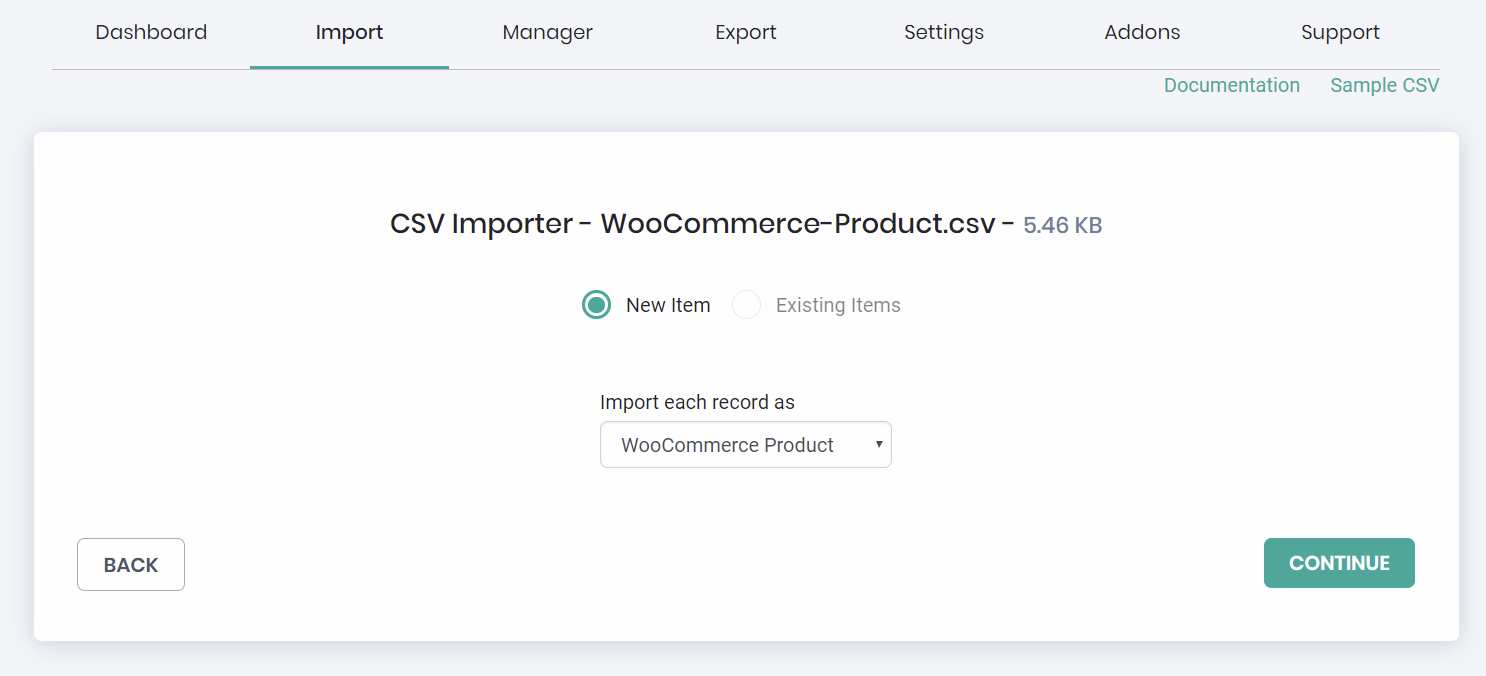
Step 1: Upload the CSV File
- Upload the CSV, XML, or Excel file containing your product data.
- Set the “Post Type” to “WooCommerce Product.”
- Click “Continue.”
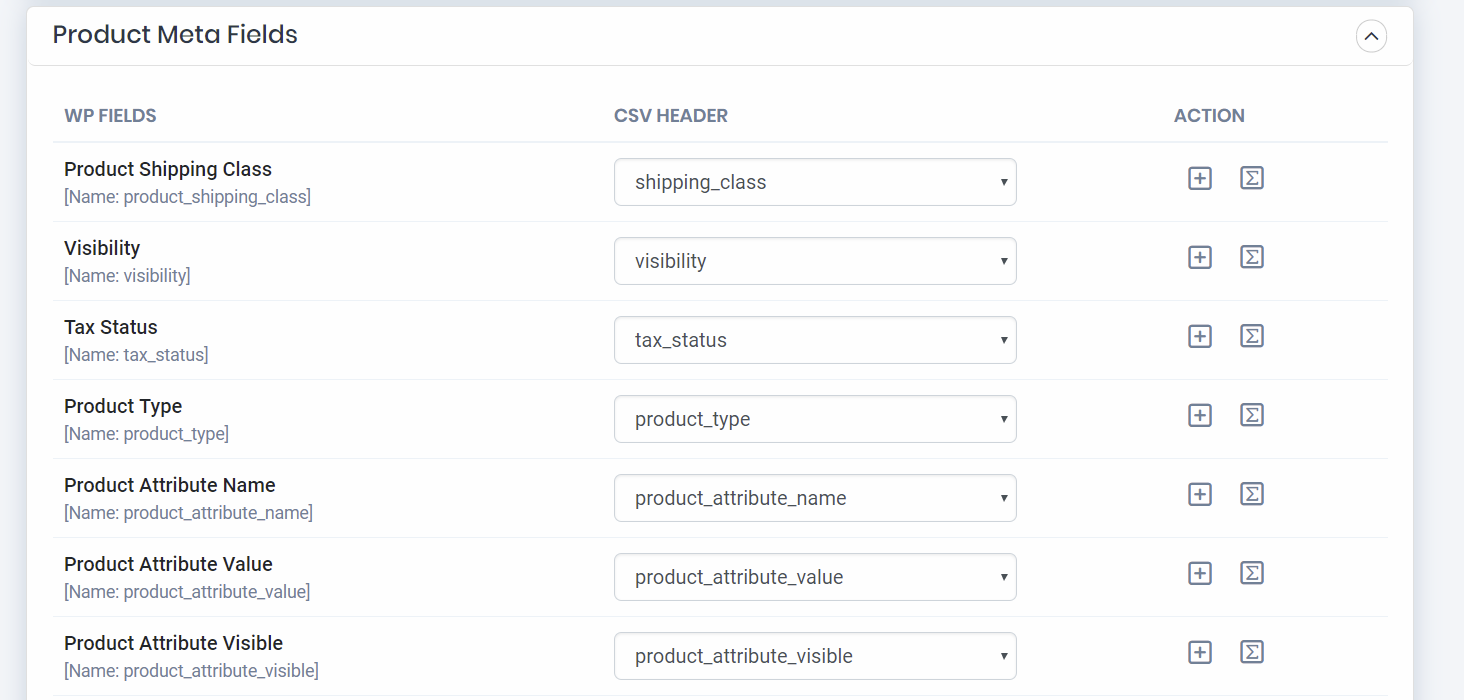
Step 2: Map Fields
- Map the required WooCommerce fields to the corresponding columns in your file.
- Matching column headers are auto-mapped to save time.
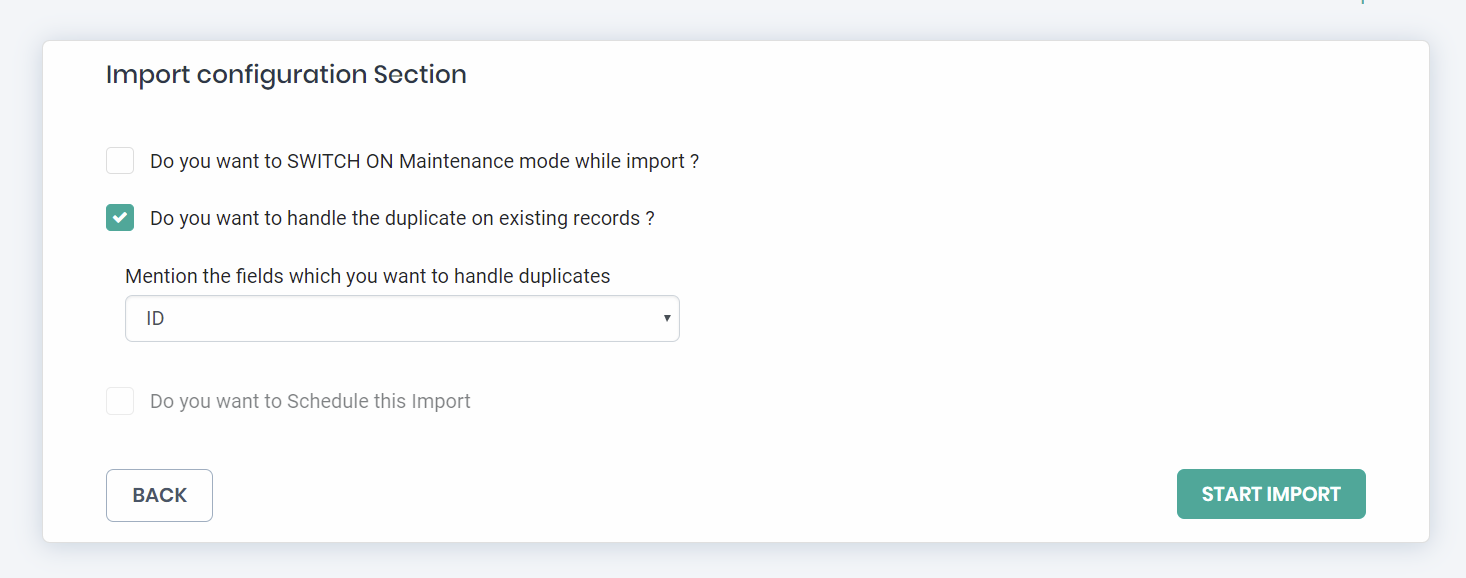
Step 3: Configure and Import
- Choose a media upload option for product images.
- Set duplicate handling: skip records with similar content, titles, or both.
- Specify the number of server requests for large imports.
- Click “Import Now.”
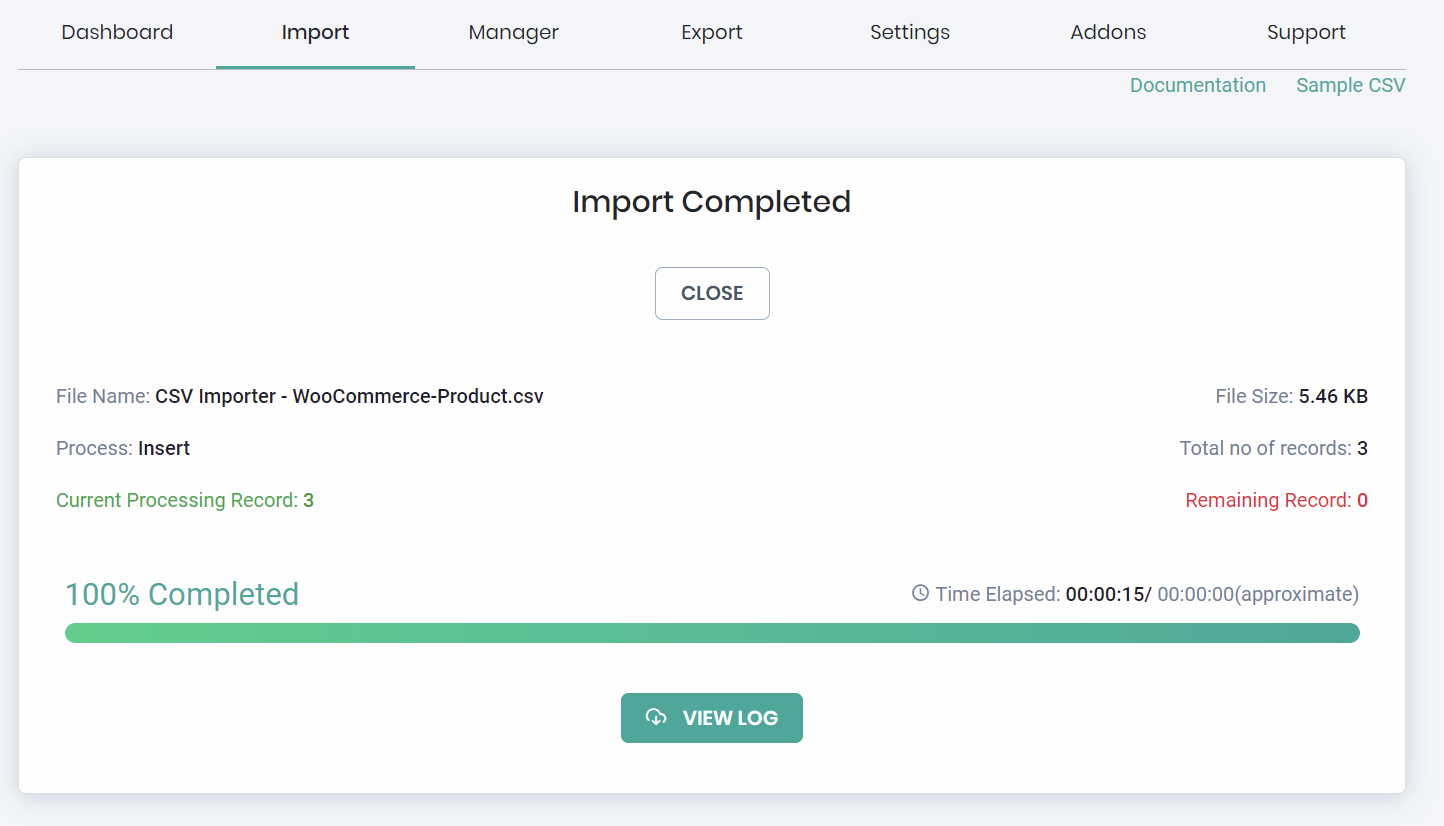
- Monitor progress in the real-time import log (web and admin view).
Upgrade to WP Ultimate CSV Importer PRO
The PRO version gives you significantly more control and automation:
- Scheduled imports exports — Automatically import and export from a URL, FTP, or Google Sheets
- Export — Export WooCommerce products, orders, coupons, and customers with advanced filters
- Update existing products — Update prices, stock, and descriptions without creating duplicates
- Advanced third-party plugin support — Extended support for chained products, pre-orders, product retailers, returns, and warranties
- Custom Fields Support – Import Products and Orders data with Custom fields created with plugins like JetEngine, Meta Box, Pods, ACF, Toolset, etc.,
- Advanced AI Import – Connect with AI providers, map automatically with AI, generate product descriptions with ai, and import files with adding a single prompt to WooCommerce Products
- Priority support – Dedicated email and call support
Helpful Links
Screenshots




Installation
- Install and activate the WP Ultimate CSV Importer & Exporter plugin first.
- Extract the import-woocommerce.zip file to the ‘wordpress/wp-content/plugins’ directory either using FTP or using the plugin installation feature in wp-admin.
- Activate the plugin in the WordPress plugin list.
FAQ
-
1. How do I import WooCommerce products from CSV?
-
Importing WooCommerce products takes three steps:
- Upload your file — In your WordPress dashboard, go to the Ultimate CSV Importer section and upload your CSV, XML, or Excel file.
- Select post type — Choose “WooCommerce Products” as the post type.
- Map fields and import — Match your column headers to the corresponding WooCommerce fields (matching headers are auto-mapped). Click “Import Now” and monitor the real-time log.
Once done, verify the results on both the frontend and your WooCommerce admin panel.
-
2. How do I import WooCommerce product variations from a single CSV?
-
Yes, you can import all product variations — including attributes, SKUs, prices, and stock — from a single CSV file. Prepare your CSV with one row per variation, include the parent product SKU or ID, and select “WooCommerce Products” as the post type. The importer will create the parent product and all its variations automatically.
-
3. How do I import WooCommerce orders?
-
Upload a CSV or XML file with your order data and select “WooCommerce Orders” as the post type. You can import standard order fields as well as personalized product fields from PPOM and Extra Product Options for WooCommerce. Map your columns to the corresponding order fields and run the import.
-
4. How do I import WooCommerce customers?
-
To import WooCommerce customers, prepare a CSV with customer details including name, email, billing, and shipping addresses. Upload the file, choose “WooCommerce Customers” as the post type, map the fields, and click Import.
-
5. How do I import product images?
-
Include a column in your CSV with the full URL of each product image. The importer supports featured images, gallery images, and inline images within product descriptions. External URLs and Dropbox links are both supported.
-
6. How do I import product categories and tags?
-
Add a column for categories and a column for tags in your CSV. For products with multiple categories or tags, separate values with commas — for example: “Shirts, T-Shirts, Clothing”. The importer will create categories and tags automatically if they do not already exist.
-
7. Can I migrate WooCommerce products from another store?
-
Yes. Export your products from the source store as a CSV (using WooCommerce’s built-in exporter or our WP Ultimate Exporter add-on), then import that file into your new store using this plugin. The same workflow applies to orders, customers, and coupons.
-
8. Is there a file size limit?
-
The maximum file size depends on your server’s
upload_max_filesizesetting, which should be at least 2MB (more for large catalogs). You can adjust this in your hosting control panel or ask your hosting provider. For very large files, the PRO version supports scheduled imports directly from a URL or FTP. -
9. Why is the import button disabled?
-
The Import button is active only after a file has been successfully uploaded. If the button remains disabled after upload, check that your file is saved in UTF-8 format. Most spreadsheet applications allow you to save as UTF-8 when using “Save As” or “Export.”
-
10. Can I also export WooCommerce data?
-
This plugin handles imports only. To export WooCommerce products, orders, customers, or other data, install the free WP Ultimate Exporter add-on.
Reviews
Contributors & Developers
“Import WooCommerce Suite for Products, Orders, Coupons, Reviews, and Customers | WP Ultimate CSV Importer” is open source software. The following people have contributed to this plugin.
Contributors“Import WooCommerce Suite for Products, Orders, Coupons, Reviews, and Customers | WP Ultimate CSV Importer” has been translated into 2 locales. Thank you to the translators for their contributions.
Interested in development?
Browse the code, check out the SVN repository, or subscribe to the development log by RSS.
Changelog
2.9.2
- Tested: Full compatibility with the latest WooCommerce version.
2.9.1
- Fix: improve bulk import stability for remote images and AJAX processing.
- Tested: Full compatibility with the latest WooCommerce version.
2.9
- Added: WordPress 7.0 compatibility
2.8
- Added: WordPress 6.9 compatibility
2.7
Bug fix: Custom slugs from post_name are now correctly applied during import.
Tested: Full compatibility with the latest WooCommerce version.
2.6.1
Release date: 2025-06-25
- Fixed: Bugs affecting Product descriptions import.
2.6
Release date: 2025-02-18
- New Feature: Added import and export support for WooCommerce Customers.
2.5
Release date: 2025-02-04
- New Feature: Added support for Single CSV Import for WooCommerce product variations.
2.4
Release date: 2025-01-28
- New Feature: Added import support for WooCommerce orders, including personalized product details from Extra Product Options for WooCommerce fields.
2.3
Release date: 2024-12-10
- New Feature: Support was added for importing WooCommerce EAN/GTIN fields.
2.2
Release date: 2024-11-20
- New Feature: Added support for YITH WooCommerce Order and Shipment Tracking plugin fields data import export.
2.1
Release date: 2024-10-21
- New Feature: Added import support for WooCommerce orders, including personalized product details from PPOM (Personalized Product Option Manager) fields.
2.0
Release date: 2024-09-24
- Added: Support for WooCommerce Orders and Coupons import
- Improved: WooCommerce Product import via API
- Resolved: Minor bug fixes
1.9.4
- Resolved: Stock import issue
- Resolved: WooCommerce attribute issue
- Added: CSV Export for Woocommerce product Failed Image Details – Users can now download a detailed CSV file after importing woocommerce products. This CSV includes columns for media_id, post_title, post_id, and actual_url.
- Added New Media Import Tab: A new tab has been introduced, dedicated to media import and updates. This feature allows users to upload both local and external images directly.
- Featured Image Metadata: Added new metadata options in the mapping section, including image_title, image_filename, image_alt_text, image_description, and image_caption.
- Enhanced Logging: Improved logging details for more comprehensive tracking of import and media processes. Post-import logs now display the count of images associated with the post and the count of any failed images.
- Log Manager Improvement: Implemented a Log Manager where users can access and download summary logs, media logs, and failed media logs as CSV files.
1.9.3
- Resolved: PHP Customfunction 500 error issue
1.9.2
- Resolved: 500 Error conflict with WooCommerce Bundle Plugin
- Resolved: 500 Error with WooCommerce Core Fields import
- Resolved: Mathematical function and PHP custom function issues
1.9.1
- Fixed: Space issue fixed
- Fixed: PHP deprecated error.
1.9
- Checked: WordPress 6.4.1 compatibility
1.8
- Checked: WordPress 6.3 compatibility
- Fixed: Minor bugs
1.7
Resolved: An issue with WooCommerce Stock Status.
1.6.9
- Checked: WordPress 6.2.1 compatibility
- Fixed: Woocommerce bundle product sort order issue
1.6.8
- Checked: WordPress 6.0 compatibility
1.6.7
- Checked: WordPress 5.9 compatibility
1.6.6
- Added: Import support for the latest WooCommerce product bundle plugin-v6.12.4
- Fixed: Dropbox link image issue
1.6.5
- Added: support for Dropbox image import (products).
- Checked: WordPress 5.8.1 compatibility.
1.6.4
- Added: Separate widget for product attributes
1.6.3
- Added: Import support for Polylang for WooCommerce.
- Added: WordPress 5.8 compatibility
1.6.2
- Added: WordPress 5.7.2 compatibility
- Fixed: Regular price issue.
1.6.1
- Added: WordPress 5.7 compatibility
- Fixed: visibility import supports both id and value.
1.6
- Added: WordPress 5.6 compatibility
- Added: PHP 8 compatibility
1.5.9
- Added: Extended import support for Product Bundle Fields.
1.5.8
- Added: Support for Variation Swatcher for WooCommerce Plugin.
- Checked: Compatibility for WordPress 5.5.1
1.5.7
- Added: Support for WC Product Bundle Meta Fields Import.
1.5.6
- Added: Product_gallery_image import supports with existing media image-URL, image name, and ID.
1.5.5
- Checked: Compatibility for WordPress 5.3.2
1.5.4
- Fixed: Minor issues and warnings
1.5.3
- Added: new API call to find is installed or not
- Added: notice/alert for the plugin not installed.
1.5.2
- Improved: user interface and performance.
- Added: Latest WooCommerce version 3.6.5 support
1.5.1
- Tested: WordPress compatibility 5.2.2
1.5
- Added: Drag & drop Mode
- UI changes
1.4
- Added: Real-time import log with both web view and Admin view options.
- Added: product import (simple, grouped, variable, external) and their field
- Added: Gallery image import(using pipeline)
- Added: Duplicate handling
- Added: Product Add-ons Import
- Added: Chained Products Import
- Added: Product Retailers Import
- Added: Returns and Warranty Request Import
- Added: Pre-Order Import
- Added: Attribute support option
- Added: Allow authors/editors to import the option
1.3
- Added: Compatibility for WordPress 4.5.3
- Added: Comma separation support in Product Attribute name, Product & Post category.
- Fixed: Post Format issue.
1.2
- Added: Compatibility for WordPress 4.5
- Fixed: Automapping issue in Core Custom Fields and SEO fields.
- Fixed: Downloadable files import issues.
1.1
- Added: Import the custom taxonomies.
- Added: Compatibility for WordPress 4.4.2.
- Fixed: Security Issues.
1.0.1
- Added: Support for All-in-one SEO.
- Added: WordPress Custom Field registration on the import flow.
- Modified: Mapping section UI.
- Fixed: Unwanted warnings.
1.0
- Initial release version. Tested and found to work well without any issues.
Meta
- Version 2.9.1
- Last updated 5 days ago
- Active installations 4,000+
- WordPress version 5.0 or higher
- Tested up to 7.0
- PHP version 7.4 or higher
- Languages
- Tags
- Advanced View