Having problems working with the Theme editor for Twenty Twenty Three theme. I had designed my entire website using an IDE and got the page looking and working exactly as I wanted. Once I uploaded the HTML into the page, everything broke. After weeks of playing with it, I realized that I don’t know enough to make my stylesheets work; so I rebuilt the page using the theme editor. I have almost everything on the main page working as it should, except I have this space underneath the cityscape/logo image that I can’t get rid of.
It is really getting on my nerves. Any help getting rid of this space would be greatly appreciated. Nothing I have found online works, and if I can’t get it to work, then I may need to move away from WordPress all together, although I would rather not do that. However, I need my page to display correctly.
Below is a screenshot of how I would like it to display, The grey has been replaced with a wood texture background on the actual website. I need the cityscape/logo to remain at the bottom of the page, even on mobile. Mobile is ridiculously bad.
Appearance -> Editor -> Template -> (probably) Blank template -> Edit -> List View on the left -> and there you are able to Remove Spacer; or change its height – see the menu on the right side.
Hi @pyrotaz27 there is a spacer block or 118px height above the title Welcome To CityLights Church Albuquerque If you cannot find it try checking your blocks in List View
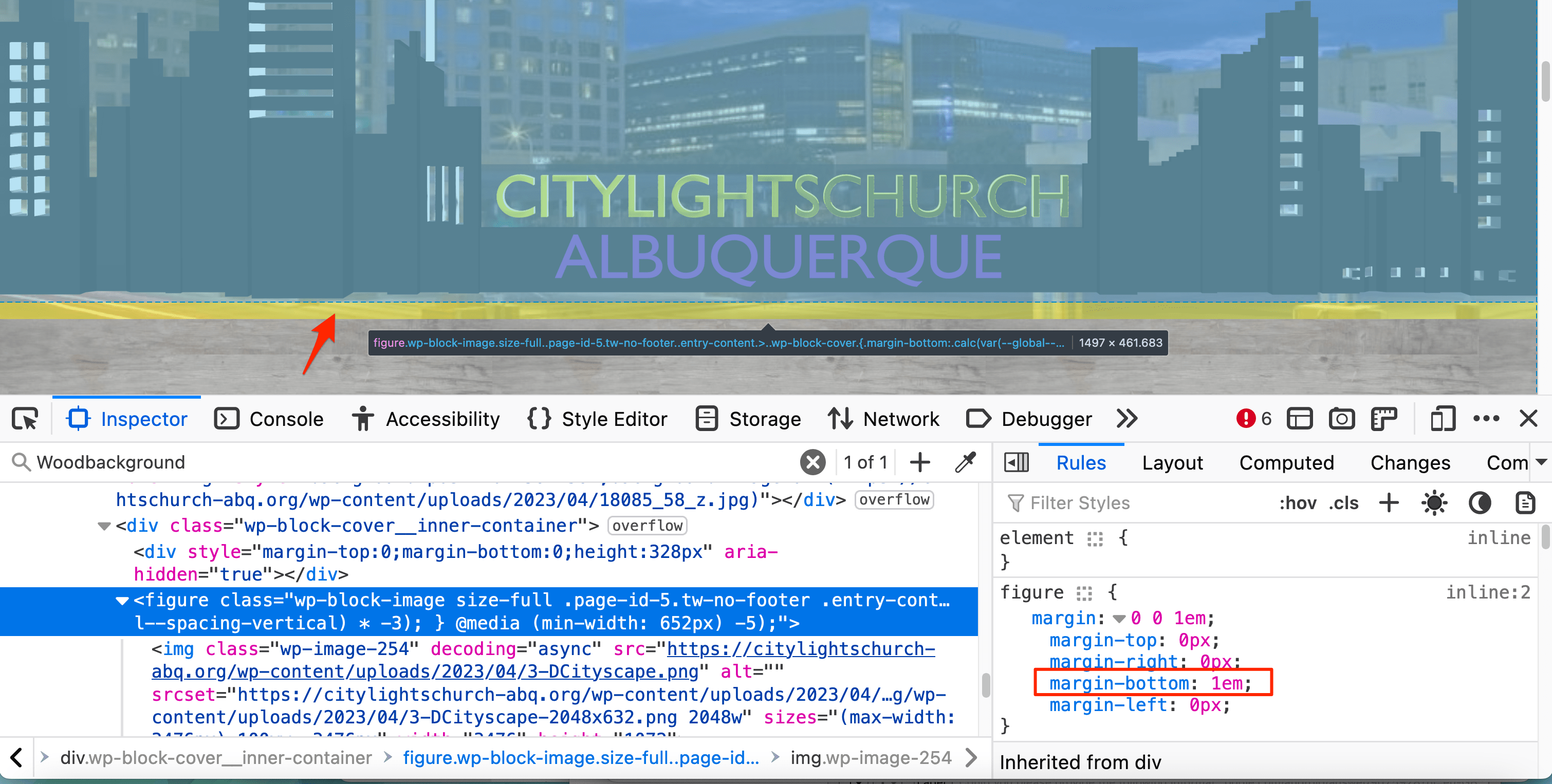
Hey there @pyrotaz27 – I see 1em of bottom margin set on the “cityscape” image block that you’ve placed inside your cover block. You can see it in the screenshot below, coming from the figure element.
Do you recall how you added that space to the image block, in order to override it? (I’m not seeing a setting for this on my test site, so perhaps you made the modification another way.) Setting the margin-bottom value to 0 on that block in the browser inspector removes some of the extra space on your site.
Once the bottom margin on that image block is zeroed out, you may still notice a few pixels of your background image coming through at the bottom. I believe that’s because you’re using a transparent PNG for your “cityscape” image which actually contains a bit of blank space at the bottom. If you crop that out in a graphics program, you should be able to tighten things up down there. This is what I mean:
Thanks for your response but the margins are all set to 0.
If I don’t use a WordPress theme, I can make it work with CSS and HTML but WordPress themes have formatting and won’t recognize my custom CSS and HTML.
The transparency at the bottom of the cityscape is deliberate for effect. The effect that I want is in my question so the transparency at the bottom is necessary for that effect.
I’m guessing I may just have to live with this until I can learn more about how to write my own php files (currently taking coding courses in a bootcamp) and get rid of WordPress.
It’s annoying that I can’t use my own custom CSS code with wordpress. Not even any of the supposed “blank” themes allow me to use my own CSS stylesheet. Drives me nuts.
@pyrotaz27 Glad you found the source of the extra space. If you need help with something else, feel free to create a new topic.
It’s annoying that I can’t use my own custom CSS code with wordpress. Not even any of the supposed “blank” themes allow me to use my own CSS stylesheet. Drives me nuts.
If you’re interested in crafting your own WordPress block theme, Create Block Theme would be the route I’d suggest – it has an option to start with a blank theme. Just keep in mind that block theme is a theme intended to be designed and customized via the Site Editor, and not with handwritten CSS.
If instead you prefer to go “old school” and start your site via a blank classic theme that does not support the Site Editor, you could try Underscores, which comes with a very minimal CSS file that you can modify as you wish – just bear in mind it hasn’t really been updated in a while, as the focus within the WP project has shifted to block themes and the Site Editor.
Viewing 8 replies - 1 through 8 (of 8 total)
The topic ‘Need help with space on page’ is closed to new replies.