|
VOOZH | about |
|
VOOZH | about |
We offer easy, convenient returns with at least one free return option: no shipping charges. All returns must comply with our returns policy.
Learn more about free returns.| Brand | NETGEAR |
| Hardware Interface | Ethernet |
| Color | White |
| Compatible Devices | Smart TV |
| Data Link Protocol | Gigabit Ethernet ¢ |
| Data Transfer Rate | 500 Megabits Per Second |
| Item Weight | 0.1 Kilograms |
| Number of Packs | 2 |
| Unit Count | 2.0 Count |
| UPC | 606449082104 |
| Hardware Interface | Ethernet |
|---|---|
| Compatible Devices | Smart TV |
| Data Link Protocol | Gigabit Ethernet ¢ |
| Data Transfer Rate | 500 Megabits Per Second |
| Compatible Operating System Family | Windows |
| Minimum Required Operating System Version | Windows 10 |
| Item Weight | 0.1 Kilograms |
|---|
| Color | White |
|---|
NETGEAR Powerline 500 Nano 1 GigE Port Starter Kit (XAVB5101)
Share:
Found a lower price? Let us know. Although we can't match every price reported, we'll use your feedback to ensure that our prices remain competitive.
Fields with an asterisk * are required
| Brand | NETGEAR |
|---|---|
| UPC | 606449082104 |
| Global Trade Identification Number | 00606449082104, 10606449082101 |
| Manufacturer | Netgear |
| Mfr Part Number | XAVB5101-100PAS |
| Model Number | XAVB5101-100PAS |
| Unit Count | 2.0 Count |
| External Testing Certification | WEEE |
| Warranty Description | 1 year |
| Best Sellers Rank |
|
| ASIN | B007ILFFS6 |
| Customer Reviews |
3.9 out of 5 stars |
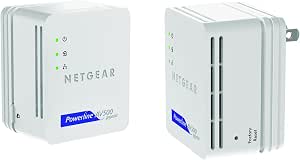
The NETGEAR Powerline Nano500 Set extends your Internet access to any electrical outlet for the most demandingapplications. It offers easy, plug-and-play setup and faster speeds, all in a convenient small design. Perfect for connectingsmart TVs, HD set-top boxes, 3D HD videos, Blu-ray™ players, DVRs, PCs and gaming consoles to your home networkand the Internet.• Extend your network — Extend Internet access throughout your home to any electrical outlet for desktop PCs, smart TVs, gamingconsoles and set-top boxes• HDTV & 3D HD — Speeds up to 500 Mbps enable applications such as HDTV, multiple HD and 3D HD video streams, streamingmultimedia, and multiplayer gaming• Compact Design — Convenient nano-design blends in nicely with any surrounding• Plug-and-play — Sets up in minutes, no need to configure or install software• Push-and-Secure — Secures the network connection with the touch of a button, no need to remember passwords• Pick-a-Plug — Automatically tests the connection at any electrical outlet to ensure the highest possible performance• Energy-saving features — Automatically powers down when not connected or not in use, disable LEDs, less than 0.5 Watt instand-by, packaging manufactured with at least 80% recyclable material• Expand your existing Powerline network — Backwards compatible with Homeplug AV including NETGEAR Powerline AV products
Customer Reviews, including Product Star Ratings help customers to learn more about the product and decide whether it is the right product for them.
To calculate the overall star rating and percentage breakdown by star, we don’t use a simple average. Instead, our system considers things like how recent a review is and if the reviewer bought the item on Amazon. It also analyzed reviews to verify trustworthiness.
Learn more how customers reviews work on AmazonI've been a Network Engineer for over 10 years and ever since I've dealt with computers, cabling is one of the worst aspects of the job. I can't tell you how many times I've run/extended CAT3/CAT5/CAT5e/CAT6 cabling and ended up terminating both ends and testing them. Some situations are easier than others when you're allowed to run a cable across the floor or above ceiling tile... but in other situations like getting networking in a certain room in your house can be a total pain in the butt.
For the average home user, the only way to get networking from point A to your house to point B is either wired with cabling or use WiFi & bridging if the WiFi didn't extend far enough. When Powerline technology came out it added convenience of existing power cabling but still was a little flaky and troublesome. But since then, Powerline has jumped leaps and bounds since and is much more reliable & faster.
When it came time to buy, I put a lot of research into looking into the latest powerline solution for my home. I wanted something with high performance and the current version of "high performance Powerline devices" allows 500Mbps transfer rate. Even still, I was having trouble selecting which manufacturer to go with (Belkin, Cisco, Netgear, etc). After my homework (and despite Netgear's horrible sales support), I ended up with a Netgear anyway.
The Netgear Powerline AV device I wanted was not on Amazon (Powerline AV+ 500 Nano (which has the extra outlet built-in)). It seemed nobody had it despite being listed on Netgear's website. I spoke with Netgear Sales Support and they said it wasn't discontinued, but on backorder. I'm not sure why but because I was on a time table, I decided to get the other version, the Powerline Nano 500 Set which I'm reviewing.
Installation is a snap. Despite the bulky unit, you just plug it in on one outlet and plug it in in another. There are 3 LEDs that consist of power (telling you it's on), a powerline indicator (letting you know the current speed), and the Ethernet LED (letting you know if the device conencted to the adapter is powered on). Within seconds of plugging both in my outlets, they came on and connected to each other. That's all it takes!
For those of you worried about security, there is a button to encrypt your traffic but it's really unnecessary unless you're really really paranoid. Since your traffic is going over electrical cable, the theory is that someone can intercept your packets and steal your information if they have the right equipment and are also tapped into your power phase in your neighborhood. But in reality, this is highly unlikely.
Unlike wardriving (where people actively drive around town trying to hack/break into wireless routers - yes, people do this), this method of "wardriving" is much more difficult. First and foremost the person needs to tap into your neighborhood's power via an outlet. Secondly, they need the right kind of equipment to intercept your data.
I know these days you can't really trust anyone, but what are the odds that your neighboors (even several houses down) are the malicious hacking type? Furthermore, you increase the odds that they are using a powerline device (lots of people still dont' use them) and even further increase the odds that they have the right equipment? I know I don't... but still... if you're paranoid just enable the security. It takes just a coupe seconds to do so.
Throughput is awesome. I have a Gig NIC card and although you can't actually do a GIG over the powerline, it's still plenty fast. What some people many not know is that you can attach a small hub/switch to the powerline device and expand your number of outlets in that room. Furthermore, you can have more than 2 of these in your house for those of you wanting to expand the availability of ethernet ports in your house.
Previously I was running cat 5e cable around the house to media streaming devices from my home server. Originally I was having intermittent connection issues through wireless so went to a wired solution which solved the problem. Aesthetically this isn't the best solution so researched EOP devices which could sustain multiple users streaming 720/1080p. After seeing the reviews @smallnetbuilder I decided on 2 sets of the XAVB5101.
Setup was ridiculously easy and didn't require me to even go near a computer. I plugged all the devices into the wall and pressed one button on each of them as the lights were flashing. Done, they were now set and I could remove them and plug them in wherever I wanted.
I tested by plugging my laptop into the router and downloading a file on usenet to max out my line speed. I then did the same on the adapter which was furthest from the modem and there was no drop in throughput. Overall I am very happy with this solution and would recommend it to everyone, however as with wireless just dependant on your situation you may achieve better or worse results.
Currently this is almost the top performing EOP device and if you have mulitple users in a house then a 500Mb device is a must.
Note- the XAVB5101 is 110-240V
Pros: Easy installation and setup
Cons: Drops connection
Just got this today. Set it up, seemed to run well. Did a 200MB download, and it choked about 85-100MB in giving me no connection. Since this is noted behavior in the Netgear forums, I'm guessing it's a general problem.
Having dealt with Netgear support before, who makes you go through ridiculous hoops and will never admit there's a problem with the firmware, I think I'll probably just return it and buy the competitor's.
Just moved into a new house, where I needed to extend our wireless N router to a main computer on the second floor as well as two TV rooms, in a living room and basement area. Even with my wireless extender I just could not get enough range on my gear. That is when I started to explore the powerline options. Read some good reviews here and I have had alot of luck with netgear over the years. Always seems to connect well and be easy to use. I purchased these nano500s and Netgear XAVB5004 Powerline Network Adapter which comes with a multiport powerline and yet another nano 500. The setup was easy for me. Plug nano500 into wall and connect directly to router. Went to my 3 rooms pluggd nano in 2 rooms and my multiport in the basement(They say do not plug into powerstrip must go into wall). Plugged cat5 from computers tivos etc as appropriate. All the nano500s have lights that instantly tell you if there is a good connection and how good that connection is. So the minute I plugged it in I already new I had a great hook up to the nano by the router. A software cd comes with the Netgear xavb5004 setup that you can run and can detect the powerline network if you will. Got it all set up but had some trouble connecting my ps3 on the multiport, I powered router on off, and then the multiport and everything linked. It was seriously that easy. It is far better than anything short of being right next to the wireless N. I can easy stream tivo from one to another with no lag. I can't believe I had not tried this way sooner!!!!!!!!! I understand that there may be some variation depending on your wiring and the age of the house wiring etc. All I can say is you don't have much to lose. Super easy setup and you can just add nano500 ports as you would like. I also plugged NETGEAR 5-port Home Theater and Network Gaming Hub GS605AVinto one of the nanos so I could plug in a NAS drive, computer, and Western Digital WD TV Live Streaming Media Player, Wi-Fi 1080p - AVI, Xvid, MKV, MOV, FLV, VOB, MP3, MP4, MPEG into it and it runs perfectly. So that seemed to work just as well as the powerline multiport hub in the box above. Anyhow, I have no complaints. Plenty fast to stream HD through the house and took me 1 hour to get it hooked up, and can easily add ports in the future.
I have three of these in my house and I am getting very good data rates.
I ran iperf (in TCP mode) to measure real performance and I get between 200 Mbit/s to 240 MBit/s of data bandwidth. I consider these results very good.
In my previous apartment I only got about 30 Mbit/s (again measured with iperf) so there definitely can be differences. In that case the Netgear monitoring program (Net genie or something like that) indicated that the PHY speeds for the devices were in excess of 130 Mbit/s but real-life performance was just a fraction of that.
But even the 30Mbit/s was as fast and way more reliable than a wifi extender.
This is the premium product with a gigabit ethernet ports If your powerlines are good and you can get data rates over 100 Mbit/s it is definitely worth the money. But if your cabling is bad the cheaper models with only 100 Mbit ethernet ports may be sufficient.
I only wish they had a power pass through and I wouldn't say no to a second ethernet port either. The XAVB5602 model has two ethernet ports and a passthrough but as far as I can tell the ethernet ports are only 100 Mbit/s (fast ethernet).
I've got 4 of these installed in my home. Not all 4 are paired together though, 2 are paired for 2 distinct networks. When there is traffic on one network, it can and will affect the other network.
I've found that maximum sustained speeds are more like 30Mbps, less than my WAN speed (50Mbps symmetric). Throughput will fluctuate from second to second, so sometimes will be better, sometimes worse -- and that variation, in itself, is highly frustrating.
There is also some increase in latency. You can see this with a ping test. Make the ping size > 32 bytes and you'll see a 20ms addition to the latency.
Anyway, they do work - and I was reasonably happy until I discovered that they were the cause of various network trouble I've had - mostly related to the aforementioned speed constraints and congestion when both networks are in use. I've found a 5ghz (802.11ac) network is far superior in speed, latency, and reliability. Unlike the 2.4ghz band, 5ghz signals won't travel as far, meaning there is inherently less interference, even as more people move to 5ghz with 802.11ac.
Bottom line: Use powerline adapters only if you have no better alternative. Test carefully and often, as conditions may change. If you have any network issues, check these first.
OK. If you are looking at ANY powerline adapters you need to keep a few things in mind first:
- Powerline (even AV 500) is on the bottom rung of connections to use in your network. Basically, your best speed & bandwidth will be from a standard hard-wire Cat5e or Cat6 gigabit connection, followed by wireless (802.11 n, a, or the new ac standard), then IP over Coax or Powerline.
- While Powerline has come a long way from its beginnings just a couple years ago, even AV 500 will not come even close to the connection speeds of wireless. Don't be fooled by the marketing hype! Do research anywhere online on these adapters and you'll see the most total bandwidth you'll expect to get from these is around 200Mbps. And that's in ideal conditions. Very likely if the remote plug you are using is anywhere more the 20 ft away and your electrical system is not ideal, the average is about 50Mbps. Add anymore then 2 boxes in the circuit and it drops even more per client. Far from the 500 Mbps they claim.
My scenario: Moved to a town home and ordered this for a machine on the 2nd floor. Unfortunately, the WiFi was getting too saturated with neighbors' networks. Despite all my troubleshooting (technician by trade), was not able to maintain a stable enough connection to a couple terminal boxes to stream videos from our networked storage.
Since this is a rental property I couldn't just run cat5 cable through the walls. Wanted to try these out since they are marketed as being able to handle bandwidth heavy tasks such as streaming HD video. Should have done my research first!
Both boxes were plugged directly in the wall (you cannot have these plugged into any surge protectors, extension cords, or line conditioners). One will have to be in an outlet near your router or switch (network source), so your limited in plug options right off the bat. This wouldn't sound like a "limitation", but considering where most people have their ISP router, you may have an issue freeing an outlet up, so just keep that in mind. The other was plugged into an outlet near my master bedroom TV. Both boxes found each other after following the synching directions.
Hears where things get interesting for you: You will see an LED stating the connection speed between the two adapters, Green (best - >80Mps) to Red (worst - <50Mbps). Side note: Funny how "Best" is considered anything above 80 Mbps when these are stated as having up to 500Mbps connection in their marketing... I digress. Mine was obviously Red from the start.
So what do you do? Well, all the manufactures suggest trying other outlets to get a better connection. I commend Netgear including this LED to make that diagnosing easier, at least. But consider your application if you are looking at getting one of these. How many outlets do you have to test around where you want to use them? Most rooms have one, maybe two sets of outlets per wall. Even -IF- you got a better connection somewhere else, how far are you willing to drag network cables around to get a slightly better connection? Doesn't that defeat the purpose of not running network cables to begin with?
Just out of morbid curiosity I tried several outlets, most I never intended to use but just to see the signal changes. None gave me a better status than Red until I got within about 20ft of the source, which was just laughable. In that case I could just buy a $4.00 cable and get 5-10x the speed. This is in relatively new copper construction on a one breaker panel system, so I'd love to see the scenario where you could get a solid connection more than a couple rooms away.
My solution: All the other wi-fi networks within range were all on 2.4 Ghz and none where on 5 Ghz (I suggest downloading a program called inSSIDer to investigate any wireless issues - google it). I already upgraded my router last year to a dual band router. Just didn't have any devices using the 5Ghz band yet. So for less than the cost of these, I was able to get 5Ghz USB adapters for two terminals and I'm getting a solid 300Mbps connection now. I'm kicking myself for not seeing this sooner, but at least now I've had enough experience with powerline to know to avoid it until better standards are released.
I'm sure there are applications for this, but for most you are probably better off examining your current network equipment to see if any adjustments/changes are in order. You may pay a little more, but at least you are making the correct adjustments and getting better connections for it.
Many of us would like to use our computer in a certain room or area of the house, but it really is too expensive, or too difficult, or not practical to run Cat5/6 Cable to the location (drilling holes, going through walls, floors, ceilings, etc.). There are also those situations, because of building structure and/or materials that wireless tends to drop internet connections or is unable to supply a desired or required amount of bandwidth.
In my own case, a few years ago, I needed a solution to bring the Internet to the 3rd floor of a 140 year-old building, which had wiring (only two-prong) more than just a few decades old. From previous experience, I knew wireless would not work (at least work well). There was also little or no hope, in the near future, of running a CAT5/6 line for a hardwired connection.
A fair amount of research first led me to find the Cisco-Linksys PLK300 PowerLine AV Ethernet Adapter Kit (made up of two Cisco-Linksys devices: PLE300 & PLS300 network adapters). I was a skeptic, but the reviews on Amazon.com and other sites convinced me to give it a try. Because of this product, I had Internet service the same day the product was delivered. The PLE300 plugs into your router or switch and an electrical receptacle. The PLS300 plugs in a wall receptacle where you want to use the network/Internet. The PLS300 is a four-port adapter (having 4 RJ-45 connectors), acting like a normal switch, giving Network/Internet access to 4 computers or any other network devices.
Since then, I have updated (actually added) several components to the network including this Netgear XAVB5101 Powerline Nano500 Set(XAVB5101). One of the units in the set replaces the above Cisco-Linksys PLE300 router connection. The other unit is now connected to my computer, replacing the PLS300 (now used elsewhere). The network connection appears as 1.0Gbps, but I am sure that these units go nowhere near this speed. While the Cisco had boasted of up to 200Mbps data rates, these claim speeds up to 500 Mbps. There is a very noticeable difference in how quickly the monitor displays a screen. I find them impressive! Plus, it's all Plug and Play!
Besides these Powerline adapters, I know of no other solution that provides Internet access to any part of a home or office so quickly and efficiently. The network is easily expandable by plugging additional single-port adapters into electrical outlets anywhere in the building controlled by the same electrical service. A network switch like NETGEAR GS105 ProSafe 5-Port Gigabit Ethernet Desktop Switch - 10/100/1000 Mbps can then be plugged into the adapter, as I am doing, to allow several devices access to the network/Internet. From a user's standpoint, you should experience Internet speeds comparable to what any cable or DSL service provides. These are fast enough to watch streaming HD video from Netflix or other services on internet-ready HD TVs. It's cleaner and easier than most other solutions.
Since initially buying my first Powerline adapters, there have been many companies that have have gotten into the "powerline" market. Cisco/Linksys, Netgear, and Monster are just a few. A little research and reviews can point to many accessories that are compatible and backwards compatible with the Homeplug AV technology standard used in these products. This also competes with products like the Western Digital WD Livewire Powerline AV Network Kit.
Works exactly as described. It turns all the electrical outlets into internet connections. Faster than wifi and more secure.
Provides a more stable connection than wireless, using the house's power wiring to transmit the signal.
Wireless works for most purposes, but to establish a network for streaming video, this is the way to go if you don't feel like doing an ethernet network.