VOOZH about

URL: https://www.analyticsvidhya.com/blog/2015/01/create-box-plot-qlikview/

⇱ What is a Box Plot | How To Create a Box Plot in Qlikview


India's Most Futuristic AI Conference Is Back – Bigger, Sharper, Bolder

  • d
  • :
  • h
  • :
  • m
  • :
  • s

How to create Box-Plot chart in Qlikview?

Sunil Ray Last Updated : 26 Jul, 2020
5 min read

The use of this article is best illustrated by a case study. So let’s dive straight in.

Business Situation:

Recently, we entered 2015 and before starting new projects and initiatives, every company would want to review their performance in last year. Let’s think about a sales oriented company ABC. They have branches across India and these branches fall under four regions. Now, the company wants to analyse profitability at branch level and compare region level performance. They are looking for answers like which regions are following good practices and can they be replicated in other regions.

So, you want to compare performance of a group of branches to come out with insights on relative performance like Region N branches are more profitable as compared to region S or 75% of Region W branches are more profitable than Region E.

Different ways of Visualization:

Now at individual level, we can easily evaluate profitability and visualize it with the help of Pivot Tables or Bar Chart to show top and bottom branches. But the question is, how would we visualize comparison of branch profitability at regional level? In other words, we can say how to compare distribution of branch profitability at regional level?

Let’s look at the available options to visualize this information. We can represent it through a pie chart, stacked column chart and also through table but all of these visualizations have some limitation.

  • Pie and Stacked Column charts are capable of showing distribution within each region, but it is difficult (or next to impossible) to compare the distribution across regions
  • If we use table, it will have lots of information to read. It would also not represent the information in easy to read / interpret format.

πŸ‘ BoxPlot, Qlikview, Pie Chart

So, whenever we come across with such situations, we should look at Box Plot chart. It is the best way to visualize distribution of a group and compare across different levels. This chart is also known as Five Number Summary in statistics.

What is a Box Plot?

A box plot is a graphical method of displaying variation in a set of data. In most cases, a histogram provides a sufficient display; however, a box plot can provide additional detail while allowing multiple sets of data to be displayed in the same graph. As I have mentioned before, it is also known as Five Number Summary, reason being it uses five statistic metrics to represent it.
πŸ‘ Box Plot, Qlikview

  • Minimum β€“ The minimum value in the data set
  • First quartile – The value below which the lower 25% of the data exist
  • Median – the value below which the lower 50% of the data exist
  • Third quartile – the value below which the lower 75% of the data exist
  • Maximum – the maximum value in the data set

There are some other types of Box plot also known as Modified Box Plot, those used to highlight outliers. In this article we will look at Box Plot only.

How to read a Box Plot?: 

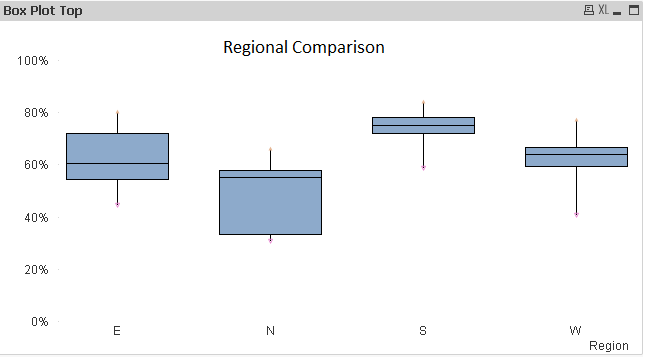
Let’s visualize the above discussed scenario using Box Plot and understand the insights gained from it.

πŸ‘ Qlikview, Boxplot

Insights for the case study using Box Plot:

While looking at the above visualization, the following inferences can be generated:-

  • We can identify distribution within each region like pie or stacked column chart.
  • Almost 75% of South branches have better profitability as compared to Region N because Region S first quartile value is above maximum value of Region N.
  • 50% of East branches have better profitability as compared to lower 75% of Region N branches as you can see that median of East is above third quartile of North.
  • If you look at the distribution of South and North, you would observe that North branches are more spread as compared to South and West.

In similar way, we can generate various inferences compare to different levels of dimensions.

Method to Create A Box Plot in Qlikview: 

Now that the use of Box plot is clear, it is dis-appointing that creating box plot is not a simple click away on QlikView. You need to use a combo chart with a few hacks to create a Box Plot. Let us look at them step by step:

Step 1:

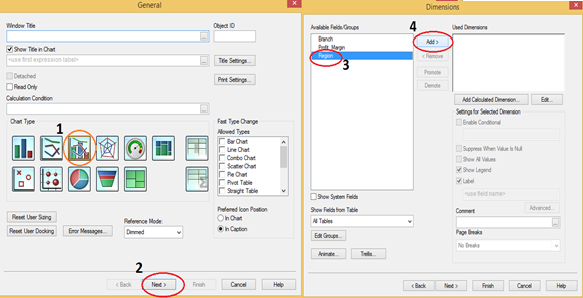
  • Right Click on New Sheet and select Combo chart from New Sheet Object.
  • Click Next and select dimension against which you want to compare distribution (Here, we have Region).

πŸ‘ Qlikview, Box Plot

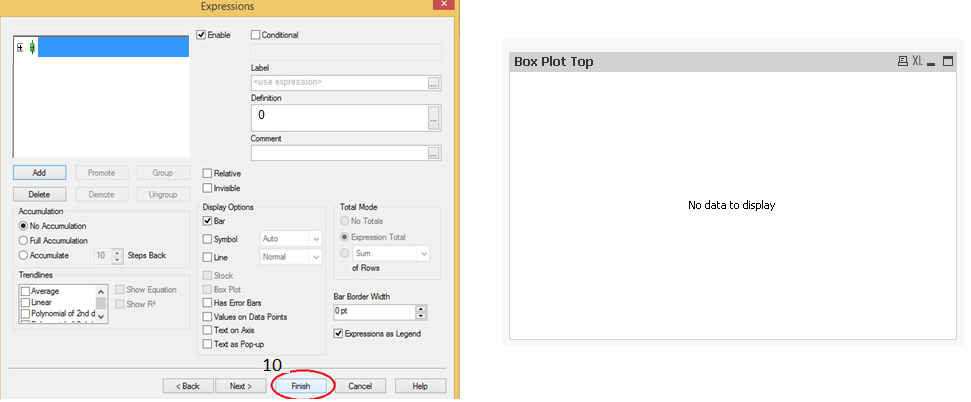
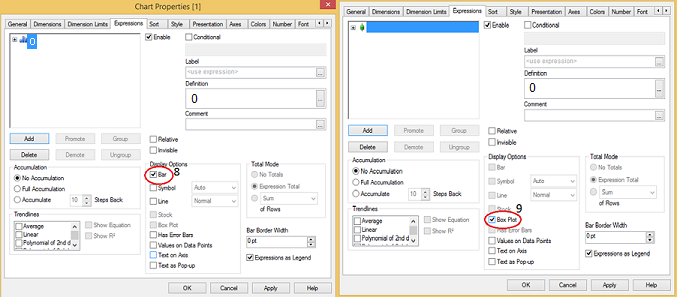
  • Click Next and write expression as β€œ=0” and click on OK, here we just need to enter something and will change it in coming steps.πŸ‘ Box Plot, Qlikview
  • Deselect Bar in display options section and select Box Plot.

πŸ‘ Qlikview, Boxplot

  • Click on Finish, now we have a chart with No Data to Display, not to worry this is not a problem.

πŸ‘ Qlikview, Boxplot

Step 2:

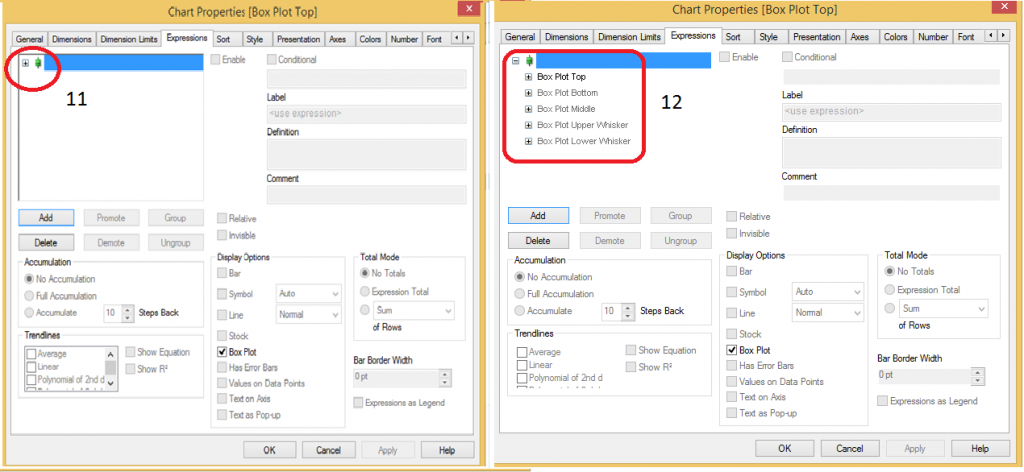
  • Now right click on chart and go to expression tab and click on + sign to look at sub-expression. Here we have five sub-expressions. Box Plot Top, Box Plot Bottom, Box Plot Middle, Box Plot Upper Whisker and Box Plot Lower Whisker.

πŸ‘ Box Plot, Qlikview

Step 3:

  • Add two more expressions for maximum and minimum value to highlight and display them as symbol as shown in below snapshot.πŸ‘ Qlikview, Boxplot
  • Go to presentation tab and deselect show legend option and format the axis as percentage after that finally click on apply and OK. Here we have Box Plot for distribution of profitability across branches at regional level.πŸ‘ Qlikview, Boxplot

End Notes:

In this article, precisely, we have looked at the methods to create Box Plot in Qlikview and how to generate insight while looking at box plot. Additionally, We have also looked at five statistical measures Minimum, Maximum, Median, First and third quartile and how these are useful to visualize the information effectively. Do you use Box Plots in your roles and visualizations? If yes, how do you create them? Do you think this tip is useful?

Do let me know your thoughts on using this chart in Qlikview.

If you like what you just read & want to continue your analytics learningsubscribe to our emailsfollow us on twitter or like our facebook page.

Sunil Ray is Chief Content Officer at Analytics Vidhya, India's largest Analytics community. I am deeply passionate about understanding and explaining concepts from first principles. In my current role, I am responsible for creating top notch content for Analytics Vidhya including its courses, conferences, blogs and Competitions.

I thrive in fast paced environment and love building and scaling products which unleash huge value for customers using data and technology. Over the last 6 years, I have built the content team and created multiple data products at Analytics Vidhya.

Prior to Analytics Vidhya, I have 7+ years of experience working with several insurance companies like Max Life, Max Bupa, Birla Sun Life & Aviva Life Insurance in different data roles.

Industry exposure: Insurance, and EdTech

Major capabilities: Content Development, Product Management, Analytics, Growth Strategy.

Login to continue reading and enjoy expert-curated content.

Free Courses

Exploratory Data Analysis with Python & GenAI

Learn EDA with Python: Transform data into insights using PandasAI & more.

Analyzing Data with Power BI

Turn raw data into insights with Power BI - dashboards, reports & more!

Responses From Readers

Hello, I have read couple of Your articles which were very helpfull. Last one "A Comprehensive guide to Data Exploration" was really excellent!! I am quite new to data science and I am working with QlikView and have a little problem. I suppose that it is not so difficult as it seems to me but it stops me and I can't find any idea for solution. Could You maybe help me? Here is my question on Qlik website: https://community.qlik.com/thread/199364?sr=inbox I will be gratefull for any reply.

Flagship Programs

GenAI Pinnacle Program| GenAI Pinnacle Plus Program| AI/ML BlackBelt Program| Agentic AI Pioneer Program

Free Courses

Generative AI| DeepSeek| OpenAI Agent SDK| LLM Applications using Prompt Engineering| DeepSeek from Scratch| Stability.AI| SSM & MAMBA| RAG Systems using LlamaIndex| Building LLMs for Code| Python| Microsoft Excel| Machine Learning| Deep Learning| Mastering Multimodal RAG| Introduction to Transformer Model| Bagging & Boosting| Loan Prediction| Time Series Forecasting| Tableau| Business Analytics| Vibe Coding in Windsurf| Model Deployment using FastAPI| Building Data Analyst AI Agent| Getting started with OpenAI o3-mini| Introduction to Transformers and Attention Mechanisms

Popular Categories

AI Agents| Generative AI| Prompt Engineering| Generative AI Application| News| Technical Guides| AI Tools| Interview Preparation| Research Papers| Success Stories| Quiz| Use Cases| Listicles

Generative AI Tools and Techniques

GANs| VAEs| Transformers| StyleGAN| Pix2Pix| Autoencoders| GPT| BERT| Word2Vec| LSTM| Attention Mechanisms| Diffusion Models| LLMs| SLMs| Encoder Decoder Models| Prompt Engineering| LangChain| LlamaIndex| RAG| Fine-tuning| LangChain AI Agent| Multimodal Models| RNNs| DCGAN| ProGAN| Text-to-Image Models| DDPM| Document Question Answering| Imagen| T5 (Text-to-Text Transfer Transformer)| Seq2seq Models| WaveNet| Attention Is All You Need (Transformer Architecture) | WindSurf| Cursor

Popular GenAI Models

Llama 4| Llama 3.1| GPT 4.5| GPT 4.1| GPT 4o| o3-mini| Sora| DeepSeek R1| DeepSeek V3| Janus Pro| Veo 2| Gemini 2.5 Pro| Gemini 2.0| Gemma 3| Claude Sonnet 3.7| Claude 3.5 Sonnet| Phi 4| Phi 3.5| Mistral Small 3.1| Mistral NeMo| Mistral-7b| Bedrock| Vertex AI| Qwen QwQ 32B| Qwen 2| Qwen 2.5 VL| Qwen Chat| Grok 3

AI Development Frameworks

n8n| LangChain| Agent SDK| A2A by Google| SmolAgents| LangGraph| CrewAI| Agno| LangFlow| AutoGen| LlamaIndex| Swarm| AutoGPT

Data Science Tools and Techniques

Python| R| SQL| Jupyter Notebooks| TensorFlow| Scikit-learn| PyTorch| Tableau| Apache Spark| Matplotlib| Seaborn| Pandas| Hadoop| Docker| Git| Keras| Apache Kafka| AWS| NLP| Random Forest| Computer Vision| Data Visualization| Data Exploration| Big Data| Common Machine Learning Algorithms| Machine Learning| Google Data Science Agent
πŸ‘ Av Logo White

Continue your learning for FREE

Forgot your password?
πŸ‘ Av Logo White

Enter OTP sent to

Edit

Wrong OTP.

Enter the OTP

Resend OTP

Resend OTP in 45s
πŸ‘ Popup Banner
πŸ‘ AI Popup Banner