|
VOOZH | about |
|
VOOZH | about |
This article was published as a part of the Data Science Blogathon.
Indexing is a technique to optimize our performance or processing speed of querying records in the database by minimizing the number of searches or scans required. It is a data structure technique that is used to quickly locate and access the data in a database. Users cannot see the indexes, they are just used to speed searches and queries.
As mentioned before indexing is needed to optimize our processing time. We can experience it once we are handling millions of data. It is nothing but like our book indexes, it does not totally scan our entire rows, it just searches for an index range and finds the result within the index. No worries we can understand clearly once we continue this article.
CREATE INDEX statement in SQL is used to create indexes in tables. The indexes are used to retrieve data from the database more quickly than others. The user can not see the indexes, and they are just used to speed up queries /searches.
Updating the table with indexes takes a lot of time than updating a table without indexes. It is because the indexes also need an update. So, only create indexes on those columns that will be frequently searched items.
In this article, we will discuss how indexes actually work and help improve the performance of our SQL queries. We will discuss how both the index types work — Clustered and Non-clustered.
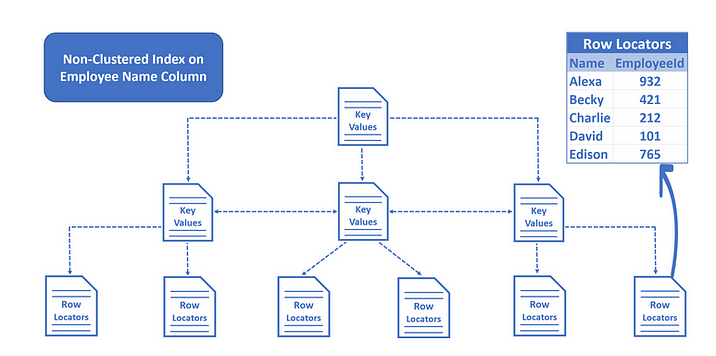
A clustered index is an index that stores the actual data & a non clustered index is just a pointer to a data. This data is available in its leaf nodes. A table can only have one clustered index and up to 249 non clustered indexes. If a table does not have a clustered index it is referred to as a heap.
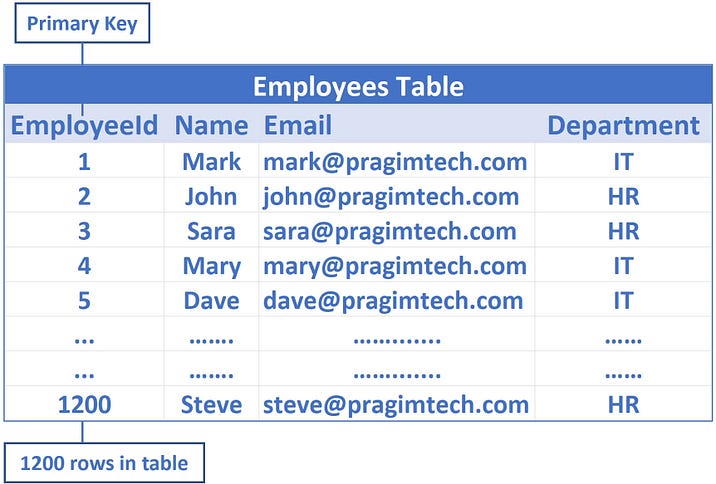
Lets look into the following Employee Table.
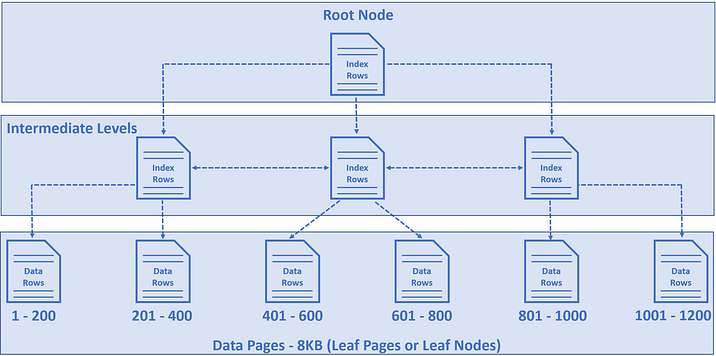
Here, EmployeeId is the primary key, as by default a clustered index on the EmployeeId column is created. This means employee data is sorted by the EmployeeId column and physically stored in a series of data pages in a tree-like structure that looks like the following.
Let’s look at this Simple Architecture to get a better understanding.
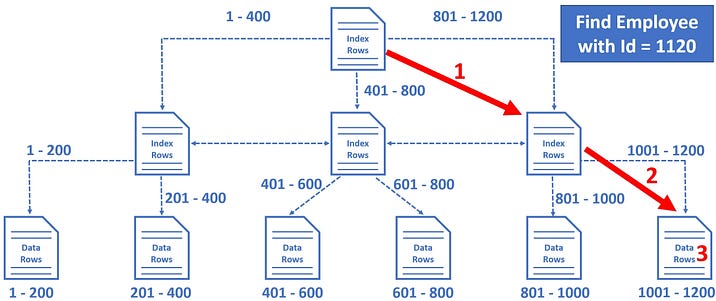
For example, let’s say we want to find Employee row with EmployeeId = 1120
Notice in just 3 operations, SQL Server is able to find the data we are looking for. It’s making use of the clustered index we have on the table.
This practice is getting practice about creating the single, combined, show, drop the index.
create index index_name on Employees(name);
desc Employees;
show index from Employees;
create index index_name_department on Employees(name, department);
alter table Employees drop index index_name_department;
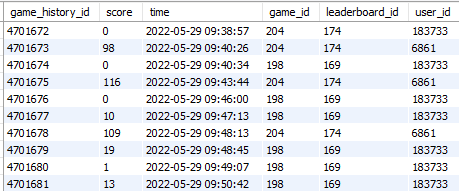
This practice is based on the game play history of game play users. It has 4701404 records. So here when we query data for some requirements there will be considerable execution time. Application wise the milliseconds we need to be accountable. Our ultimate plan is to create an index for the game_history table by using the score column.
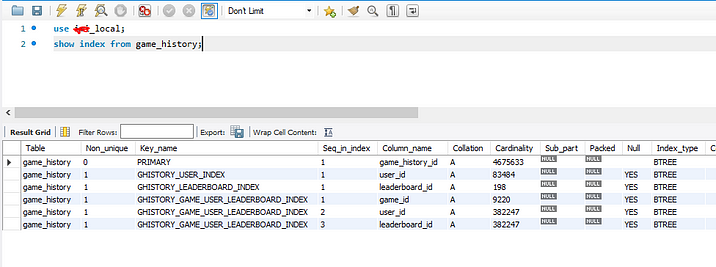
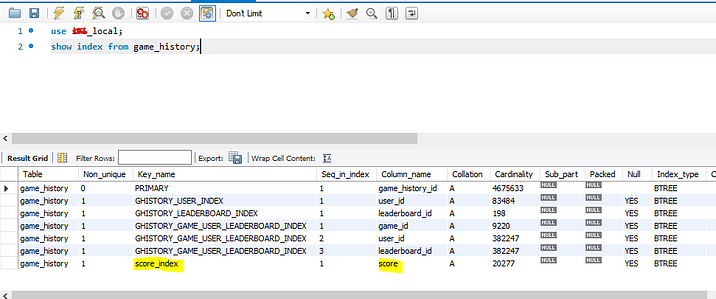
2. Now let’s show the index that we have a default. You can see the default indexes. Here only the primary key is known as a clustered index, the rest are called non clustered index.
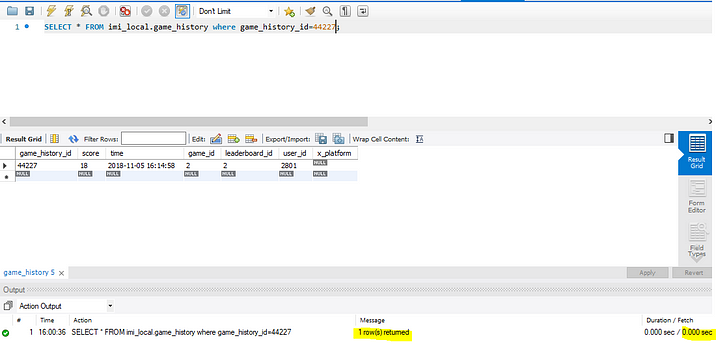
3. Before getting into adding an index let’s have a play with the default index that game_history_id.
Notice, that the operation is Clustered Index Seek, meaning the database engine is using the clustered index on the game_history_id column to find the game_history row with game_history_id = 44227
The number of rows reads is the number of rows the SQL server has to read to produce the query result. In our case game_history_id is unique, so we expect 1 row and that is represented by an Actual number of rows for all executions.
With the help of the default index, the SQL server is able to directly read that 1 specific game_history row we want. Hence, both, Number of rows read and the Actual number of rows for all executions is 1.
So the point is, if there are thousands or even millions of records, the SQL server can easily and quickly find the data we are looking for, provided there is an index that can help the query find data.
In this example, there is a clustered index on the game_history_id column, so when we search by game_history_id, SQL Server can easily and quickly find the data we are looking for. What if we search by score? At the moment, there is no index on the score column, so there is no easy way for the SQL server to find the data we are looking for. SQL Server has to read every record in the table which is extremely inefficient from a performance standpoint.
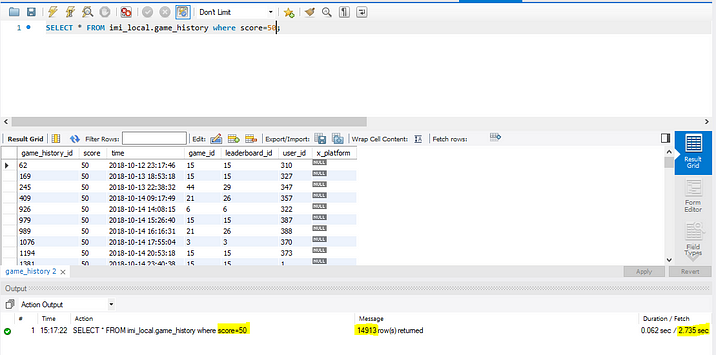
1. We know we don’t have any indexes for retrieving scores from the table. so at first to see the execution time, we get the results of a score that equals 50.
Notice, that the operation is Clustered Index scan. Since there is no proper index to help this query, the database engine has no other choice than to read every record in the table. This is exactly the reason why the number of rows reads is 4701404, i.e every row in the table.
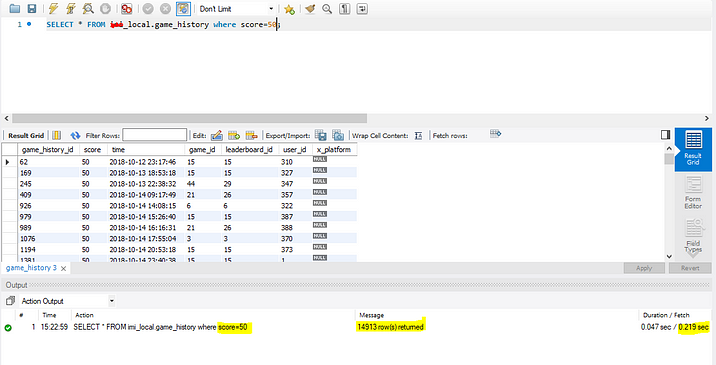
Here we can see we are getting 14913 results, the execution time is 2.735 seconds without a score index.
How many rows are we expecting in the result? Well, only 14913 rows because there are some game_history which score=50. So, to produce these 14913 rows as the result, the SQL Server has to read all the 4701404 rows from the table because there is no index to help this query. This is called Index Scan and in general, Index Scans are bad for performance.
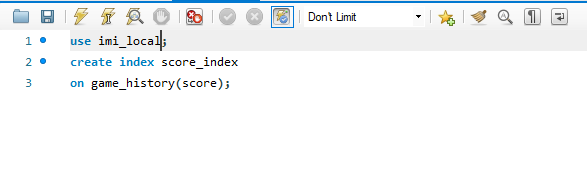
3. Now let’s add the index for the score. If we add the index here, it will consider as non clustered index.
Note: You don’t need to specify that an index is NON-CLUSTERED in MySQL, it’s implicit from the table design. Only the PRIMARY KEY or the first non-NULL UNIQUE KEY can be the clustered index, and they will be the clustered index without your choosing. All the other indexes in the table are implicitly non-clustered.
4. After adding the index, execute the same query to get the results of a score that equals 50.
Without index: Execution time is 2.735
With index: Execution time is 0.219
Finally, what we learned so far is, Indexing the Database Management System is the best technique for querying the largest set of data by reducing the execution time multiple times. Ideally, this article provides much conceptual and practical knowledge about indexing. I hope this article explains the indexing method using clustered and non-clustered techniques. Also keep in mind when you are going to index the MySQL Database, If the table has the primary key that will be considered the clustered indexing, All the other indexing is known as non clustered indexing. We will see it in another article.
Cheers…!
The media shown in this article is not owned by Analytics Vidhya and is used at the Author’s discretion.
I am a Software Engineer working in Arimac Digital in Sri Lanka. I graduated from the University of Kelaniya with a BSc (Hons) in Software Engineering. Also specialized in Business Intelligence (Data Science) and web development. I am much interested in learning new technologies.
GPT-4 vs. Llama 3.1 – Which Model is Better?
Llama-3.1-Storm-8B: The 8B LLM Powerhouse Surpa...
A Comprehensive Guide to Building Agentic RAG S...
Top 10 Machine Learning Algorithms in 2026
45 Questions to Test a Data Scientist on Basics...
90+ Python Interview Questions and Answers (202...
8 Easy Ways to Access ChatGPT for Free
Prompt Engineering: Definition, Examples, Tips ...
What is LangChain?
What is Retrieval-Augmented Generation (RAG)?
Edit
Resend OTP
Resend OTP in 45s