This article was published as a part of the Data Science Blogathon.
Introduction to Data Warehouse
SQL Data Warehouse is also a cloud-based data warehouse that uses Massively Parallel Processing (MPP) to run complex queries across petabytes of data rapidly. Use SQL Data Warehouse as a key part of your big data solution. Import big data into SQL Data Warehouse using simple PolyBase T-SQL queries, then harness the power of MPP to run high-performance analysis. As you analyze and integrate, the data warehouse becomes a single version of the truth that your business can rely on for insights.
Big Data Solutions
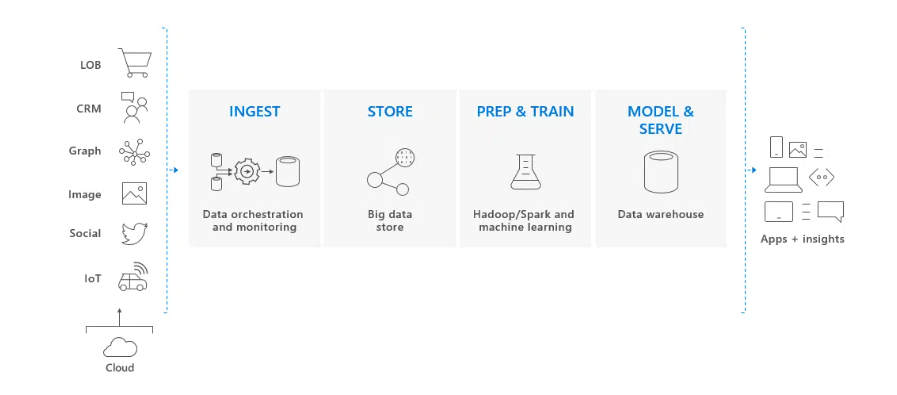
SQL Data Warehouse is a key part of a comprehensive big data solution in the cloud.
A cloud data solution receives data from various sources into big data warehouses. Once in the big data warehouse, Hadoop, Spark, and machine learning algorithms prepare and train the data. When data is ready for complex analysis, SQL Data Warehouse uses PolyBase to query big data stores. PolyBase uses standard T-SQL queries to transfer data to the SQL Data Warehouse.
SQL Data Warehouse stores data in relational tables with a column store. This format improves query performance and reduces data storage costs. Once the data is stored in SQL Data Warehouse, you can run analytics at a massive scale. Compared to traditional database systems, analytical queries end in seconds instead of minutes or hours instead of days. Analysis results can go to global databases or applications. Business analysts can then gain insight to make well-informed business decisions.
Working on SQL Data Warehouse
It is designed for industry-level data warehouse implementations and stores large amounts of data in the cloud of Microsoft Azure. It uses a single SQL-based view across non-relational big data stores and relational databases, enabling businesses to unify structured, unstructured and streaming data within a cloud data warehouse. Users can operate Azure SQL Data Warehouse using SQL Server Management Studio (SSMS) or write queries using Azure Data Studio (ADS).
SQL Data Warehouse uses PolyBase to query big data stores such as Hadoop systems directly. Polybase enables organizations to use standard T-SQL queries to push data into the SQL Data Warehouse and provides a single SQL-based query area for all the data. it stores data in relational tables using columnar storage, which reduces data storage costs and improves query performance.
SQL Data Warehouse uses a scalable architecture to distribute data processing across multiple nodes. Azure SQL Data Warehouse’s architecture decouples compute and storage, allowing users to scale independently and pay only for the processing and storage an organization requires.
Optimization Options
It offers performance tiers designed for flexibility to meet your data needs. You can choose a warehouse that is optimized for computing or elasticity.
- The performance layer Optimized for elasticity separates the compute and storage layers in the architecture. This option excels in workloads that can take full advantage of the separation between computing and storage by frequently scaling for supporting short periods of activity. The compute tier has the lowest entry price and scales to support most customer workloads.
- Performance level Optimized for computing power, it uses the latest Azure hardware to introduce a new NVMe Solid State Disk cache that keeps the most frequently used data close to the processors, exactly where you want it. Automatic storage layering makes this performance layer excel with complex queries because all I/O is kept local to the compute layer. In addition, The column stores are enhanced to store a large amount of data in the data warehouse. It is Optimized for Compute performance tier and provides the highest level of scalability, allowing you to scale up to 30,000 data warehouse compute units (cDWUs). Choose this level for tasks that require continuous, lightning-fast performance.
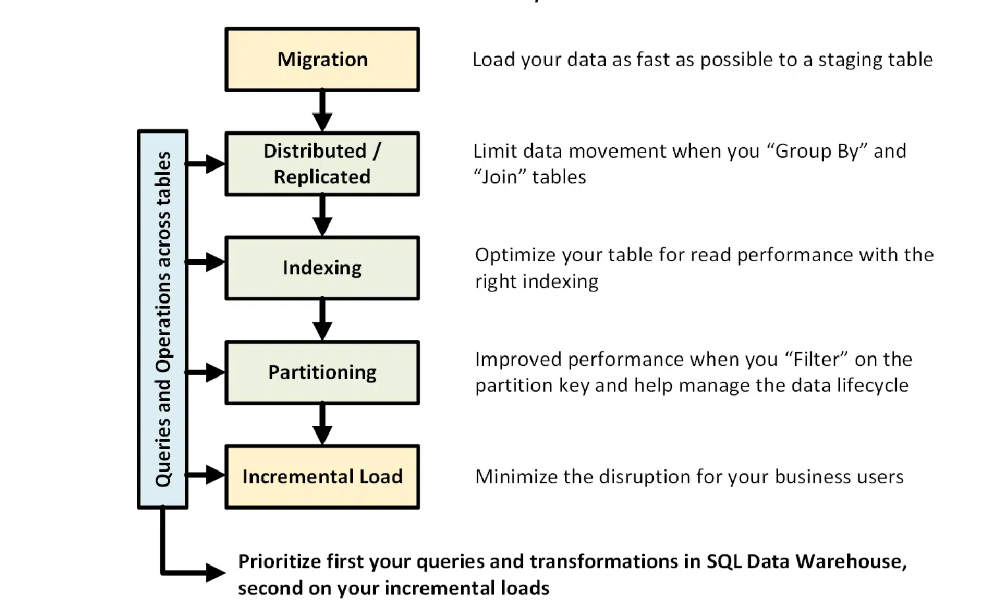
The following figure illustrates the data warehouse design process:
Performing Operations and Queries
You can prioritise the data warehouse architecture for those operations if you already know the primary operations and queries to run on your data warehouse. These queries and operations may contain:
- Apply to join one or two fact tables with dimension tables, filter out the combined table, and then connect the results to the data mart.
- Making big or small updates to sales facts.
- Joining only the data in your tables.
Knowing the types of operations in advance will help optimize the design of tables.
Notes
• You can always Start with Round Robin but aspire to a hash distribution strategy to take advantage of the massively parallel architecture.
• Make sure common hash keys have the same data format.
• Do not distribute in varchar data format.
• Dimensional tables with a similar hash key to a fact table with frequent join operations can be hash distributed.
• Use sys.dm_nodes_db_partition_stats to analyze any data distortion.
• Use sys.dm_request_steps to analyze data movement behind requests and monitor broadcast time and random operations. This is useful for checking your data distribution.
Partitioning
You can split the table if you have a large fact table (more than 1 billion rows). In the case of 99 per cent of cases, the partition key should be date based. Remember not to partition, especially when you have a clustered columnstore index.
With worksheets that require ELT, you can benefit from partitioning. Facilitates data lifecycle management. Remember not to partition your data, especially in a clustered columnstore index.
Incremental Load
If you’re going to load your data incrementally, make sure you’re allocating larger resource classes to load the data. We recommend using PolyBase and ADF V2 to automate your ELT feeds to SQL Data Warehouse. Delete the relevant data first for a large batch of updates to your historical data. Then perform a mass insertion of the new data. This two-step approach is more efficient.
Keep Statistics
Until automatic statistics are generally available, SQL Data Warehouse requires manual maintenance. It is important to update your statistics when there are significant changes to your data. This helps optimize the query plan. If you think it takes too long to maintain all the statistics, be more selective about which columns contain them.
You can also define the update frequency. For example, you may want to update the date columns daily, to which new values may be added. You will benefit from having statistics about the columns involved in the join, the columns used in the WHERE clause, and the columns found in the GROUP BY.
Resource Class
SQL Data Warehouse uses resource groups to allocate memory for queries. You should allocate higher resource classes if you need more memory to improve polling or loading speed. On the other hand, using larger resource classes affects concurrency. Consider this before you move all your users to a large resource class.
If you notice that queries are taking too long, check that your users are not running large resource classes. Large resource classes consume many concurrent slots. They can cause additional queries to be queued. Finally, using the Compute Optimized Tier, each resource class gets 2.5 times more memory than the Elastic Optimized Tier.
Reduce your Costs
A key feature of SQL Data Warehouse is the ability to pause when not in use, which stops computing resources from being charged. Pausing and scaling can be done through the Azure Portal or PowerShell commands.
Conclusion
At the end of this article, we will revise it short. This solution can provide load isolation between different user groups while leveraging advanced security features from SQL Database and Azure Analysis Services. This is also a way to provide users with unlimited concurrency.
- Azure SQL Data Warehouse’s architecture decouples compute and storage, allowing users to scale independently and pay only for the processing and storage an organization requires.
- SQL Data Warehouse uses resource groups to allocate memory for queries. You should allocate higher resource classes if you need more memory to improve polling or loading speed.
- The performance layer Optimized for elasticity separates the compute and storage layers in the architecture. This option excels in workloads that can take full advantage of the separation between computing and storage by frequently scaling for supporting short periods of activity.
The media shown in this article is not owned by Analytics Vidhya and is used at the Author’s discretion.
Data Analyst who love to drive insights by visualizing the data and extracting the knowledge from it. Automating various tasks using python & builds Real time Dashboard's using tech like React and node.js. Capable of Creaking complex SQL queries to fetch the accurate data.


.jpg)