|
VOOZH | about |
|
VOOZH | about |
The LangGraph Reflection Framework is a type of agentic framework which offers a powerful way to improve language model outputs through an iterative critique process using Generative AI. This article breaks down how to implement a reflection agent that validates Python code using Pyright and improves its quality using GPT-4o mini. AI agents play a crucial role in this framework, automating decision-making processes by combining reasoning, reflection, and feedback mechanisms to enhance model performance.
This article was published as a part of the Data Science Blogathon.
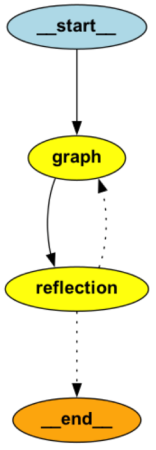
The LangGraph Reflection Framework follows a simple yet effective agentic architecture:
Also Read: Agentic Frameworks for Generative AI Applications
Here is a Step-by-Step Guide for an Illustrative Implementation and Usage:
First, install the required dependencies:
pip install langgraph-reflection langchain pyrightWe’ll use Pyright to analyze generated code and provide error details.
Pyright Analysis Function
from typing import TypedDict, Annotated, Literal
import json
import os
import subprocess
import tempfile

from langchain.chat_models import init_chat_model
from langgraph.graph import StateGraph, MessagesState, START, END
from langgraph_reflection import create_reflection_graph

os.environ["OPENAI_API_KEY"] = "your_openai_api_key"

def analyze_with_pyright(code_string: str) -> dict:
 """Analyze Python code using Pyright for static type checking and errors.

 Args:
 code_string: The Python code to analyze as a string

 Returns:
 dict: The Pyright analysis results
 """
 with tempfile.NamedTemporaryFile(suffix=".py", mode="w", delete=False) as temp:
 temp.write(code_string)
 temp_path = temp.name

 try:
 result = subprocess.run(
 [
 "pyright",
 "--outputjson",
 "--level",
 "error", # Only report errors, not warnings
 temp_path,
 ],
 capture_output=True,
 text=True,
 )

 try:
 return json.loads(result.stdout)
 except json.JSONDecodeError:
 return {
 "error": "Failed to parse Pyright output",
 "raw_output": result.stdout,
 }
 finally:
os.unlink(temp_path)GPT-4o Mini Model Setup
def call_model(state: dict) -> dict:
 """Process the user query with the GPT-4o mini model.

 Args:
 state: The current conversation state

 Returns:
 dict: Updated state with the model response
 """
 model = init_chat_model(model="gpt-4o-mini", openai_api_key = 'your_openai_api_key')
 return {"messages": model.invoke(state["messages"])}
Note: Use os.environ[“OPENAI_API_KEY”] = “YOUR_API_KEY” securely, and never hardcode the key in your code.
Code Extraction Types
# Define type classes for code extraction
class ExtractPythonCode(TypedDict):
 """Type class for extracting Python code. The python_code field is the code to be extracted."""
 python_code: str


class NoCode(TypedDict):
 """Type class for indicating no code was found."""
 no_code: bool
System Prompt for GPT-4o Mini
# System prompt for the model
SYSTEM_PROMPT = """The below conversation is you conversing with a user to write some python code. Your final response is the last message in the list.

Sometimes you will respond with code, othertimes with a question.

If there is code - extract it into a single python script using ExtractPythonCode.

If there is no code to extract - call NoCode."""
Pyright Code Validation Function
def try_running(state: dict) -> dict | None:
 """Attempt to run and analyze the extracted Python code.

 Args:
 state: The current conversation state

 Returns:
 dict | None: Updated state with analysis results if code was found
 """
 model = init_chat_model(model="gpt-4o-mini")
 extraction = model.bind_tools([ExtractPythonCode, NoCode])
 er = extraction.invoke(
 [{"role": "system", "content": SYSTEM_PROMPT}] + state["messages"]
 )
 if len(er.tool_calls) == 0:
 return None
 tc = er.tool_calls[0]
 if tc["name"] != "ExtractPythonCode":
 return None

 result = analyze_with_pyright(tc["args"]["python_code"])
 print(result)
 explanation = result["generalDiagnostics"]

 if result["summary"]["errorCount"]:
 return {
 "messages": [
 {
 "role": "user",
 "content": f"I ran pyright and found this: {explanation}\n\n"
 "Try to fix it. Make sure to regenerate the entire code snippet. "
 "If you are not sure what is wrong, or think there is a mistake, "
 "you can ask me a question rather than generating code",
 }
 ]
}Building the Main and Judge Graphs
def create_graphs():
 """Create and configure the assistant and judge graphs."""
 # Define the main assistant graph
 assistant_graph = (
 StateGraph(MessagesState)
 .add_node(call_model)
 .add_edge(START, "call_model")
 .add_edge("call_model", END)
 .compile()
 )

 # Define the judge graph for code analysis
 judge_graph = (
 StateGraph(MessagesState)
 .add_node(try_running)
 .add_edge(START, "try_running")
 .add_edge("try_running", END)
 .compile()
 )

 # Create the complete reflection graph
 return create_reflection_graph(assistant_graph, judge_graph).compile()

reflection_app = create_graphs()Example Execution
if __name__ == "__main__":
 """Run an example query through the reflection system."""
 example_query = [
 {
 "role": "user",
 "content": "Write a LangGraph RAG app",
 }
 ]

 print("Running example with reflection using GPT-4o mini...")
 result = reflection_app.invoke({"messages": example_query})
print("Result:", result)Our LangGraph Reflection system was designed to do the following:
1. Import “faiss” could not be resolved.
pip install faiss-cpu2. Cannot access attribute “embed” for class “OpenAIEmbeddings”.
3. Arguments missing for parameters “docstore”, “index_to_docstore_id”.
In the second iteration, the system improved the code but still identified:
1. Import “langchain.document” could not be resolved.
2. “InMemoryDocstore” is not defined.
from langchain.docstore import InMemoryDocstoreIn the final iteration, the reflection agent successfully addressed all issues by:
The improved code then successfully ran without errors.
The LangGraph Reflection Framework demonstrates the power of combining AI critique agents with robust static analysis tools. This intelligent feedback loop enables faster code correction, improved coding practices, and better overall development efficiency. Whether for beginners or experienced developers, LangGraph Reflection offers a powerful tool for improving code quality.
The media shown in this article is not owned by Analytics Vidhya and is used at the Author’s discretion.
A. LangGraph Reflection is a powerful framework that combines a primary AI agent (for code generation or task execution) with a critique agent (to identify issues and suggest improvements). This iterative loop improves the final output by leveraging feedback and reflection.
A. The reflection mechanism follows this workflow:
– Main Agent: Generates the initial output.
– Critique Agent: Analyzes the generated output for errors or improvements.
– Improvement Loop: If issues are found, the main agent is re-invoked with feedback for refinement. This loop continues until the output meets quality standards.
A. You’ll need the following dependencies:
– langgraph-reflection
– langchain
– pyright (for code analysis)
– faiss (for vector search)
– openai (for GPT-based models)
To install them, run: pip install langgraph-reflection langchain pyright faiss openai
A. LangGraph Reflection excels at tasks like:
– Python code validation and improvement.
– Natural language responses requiring fact-checking.
– Document summarization with clarity and completeness.
– Ensuring AI-generated content adheres to safety guidelines.
A. No, while we have shown Pyright in code correction examples, the framework can even help in improving text summarization, data validation, and chatbot response refinement.
Hi! I'm Adarsh, a Business Analytics graduate from ISB, currently deep into research and exploring new frontiers. I'm super passionate about data science, AI, and all the innovative ways they can transform industries. Whether it's building models, working on data pipelines, or diving into machine learning, I love experimenting with the latest tech. AI isn't just my interest, it's where I see the future heading, and I'm always excited to be a part of that journey!
GPT-4 vs. Llama 3.1 – Which Model is Better?
Llama-3.1-Storm-8B: The 8B LLM Powerhouse Surpa...
A Comprehensive Guide to Building Agentic RAG S...
Top 10 Machine Learning Algorithms in 2026
45 Questions to Test a Data Scientist on Basics...
90+ Python Interview Questions and Answers (202...
8 Easy Ways to Access ChatGPT for Free
Prompt Engineering: Definition, Examples, Tips ...
What is LangChain?
What is Retrieval-Augmented Generation (RAG)?
Edit
Resend OTP
Resend OTP in 45s