|
VOOZH | about |
|
VOOZH | about |
A few days ago, Google DeepMind introduced Gemma 3, and I was still exploring its capabilities. But now, there’s a major development: Mistral AI’s Small 3.1 has arrived, claiming to be the best model in its weight class! This lightweight, fast, and highly customizable marvel operates effortlessly on a single RTX 4090 or a Mac with 32GB RAM, making it perfect for on-device applications. In this article, I’ll break down the details of Mistral Small 3.1 and provide hands-on examples to showcase its potential.
Mistral Small 3.1 is a cutting-edge, open-source AI model released under the Apache 2.0 license by Mistral AI. Designed for efficiency, it supports multimodal inputs (text and images) and excels in multilingual tasks with exceptional accuracy. With a 128k token context window, it’s built for long-context applications, making it a top choice for real-time conversational AI, automated workflows, and domain-specific fine-tuning.
The image compares five AI models across six benchmarks. Mistral Small 3.1 (24B) achieved the best performance in four benchmarks: GPQA Main, GPQA Diamond, MMLU, and HumanEval. Gemma 3-it (27B) leads in SimpleQA and MATH benchmarks.
This image compares AI models across seven benchmarks. Mistral Small 3.1 (24B) leads in MMMU-Pro, MM-MT-Bench, ChartQA, and AI2D benchmarks. Gemma 3-it (27B) performs best in MathVista, MMMU, and DocVQA benchmarks.
This image shows AI model performance across four cultural categories: Average, European, East Asian, and Middle Eastern. Mistral Small 3.1 (24B) leads in Average, European, and East Asian categories, while Gemma 3-it (27B) is best in the Middle Eastern category.
This image compares four AI models across three benchmarks. Mistral Small 3.1 (24B) achieves highest performance on LongBench v2 and RULER 32k benchmarks, while Claude-3.5 Haiku scores highest in the RULER 128k benchmark.
This image compares two AI models: Mistral Small 3.1 Base (24B) and Gemma 3-pt (27B), across five benchmarks. Mistral performs better on MMLU, MMLU Pro, GPQA, and MMMU. Gemma achieves the best result on the TriviaQA benchmark.
Step 1: Search for the Mistral AI on your Browser
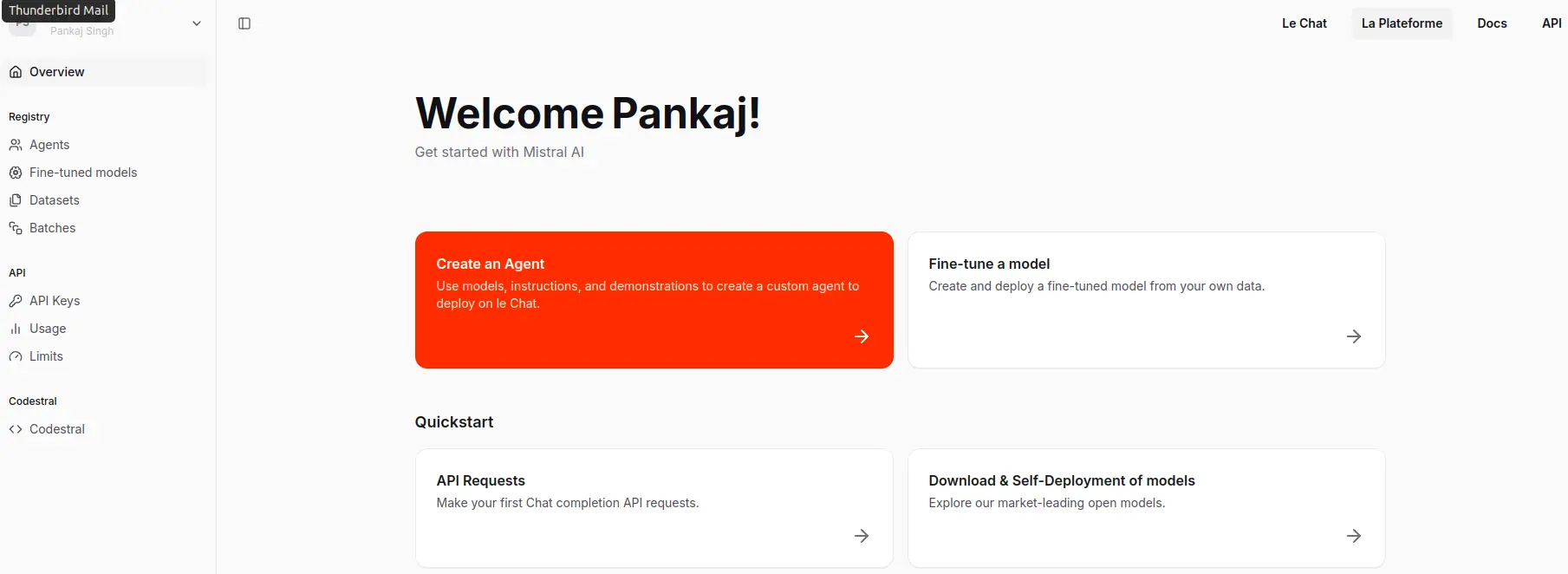
Step 2: Open the Mistral AI website and click on Try API
Step 3: Click on the API Keys and Generate the key
import requests
api_key = "your_api_key"
headers = {"Authorization": f"Bearer {api_key}", "Content-Type": "application/json"}
data = {"model": "mistral-small-latest", "messages": [{"role": "user", "content": "Test"}]}
response = requests.post("https://api.mistral.ai/v1/chat/completions", json=data, headers=headers)
print(response.json())!pip install mistralaiimport os
from mistralai import Mistralfrom getpass import getpass
MISTRAL_KEY = getpass('Enter Mistral AI API Key: ')import os
os.environ['MISTRAL_API_KEY'] = MISTRAL_KEYmodel = "mistral-small-2503"
client = Mistral(api_key=MISTRAL_KEY)
chat_response = client.chat.complete(
model= model,Picsum ID: 237
messages = [
{
"role": "user",
"content": "What is the best French cheese?",
},
]
)
print(chat_response.choices[0].message.content)Choosing the "best" French cheese can be highly subjective, as it depends on personal taste preferences. France is renowned for its diverse and high-quality cheeses, with over 400 varieties. Here are a few highly regarded ones:
1. **Camembert de Normandie**: A soft, creamy cheese with a rich, buttery flavor. It's often considered one of the finest examples of French cheese.
2. **Brie de Meaux**: Another soft cheese, Brie de Meaux is known for its creamy texture and earthy flavor. It's often served at room temperature to enhance its aroma and taste.
3. **Roquefort**: This is a strong, blue-veined cheese made from sheep's milk. It has a distinctive, tangy flavor and is often crumbled over salads or served with fruits and nuts.
4. **Comté**: A hard, cow's milk cheese from the Jura region, Comté has a complex, nutty flavor that varies depending on the age of the cheese.
5. **Munster-Gérardmer**: A strong, pungent cheese from the Alsace region, Munster-Gérardmer is often washed in brine, giving it a distinctive orange rind and robust flavor.
6. **Chèvre (Goat Cheese)**: There are many varieties of goat cheese in France, ranging from soft and creamy to firm and crumbly. Some popular types include Sainte-Maure de Touraine and Crottin de Chavignol.
Each of these cheeses offers a unique taste experience, so the "best" one ultimately depends on your personal preference.
import base64

def describe_image(image_path: str, prompt: str = "Describe this image in detail."):
 # Encode image to base64
 with open(image_path, "rb") as image_file:
 base64_image = base64.b64encode(image_file.read()).decode("utf-8")

 # Create message with image and text
 messages = [{
 "role": "user",
 "content": [
 {"type": "text", "text": prompt},
 {
 "type": "image_url",
 "image_url": {
 "url": f"data:image/jpeg;base64,{base64_image}" # Adjust MIME type if needed
 }
 }
 ]
 }]

 # Get response
 chat_response = client.chat.complete(
 model=model,
 messages=messages
 )

 return chat_response.choices[0].message.content

# Usage Example
image_description = describe_image("/content/image_xnt9HBr.png")
print(image_description)The image illustrates a process involving the Gemini model, which appears to be a type of AI or machine learning system. Here is a detailed breakdown of the image:
1. **Input Section**:
- There are three distinct inputs provided to the Gemini system:
- The word "Cat" written in English.
- The character "猫" which is the Chinese character for "cat."
- The word "कुत्ता" which is the Hindi word for "dog."
2. **Processing Unit**:
- The inputs are directed towards a central processing unit labeled "Gemini." This suggests that the Gemini system is processing the inputs in some manner, likely for analysis, translation, or some form of recognition.
3. **Output Section**:
- On the right side of the Gemini unit, there are three sets of colored dots:
- The first set consists of blue dots.
- The second set consists of a mix of blue and light blue dots.
- The third set consists of yellow and orange dots.
- These colored dots likely represent some form of encoded data, embeddings, or feature representations generated by the Gemini system based on the input data.
**Summary**:
The image depicts an AI system named Gemini that takes in textual inputs in different languages (English, Chinese, and Hindi) and processes these inputs to produce some form of encoded output, represented by colored dots. This suggests that Gemini is capable of handling multilingual inputs and generating corresponding data representations, which could be used for various applications such as language translation, semantic analysis, or machine learning tasks.
image_description = describe_image("/content/yosemite.png")
print(image_description)The image depicts a serene and picturesque natural landscape, likely in a national park. The scene is dominated by towering granite cliffs and rock formations, which rise dramatically into a clear blue sky with a few scattered clouds. The cliffs are rugged and steep, showcasing the natural beauty of the area.
In the foreground, there is a calm river or stream flowing gently over a rocky bed. The water reflects the surrounding landscape, adding to the tranquility of the scene. The riverbank is lined with green vegetation, including grasses and small plants, which add a touch of vibrant color to the scene.
The background features a dense forest of tall evergreen trees, primarily conifers, which provide a lush green contrast to the gray and brown tones of the rock formations. The trees are scattered across the landscape, extending up the slopes of the cliffs, indicating a healthy and thriving ecosystem.
Overall, the image captures the majestic and peaceful beauty of a natural landscape, likely in a well-known park such as Yosemite National Park, known for its iconic granite cliffs and scenic valleys.
image_description = describe_image("/content/237-200x300.jpg")
print(image_description)The image features a black dog lying down on a wooden surface. The dog has a short, glossy black coat and is looking directly at the camera with a calm and attentive expression. Its ears are perked up, and its eyes are wide open, giving it a curious and alert appearance. The wooden surface beneath the dog has a rustic, textured look, with visible grain patterns and a warm, natural color. The overall setting appears to be indoors, and the lighting is soft, highlighting the dog's features and the texture of the wood.
Install required libraries:
pip install transformers torch (add mistral-inference if using their official library)Load the model in Python:
from transformers import AutoModelForCausalLM, AutoTokenizer
model_name = "mistralai/Mistral-Small-3.1" # Adjust based on exact name
tokenizer = AutoTokenizer.from_pretrained(model_name)
model = AutoModelForCausalLM.from_pretrained(model_name)
Check out this link for more information: Mistral Small
Mistral Small 3.1 stands out as a powerful, efficient, and versatile AI model, offering top-tier performance in its class. With its ability to handle multimodal inputs, multilingual tasks, and long-context applications, it provides a compelling alternative to competitors like Gemma 3 and GPT-4o Mini.
Its lightweight deployment on consumer-grade hardware, combined with real-time responsiveness and customization options, makes it an excellent choice for AI-driven applications. Whether for conversational AI, automation, or domain-specific fine-tuning, Mistral Small 3.1 is a strong contender in the AI.
Hello, I am Nitika, a tech-savvy Content Creator and Marketer. Creativity and learning new things come naturally to me. I have expertise in creating result-driven content strategies. I am well versed in SEO Management, Keyword Operations, Web Content Writing, Communication, Content Strategy, Editing, and Writing.
GPT-4 vs. Llama 3.1 – Which Model is Better?
Llama-3.1-Storm-8B: The 8B LLM Powerhouse Surpa...
A Comprehensive Guide to Building Agentic RAG S...
Top 10 Machine Learning Algorithms in 2026
45 Questions to Test a Data Scientist on Basics...
90+ Python Interview Questions and Answers (202...
8 Easy Ways to Access ChatGPT for Free
Prompt Engineering: Definition, Examples, Tips ...
What is LangChain?
What is Retrieval-Augmented Generation (RAG)?
Edit
Resend OTP
Resend OTP in 45s