|
VOOZH | about |
|
VOOZH | about |
The command line has always been a developer’s haven, a space where ideas take shape, bugs are crushed, and real innovation begins. Now, Google is stepping in to amplify that environment with a major announcement that has the potential to reshape how we write and manage code. Enter Gemini CLI: a free, open-source AI coding agent that brings Google’s Gemini right into your terminal, and the best part? It’s fully accessible to individual developers.
Imagine you’re knee-deep in a tricky coding problem, juggling nested functions, or struggling with legacy code. Instead of alt-tabbing between browser windows and scattered documentation, you type out your question in plain English. Your terminal responds with intelligent, context-aware guidance tailored to your project, your codebase, and even your current working directory. But this isn’t some far-off dream; it’s exactly what Google just delivered to millions of developers around the world. In this blog, we will know all about Gemini CLI, its features, its accessibility, and its use cases.
Gemini CLI is Google’s forward-looking solution to bring the full force of advanced AI into developers’ daily workflows right at their fingertips. Still in preview, this open-source AI agent is designed for simplicity, speed, and deep integration with your terminal environment. Whether you’re on Mac, Windows, or Linux, Gemini CLI works right inside your terminal of choice.
Think of it as a brilliant coding companion that lives in your terminal and is always available. It doesn’t just spit out generic responses. It reads your files, understands your folder structure, recognizes how your code fits together, and responds with thoughtful, context-aware suggestions.
With Gemini CLI, there’s no need to copy-paste code into a browser-based AI tool or explain everything from scratch. You can ask it to explain a function, write a new feature, debug an error, or even restructure parts of your codebase, and it responds clearly and concisely. All of this happens inside the terminal, so your workflow remains uninterrupted.
Gemini CLI isn’t just another assistant that generates code snippets. It’s designed to be a core part of your workflow, helping with every step of development, from understanding code to running terminal commands. Here’s what makes it stand out:
Perhaps most impressively, when something breaks, i.e., when an error pops up or a module fails, Gemini CLI can investigate the issue, examine your code, and suggest targeted fixes. It’s like having a seasoned developer always available to jump in and help you troubleshoot.
Getting started with Gemini CLI is easy. The setup is minimal; you’ll be up and running in just a few minutes.
npm install -g @google/gemini-cligemini in the terminal to launch it.Authenticating your Google Account during the setup is necessary for a seamless experience:
The user interface feels familiar and intuitive, especially for developers who already spend most of their time in the terminal. It’s lightweight, quick, and fits right in with your usual workflow.
Gemini CLI is part of Google’s broader vision of AI-assisted development, and it integrates tightly with Gemini Code Assist, Google’s IDE-based coding assistant for developers at all levels. The two tools share the same underlying technology, so you can expect consistent results whether you’re using the terminal or a full-featured editor like VS Code.
Gemini Code Assist is particularly effective in VS Code environments. With agent mode, you can type a prompt into the chat window, and it will do the heavy lifting: from writing tests and fixing bugs to building out features or helping with large-scale code migrations.
The best part? You’re not locked into one interface. Whether you prefer the speed of a terminal or the comfort of your IDE, the underlying Gemini engine supports both, and context carries over smoothly between them.
Code Assist’s agent mode offers a deeper layer of intelligence. It breaks down prompts into structured plans, handles failures during implementation, and even suggests new approaches you might not have considered. It’s not just responding to instructions; it’s thinking a few steps ahead.
Now, let’s put this latest coding agent by Google to the test!
To get a feel for Gemini CLI, let’s try it on a real project. Open your terminal, navigate to an existing codebase, and launch Gemini CLI using the command:
geminiThen you can try a few natural language requests with prompts like:
Gemini will return thoughtful, clear, and easy-to-understand explanations. It doesn’t just tell you what the code is doing – it gives you insight into why it’s written that way and how it fits into your overall architecture.
Result:
Result Analysis:
When I ran Task 1, Gemini CLI did a good job of figuring out what the script was all about. I looked through the testing.py file and realized there wasn’t a main function, and nothing gets executed directly.
Instead, the file is more like a toolbox filled with functions for visualizing different aspects of the model. The function run_visualizations() stood out as the one that ties everything together. It’s used to generate things like training graphs, prediction heatmaps, and evaluation metrics.
What I liked was how Gemini picked up on the fact that the main training logic probably lives in the notebook file, not here (a small but important detail), which shows it understands how codebases are often structured in real-world projects.
Where Gemini CLI shines is in automating development tasks that usually eat up a lot of time. Here are some practical examples to try:
Following is a demonstration of code generation, where you’ll see your legacy code transformed into modern, clean JavaScript that’s easier to read and maintain, all while keeping the core logic intact.
Result:
Result Analysis:
Task 2 was all about setting up a basic user authentication API, and I have to say, Gemini CLI made the process surprisingly smooth. It started by scaffolding a Node.js project and then handled the setup – installing express, bcrypt, and jsonwebtoken, without any fuss.
From there, it generated two endpoints: one for user registration and one for login, which returns a JWT on successful authentication. What I appreciated was that it didn’t just throw code at me, but it explained what each piece was doing along the way.
It even caught a small mistake in the file path and fixed it, which was kind of cool to watch. Error handling was built-in and pretty solid, with clear messages for missing fields or invalid credentials. Overall, the whole experience felt like pairing with a really focused dev who just wanted to help me ship something that works and does it right.
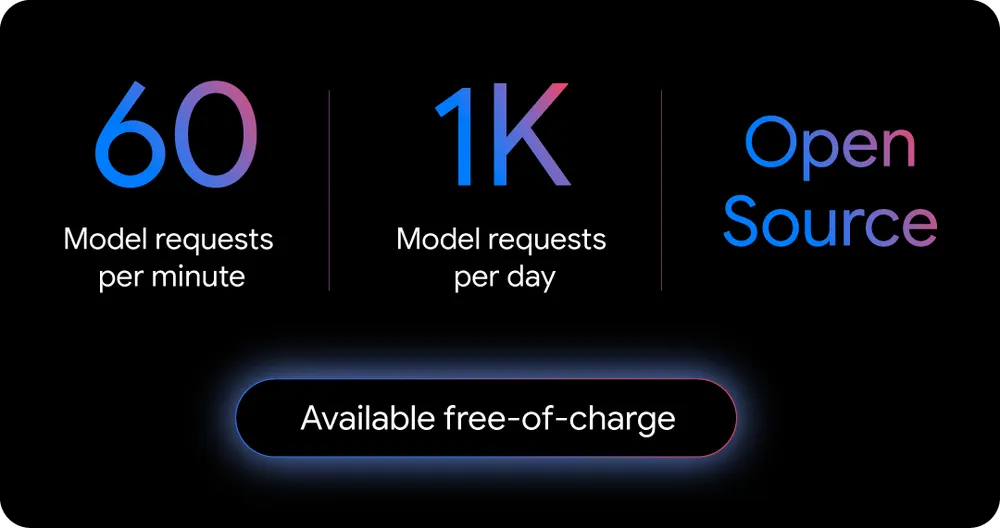
Google has taken a very developer-friendly approach when it comes to pricing the Gemini CLI. The tool’s free tier is extremely generous, offering advanced AI support without any upfront cost.
The free offering alone is enough for most individuals, hobbyists, and even small dev teams to work without ever worrying about limitations. It’s one of the most generous free AI tooling tiers available today. Google’s approach is clearly about making AI development accessible, while still offering scalable options for those who need more power.
Some of the advantages of Gemini CLI are:
A few drawbacks of the Google Gemini CLI coding agent are:
The Gemini CLI represents a significant leap forward for AI-assisted development. It’s open source (under the Apache 2.0 license), which means you can look under the hood, understand how it works, and even contribute to its growth. That transparency builds trust and opens the door for innovation by the developer community.
The generous free tier means that advanced AI assistance is no longer limited to big companies or teams with large budgets. With up to 1,000 daily requests, most individual developers can integrate Gemini CLI into their daily workflow with no cost at all.
Most importantly, Gemini CLI doesn’t disrupt your process; it enhances it. It brings intelligence to the terminal without adding complexity or forcing you to change how you work. And because it’s open to contributions, it’s likely to keep evolving with the needs of the developer community.
A. No, you don’t need a Google Cloud account. A regular personal Google account is enough to access Gemini CLI’s free tier, which includes 1,000 requests per day.
A. Gemini CLI is great for a wide range of development tasks, like explaining code, generating functions, debugging errors, creating documentation, organizing files, and even running terminal commands through natural language input.
A. No, Gemini CLI requires an internet connection to function. It connects to Google’s Gemini models via API, which means it needs online access to process requests and generate responses.
A. It can read and interpret local files in your current working directory, but it doesn’t automatically analyze entire repositories unless prompted. For large projects, guiding it with specific file references improves accuracy.
A. Yes, Gemini CLI is open source, and Google has implemented secure authentication using your Google account. However, as with any AI tool, avoid sharing highly sensitive information unless you’re confident in your data privacy practices.
Data Science Trainee at Analytics Vidhya
I am currently working as a Data Science Trainee at Analytics Vidhya, where I focus on building data-driven solutions and applying AI/ML techniques to solve real-world business problems. My work allows me to explore advanced analytics, machine learning, and AI applications that empower organizations to make smarter, evidence-based decisions.
With a strong foundation in computer science, software development, and data analytics, I am passionate about leveraging AI to create impactful, scalable solutions that bridge the gap between technology and business.
📩 You can also reach out to me at [email protected]
GPT-4 vs. Llama 3.1 – Which Model is Better?
Llama-3.1-Storm-8B: The 8B LLM Powerhouse Surpa...
A Comprehensive Guide to Building Agentic RAG S...
Top 10 Machine Learning Algorithms in 2026
45 Questions to Test a Data Scientist on Basics...
90+ Python Interview Questions and Answers (202...
8 Easy Ways to Access ChatGPT for Free
Prompt Engineering: Definition, Examples, Tips ...
What is LangChain?
What is Retrieval-Augmented Generation (RAG)?
Edit
Resend OTP
Resend OTP in 45s