
eBook – Guide Spring Cloud – NPI EA (cat=Spring Cloud)

eBook – Mockito – NPI EA (tag = Mockito)
👁 announcement - icon
Mocking is an essential part of unit testing, and the Mockito library makes it easy to write clean and intuitive unit tests for your Java code.
Get started with mocking and improve your application tests using our Mockito guide:
eBook – Java Concurrency – NPI EA (cat=Java Concurrency)
👁 announcement - icon
Handling concurrency in an application can be a tricky process with many potential pitfalls. A solid grasp of the fundamentals will go a long way to help minimize these issues.
Get started with understanding multi-threaded applications with our Java Concurrency guide:
eBook – Reactive – NPI EA (cat=Reactive)
👁 announcement - icon
Spring 5 added support for reactive programming with the Spring WebFlux module, which has been improved upon ever since. Get started with the Reactor project basics and reactive programming in Spring Boot:
eBook – Java Streams – NPI EA (cat=Java Streams)
👁 announcement - icon
Since its introduction in Java 8, the Stream API has become a staple of Java development. The basic operations like iterating, filtering, mapping sequences of elements are deceptively simple to use.
But these can also be overused and fall into some common pitfalls.
To get a better understanding on how Streams work and how to combine them with other language features, check out our guide to Java Streams:
eBook – Jackson – NPI EA (cat=Jackson)
eBook – HTTP Client – NPI EA (cat=Http Client-Side)
eBook – Maven – NPI EA (cat = Maven)
eBook – Persistence – NPI EA (cat=Persistence)
eBook – RwS – NPI EA (cat=Spring MVC)
Course – LS – NPI EA (cat=Jackson)
👁 announcement - icon
Get started with Spring and Spring Boot, through the Learn Spring course:
>> LEARN SPRINGCourse – RWSB – NPI EA (cat=REST)
👁 announcement - icon
Explore Spring Boot 3 and Spring 6 in-depth through building a full REST API with the framework:
Course – LSS – NPI EA (cat=Spring Security)
👁 announcement - icon
Yes, Spring Security can be complex, from the more advanced functionality within the Core to the deep OAuth support in the framework.
I built the security material as two full courses - Core and OAuth, to get practical with these more complex scenarios. We explore when and how to use each feature and code through it on the backing project.
You can explore the course here:
Course – LSD – NPI EA (tag=Spring Data JPA)
👁 announcement - icon
Spring Data JPA is a great way to handle the complexity of JPA with the powerful simplicity of Spring Boot.
Get started with Spring Data JPA through the guided reference course:
Partner – Moderne – NPI EA (cat=Spring Boot)
👁 announcement - icon
Refactor Java code safely — and automatically — with OpenRewrite.
Refactoring big codebases by hand is slow, risky, and easy to put off. That’s where OpenRewrite comes in. The open-source framework for large-scale, automated code transformations helps teams modernize safely and consistently.
Each month, the creators and maintainers of OpenRewrite at Moderne run live, hands-on training sessions — one for newcomers and one for experienced users. You’ll see how recipes work, how to apply them across projects, and how to modernize code with confidence.
Join the next session, bring your questions, and learn how to automate the kind of work that usually eats your sprint time.
Course – LJB – NPI EA (cat = Core Java)
1. Overview
In this tutorial, we’ll cover Spring Cloud Netflix Hystrix – the fault tolerance library. We’ll use the library and implement the Circuit Breaker enterprise pattern, which is describing a strategy against failure cascading at different levels in an application.
The principle is analogous to electronics: Hystrix is watching methods for failing calls to related services. If there is such a failure, it will open the circuit and forward the call to a fallback method.
The library will tolerate failures up to a threshold. Beyond that, it leaves the circuit open. Which means, it will forward all subsequent calls to the fallback method, to prevent future failures. This creates a time buffer for the related service to recover from its failing state.
2. REST Producer
To create a scenario, which demonstrates the Circuit Breaker pattern, we need a service first. We’ll name it “REST Producer” since it provides data for the Hystrix-enabled “REST Consumer”, which we’ll create in the next step.
Let’s create a new Maven project using the spring-boot-starter-web dependency:
<dependency>
 <groupId>org.springframework.boot</groupId>
 <artifactId>spring-boot-starter-web</artifactId>
 <version>2.2.6.RELEASE</version>
</dependency>
The project itself is intentionally kept simple. It consists of a controller interface with one @RequestMapping annotated GET method returning simply a String, a @RestController implementing this interface and a @SpringBootApplication.
We’ll begin with the interface:
public interface GreetingController {
 @GetMapping("/greeting/{username}")
 String greeting(@PathVariable("username") String username);
}
And the implementation:
@RestController
public class GreetingControllerImpl implements GreetingController {

 @Override
 public String greeting(@PathVariable("username") String username) {
 return String.format("Hello %s!\n", username);
 }
}
Next, we’ll write down the main application class:
@SpringBootApplication
public class RestProducerApplication {
 public static void main(String[] args) {
 SpringApplication.run(RestProducerApplication.class, args);
 }
}
To complete this section, the only thing left to do is to configure an application-port on which we’ll be listening. We won’t use the default port 8080 because the port should remain reserved for the application described in the next step.
Furthermore, we’re defining an application name to be able to look-up our producer from the client application that we’ll introduce later.
Let’s then specify a port of 9090 and a name of rest-producer in our application.properties file:
server.port=9090
spring.application.name=rest-producer
Now we’re able to test our producer using cURL:
$> curl http://localhost:9090/greeting/Cid
Hello Cid!
3. REST Consumer With Hystrix
For our demonstration scenario, we’ll be implementing a web application, which is consuming the REST service from the previous step using RestTemplate and Hystrix. For the sake of simplicity, we’ll call it the “REST Consumer”.
Consequently, we create a new Maven project with spring-cloud-starter-hystrix, spring-boot-starter-web and spring-boot-starter-thymeleaf as dependencies:
<dependency>
 <groupId>org.springframework.cloud</groupId>
 <artifactId>spring-cloud-starter-hystrix</artifactId>
 <version>1.4.7.RELEASE</version>
</dependency>
<dependency>
 <groupId>org.springframework.boot</groupId>
 <artifactId>spring-boot-starter-web</artifactId>
 <version>2.2.6.RELEASE</version>
</dependency>
<dependency>
 <groupId>org.springframework.boot</groupId>
 <artifactId>spring-boot-starter-thymeleaf</artifactId>
 <version>2.2.6.RELEASE</version>
</dependency>
For the Circuit Breaker to work, Hystix will scan @Component or @Service annotated classes for @HystixCommand annotated methods, implement a proxy for it and monitor its calls.
We’re going to create a @Service class first, which will be injected to a @Controller. Since we’re building a web application using Thymeleaf, we also need an HTML template to serve as a view.
This will be our injectable @Service implementing a @HystrixCommand with an associated fallback method. This fallback has to use the same signature as the original:
@Service
public class GreetingService {
 @HystrixCommand(fallbackMethod = "defaultGreeting")
 public String getGreeting(String username) {
 return new RestTemplate()
 .getForObject("http://localhost:9090/greeting/{username}",
 String.class, username);
 }

 private String defaultGreeting(String username) {
 return "Hello User!";
 }
}
RestConsumerApplication will be our main application class. The @EnableCircuitBreaker annotation will scan the classpath for any compatible Circuit Breaker implementation.
To use Hystrix explicitly, we have to annotate this class with @EnableHystrix:
@SpringBootApplication
@EnableCircuitBreaker
public class RestConsumerApplication {
 public static void main(String[] args) {
 SpringApplication.run(RestConsumerApplication.class, args);
 }
}
We’ll set up the controller using our GreetingService:
@Controller
public class GreetingController {

 @Autowired
 private GreetingService greetingService;

 @GetMapping("/get-greeting/{username}")
 public String getGreeting(Model model, @PathVariable("username") String username) {
 model.addAttribute("greeting", greetingService.getGreeting(username));
 return "greeting-view";
 }
}
And here’s the HTML template:
<!DOCTYPE html>
<html xmlns:th="http://www.thymeleaf.org">
 <head>
 <title>Greetings from Hystrix</title>
 </head>
 <body>
 <h2 th:text="${greeting}"/>
 </body>
</html>
To ensure that the application is listening on a defined port, we put the following in an application.properties file:
server.port=8080To see a Hystix circuit breaker in action, we’re starting our consumer and pointing our browser to http://localhost:8080/get-greeting/Cid. Under normal circumstances, the following will be shown:
Hello Cid!To simulate a failure of our producer, we’ll simply stop it, and after we finished refreshing the browser we should see a generic message, returned from the fallback method in our @Service:
Hello User!4. REST Consumer With Hystrix and Feign
Now, we’re going to modify the project from the previous step to use Spring Netflix Feign as declarative REST client, instead of Spring RestTemplate.
The advantage is that we’re later able to easily refactor our Feign Client interface to use Spring Netflix Eureka for service discovery.
To start the new project, we’ll make a copy of our consumer, and add our producer and spring-cloud-starter-feign as dependencies:
<dependency>
 <groupId>com.baeldung.spring.cloud</groupId>
 <artifactId>spring-cloud-hystrix-rest-producer</artifactId>
 <version>1.0.0-SNAPSHOT</version>
</dependency>
<dependency>
 <groupId>org.springframework.cloud</groupId>
 <artifactId>spring-cloud-starter-feign</artifactId>
 <version>1.1.5.RELEASE</version>
</dependency>
Now, we’re able to use our GreetingController to extend a Feign Client. We’ll implement Hystrix fallback as a static inner class annotated with @Component.
Alternatively, we could define a @Bean annotated method returning an instance of this fallback class.
The name property of the @FeignClient is mandatory. It is used, to look-up the application either by service discovery via a Eureka Client or by URL, if this property is given:
@FeignClient(
 name = "rest-producer"
 url = "http://localhost:9090",
 fallback = GreetingClient.GreetingClientFallback.class
)
public interface GreetingClient extends GreetingController {

 @Component
 public static class GreetingClientFallback implements GreetingController {

 @Override
 public String greeting(@PathVariable("username") String username) {
 return "Hello User!";
 }
 }
}
For more on using Spring Netflix Eureka for service discovery have a look at this article.
In the RestConsumerFeignApplication, we’ll put an additional annotation to enable Feign integration, in fact, @EnableFeignClients, to the main application class:
@SpringBootApplication
@EnableCircuitBreaker
@EnableFeignClients
public class RestConsumerFeignApplication {

 public static void main(String[] args) {
 SpringApplication.run(RestConsumerFeignApplication.class, args);
 }
}
We’re going to modify the controller to use an auto-wired Feign Client, rather than the previously injected @Service, to retrieve our greeting:
@Controller
public class GreetingController {
 @Autowired
 private GreetingClient greetingClient;

 @GetMapping("/get-greeting/{username}")
 public String getGreeting(Model model, @PathVariable("username") String username) {
 model.addAttribute("greeting", greetingClient.greeting(username));
 return "greeting-view";
 }
}
To distinguish this example from the previous, we’ll alter the application listening port in the application.properties:
server.port=8082Finally, we’ll test this Feign-enabled consumer like the one from the previous section. The expected result should be the same.
5. Cache Fallback With Hystrix
Now, we are going to add Hystrix to our Spring Cloud project. In this cloud project, we have a rating service that talks to the database and gets ratings of books.
Let’s assume that our database is a resource under demand, and its response latency might vary in time or might not be available in times. We’ll handle this scenario with the Hystrix Circuit Breaker falling back to a cache for the data.
5.1. Setup and Configuration
Let us add the spring-cloud-starter-hystrix dependency to our rating module:
<dependency>
 <groupId>org.springframework.cloud</groupId>
 <artifactId>spring-cloud-starter-hystrix</artifactId>
</dependency>
When ratings are inserted/updated/deleted in the database, we’ll replicate the same to the Redis cache with a Repository. To learn more about Redis, check this article.
Let’s update the RatingService to wrap the database querying methods in a Hystrix command with @HystrixCommand and configure it with a fallback to reading from Redis:
@HystrixCommand(
 commandKey = "ratingsByIdFromDB",
 fallbackMethod = "findCachedRatingById",
 ignoreExceptions = { RatingNotFoundException.class })
public Rating findRatingById(Long ratingId) {
 return Optional.ofNullable(ratingRepository.findOne(ratingId))
 .orElseThrow(() ->
 new RatingNotFoundException("Rating not found. ID: " + ratingId));
}

public Rating findCachedRatingById(Long ratingId) {
 return cacheRepository.findCachedRatingById(ratingId);
}
Note that the fallback method should have the same signature of a wrapped method and must reside in the same class. Now when the findRatingById fails or gets delayed more than a given threshold, Hystrix fallbacks to findCachedRatingById.
As the Hystrix capabilities are transparently injected as AOP advice, we have to adjust the order in which the advice is stacked, in case if we have other advice like Spring’s transactional advice. Here we have adjusted the Spring’s transaction AOP advice to have lower precedence than Hystrix AOP advice:
@EnableHystrix
@EnableTransactionManagement(
 order=Ordered.LOWEST_PRECEDENCE,
 mode=AdviceMode.ASPECTJ)
public class RatingServiceApplication {
 @Bean
 @Primary
 @Order(value=Ordered.HIGHEST_PRECEDENCE)
 public HystrixCommandAspect hystrixAspect() {
 return new HystrixCommandAspect();
 }

 // other beans, configurations
}
Here, we have adjusted the Spring’s transaction AOP advice to have lower precedence than Hystrix AOP advice.
5.2. Testing Hystrix Fallback
Now that we have configured the circuit, we can test it by bringing down the H2 database our repository interacts with. But first, let’s run the H2 instance as an external process instead of running it as an embedded database.
Let’s copy the H2 library (h2-1.4.193.jar) to a known directory and start the H2 server:
>java -cp h2-1.4.193.jar org.h2.tools.Server -tcp
TCP server running at tcp://192.168.99.1:9092 (only local connections)
Let’s now update our module’s data source URL in rating-service.properties to point to this H2 server:
spring.datasource.url = jdbc:h2:tcp://localhost/~/ratingsWe can start our services as given in our previous article from the Spring Cloud series, and test ratings of each book by bringing down the external H2 instance we are running.
We could see that when the H2 database is not reachable, Hystrix automatically falls back to Redis to read the ratings for each book. The source code demonstrating this use case can be found here.
6. Using Scopes
Normally a @HytrixCommand annotated method is executed in a thread pool context. But sometimes it needs to be running in a local scope, for example, a @SessionScope or a @RequestScope. This can be done via giving arguments to the command annotation:
@HystrixCommand(fallbackMethod = "getSomeDefault", commandProperties = {
 @HystrixProperty(name = "execution.isolation.strategy", value = "SEMAPHORE")
})
7. The Hystrix Dashboard
A nice optional feature of Hystrix is the ability to monitor its status on a dashboard.
To enable it, we’ll put spring-cloud-starter-hystrix-dashboard and spring-boot-starter-actuator in the pom.xml of our consumer:
<dependency>
 <groupId>org.springframework.cloud</groupId>
 <artifactId>spring-cloud-starter-hystrix-dashboard</artifactId>
 <version>1.4.7.RELEASE</version>
</dependency>
<dependency>
 <groupId>org.springframework.boot</groupId>
 <artifactId>spring-boot-starter-actuator</artifactId>
 <version>2.2.6.RELEASE</version>
</dependency>
The former needs to be enabled via annotating a @Configuration with @EnableHystrixDashboard and the latter automatically enables the required metrics within our web application.
After we’ve done restarting the application, we’ll point a browser at http://localhost:8080/hystrix, input the metrics URL of a Hystrix stream and begin monitoring.
Finally, we should see something like this:
👁 Screenshot_20160819_031730
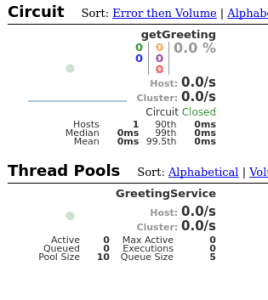
Monitoring a Hystrix stream is something fine, but if we have to watch multiple Hystrix-enabled applications, it will become inconvenient. For this purpose, Spring Cloud provides a tool called Turbine, which can aggregate streams to present in one Hystrix dashboard.
Configuring Turbine is beyond the scope of this write-up, but the possibility should be mentioned here. So it’s also possible to collect these streams via messaging, using Turbine stream.
8. Conclusion
As we’ve seen so far, we’re now able to implement the Circuit Breaker pattern using Spring Netflix Hystrix together with either Spring RestTemplate or Spring Netflix Feign.
This means that we’re able to consume services with included fallback using default data, and we’re able to monitor the usage of this data.
The code backing this article is available on GitHub. Once you're logged in as a Baeldung Pro Member, start learning and coding on the project.












