

Whole Class with PhET for STEM Education
Ends soon! Keep adding new skills with 10,000+ programs for $239 (usually $399). Save now.

Whole Class with PhET for STEM Education
This course is part of Active Learning in STEM with PhET Interactive Simulations Specialization


Instructors: Rebecca Vieyra
2,028 already enrolled
Included with
24 reviews
Recommended experience
24 reviews
Recommended experience
What you'll learn
Whole Class Inquiry: Strategies for open-ended discussion.
Interactive Lecture Demonstration: Strategies for making predictions.
Concept Questions: Strategies for classroom voting and Peer Instruction.
Details to know

See how employees at top companies are mastering in-demand skills

Build your subject-matter expertise
- Learn new concepts from industry experts
- Gain a foundational understanding of a subject or tool
- Develop job-relevant skills with hands-on projects
- Earn a shareable career certificate

There are 6 modules in this course
PhET Interactive Simulations ( https://phet.colorado.edu), a project of the University of Colorado Boulder, provides fun, free, interactive, research-based science and mathematics simulations for use across, primary, secondary, and higher education levels. We extensively test and evaluate each simulation to ensure educational effectiveness. All simulations are open source and free to all students and teachers.
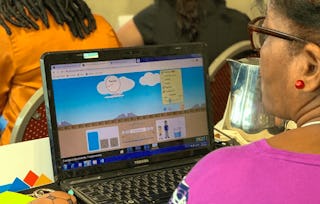
In this course, you will learn strategies for how to use PhET in circumstances where you are presenting a simulation in front of the whole class using a projector, interactive whiteboard, or while sharing your screen online. This course is the second in the specialization “Active Learning in STEM with PhET Interactive Simulations,” which includes 4 courses in total. To finish this course, you need to complete two of three possible assignments with Peer Review: 1) Whole Class Inquiry, 2) Interactive Lecture Demonstrations, 3) Concept Questions. This course is also available in Spanish as “Clase Entera con PhET para la Educación STEM” and Portuguese as "A Turma Toda com Simulações PhET para Educação STEM".
In this course, we will review strategies for how to use PhET in circumstances where you are presenting a simulation in front of the whole class using a projector, television, interactive whiteboard, or while sharing your screen online.
What's included
1 video6 readings2 discussion prompts
1 video•Total 6 minutes
- PhET in Whole Class Presentations•6 minutes
6 readings•Total 27 minutes
- Course Updates and Accessibility Support•1 minute
- Welcome! •2 minutes
- Choosing to Use Whole Class Strategies•2 minutes
- PhET in Whole Class Activities•2 minutes
- Tips for Best Use of PhET Sims in Whole Class Contexts•10 minutes
- Promoting Equity through Active Learning •10 minutes
2 discussion prompts•Total 40 minutes
- Visualizing a Whole Class activity with PhET•20 minutes
- Promoting Equity through Active Learning•20 minutes
This module will introduce you to general strategies for getting students to respond to open-ended questions as a whole class: Whole Class Inquiry. These strategies can help you as a teacher to be more creative in the types of questions you ask, and can help to reveal students’ prior knowledge especially at the introduction of a new topic.
What's included
2 videos6 readings1 discussion prompt
2 videos•Total 8 minutes
- Prediction Experiments•5 minutes
- Example of Whole Class Inquiry: Friction•3 minutes
6 readings•Total 58 minutes
- Introduction to Whole Class Inquiry•1 minute
- Whole Class Inquiry - What will happen if...?•15 minutes
- Whole Class Inquiry - What should we change in order to...?•15 minutes
- Whole Class Inquiry - Explanations•15 minutes
- Whole Class Inquiry Guidelines•2 minutes
- Reading: Whole Class Inquiry Template•10 minutes
1 discussion prompt•Total 10 minutes
- Reflection on Whole Class Inquiry•10 minutes
In this module, you will learn about how to ask pointed prediction questions, and help scaffold students’ responses through the use of a structured worksheet and discussions in pairs and as a whole class: Interactive Lecture Demonstrations. This strategy is especially effective for focusing students’ thinking on specific concepts and helping them to think about their own thinking.
What's included
7 readings1 discussion prompt
7 readings•Total 104 minutes
- Introduction to Interactive Lecture Demonstrations (ILD)•1 minute
- Components of an ILD•3 minutes
- ILD with The Moving Man•10 minutes
- ILD with The Moving Man - Predictions•45 minutes
- ILD with Build a Nucleus•10 minutes
- ILD with Build a Nucleus - Predictions•20 minutes
- Interactive Lecture Demonstrations Template•15 minutes
1 discussion prompt•Total 30 minutes
- Reflecting on ILDs•30 minutes
This module will introduce you to how to effectively write multiple choice questions to promote critical thinking: Concept Questions. These questions may include open-ended predictions, contrasting cases, ordering and ranking cases, and interpreting representations, among others. However, in all cases, these questions are written in such a way that they allow students to vote and engage in peer instruction.
What's included
1 video5 readings1 assignment1 discussion prompt
1 video•Total 5 minutes
- Using PhET with Concept Questions•5 minutes
5 readings•Total 70 minutes
- Introduction to Concept Questions •10 minutes
- Concept Question - Graphing Lines•10 minutes
- Types of Concept Questions•20 minutes
- Cascading Concept Questions•20 minutes
- Reading: Concept Questions Template•10 minutes
1 assignment•Total 5 minutes
- Concept Question - Graphing Lines•5 minutes
1 discussion prompt•Total 30 minutes
- Reflecting on Concept Questions•30 minutes
In this module, you will design two activities for a whole class setup using two of the three strategies reviewed in this course: Whole Class Inquiry, Interactive Lecture Demonstrations, and Concept Questions.
What's included
2 readings3 peer reviews1 discussion prompt
2 readings•Total 3 minutes
- Combining Strategies•1 minute
- Planning a Whole Class Activity for your Classroom•2 minutes
3 peer reviews•Total 450 minutes
- Whole Class Inquiry•150 minutes
- Interactive Lecture Demonstration•150 minutes
- Concept Questions•150 minutes
1 discussion prompt•Total 20 minutes
- Combining Strategies•20 minutes
In this final module, we will ask you to reflect on your achievements and identify room for improvement, provide feedback on this course, and share information about how to download your certificate once you have completed all requirements
What's included
1 reading1 assignment
1 reading•Total 2 minutes
- Get Your Certificate•2 minutes
1 assignment•Total 10 minutes
- Congratulations!•10 minutes
Earn a career certificate
Add this credential to your LinkedIn profile, resume, or CV. Share it on social media and in your performance review.
Instructors
Offered by

Explore more from Education
- Status: Free TrialU
University of Colorado Boulder
Specialization
- Status: Free TrialU
University of Colorado Boulder
Course
- Status: Free TrialU
University of Colorado Boulder
Course
- Status: Free TrialU
University of Colorado Boulder
Course


Why people choose Coursera for their career


Learner reviews
- 5 stars
91.66%
- 4 stars
4.16%
- 3 stars
4.16%
- 2 stars
0%
- 1 star
0%
Showing 3 of 24
Reviewed on Aug 21, 2024
Very instructive with robust experiential hands-on activities.
Reviewed on Apr 30, 2024
It is a great course. It is very practical with hands on assignments that help one to better grasp the knowledge taught. Thanks for everything
Reviewed on Aug 13, 2024
Great to be part of these innovations in education.




Frequently asked questions
To access the course materials, assignments and to earn a Certificate, you will need to purchase the Certificate experience when you enroll in a course. You can try a Free Trial instead, or apply for Financial Aid. The course may offer 'Full Course, No Certificate' instead. This option lets you see all course materials, submit required assessments, and get a final grade. This also means that you will not be able to purchase a Certificate experience.
When you enroll in the course, you get access to all of the courses in the Specialization, and you earn a certificate when you complete the work. Your electronic Certificate will be added to your Accomplishments page - from there, you can print your Certificate or add it to your LinkedIn profile.
Yes. In select learning programs, you can apply for financial aid or a scholarship if you can’t afford the enrollment fee. If fin aid or scholarship is available for your learning program selection, you’ll find a link to apply on the description page.
More questions
Financial aid available,
¹ Some assignments in this course are AI-graded. For these assignments, your data will be used in accordance with Coursera's Privacy Notice.